Have you ever been in the middle of your favorite song or an important call, only to have your Bluetooth audio suddenly cut out? It’s frustrating, right?
You’re not alone, and understanding why this happens can save you from endless interruptions. You’ll discover the common reasons behind those annoying audio dropouts and simple ways to fix them. Keep reading, and you’ll never have to deal with choppy sound again.

49% off Today's Exclusive Deals
Limited-time Exclusive Deals. Check current discount on Amazon.
Check Price on Amazon As an Amazon Associate I earn from qualifying purchases.Common Bluetooth Audio Issues
Bluetooth audio cutting out is a common problem. Many users face this issue without knowing the cause. Several factors can disrupt Bluetooth connections. Understanding these issues helps fix the problem quickly. Here are some common reasons why Bluetooth audio drops.
Signal Interference
Bluetooth uses radio waves to send audio signals. Other devices using the same frequency cause interference. Wi-Fi routers, microwaves, and cordless phones can block signals. This interference weakens the Bluetooth connection. The audio may cut out or sound choppy.
Low Battery Levels
Devices with low battery often lose connection. Bluetooth needs power to work properly. When the battery drops, the signal becomes unstable. This can cause audio to skip or stop. Keeping devices charged helps maintain clear sound.
49% off Today's Exclusive Deals
Limited-time Exclusive Deals. Check current discount on Amazon.
Check Price on Amazon As an Amazon Associate I earn from qualifying purchases.Outdated Firmware
Firmware controls how devices communicate. Old firmware may have bugs or compatibility issues. Updating firmware improves connection stability. It fixes known problems and adds new features. Regular updates keep Bluetooth working smoothly.
Device Compatibility
Not all devices work well together. Different Bluetooth versions may cause connection issues. Some devices lack support for certain audio codecs. This mismatch can lead to audio cutting out. Checking compatibility before pairing helps avoid problems.
Physical Obstructions
Walls, furniture, and even your body can block signals. Bluetooth works best with a clear line of sight. Obstructions weaken the signal strength. This results in audio interruptions or disconnection. Staying close to the device improves sound quality.
How Bluetooth Works
Bluetooth is a wireless technology used to send audio and data between devices. It connects gadgets like phones, headphones, and speakers without cables. The connection happens over short distances using radio waves. Understanding how Bluetooth works helps explain why audio sometimes cuts out.
49% off Today's Exclusive Deals
Limited-time Exclusive Deals. Check current discount on Amazon.
Check Price on Amazon As an Amazon Associate I earn from qualifying purchases.Frequency Bands
Bluetooth uses radio waves in the 2.4 GHz frequency band. This band is common and shared with other devices like Wi-Fi and microwaves. Sharing the band can cause interference. Interference may lead to breaks or drops in audio signals.
Pairing Process
Pairing links two devices to communicate securely. Devices exchange codes to confirm the connection. A successful pair creates a stable audio link. Problems in pairing can cause weak or lost signals. Restarting the devices often helps fix pairing issues.
Range Limitations
Bluetooth works best within a limited range. Most devices connect up to 30 feet apart. Walls and obstacles reduce this range significantly. Going beyond the range causes the audio to cut out. Staying close to the source ensures a steady connection.
Troubleshooting Signal Interference
Bluetooth audio cutting out often happens due to signal interference. Interference can block or weaken the Bluetooth connection. Troubleshooting this problem starts with finding what causes the interference. After that, take steps to reduce its impact. This helps make the sound clearer and more stable.
Identifying Interference Sources
Many devices use the same frequency as Bluetooth. These devices can cause interference. Common culprits include cordless phones, wireless routers, and other Bluetooth devices. Walls and metal objects also weaken signals. Check your surroundings for these items. Moving away from them can improve audio quality. Testing different locations helps find the best spot.
Reducing Wi-fi And Microwave Impact
Wi-Fi and microwave ovens work on similar frequencies as Bluetooth. They can disrupt Bluetooth audio signals. Keep Bluetooth devices away from Wi-Fi routers. Avoid using Bluetooth headphones near microwaves. Turn off or pause nearby Wi-Fi devices if possible. Using 5 GHz Wi-Fi can reduce interference. These steps improve Bluetooth audio stability and reduce cutouts.
Battery And Power Solutions
Battery and power issues often cause Bluetooth audio to cut out. Devices need enough power to keep a strong connection. Low battery levels can weaken signals and cause interruptions. Managing power wisely helps maintain smooth audio playback.
Checking Battery Status
Start by checking the battery level on both devices. Many smartphones and headphones show battery percentages. Low battery can cause Bluetooth to disconnect or reduce audio quality. Charge devices fully before using Bluetooth audio for longer times. Replace old batteries in wireless earbuds if they drain quickly. Keeping batteries charged prevents unexpected audio cuts.
Optimizing Power Settings
Some devices have power-saving modes that affect Bluetooth performance. Turn off battery saver features during audio playback. Adjust device settings to allow Bluetooth to run without limits. Avoid closing apps that use Bluetooth in the background. These steps keep the connection stable and reduce audio dropouts. Proper power management improves Bluetooth audio reliability.
Firmware And Software Updates
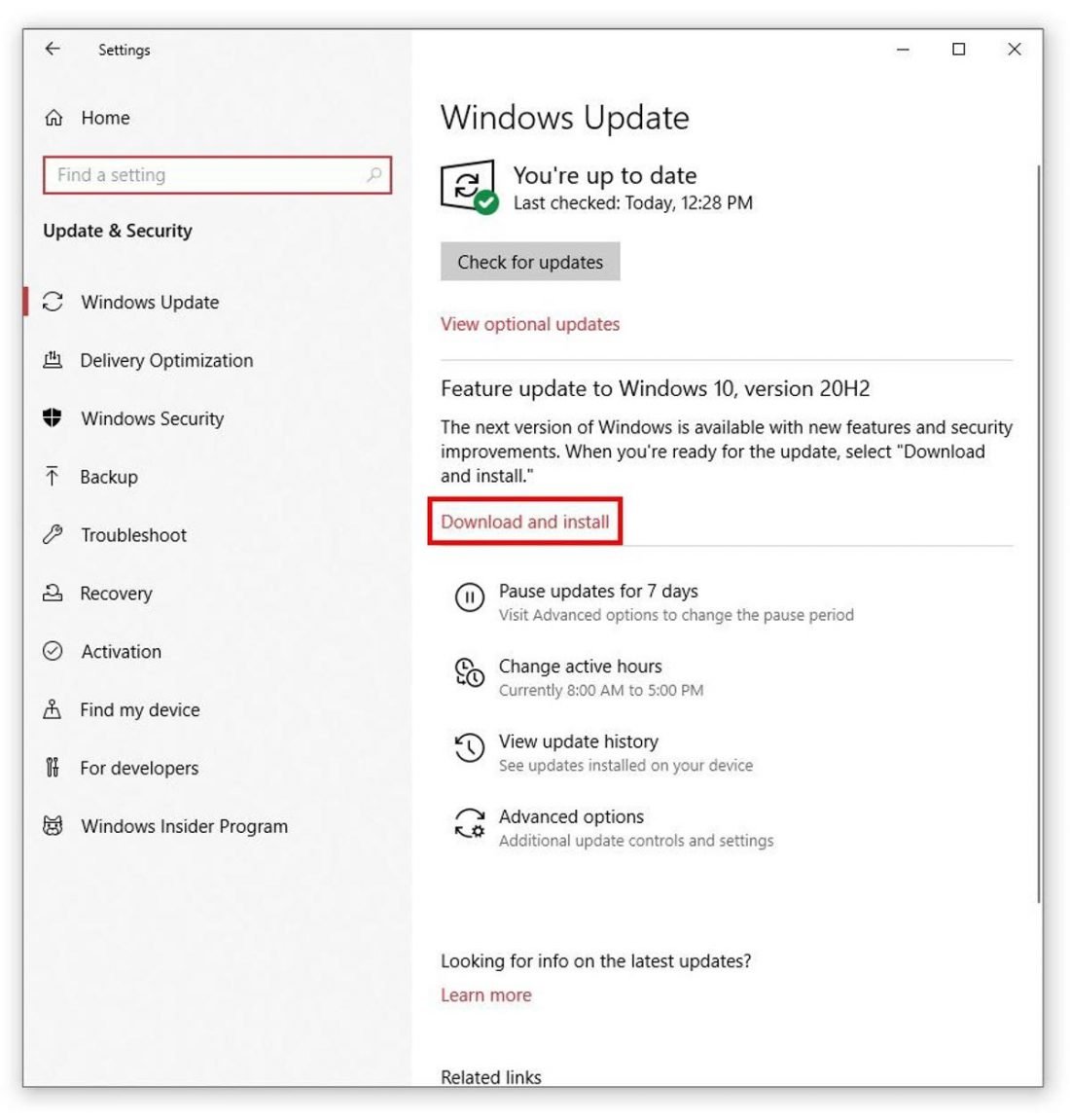
Firmware and software updates play a key role in keeping Bluetooth devices stable. These updates fix bugs and improve the connection quality. Ignoring updates can cause frequent audio dropouts and interruptions. Regular updates ensure smooth and clear Bluetooth audio performance.
Updating Bluetooth Drivers
Bluetooth drivers help your device communicate with Bluetooth hardware. Outdated drivers may cause connection problems and audio cuts. Checking for driver updates can fix these issues. You can update drivers through your device’s settings or the manufacturer’s website. Keeping drivers current improves Bluetooth stability and sound quality.
Device Firmware Updates
Firmware is the software inside your Bluetooth device. It controls how the device works and connects. Manufacturers release firmware updates to fix bugs and add features. Updating firmware often solves audio cutting problems. Check your device app or settings for available firmware updates. Staying updated helps maintain strong and steady Bluetooth audio.

Improving Device Compatibility
Improving device compatibility helps reduce Bluetooth audio dropouts. It ensures your devices communicate smoothly. Compatibility issues often cause signal loss and interruptions. Fixing these can make your audio clearer and more stable.
Pairing With Supported Devices
Always pair your Bluetooth audio with supported devices. Check if your device lists compatible models. Unsupported devices may cause frequent audio cuts. Use the latest software version for better connection. This improves signal strength and reduces interference. Proper pairing prevents many common Bluetooth issues.
Resetting Bluetooth Connections
Resetting Bluetooth connections can fix many audio problems. Turn off Bluetooth on both devices first. Then, restart them to clear any glitches. Forget the old pairing and reconnect fresh. This process refreshes the signal link. It often solves issues causing audio to cut out.
Minimizing Physical Barriers
Bluetooth signals travel through the air to connect devices. Physical barriers can block or weaken these signals. This causes audio to cut out or skip. Minimizing these barriers helps keep the sound clear and steady.
Optimal Device Placement
Place devices close to each other for the best connection. Keep the Bluetooth source and receiver within a few feet. Avoid placing them inside bags or pockets. Position devices so no objects are between them. This reduces signal loss and improves audio quality.
Avoiding Thick Walls And Objects
Thick walls block Bluetooth signals easily. Materials like concrete, brick, and metal are especially bad. Try to use Bluetooth devices in open spaces. Move away from large furniture or appliances that can block signals. Clear paths help signals travel without interruption.

Advanced Fixes For Persistent Issues
Bluetooth audio cutting out can be very frustrating. Basic fixes like restarting devices or moving closer often help. But some problems stay even after these steps. Advanced fixes may solve persistent Bluetooth audio issues. These methods dig deeper into the technology behind Bluetooth connections. They help improve sound quality and stop interruptions.
Using Bluetooth Adapters
Bluetooth adapters can improve audio connections. They act as a bridge between your device and headphones. A good adapter uses stronger signals and better antennas. This reduces dropouts and interference. USB Bluetooth adapters often offer higher quality than built-in ones. Plugging an adapter into your computer or TV can fix cutting out. Choose one that supports the latest Bluetooth version for best results.
Switching Audio Codecs
Audio codecs control how sound data moves over Bluetooth. Different codecs affect sound quality and connection stability. Some codecs use more data but offer better sound. Others use less data and keep the connection steady. Changing to a different codec may stop audio from cutting out. Devices often allow selecting codecs in settings or developer options. Try switching to codecs like aptX, AAC, or SBC to find the best fit.
Testing With Different Devices
Testing Bluetooth audio with different devices helps find the problem. Use another phone, tablet, or computer to play sound. This shows if the issue is with the original device or headphones. If audio cuts out on all devices, the headphones may be faulty. If only one device has problems, check its Bluetooth settings or drivers. Testing helps narrow down the cause and guides the next fix.
Frequently Asked Questions
Why Does Bluetooth Audio Keep Cutting Out?
Bluetooth audio cuts out due to interference, low battery, or distance. Obstacles like walls also weaken signals. Ensuring devices are close and charged helps maintain stable audio connections.
How Can I Fix Bluetooth Audio Dropouts?
Fix dropouts by reducing device distance and removing obstacles. Restart devices and update firmware regularly. Also, avoid crowded wireless areas to minimize interference for smoother audio playback.
Does Bluetooth Version Affect Audio Stability?
Yes, newer Bluetooth versions offer better stability and range. Devices with Bluetooth 5. 0 or higher provide stronger, more reliable connections, reducing audio cutouts and improving overall sound quality.
Can Multiple Bluetooth Devices Cause Audio Issues?
Yes, multiple devices can cause signal interference. Disconnect unused devices and prioritize one connection to reduce audio dropouts and maintain clear Bluetooth sound without interruptions.
Conclusion
Bluetooth audio cuts out mostly due to interference or weak signals. Keeping devices close helps improve connection. Checking battery levels and device settings also matters. Updating software can fix bugs causing drops. Simple steps can reduce interruptions and improve sound.
Understanding these causes helps enjoy smoother audio playback. Small fixes often solve big problems. Stay patient and try different solutions. Clear audio is possible with a little effort.