Are you tired of fumbling with cables or missing out on wireless music while driving? Adding Bluetooth to your factory stereo can change the way you enjoy your favorite tunes, make hands-free calls, and stay connected safely on the road.
The best part? You don’t need to replace your entire stereo system or spend a fortune. In this guide, you’ll discover simple, practical steps to upgrade your car stereo with Bluetooth quickly and easily. Ready to transform your driving experience?

49% off Today's Exclusive Deals
Limited-time Exclusive Deals. Check current discount on Amazon.
Check Price on Amazon As an Amazon Associate I earn from qualifying purchases.Let’s dive in and make your car smarter today.

Check Stereo Compatibility
Before adding Bluetooth to your factory stereo, check if your stereo supports it. This step saves time and effort. Understanding your stereo’s compatibility helps you choose the right Bluetooth adapter. Some stereos have built-in Bluetooth options, while others need external devices.
Start by identifying your stereo model. Next, verify available Bluetooth support options. These actions ensure a smooth upgrade process.
49% off Today's Exclusive Deals
Limited-time Exclusive Deals. Check current discount on Amazon.
Check Price on Amazon As an Amazon Associate I earn from qualifying purchases.Identify Your Stereo Model
Look at the front or back of your stereo for a model number. It is usually printed on a label or etched on the unit. Write down the model number exactly as it appears. This number helps you find manuals and technical details online. Knowing the model aids in selecting the correct Bluetooth adapter. Some models have unique connectors and features.
Verify Bluetooth Support Options
Check your stereo’s manual or manufacturer website for Bluetooth features. Some factory stereos have Bluetooth built-in but disabled. Others need an external Bluetooth receiver to work. Confirm if your stereo supports Bluetooth audio streaming or hands-free calls. This information guides your choice of adapter or upgrade kit. Also, check if the stereo has auxiliary or USB inputs. These inputs can be used with Bluetooth adapters for easy connection.
Choose The Right Bluetooth Adapter
Choosing the right Bluetooth adapter is key to adding Bluetooth to your factory stereo. It affects sound quality, ease of use, and installation time. Picking the best adapter helps you enjoy wireless music without hassle.
Types Of Adapters Available
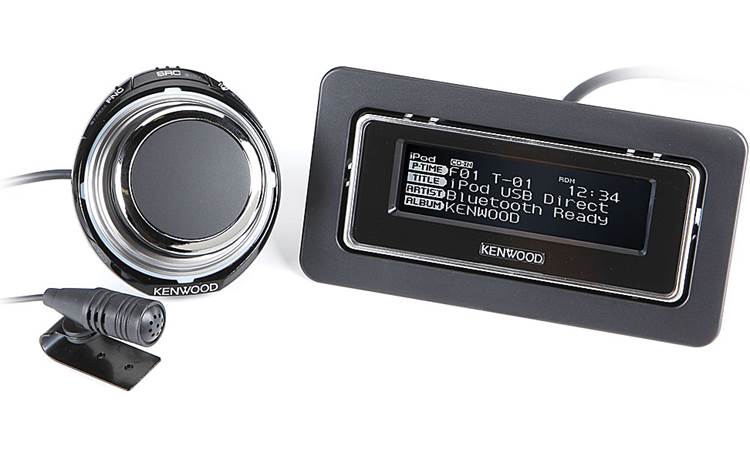
There are several types of Bluetooth adapters to fit your stereo. Some plug into the AUX input, while others connect via the FM transmitter. Some adapters pair directly with the stereo’s USB port or the CD changer port. Each type has pros and cons. AUX adapters offer clear sound but need an AUX jack. FM transmitters work with any stereo but may have some static. USB adapters provide power and sound but depend on stereo compatibility.
49% off Today's Exclusive Deals
Limited-time Exclusive Deals. Check current discount on Amazon.
Check Price on Amazon As an Amazon Associate I earn from qualifying purchases.Wired Vs. Wireless Solutions
Wired Bluetooth adapters connect to your stereo with a cable. They usually give better sound and stable connection. Wireless adapters use radio signals, so no wires are needed. They are easy to install but may face interference or weaker sound. Wired adapters are best for a permanent setup. Wireless adapters suit temporary use or rentals. Think about your stereo and how you want to use Bluetooth before choosing.
Gather Required Tools
Before starting to add Bluetooth to your factory stereo, gather all necessary tools. Having the right tools saves time and avoids frustration. Prepare well to make the installation smooth and safe.
Basic Tools Checklist
- Screwdrivers (flathead and Phillips)
- Wire strippers
- Electrical tape
- Crimp connectors or soldering kit
- Multimeter for testing connections
- Panel removal tool
- Bluetooth adapter compatible with your stereo
- Zip ties for cable management
Safety Precautions
Disconnect the car battery before starting any work. This prevents electrical shocks and shorts.
Wear safety gloves to protect your hands from sharp edges. Work in a well-lit area to see clearly.
Keep tools organized to avoid losing small parts. Follow instructions carefully to avoid damage.

Prepare The Vehicle
Start by getting your vehicle ready for the Bluetooth installation. This step is important to work safely and avoid damage. Take your time and follow each instruction carefully.
Preparing the vehicle helps you avoid electrical problems. It also makes removing the stereo easier and safer. A clean workspace inside the car helps too.
Disconnect Power Source
First, disconnect the car battery. This stops electrical power from flowing. It keeps you safe from shocks or short circuits.
Open the car hood and find the battery. Use a wrench to loosen the negative terminal. Remove the cable and keep it away from the battery.
Do not touch both battery terminals at the same time. Wait a few minutes for the car system to power down fully.
Remove Stereo Unit
Next, remove the factory stereo from the dashboard. Check your car manual for stereo removal instructions. This step varies by car model.
Use plastic trim tools to avoid scratching the dashboard. Carefully pry around the stereo frame to release clips. Pull the stereo out gently.
Disconnect the wiring harness and antenna cable from the back of the stereo. Keep screws and parts safe for reassembly later.
Removing the stereo lets you access the wiring for the Bluetooth adapter. Handle all parts with care to avoid damage.
Install The Bluetooth Adapter
Installing the Bluetooth adapter is the key step to add wireless audio to your factory stereo. This adapter lets you play music and take calls through your car’s sound system. The process involves connecting the adapter to your stereo wiring and securing it inside your vehicle.
Careful installation ensures a stable connection and prevents damage. Follow each step to get clear sound and reliable Bluetooth performance.
Connect To Stereo Wiring
Start by locating the wiring harness behind your stereo unit. Identify the power, ground, and audio input wires. Use a wiring diagram to match these wires correctly. Connect the Bluetooth adapter wires to the corresponding stereo wires. Use wire connectors or solder for a secure connection. Avoid loose connections to prevent sound cutouts.
Secure The Adapter
Find a dry and hidden spot near the stereo to place the adapter. Use zip ties or double-sided tape to fix the adapter firmly. Ensure the adapter does not block any vents or moving parts. Keep the wires neat and away from sharp edges. Proper securing prevents damage from vibrations and keeps your setup clean.
Test Bluetooth Functionality
Testing the Bluetooth functionality is the key step after installation. It ensures the system works well and connects easily. Without testing, you might miss problems that affect your listening experience.
Check the connection strength and sound quality. This step gives confidence that the Bluetooth setup is successful and ready to use daily.
Pair With A Device
Turn on Bluetooth on your phone or tablet. Search for available devices in the Bluetooth menu. Select the name of your car stereo or Bluetooth adapter. Wait for a confirmation message or sound. If asked, enter the default PIN, usually “0000” or “1234”. Successful pairing means the device and stereo are connected. Try playing a song to confirm the connection works.
Check Audio Quality
Play different music tracks or audio files. Listen for clear sound without static or cuts. Adjust the volume to test the stereo’s response. Check if the audio delays or drops during playback. Make sure the sound matches the source device’s quality. If problems appear, try reconnecting or moving the device closer. Good audio quality means your Bluetooth setup is complete and reliable.
Reassemble And Finalize
After installing the Bluetooth adapter, the next step is to reassemble and finalize your factory stereo. This stage is important to ensure everything fits well and works correctly. Careful reassembly keeps your car’s interior neat and protects the new connections.
Reinstall Stereo
Start by placing the stereo back into its slot. Align it carefully with the mounting points. Push it in gently but firmly until it clicks or locks in place. Secure it with screws or bolts removed earlier. Double-check that the stereo does not move or feel loose. Connect the faceplate or trim panel once the stereo is secure. This keeps the installation looking clean and factory-made.
Tidy Up Wiring
Organize all the wires behind the stereo. Use zip ties or electrical tape to bundle loose cables. Avoid pinching wires when pushing the stereo back. Make sure no wires block vents or moving parts. Tidy wiring prevents damage and maintains a professional look. Check all connections one last time for stability. A neat setup helps your stereo last longer and work better.
Troubleshoot Common Issues
Adding Bluetooth to a factory stereo can improve your driving experience. Sometimes, issues may arise during setup or use. Troubleshooting helps fix these common problems quickly. Understanding simple solutions saves time and frustration.
Connection Problems
Bluetooth may fail to connect with your phone or device. First, check if the Bluetooth is turned on both devices. Restart your phone and stereo to refresh the connection. Remove old Bluetooth pairings from your phone’s memory. Try pairing the devices again following the instructions carefully. Keep devices close to avoid signal loss. Interference from other wireless devices can block the connection.
Audio Distortion Fixes
Distorted sound can spoil your music or calls. Check the volume level on both the stereo and phone. Lower the volume if it is too high. Inspect the Bluetooth adapter’s connection for loose cables. Clean the stereo’s audio input ports gently. Update the Bluetooth adapter firmware if available. Using a different Bluetooth device helps find if the problem is device-specific. Restarting devices often clears minor glitches causing distortion.
Enhance Bluetooth Experience
Enhancing your Bluetooth experience can make driving more enjoyable and safer. Using Bluetooth with your factory stereo lets you play music, take calls, and use apps without wires. Small steps improve sound quality and ease of use. Focus on simple tricks to get the best from your setup.
Use Voice Commands
Voice commands keep your hands on the wheel and eyes on the road. Most Bluetooth adapters support voice control. Use your phone’s assistant to play songs, make calls, or get directions. Speak clearly and use short commands for quick responses. This method reduces distractions and helps you stay safe while driving.
Optimize Settings
Check your stereo and phone settings to improve Bluetooth quality. Adjust volume levels on both devices for balanced sound. Turn off unused Bluetooth devices to avoid interference. Set your phone to prioritize Bluetooth audio over calls. Update your device software regularly to fix bugs and add features.
Frequently Asked Questions
How Can I Add Bluetooth To My Factory Stereo?
You can add Bluetooth using a Bluetooth adapter or FM transmitter. Choose an adapter compatible with your car stereo. Connect it via AUX, USB, or cassette port for wireless audio streaming and hands-free calls.
What Tools Do I Need To Install Bluetooth In A Car Stereo?
Basic tools include a screwdriver, wire stripper, and electrical tape. You might also need a multimeter for wiring checks. Some Bluetooth kits come with installation guides and necessary connectors for easier setup.
Will Adding Bluetooth Affect My Factory Stereo Sound Quality?
Adding Bluetooth may slightly reduce sound quality compared to wired connections. However, modern Bluetooth adapters use advanced codecs for clear audio. Choose high-quality adapters to minimize any audio loss or interference.
Is Professional Installation Necessary For Bluetooth Adapters?
Professional installation is not mandatory but recommended for complex wiring. If you’re comfortable with basic car electronics, you can install it yourself. Follow instructions carefully to avoid damage and ensure optimal performance.
Conclusion
Adding Bluetooth to your factory stereo brings modern convenience to your car. It lets you play music and take calls without wires. The process is simple with the right tools and steps. Choose a Bluetooth adapter that fits your stereo type.
Follow instructions carefully for a smooth setup. Enjoy hands-free calls and wireless audio on every drive. This small upgrade improves your car experience a lot. Try it today for easier and safer driving.