Have you ever wondered if you can install a dash cam without dealing with complicated wiring? If you want to protect your car and capture every important moment on the road, a dash cam is a smart choice.
But the thought of running wires through your vehicle can feel overwhelming. What if there was an easier way? You’ll discover how dash cams can be installed without any wiring hassle. Keep reading to find out how simple it can be to set up your dash cam quickly and safely—no expert skills needed.
Your car’s safety and your peace of mind are closer than you think.
Benefits Of Dash Cams
Dash cams offer many benefits for drivers. They are useful tools that improve safety and provide proof in case of accidents. Installing a dash cam can bring peace of mind on the road. These devices are easy to use and help protect you and your vehicle.
Enhancing Road Safety
Dash cams help drivers stay alert. They record the road and capture any unusual behavior. This makes drivers more cautious and careful. Knowing that a dash cam is recording can reduce reckless driving. It encourages safer habits behind the wheel.
Evidence In Accidents
Dash cams record clear video evidence during accidents. This proof shows exactly what happened. It helps avoid arguments about fault or blame. Police and courts accept dash cam footage as reliable evidence. This can speed up the claims process and bring fair results.
Insurance Advantages
Many insurance companies offer discounts for dash cam users. The footage can support your claims and prevent fraud. Dash cams reduce false claims and provide clear facts. This makes insurance processes easier and faster. Saving money on premiums is another bonus.

Dash Cam Power Options
Dash cams need power to work properly. There are several ways to power a dash cam. Each method has its own benefits and limits. Choosing the right power option can affect how you install and use your dash cam. Let’s explore the common dash cam power options.
Battery-powered Models
Some dash cams come with built-in batteries. They do not need to be wired to the car’s power. These models are easy to install and move between vehicles. The battery usually lasts for a short time, enough for parking mode or emergencies. Battery-powered dash cams are good for quick setup and simple use.
Usb And Cigarette Lighter Power
Many dash cams use a USB cable or connect to the cigarette lighter socket. This method uses the car’s existing power without complex wiring. It is easy to plug and unplug. The dash cam powers on and off with the car. This option is popular for its convenience and simple installation.
Hardwired Systems
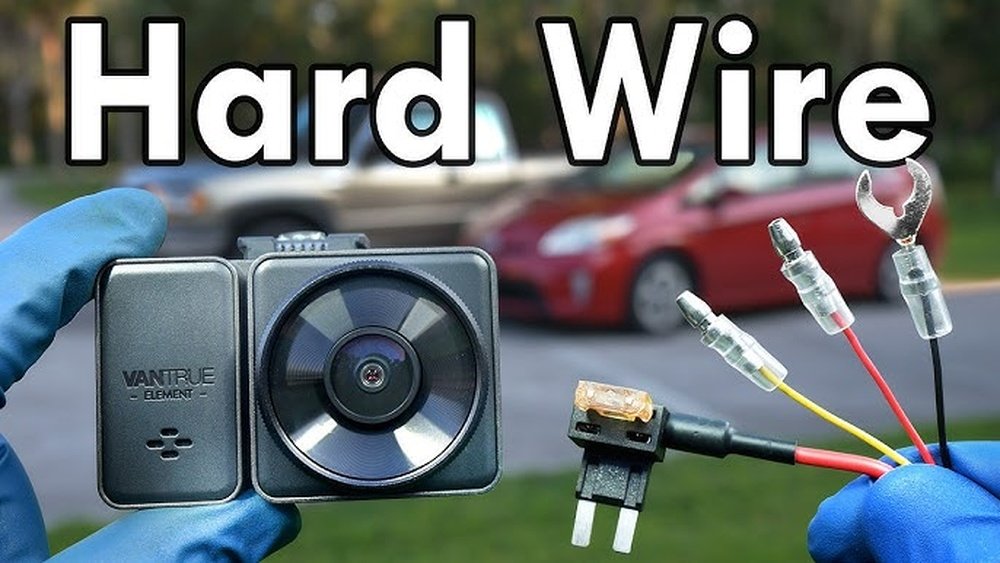
Hardwired dash cams connect directly to the car’s fuse box. This setup is more permanent and neat. It hides wires and allows continuous power, even when the car is off. This option is ideal for advanced features like parking surveillance. Installation may require professional help or knowledge of car wiring.
Choosing A No-wire Dash Cam
Choosing a no-wire dash cam means selecting a device that fits your needs without complex installation. These dash cams work without hardwiring to your car’s electrical system. They offer easy setup and portability. Understanding key features helps pick the best option for your vehicle and lifestyle.
Battery Life Considerations
Battery life is crucial for no-wire dash cams. Longer battery life means less frequent charging. Some models last a few hours, while others can run all day. Check the battery capacity before buying. A dash cam with a strong battery is ideal for long trips or daily use.
Storage And Connectivity
Storage options vary between dash cams. Most use microSD cards to save videos. Larger storage allows more footage without deleting files. Connectivity is also important. Some dash cams have Wi-Fi or Bluetooth to transfer videos to your phone. This feature makes viewing and sharing easy.
Video Quality And Features
Good video quality is essential for clear recordings. Look for dash cams with at least 1080p resolution. Night vision helps capture details in low light. Other useful features include motion detection and loop recording. These ensure the camera records important events smoothly.
Step-by-step Diy Installation
Installing a dash cam without wiring is simple and quick. This step-by-step guide helps you do it yourself. You only need a few tools and a dash cam with a rechargeable battery or USB power option. Follow these steps for a clean, no-wires setup that keeps your car neat and safe.
Selecting The Mounting Location
Choose a spot on your windshield that does not block your view. The center behind the rearview mirror is ideal. It records the road clearly and stays hidden. Clean the glass with an alcohol wipe to make the mount stick well.
Attaching The Dash Cam
Most dash cams use a suction cup or adhesive mount. Press the suction cup firmly on the glass and lock it in place. For adhesive mounts, peel off the cover and press hard for 30 seconds. Make sure the mount is secure before releasing.
Powering Without Wiring
Use the dash cam’s built-in battery or a USB power bank. Charge the device fully before use. Some dash cams turn on automatically when the car starts. Others need a manual power button press. This avoids running wires through the car.
Adjusting Camera Angle
Point the camera slightly downwards to capture the road. Adjust side to side for the best view. Check the screen to confirm the angle before finalizing. Tighten any knobs to hold the position steady during driving.
Troubleshooting Common Issues
Troubleshooting dash cams without wiring can feel tricky. These devices rely on battery power and storage space. Small problems may stop your dash cam from working right. Knowing common issues helps you fix them fast. This guide covers power, recording, and storage problems.
Power And Battery Problems
Dash cams without wiring use built-in batteries. Batteries can run out quickly if not charged well. Check if the camera turns on. If not, charge it fully before use. Sometimes batteries drain fast in cold weather. Try keeping the dash cam warm inside the car. Also, test the power button for damage. A faulty button stops the camera from powering up.
Recording Interruptions
Recording may stop without warning. This can happen if the camera loses power. Low battery causes sudden shutdowns during recording. Another cause is a corrupted memory card. The dash cam may freeze or restart. Restart the camera to fix minor bugs. Format the memory card regularly to avoid errors. Use a good-quality card to reduce interruptions.
Storage Management
Storage space affects dash cam performance. Full memory cards stop new videos from saving. Delete old files to free space. Some dash cams overwrite old videos automatically. Check if this feature is active. Use a memory card with enough storage for long trips. Keep your files organized for easy access. Regularly backing up important videos is smart.
Maintaining Your Dash Cam
Maintaining your dash cam helps it work well for a long time. A well-kept dash cam records clear videos and stays reliable. Simple care steps keep it ready to capture every drive.
Regular Cleaning Tips
Keep the lens clean for clear video footage. Use a soft cloth to wipe the lens gently. Avoid using harsh chemicals that can damage the lens. Clean the screen and body to remove dust and dirt. Regular cleaning stops smudges from blocking the view.
Firmware Updates
Update your dash cam software often. Updates fix bugs and add new features. Check the manufacturer’s website or app for updates. Install updates using a computer or memory card. Staying updated improves your camera’s performance and security.
Safe Storage Practices
Store your dash cam in a cool, dry place when not in use. Avoid leaving it in direct sunlight or extreme heat. Keep it away from moisture and dust. Proper storage prevents damage and extends the device’s life. Use the original box or a protective case for storage.

Frequently Asked Questions
Can Dash Cams Work Without Any Wiring Installation?
Yes, many dash cams operate using built-in batteries or rechargeable packs. These models don’t require hardwiring, making installation quick and simple. However, battery life may limit continuous recording, so occasional charging is necessary.
Are Wireless Dash Cams Reliable For Continuous Recording?
Wireless dash cams offer convenience but may have shorter recording times than wired ones. They rely on battery power, which can drain quickly during long drives. For uninterrupted recording, wired dash cams are generally more reliable.
How Do You Install A Dash Cam Without Wiring?
To install without wiring, mount the dash cam on your windshield using the adhesive mount. Power it via a USB cable connected to a car charger or use a built-in battery model. No professional wiring is needed.
Will A Dash Cam Without Wiring Save Footage During A Crash?
Some battery-powered dash cams save footage automatically during impacts using built-in sensors. However, wired dash cams connected to constant power sources often provide more reliable crash recording and data protection.
Conclusion
Dash cams can often be installed without complex wiring. Many models use simple plugs or batteries for power. This makes installation quick and easy for most drivers. You avoid cutting wires or changing your car’s system. Portable dash cams work well for temporary use too.
Choose the right model for your needs. Enjoy added safety and peace of mind on the road. Simple installation means anyone can set it up fast. No need to worry about damaging your vehicle’s wiring.




