Have you ever wondered if your dash cam can do more than just record while you’re driving? Imagine if it could detect motion and keep an eye on your car even when you’re not around.
This feature could be a game-changer for protecting your vehicle from theft or damage. You’ll discover how dash cams with motion detection work, why they matter, and how they can give you peace of mind every time you leave your car.
Keep reading to find out if your dash cam has this hidden power and how to make the most of it.
Dash Cam Motion Detection Basics
Dash cams have become essential tools for drivers. They record video while you drive. Some models also detect motion. This feature helps record events even when the car is parked. It keeps an eye on your vehicle without you being there. Understanding how motion detection works helps you choose the right dash cam.
Motion detection activates the camera only when there is movement. This saves memory and power. It also ensures that important events get recorded. The technology behind this is simple yet effective. Let’s explore how these motion sensors work and the types used in dash cams.
How Motion Sensors Work
Motion sensors detect changes in their environment. They notice movement by sensing light or heat changes. When something moves, the sensor sends a signal to the camera. This triggers the camera to start recording. The sensor stops the recording if no motion is detected. This helps save storage space and battery life.
Some sensors use infrared to detect heat. Others rely on changes in light patterns. Both types work to spot moving objects near the car. The sensor’s sensitivity can often be adjusted to reduce false alarms. This ensures the camera records only real events.
Types Of Motion Detection In Dash Cams
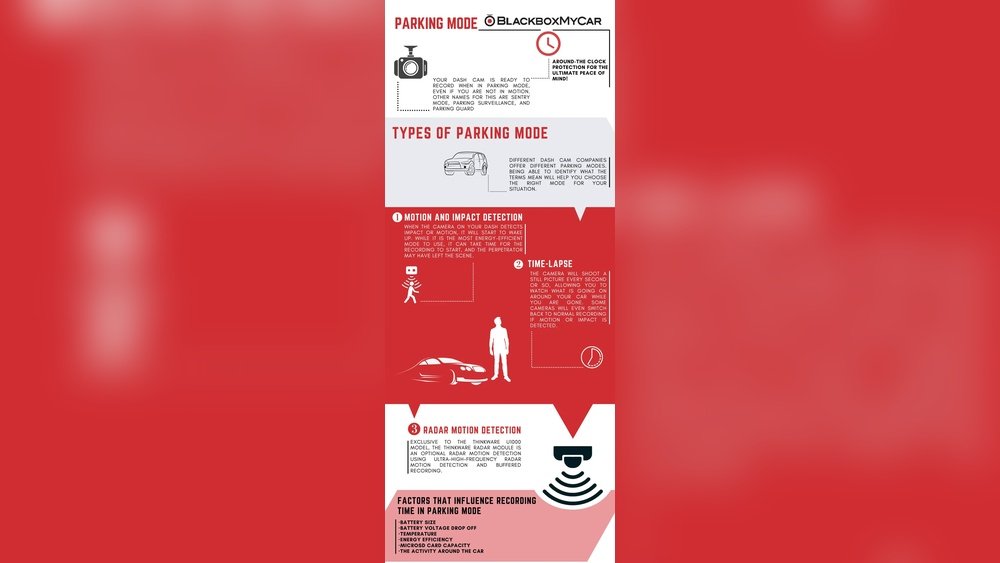
There are two main types of motion detection in dash cams. The first is sensor-based motion detection. It uses physical sensors outside the camera lens. These sensors detect movement and activate recording.
The second type is software-based detection. It uses the camera’s video feed to spot motion. The software compares frames and finds differences. If it detects motion, it starts recording. Both types aim to protect your car even when parked.
Some dash cams combine both types for better accuracy. This reduces false alerts from shadows or passing animals. Knowing these types helps you pick a dash cam that fits your needs.

Benefits Of Motion Detection
Motion detection in dash cams offers many useful benefits. It helps keep your vehicle safe and records important events. This feature makes dash cams more effective and reliable. It captures activity around your car even when parked. Let’s explore the key benefits of motion detection.
Enhanced Security While Parked
Dash cams with motion detection watch your car carefully. They start recording when they sense movement nearby. This helps catch any unusual activity or threats. Your car stays protected even if you are away. It gives peace of mind during long parking times.
Accident Evidence Collection
Motion detection records incidents automatically. It captures accidents or collisions as soon as they happen. This provides clear evidence for insurance claims or police reports. You don’t need to worry about missing critical footage. The camera saves important details instantly.
Theft And Vandalism Prevention
Motion sensors alert the dash cam to potential thieves or vandals. The camera records suspicious actions around your car. This can scare off criminals or help identify them later. The presence of a dash cam alone may deter theft or damage. Motion detection strengthens this protection.
Smart Features In Modern Dash Cams
Modern dash cams do more than just record video. They come with smart features that improve safety and convenience. These features help detect motion, recognize objects, and keep you informed. They make dash cams useful tools for every driver.
Ai And Object Recognition
Smart dash cams use AI to understand what they see. They can recognize cars, people, and other objects. This helps detect important motion around your vehicle. AI reduces false alarms from irrelevant movements like trees or shadows. It focuses on real threats and events.
Cloud Connectivity
Many dash cams connect to the cloud for extra security. Videos and data upload automatically to online storage. This keeps your files safe even if the camera is damaged. Cloud access lets you watch footage from any device. It also helps share videos quickly when needed.
Alerts And Notifications
Dash cams send alerts when they detect motion or unusual activity. These notifications come through apps on your phone. You get instant updates about your vehicle’s surroundings. This feature provides peace of mind, especially when parked in busy areas.
Setting Up Motion Detection
Setting up motion detection on your dash cam helps catch important events. It allows the camera to start recording when it senses movement. This feature saves storage space and battery life. Proper setup improves accuracy and reduces false alerts. Here are key steps to set up motion detection for best results.
Choosing Sensitivity Levels
Sensitivity controls how much movement triggers the camera. High sensitivity catches small movements but may cause false alarms. Low sensitivity ignores small motion but might miss some events. Find a balance based on your parking spot and traffic flow. Test different levels to see what works best for your needs.
Adjusting Detection Zones
Detection zones let you select areas the camera monitors for motion. You can focus on the road or parking space, ignoring irrelevant spots. This reduces unwanted recordings and saves memory. Most dash cams allow you to customize zones through the settings menu. Set zones to cover critical areas only.
Power Management Tips
Motion detection uses power, especially when the car is off. Use a hardwire kit or external battery to keep the camera running safely. Some dash cams have a parking mode with low power consumption. Set timers or sleep modes to extend battery life. Monitor power usage regularly to avoid unexpected shutdowns.
Limitations And Challenges
Dash cams with motion detection offer useful security features. They can start recording when they sense movement near your vehicle. Yet, these systems face some limitations and challenges. Understanding these helps users set the right expectations.
False Alarms And How To Reduce Them
Motion sensors can trigger false alarms often. Moving shadows, passing cars, or animals may cause unwanted recordings. These false alerts waste storage space and drain battery life. To reduce false alarms, adjust the sensitivity settings. Position the camera to avoid busy roads or areas with frequent movement. Some dash cams offer zones to ignore motion in specific areas. Using these features can improve accuracy.
Weather And Lighting Effects
Bad weather affects motion detection. Rain, snow, or fog can obscure the camera lens. This reduces its ability to detect motion correctly. Low light or bright glare also disrupts sensor function. Nighttime detection may not work well without good infrared support. Keep your dash cam lens clean for better visibility. Choose models with good low-light performance for improved results.
Storage And Battery Constraints
Motion detection increases recording time and data storage needs. Long videos fill memory cards quickly. This can lead to overwriting important footage. Battery-powered dash cams may run out of power fast. Continuous recording drains batteries faster than usual. Using a dash cam connected to your car’s power supply helps. Also, choose memory cards with enough capacity to store videos.
Top Dash Cams With Motion Detection
Dash cams with motion detection help protect your car even when parked. They start recording if they sense movement nearby. This feature captures potential accidents or vandalism instantly. Many models now include motion detection with clear video quality.
Choosing the right dash cam depends on your budget and needs. Some affordable models offer reliable motion sensors. Premium options provide extra features like night vision and wide-angle lenses. User feedback helps find the best balance of price and performance.
Budget-friendly Options
Several dash cams offer motion detection at a low price. These models focus on core functions without extra costs. They usually have decent video quality and simple controls. A good budget dash cam records clear footage during motion events. Some popular brands include basic parking mode features. These cams suit drivers wanting protection without high spending.
Premium Models
High-end dash cams come with advanced motion detection technology. They detect small movements and record in high definition. Many include infrared sensors for night recording. These models often have larger memory and better build quality. They provide detailed video evidence for insurance or police. Premium dash cams also offer smartphone alerts during motion detection. Drivers who want thorough security prefer these options.
User Reviews And Ratings
Customer opinions reveal how well motion detection works in real life. Reviews highlight strengths and weaknesses of specific dash cams. Many users praise clear recordings and quick motion triggers. Negative feedback often points to false alarms or poor app interfaces. Checking ratings helps choose reliable dash cams with effective motion sensors. User experiences guide buyers toward trusted models.
Future Trends In Dash Cam Security
Dash cam security is evolving fast. New technology will make dash cams smarter and more useful. They will do more than just record video. Future dash cams will help protect your car and your home.
Integration With Smart Home Systems
Dash cams will connect with smart home devices. They can send alerts to your phone or smart speaker. If motion is detected near your car, your home security can react. Lights can turn on, or alarms can sound. This link between car and home adds a new safety layer.
Advanced Ai Capabilities
Artificial intelligence will improve motion detection. Dash cams will tell the difference between people, animals, and objects. They will reduce false alarms caused by shadows or weather. AI will also analyze driving behavior to warn of risks. This makes dash cams more accurate and helpful.
Improved Cloud Storage Solutions
Cloud storage will become faster and more reliable. Videos will upload automatically when the car is parked. This means footage stays safe even if the camera is damaged. Users can access videos anytime from their phones or computers. Cloud storage will allow more video to be saved without using device memory.

Frequently Asked Questions
Can Dash Cams Detect Motion When Parked?
Yes, many dash cams have motion detection features. They can start recording when they sense movement near the vehicle, even if it’s parked. This helps capture potential incidents like vandalism or theft automatically.
How Does Motion Detection Work In Dash Cams?
Dash cams use built-in sensors or video analysis to detect changes in the frame. When motion is detected, they trigger recording or alerts. This feature ensures important events are captured without wasting storage on idle footage.
Are All Dash Cams Equipped With Motion Detection?
No, not all dash cams offer motion detection. It is usually available in mid to high-end models. Always check the product specifications to confirm if motion detection is included before purchasing.
Can Motion Detection Save Storage On Dash Cams?
Yes, motion detection helps save storage by only recording when movement occurs. This prevents continuous recording, reducing file sizes and making it easier to review important footage without unnecessary clips.
Conclusion
Dash cams with motion detection add an extra layer of safety. They start recording when movement happens nearby. This feature helps catch unexpected events clearly. Not all dash cams have motion sensors, so choose carefully. Using motion detection can save important video evidence.
It works best in parked cars and busy areas. Overall, dash cams with this feature offer peace of mind. They keep an eye on your vehicle, even when you’re away. Simple, smart, and useful for daily driving needs.




