Have you ever wondered how a dash cam actually works? Whether you want to protect yourself from unfair accidents or capture unexpected moments on the road, understanding this small device can make a big difference.
You’ll discover exactly what happens behind the scenes when your dash cam is recording. By the time you finish reading, you’ll know how to choose the right one and use it to your advantage every time you drive. Keep reading to unlock the full power of your dash cam!
Dash Cam Basics
Understanding dash cams starts with the basics. These devices capture video footage while you drive. They help record events on the road. This can be useful for safety and evidence after accidents.
Dash cams come in different styles and offer various features. Knowing how they work and what parts they have helps you choose the right one. Proper installation is key to making sure they work well.
Core Components
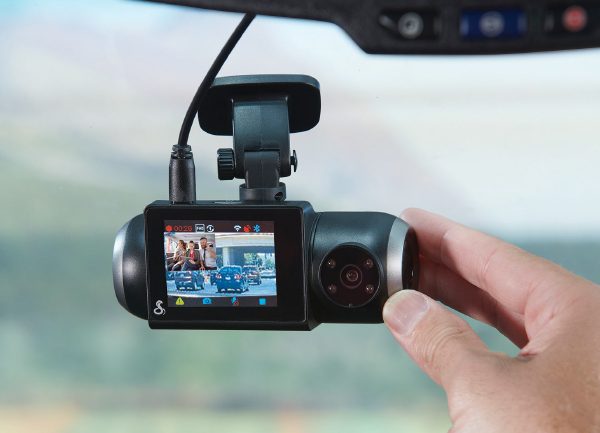
A dash cam has several important parts. The camera lens records the video. A memory card stores the footage. The power supply keeps the camera running. Some models include a screen to view videos. Sensors detect movement or impacts to save clips automatically.
Types Of Dash Cams
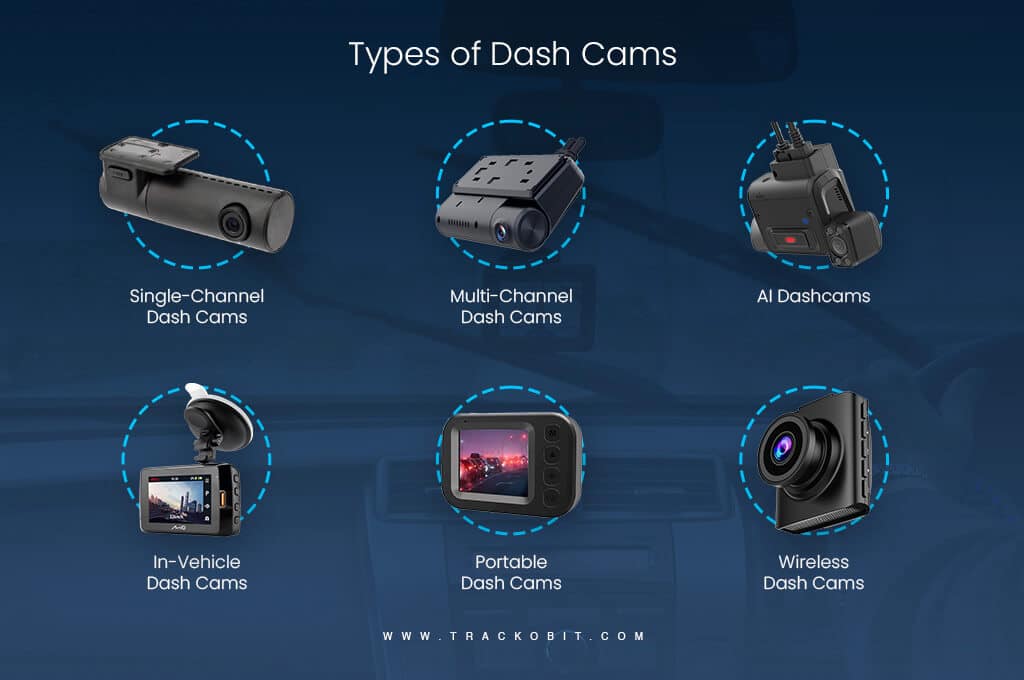
Single-lens dash cams record only the front view. Dual-lens models capture both front and rear views. Some have wide-angle lenses to cover more area. Others offer GPS to track your location. Choose based on your needs and budget.
Installation Tips
Place the dash cam where it has a clear view. Usually, this is behind the rearview mirror. Avoid blocking your vision while driving. Connect the power cable to the car’s cigarette lighter or fuse box. Test the camera to make sure it records properly. Secure the device to prevent it from falling.
Recording Features
Dash cams capture everything happening on the road. Their recording features make sure you get clear and useful footage. These features work together to save important moments and keep your video files organized.
Video Quality And Resolution
Video quality shows how clear the footage looks. Higher resolution means sharper images and better details. Most dash cams record in Full HD or 4K. Good quality helps identify faces, license plates, and road signs easily.
Loop Recording
Loop recording lets the camera record continuously. It saves space by overwriting old videos automatically. This way, the dash cam never stops recording. You always have the latest footage without worrying about storage.
G-sensor And Impact Detection
The G-sensor detects sudden movements or impacts. It locks the video file when a crash happens. This prevents important footage from being deleted. The camera can save evidence automatically after an accident.
Power And Storage
Understanding power and storage is key to knowing how a dash cam works. These two features control how long your dash cam runs and how much video it can save. Without reliable power, the camera stops recording. Without enough storage, important footage can be lost.
Power Sources
Most dash cams get power from the car’s cigarette lighter socket. Some models connect directly to the car battery for a steady power supply. Others can use USB ports or adapters. This constant power keeps the dash cam on while you drive.
Memory Cards And Capacity
Dash cams save videos on memory cards, usually microSD cards. These cards come in different sizes, from 16GB to 256GB or more. Larger cards store more hours of footage. The camera writes over old files automatically when the card is full, a feature called loop recording.
Battery Backup
Many dash cams have small built-in batteries. These batteries keep the camera running for a short time after the car turns off. This feature helps capture events like accidents or vandalism when you are not driving. However, battery backup usually lasts only a few minutes.
Smart Safety Functions
Dash cams today do more than just record video. They include smart safety functions to protect drivers and vehicles. These features help prevent accidents and provide security even when the car is parked. They work quietly in the background, watching and alerting drivers to potential dangers.
Parking Mode
Parking mode keeps the dash cam active after the engine is off. It detects motion or impacts near the car. If it senses a hit or a bump, it starts recording automatically. This helps capture evidence of vandalism or accidents while parked. The feature gives peace of mind when leaving the car unattended.
Lane Departure Warning
Lane departure warning alerts drivers if the car moves out of its lane. The dash cam uses sensors to track lane markings on the road. It sounds an alert if the vehicle drifts without signaling. This helps reduce accidents caused by drifting or drowsy driving. It keeps drivers focused and safer on the road.
Collision Detection
Collision detection senses sudden impacts or crashes. The dash cam records the moments before and after a collision. It saves this video securely so it cannot be overwritten. This evidence is vital for insurance claims and legal cases. The feature activates instantly to capture critical details during a crash.
Connectivity Options
Dash cams today offer several ways to connect with your devices. These connectivity options make it easy to view and save footage. They also help to control the dash cam without touching it directly. Understanding these options can help you choose the best dash cam for your needs.
Wi-fi And Bluetooth
Many dash cams come with built-in Wi-Fi or Bluetooth. These let the camera connect directly to your smartphone or tablet. You can watch live video or download clips quickly. No need to remove the memory card. Wi-Fi offers a stronger connection over longer distances. Bluetooth uses less power and connects faster nearby.
App Integration
Dash cams usually work with a dedicated app. This app lets you control settings and view recorded videos. You can save important clips to your phone. The app may also show GPS data and speed. Some apps allow you to share videos easily. This feature helps keep your dash cam user-friendly and handy.
Cloud Storage
Some dash cams offer cloud storage services. This means your videos upload to the internet automatically. Cloud storage protects footage from being lost or damaged. You can access videos from any device with internet. It also frees up space on your memory card. This option adds security and convenience.

Legal And Privacy Considerations
Dash cams are useful tools for capturing road events. Yet, using them means knowing the legal and privacy rules. These rules vary by place and affect how you record, keep, and share videos.
Recording Laws
Many places allow dash cam use in private cars. But some states or countries limit recording in public. Laws often focus on where cameras point and what is recorded. Some require notifying passengers or other drivers about recording. Breaking these laws can lead to fines or legal trouble. Check local rules before using your dash cam.
Data Privacy
Dash cam videos often include people’s faces and license plates. This information is personal data under privacy laws. Storing or sharing this data requires care. Keep videos safe and limit access to trusted people. Deleting old footage regularly helps protect privacy. Avoid using videos for purposes beyond your original intent.
Sharing Footage
Sharing dash cam videos online can help report accidents or crimes. But it may also expose personal information of others. Always blur faces and plates if possible. Get permission from people involved before posting videos publicly. Respect privacy and legal rights to avoid problems.
Choosing The Right Dash Cam
Choosing the right dash cam is important for safety and peace of mind. Not all dash cams are the same. Some offer more features but cost more. Others are simple and cheaper. Picking the best one means balancing price, quality, and user feedback.
Budget Vs Features
Dash cams come in many price ranges. Cheaper models cover basics like recording video. Expensive ones add GPS, night vision, or parking mode. Decide what features matter most. A simple cam might be enough for daily drives. Advanced features help in complex situations.
Brand Reliability
Trustworthy brands build better dash cams. They use quality parts and update software often. A reliable brand offers good customer support. Check if the brand has a good reputation. Avoid unknown brands that might fail quickly.
User Reviews
Reading user reviews gives real opinions. Look for common praise or complaints. Users mention video quality, ease of use, and durability. Reviews help spot hidden problems or benefits. Choose a dash cam that many users trust and recommend.
Frequently Asked Questions
How Does A Dash Cam Record Video Footage?
A dash cam records video using a built-in camera lens. It continuously captures footage while the vehicle is on or in motion. The recorded videos save automatically to internal storage or a memory card for later review or evidence.
What Powers A Dash Cam During Driving?
Dash cams are typically powered through the vehicle’s cigarette lighter socket or USB port. Some models have an internal battery for short-term recording when the engine is off. This ensures continuous operation while driving and can capture incidents even when parked.
Can Dash Cams Record Audio Inside The Car?
Yes, many dash cams have built-in microphones to record audio inside the vehicle. Audio recording helps capture conversations and sounds during incidents. However, users should check local laws, as audio recording rules vary by region and may require consent.
How Does A Dash Cam Save And Protect Videos?
Dash cams use loop recording to save videos continuously. When storage is full, the oldest files overwrite automatically. Important videos can be locked manually or automatically during impacts to prevent deletion or overwriting.
Conclusion
A dash cam records video while you drive. It saves important moments automatically. This helps prove what happened during accidents. Many dash cams also capture audio and GPS data. They start working as soon as the car moves. Some models record even when parked.
Using a dash cam adds extra safety on the road. It gives peace of mind to drivers everywhere. Understanding how it works can help you choose the right one. Simple, reliable, and useful—dash cams protect drivers every day.




