Are you struggling to connect your RCA cables and get your devices working smoothly? You’re not alone.
Many people find it confusing to match the right cables and plugs, which can lead to poor sound or no signal at all. But don’t worry—this guide will show you exactly how to connect RCA cables step-by-step. By the end, you’ll have your audio and video devices hooked up perfectly, so you can enjoy clear sound and crisp pictures without any hassle.
Ready to make your setup simple and stress-free? Let’s get started!

What Are Rca Cables
RCA cables are common wires used to connect audio and video devices. They transfer sound and picture signals from one device to another. You see them in home theaters, TVs, DVD players, and game consoles.
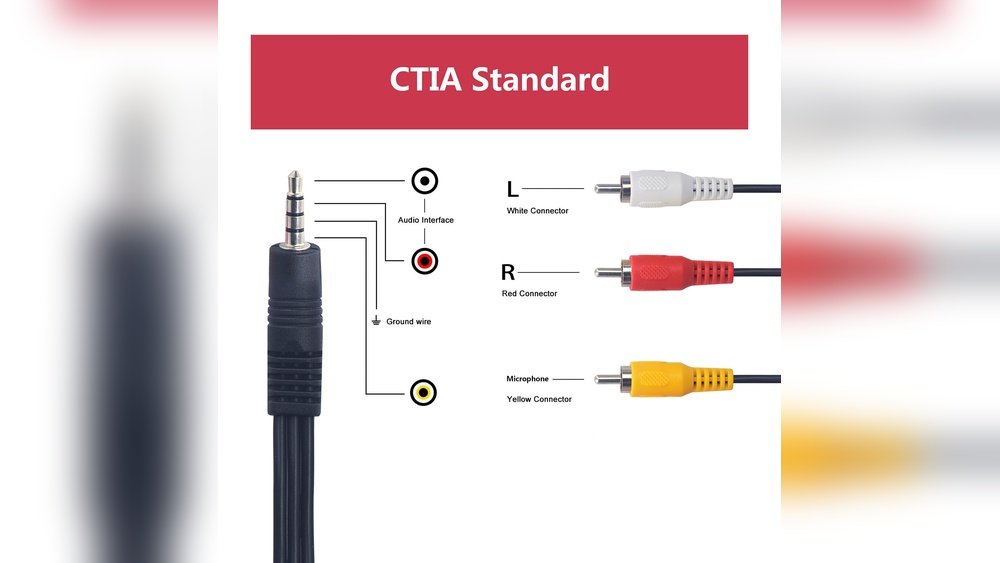
Each RCA cable has a plug with a metal tip and a ring. The metal tip carries the signal, and the ring connects to the ground. These cables usually come in red, white, and yellow colors.
Design And Structure Of Rca Cables
RCA cables have simple and sturdy designs. The cables have one or more connectors at each end. These connectors plug into matching jacks on devices. The outer ring is metal and helps reduce noise.
Inside, a wire carries the signal. The cable is covered with plastic or rubber for protection. The color coding helps to match the right plugs to the right jacks.
Common Uses Of Rca Cables
These cables often connect audio equipment. The red and white plugs carry stereo audio signals. The yellow plug carries video signals. RCA cables link DVD players to TVs, speakers, and other devices.
Many older devices still rely on RCA cables. They provide clear sound and video for everyday use. They work well for short distances between devices.
Benefits Of Using Rca Cables
RCA cables are easy to use and widely available. They offer good quality for audio and video. The color codes make connection simple. They fit most home electronics without extra setup.
These cables are affordable and durable. They do not need special tools to connect. RCA cables are a reliable choice for many households.
Types Of Rca Connectors
RCA connectors come in different types for various audio and video needs. Knowing these types helps connect devices correctly. Each type has a unique design and purpose.
Single Rca Connectors
Single RCA connectors carry one signal at a time. They are common for audio or video. Usually, red, white, or yellow colors mark them. Red and white are for audio. Yellow is for composite video.
Stereo Rca Connectors
Stereo RCA connectors use two plugs. One plug carries the left audio channel. The other carries the right channel. They work together to give stereo sound. These connectors are often red and white.
Component Rca Connectors
Component RCA connectors split video into three parts. They use red, green, and blue plugs. This setup gives better video quality. It separates brightness and color signals for clarity.
Phono Rca Connectors
Phono RCA connectors are made for turntables. They connect vinyl players to amplifiers or speakers. These connectors reduce noise and keep sound clear. They look like regular RCA plugs but have better shielding.
Preparing Your Devices
Preparing your devices is the first step to connect RCA cables correctly. It helps avoid damage and ensures a clear signal. Taking time now makes the connection smooth and safe.
Start by finding the right ports on your devices. Then, make sure all equipment is turned off. These steps protect your devices and keep the setup easy.
Locate Rca Ports
Look at the back or side of your device. RCA ports are usually round and color-coded. Red and white ports carry audio signals. Yellow ports carry video signals.
Match the colors on your RCA cables to the ports. This color coding helps avoid confusion. Some devices label ports as “Audio In” or “Video Out.” Use these labels for guidance.
Turn Off Equipment
Turn off all devices before connecting cables. This prevents short circuits and electric shocks. Unplug devices from the power source if possible.
Turning off equipment protects both you and your devices. It also prevents static noise during connection. Only turn devices back on after all cables are connected.
Step-by-step Connection Guide
Connecting RCA cables is simple when you follow clear steps. This guide helps you connect cables correctly for the best sound and video quality. Each step is easy to understand and follow. Let’s start with matching cable colors.
Match Colors Correctly
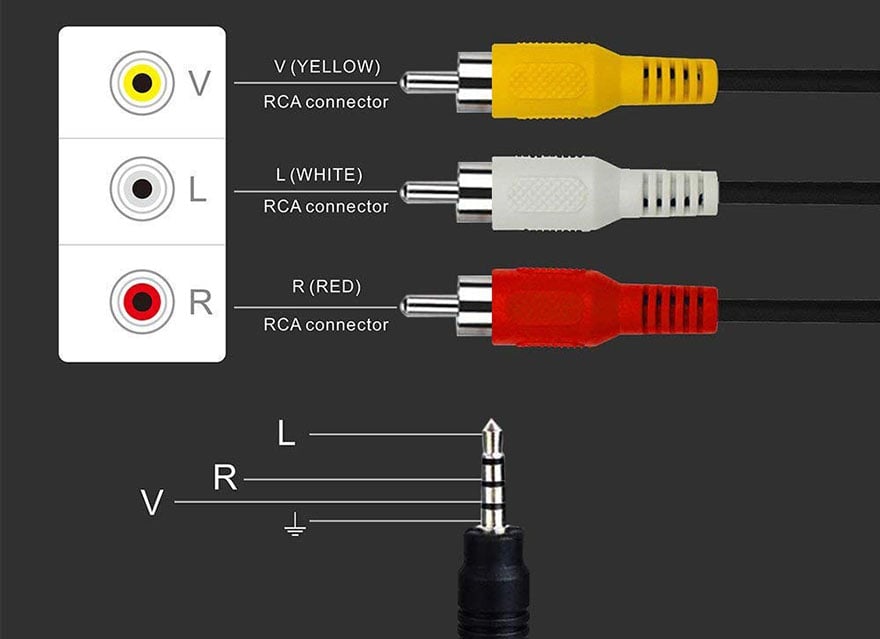
RCA cables come in red, white, and yellow colors. Red and white carry audio signals. Yellow carries video signals. Match the red plug to the red jack. Connect the white plug to the white jack. Plug the yellow cable into the yellow port. Matching colors avoids confusion and errors.
Connect Audio Outputs
Find the audio output ports on your device. These are usually labeled as “Audio Out.” Insert the red RCA cable into the red audio output port. Insert the white RCA cable into the white audio output port. Make sure the cables are pushed in firmly for a good connection.
Connect Audio Inputs
Locate the audio input ports on your receiver or TV. These ports often say “Audio In.” Plug the red RCA cable into the red audio input port. Plug the white RCA cable into the white audio input port. Check that the cables fit snugly to avoid sound issues.
Common Mistakes To Avoid
Connecting RCA cables seems simple, but mistakes can cause poor sound or no sound at all. Avoiding common errors helps ensure your audio works well. Pay attention to details and check connections carefully. This saves time and frustration later.
Wrong Color Connections
RCA cables use colors to match audio and video ports. Red usually connects to right audio, white to left audio, and yellow to video. Mixing these colors causes wrong signals to play. Always connect red to red, white to white, and yellow to yellow. This keeps sound and picture correct.
Loose Connections
Loose RCA cables cause crackling sounds or no sound. Push cables firmly into the ports. A tight connection ensures stable audio and video signals. Avoid forcing cables, but make sure they fit well. Check connections if the sound cuts out or is weak.
Using Damaged Cables
Old or damaged RCA cables reduce sound quality. Cracks or bends in cables can block signals. Replace cables if you see damage or hear static. Using good cables improves your listening experience. Don’t ignore worn-out cables, as they cause many problems.
Testing Your Audio Setup
Testing your audio setup is a key step after connecting RCA cables. It ensures everything works properly. This helps avoid sound problems later. Follow simple steps to check your connections and sound quality. Confirm the audio plays clearly from your devices.
Power On Devices
Turn on all devices linked with RCA cables. This includes your TV, amplifier, or speakers. Make sure each device is fully powered. Look for any indicator lights that show the device is on. Without power, no sound will come through.
Play Test Audio
Choose a clear audio source to test the setup. Use music, a movie, or a test tone. Start playing the audio from the source device. Listen carefully for sound from connected speakers. This confirms the RCA cables carry the signal correctly.
Adjust Volume And Settings
Set the volume to a low level first. Slowly increase it to a comfortable level. Check for any distortion or crackling noises. Adjust audio settings on your devices if needed. Balance bass, treble, and other sound options for best quality.
Tips For Maintaining Rca Cables
Maintaining RCA cables helps keep your audio and video signals clear. Taking care of these cables extends their life and saves money. Follow simple tips to keep your RCA cables in good shape.
Proper Storage
Store RCA cables in a dry, cool place. Avoid places with heat or moisture. Coil cables loosely to prevent damage. Use cable ties or Velcro straps to keep them organized. Proper storage stops tangles and breaks.
Regular Inspection
Check RCA cables often for wear and tear. Look for cracks, frayed wires, or loose connectors. Test cables by plugging them in before use. Early detection of problems avoids signal loss or damage.
Avoid Bending And Twisting
Do not bend RCA cables sharply. Twisting can break internal wires and cause poor connections. Keep cables straight or gently curved. Handle cables with care to maintain good signal quality.
Frequently Asked Questions
How Do I Connect Rca Cables To A Tv?
Plug the RCA cables into the TV’s matching colored ports. Usually, yellow is video, and red and white are audio. Ensure a snug fit to avoid loose connections and poor signal quality.
Can Rca Cables Transmit Audio And Video Simultaneously?
Yes, RCA cables can transmit both audio and video. The yellow cable carries video, while red and white cables handle stereo audio signals separately.
What Devices Commonly Use Rca Cable Connections?
Devices like DVD players, gaming consoles, and older TVs often use RCA cables. These cables transmit analog audio and video signals between devices.
How To Avoid Interference With Rca Cables?
Keep RCA cables away from power cords and other electronic devices. Use shielded cables to minimize signal interference and maintain clear audio and video quality.
Conclusion
Connecting RCA cables is simple and quick with the right steps. Match the colors and plug cables firmly into the ports. Double-check the connections for a clear audio and video signal. Avoid twisting or pulling the cables to keep them in good shape.
With a little care, your devices will work together smoothly. Enjoy your sound and picture without any hassle. Simple steps lead to better connections every time.




