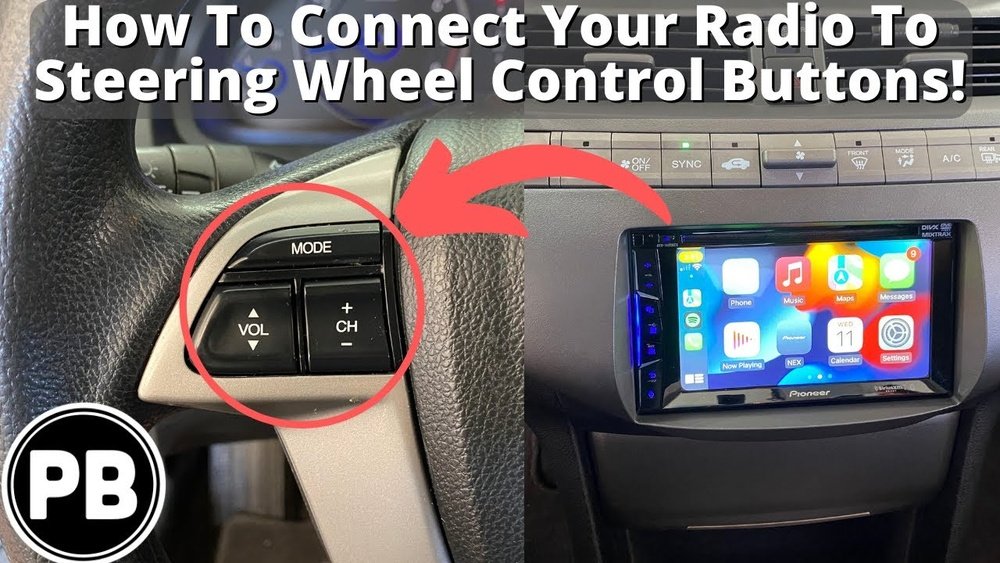
Have you ever wished you could control your car’s audio or phone calls without taking your hands off the steering wheel? Connecting your steering wheel buttons can make driving safer and more convenient.
But if you’re unsure how to get started, don’t worry—you’re in the right place. This guide will walk you through simple steps to connect your steering wheel buttons quickly and easily. By the end, you’ll enjoy full control right at your fingertips, making every drive smoother and more enjoyable.
Ready to take control? Let’s dive in!

Choosing The Right Steering Wheel Interface
Choosing the right steering wheel interface is essential for a smooth connection. This step ensures your buttons work correctly with your car’s audio or control system. A wrong interface can cause malfunctions or no response at all. Understanding compatibility and the right adapters helps avoid these issues. Focus on matching your car model with the correct interface type.
Identifying Compatible Button Controls
Start by checking which buttons your steering wheel has. Common controls include volume, track change, and phone buttons. Verify if these controls are supported by your car’s system. Consult your car manual or the steering wheel’s guide. Not all buttons work with every car model. Find the exact make and model of your vehicle. Use this information to search for compatible control systems.
Selecting The Correct Adapter Or Harness
Adapters connect your steering wheel buttons to the car’s wiring. Choosing the right adapter is key for signal transmission. Look for adapters that fit your car brand and year. Some adapters come with plug-and-play features for easy installation. Others may need cutting or splicing wires. Always match the adapter’s pin configuration with your car’s connector. This match prevents connection problems and button failures.

Gathering Necessary Tools And Materials
Gathering the right tools and materials is the first step to connect steering wheel buttons. Having everything ready helps the process go smoothly. It saves time and avoids frustration. This section lists all essential tools and safety gear needed for the job.
Essential Tools For The Connection
You need a few basic tools for this task. A screwdriver set is important. It helps remove panels and screws carefully. Wire strippers make it easy to prepare wires for connection. A multimeter checks electrical connections and signals. Soldering equipment may be needed for secure wiring. Electrical tape or heat shrink tubing protects connections. Keep a small flashlight handy to see inside tight spaces.
Safety Equipment To Use
Safety matters when working with car electronics. Wear insulated gloves to avoid electric shocks. Safety glasses protect your eyes from sparks or debris. Work in a well-lit area to see clearly. Disconnect the car battery before starting any wiring work. This prevents accidental short circuits. Keep a fire extinguisher nearby as a precaution. Follow all safety rules to protect yourself and the vehicle.
Preparing The Steering Wheel Buttons
Preparing the steering wheel buttons is an important step before connecting them. It ensures the buttons work correctly and safely. This process involves careful handling and checking the parts. It helps avoid problems later on.
Start by accessing the steering wheel buttons. Then, check the wiring and button modules for any damage. Proper preparation makes the connection smoother and more reliable.
Removing The Steering Wheel Cover
First, turn off the car and disconnect the battery. This prevents any electrical issues. Use a screwdriver or the right tool to remove screws holding the cover. Carefully lift the cover off the steering wheel. Avoid using too much force to prevent damage.
Keep the screws in a safe place. The cover protects the buttons and wiring. Removing it gives clear access to the buttons and connections.
Inspecting Wiring And Button Modules
Look closely at the wires connected to the buttons. Check for cuts, frays, or loose connections. Damaged wires can cause the buttons to fail. Also, inspect the button modules for cracks or dirt.
Clean any dust or debris gently with a soft cloth. Ensure all parts fit well and move smoothly. Fix or replace damaged parts before connecting the buttons. This step helps avoid future malfunctions and ensures safety.
Wiring The Button Controls
Wiring the button controls is a key step in connecting steering wheel buttons. This process allows the buttons to send signals to your car’s system. Proper wiring ensures the buttons work correctly and safely. It involves careful handling of wires and connections. Following clear steps helps avoid damage and errors.
Connecting Wires To The Interface
Start by identifying each wire from the steering wheel buttons. Match these wires with the correct pins on the interface. Use a wiring diagram if available. Strip a small part of each wire’s insulation to expose the metal core. Connect the exposed wire to the matching terminal on the interface. Make sure the connection is tight and secure. Loose wires can cause poor button response or failure.
Securing Connections And Avoiding Short Circuits
After connecting, secure each wire with electrical tape or heat shrink tubing. This prevents wires from touching and creating shorts. Check that no bare wires are exposed. Organize wires neatly to avoid stress or pulling. Use cable ties to bundle wires together. Confirm all connections are stable before powering on the system. This step helps protect the car’s electronics and ensures safety.
Programming The Button Functions
Programming the button functions is a key step in connecting steering wheel buttons. It lets you assign specific actions to each button. This makes driving safer and more comfortable. Proper programming ensures each button works as you want.
Programming can be done with your vehicle’s built-in software or with special aftermarket tools. Both methods allow you to customize the buttons for volume, calls, or cruise control. Clear programming helps prevent mistakes while driving.
Using Vehicle Software Or Aftermarket Tools
Many modern vehicles have software for programming steering wheel buttons. Use the car’s menu system or touchscreen to assign functions. Follow the on-screen instructions carefully. Some cars require a diagnostic tool connected to the OBD-II port.
Aftermarket tools are another option. These devices connect to your car and let you program buttons. They often offer more choices and flexibility. Choose a tool that matches your car model. Read the user manual to avoid errors.
Testing Button Responses
Testing is essential after programming the buttons. Press each button to check if it performs the assigned task. Test functions like volume control, call answer, and voice commands. Ensure the buttons respond quickly and correctly.
If a button does not work, reprogram or reset it. Double-check the connection and software settings. Proper testing avoids frustration and unsafe driving conditions.
Reassembling And Final Checks
After connecting the steering wheel buttons, the next step is reassembling the parts and performing final checks. This step ensures everything fits well and works correctly. Taking time here avoids future problems and keeps the steering wheel safe to use.
Replacing Steering Wheel Components
Start by carefully placing each component back in its original spot. Align the buttons and wires without forcing them. Tighten screws gently to avoid damage. Check that no parts are loose or misplaced. The steering wheel should look like before disassembly.
Performing A Full Functionality Test
Switch on the car to test all buttons on the steering wheel. Press each button and watch for the expected response. Check volume controls, call buttons, and cruise control settings. Confirm the horn works without issues. Any problem needs rechecking the connections or alignment.
Troubleshooting Common Issues
Steering wheel buttons make driving safer and more fun. Sometimes, these buttons stop working or act strange. Fixing these issues is easy with simple checks. This section covers common problems and how to solve them.
Buttons Not Responding
First, check if the car’s ignition is on. Some buttons only work when the engine runs. Next, inspect the wiring under the steering wheel. Loose or damaged wires cause no response. Clean the connectors with a soft cloth to remove dust. Reset the car’s computer by disconnecting the battery for a few minutes. Press the buttons again after reconnecting. If still no response, the button module might need replacement.
Intermittent Or Incorrect Controls
Intermittent button behavior often comes from poor connections. Wiggle the steering wheel gently and press buttons to find loose wires. Corroded contacts inside the button panel can cause wrong commands. Clean these contacts carefully with electronic cleaner spray. Software glitches might cause wrong functions. Check for updates for your car’s system. Resetting the system can clear errors. Faulty buttons or switches may need professional repair or replacement.
Tips For Maintaining Seamless Control
Maintaining seamless control of your steering wheel buttons is key for safe driving. Proper care helps these buttons work smoothly and last longer. Follow simple tips to keep them responsive and free from issues.
Regular Inspection And Cleaning
Check your steering wheel buttons often. Dirt and dust can block their function. Use a soft cloth to clean around the buttons carefully. Avoid harsh chemicals that may damage the surface. Keeping buttons clean stops sticky or unresponsive controls.
Updating Firmware And Software
Steering wheel buttons often rely on software to work well. Check for updates from your car or device maker. Updates fix bugs and improve button response. Install updates as soon as possible to avoid control problems. Staying current keeps your system running smoothly.
Frequently Asked Questions
How Do I Connect Steering Wheel Buttons To My Car Stereo?
To connect steering wheel buttons, use a compatible wiring harness or adapter. Follow your car’s manual for specific wiring. This ensures buttons communicate correctly with the stereo system, enabling control without distraction.
Can Steering Wheel Buttons Be Programmed For Custom Functions?
Yes, many modern cars allow programming steering wheel buttons. Use the car’s infotainment system or aftermarket software. Custom functions can include volume control, track change, or voice command activation, enhancing driving convenience.
What Tools Are Needed To Connect Steering Wheel Buttons?
You typically need a wiring harness, screwdrivers, wire strippers, and possibly a multimeter. Having the vehicle’s wiring diagram helps. Proper tools ensure a safe, secure connection without damaging your car’s electronics.
Are Steering Wheel Button Adapters Compatible With All Car Models?
No, compatibility varies by car make and model. Check the adapter’s specifications before purchase. Using the correct adapter ensures seamless integration and full functionality of steering wheel controls.
Conclusion
Connecting steering wheel buttons improves driving comfort and safety. Follow clear steps to link wires and test each button carefully. Use the right tools and check your car’s manual for guidance. Take your time and work patiently to avoid mistakes.
With a bit of effort, you can enjoy easy control over music and calls while driving. Simple changes like this make your car more user-friendly and fun. Stay safe and enjoy the convenience of steering wheel buttons every time you drive.




