Are you tired of your music sounding muddy or your bass feeling off? Distorted bass can ruin your listening experience and leave you frustrated.
But don’t worry—fixing it is easier than you think. You’ll discover simple and effective ways to bring back the clear, powerful bass you love. Keep reading to learn how to enjoy your favorite songs the way they were meant to be heard.
Common Causes Of Bass Distortion
Bass distortion can ruin your music experience. It makes sounds unclear and unpleasant. Understanding why bass distorts helps fix the problem faster. Several common causes lead to distorted bass. Identifying these issues is the first step to better sound.
Speaker Overload
Speakers have limits on power and volume. Playing bass too loud can overload them. Overload causes speakers to struggle and distort sound. Keep volume levels in check to avoid this. Using speakers suited for bass-heavy music helps too.
Poor Audio Source Quality
Low-quality audio files often cause bass distortion. Compressed or damaged files lose sound clarity. Bad quality sources make bass sound muddy or harsh. Use high-quality audio files for clear bass. Streaming at higher bitrates also improves sound quality.
Incorrect Equalizer Settings
Equalizers change sound frequencies to suit preferences. Wrong settings can boost bass too much. Too much bass boost causes distortion and noise. Adjust equalizer settings carefully to balance sound. Try lowering bass levels to reduce distortion.
Faulty Cables And Connections
Damaged or loose cables affect sound signals. Poor connections cause noise and distortion in bass. Check cables for damage or wear regularly. Secure all connections tightly to ensure clear sound. Replace faulty cables to fix distortion problems.

Diagnosing Bass Distortion Issues
Distorted bass can ruin your listening experience. Finding the cause helps fix the problem fast. Diagnosing bass distortion requires careful checks. Listen closely and inspect your gear. Follow your signal from start to finish. These steps reveal where distortion happens.
Listening Tests
Use familiar songs with strong bass lines. Listen for crackling, buzzing, or muffled sounds. Play music at different volumes. Notice if distortion changes with volume. Test with headphones and speakers. This helps find if the issue is in output or source.
Equipment Inspection
Check cables for breaks or loose plugs. Damaged wires cause poor signal flow. Look at speaker cones for tears or dents. Inspect amplifier settings for clipping or overload. Clean all connection points to remove dirt. Faulty equipment often causes distorted bass.
Signal Chain Analysis
Trace your audio path from source to speaker. Check each device in the chain. Test each one separately with the same track. Identify if distortion appears at any point. Replace or repair faulty devices. This process isolates the exact cause of distortion.
Adjusting Speaker Placement
Adjusting speaker placement plays a key role in fixing distorted bass. The position of your speakers affects how bass sounds in your room. Small changes can clear up muddy or boomy bass. You can create a cleaner and more balanced sound with careful placement.
Optimizing Room Acoustics
Room shape and materials change how bass waves move. Hard surfaces reflect sound, causing echoes and distortion. Soft surfaces absorb sound, reducing echo and improving clarity. Place speakers in spots where bass sounds natural and smooth. Try moving speakers to different locations to find the best sound.
Avoiding Bass Traps
Bass traps are designed to absorb low frequencies. Too many bass traps can kill bass energy. Avoid placing speakers too close to bass traps. This can cause weak or uneven bass response. Balance bass traps and speaker placement to keep bass full but clear.
Distance From Walls
Speakers too close to walls cause bass to become exaggerated or distorted. Try moving speakers away from walls by a few inches or more. This reduces unwanted bass reflections and cleans up the sound. Experiment with distance to find the perfect bass balance in your room.
Tuning Equalizer Settings
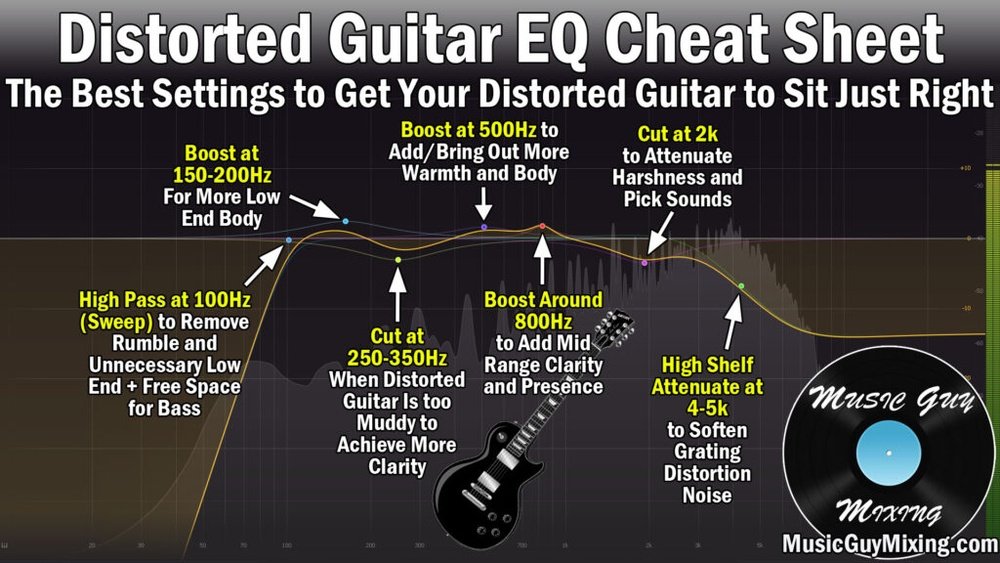
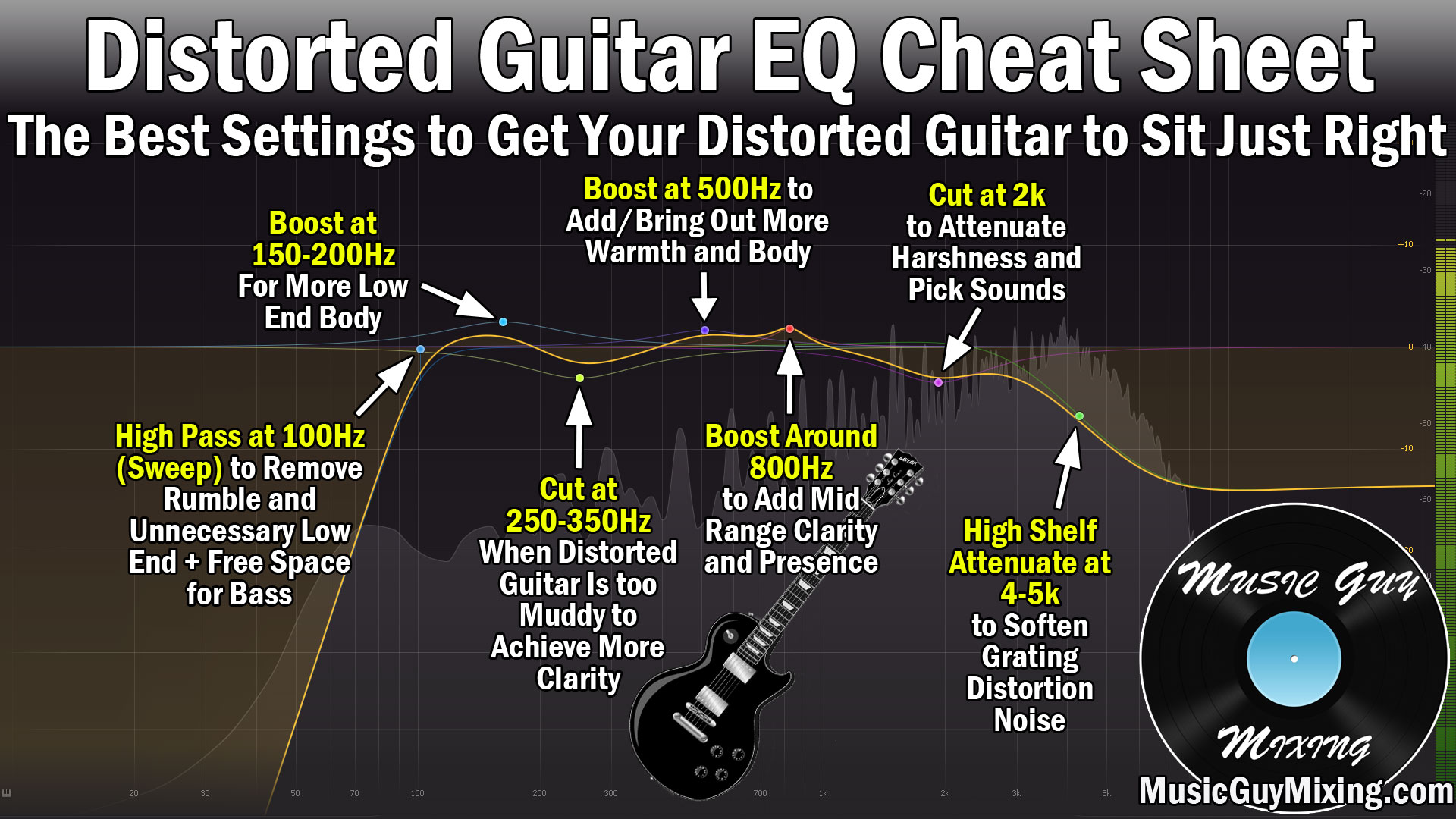
Adjusting equalizer settings can fix distorted bass effectively. An equalizer controls sound frequencies, shaping the audio output. Proper tuning balances the bass with other sounds. This keeps the bass clear and prevents distortion.
Start by understanding how bass frequencies interact with mids and highs. Small changes in equalizer settings can improve sound quality a lot. Focus on reducing excess bass, balancing frequencies, and using presets smartly.
Reducing Bass Boost
Too much bass boost causes distortion and muddiness. Lower the bass boost level gradually. Listen carefully to the sound after each change. Stop reducing when the bass sounds tight and clear. Avoid setting the bass too low, or it will sound weak.
Balancing Mid And Low Frequencies
Mid and low frequencies work together to create full sound. Raise mids slightly to support the bass. Keep lows at a moderate level to avoid overlap. Check that vocals and instruments remain clear. Balanced frequencies make the bass punchy without distortion.
Using Presets Effectively
Equalizer presets offer quick sound adjustments for different music types. Choose a preset close to your desired sound first. Then tweak bass and mid settings for better clarity. Avoid relying only on presets. Customize settings to suit your speakers and room.
Upgrading Audio Equipment
Upgrading your audio equipment can fix distorted bass and improve sound quality. Old or low-quality gear often causes distortion. Better equipment handles bass frequencies more cleanly. This change makes music sound clear and rich. Even small upgrades can reduce unwanted noise and distortion.
Choosing Quality Speakers
Good speakers are key to clean bass. Cheap speakers often struggle with low sounds. Look for speakers designed to handle bass well. Check speaker size and power rating. Bigger speakers usually produce better bass. Quality materials and design help reduce distortion.
Investing In Amplifiers
An amplifier powers your speakers. Weak amplifiers cause poor bass and distortion. Choose an amplifier with enough power for your speakers. Proper matching prevents clipping and distortion. A good amplifier delivers clear, strong bass without strain.
Using Subwoofers Properly
Subwoofers focus on low-frequency sounds. Place your subwoofer in a good spot for best bass. Avoid placing it too close to walls or corners. Use the right volume level to avoid distortion. Proper settings on the subwoofer improve bass clarity and depth.
Maintaining Cables And Connections
Maintaining cables and connections is key to clear, distortion-free bass. Poor cables or loose connections often cause bass problems. Keeping cables in good shape helps your sound stay clean and strong. Regular checks stop small issues from becoming big problems.
Checking For Damage
Look closely at your cables for cuts, bends, or worn spots. Damaged cables can cause signal loss or noise. Replace any cable with visible damage. Even small cracks can affect sound quality. Be gentle when handling cables to avoid damage.
Using Shielded Cables
Shielded cables protect your audio from interference. Interference can cause buzzing or distorted bass. Choose cables with good shielding to keep sound clear. Shielding blocks unwanted noise from other electronics. This keeps your bass tight and clean.
Ensuring Secure Connections
Make sure all cables are plugged in firmly. Loose connections cause crackling and weak bass. Push plugs fully into sockets and avoid wiggling. Check both ends of each cable. Tight connections keep your bass strong and steady.
Software Solutions For Bass Clarity
Distorted bass can ruin your listening experience. Software tools help fix this issue quickly. They improve bass clarity without changing your hardware. Using the right software, you can clean up the sound and enjoy deep, clear bass.
Using Audio Plugins
Audio plugins adjust sound frequencies to reduce distortion. Equalizers and compressors help balance bass tones. They cut harsh sounds and boost low frequencies smoothly. Many plugins work with common music players and editors.
Choose plugins that focus on bass enhancement. These tools make the bass sound richer and clearer. Experiment with settings to find the perfect balance for your music.
Applying Noise Reduction
Noise reduction software removes unwanted sounds from audio tracks. It clears up background noise that causes bass distortion. This makes the bass sound cleaner and more defined.
Use noise reduction before boosting bass levels. It helps prevent new distortions from appearing. Many audio editors include easy noise reduction features for quick fixes.
Firmware Updates
Firmware updates improve device sound processing. Manufacturers often fix audio bugs in updates. Updating your device can fix distorted bass issues.
Check your device’s settings or website for updates. Installing the latest firmware keeps your sound system working well. This simple step can enhance bass clarity significantly.

Frequently Asked Questions
What Causes Distorted Bass In Audio Systems?
Distorted bass often results from speaker overload, poor equalizer settings, or low-quality audio files. It can also happen due to amplifier clipping or damaged speaker components. Identifying the root cause helps in choosing the right fix for clear and powerful bass sound.
How Can I Fix Distorted Bass On My Speakers?
To fix distorted bass, reduce volume levels and adjust equalizer settings. Check speaker wiring and replace damaged speakers. Use high-quality audio sources and avoid overloading the amplifier. Proper speaker placement also improves bass clarity and reduces distortion.
Does Speaker Placement Affect Bass Distortion?
Yes, improper speaker placement can cause bass distortion. Placing speakers too close to walls or corners may create unwanted bass resonance. Positioning speakers correctly ensures balanced sound distribution and reduces distortion, resulting in clearer and more accurate bass output.
Can Software Settings Help Fix Distorted Bass?
Software settings like equalizer adjustments can significantly improve bass quality. Lowering bass frequencies or enabling bass boost features may reduce distortion. Using audio enhancement software or firmware updates can also optimize sound performance and fix bass distortion issues.
Conclusion
Distorted bass can ruin your listening experience. Fixing it improves sound clarity and enjoyment. Start by checking your speaker connections and settings. Adjust equalizer levels to balance bass properly. Clean your audio equipment to avoid interference. Test with different devices to find the issue.
Small changes make a big difference in sound quality. Clear, deep bass brings music to life. Follow these steps to enjoy better audio every time. Keep your sound system well maintained and tuned. Good bass means better music and happier ears.




