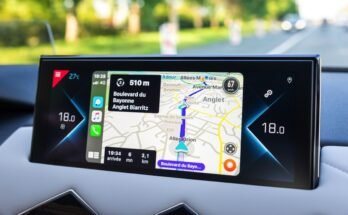
Are you tired of missing out on the smart features newer cars offer? Imagine having Apple CarPlay in your used car, making every drive safer and more connected.
You don’t have to buy a new vehicle to enjoy this convenience. You’ll discover simple and affordable ways to add CarPlay to your current ride. Keep reading, and by the end, you’ll know exactly how to upgrade your car’s tech without breaking the bank.
Benefits Of Carplay In Used Cars
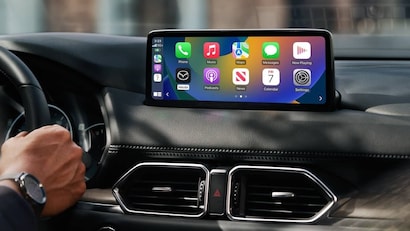
Adding CarPlay to a used car brings many benefits. It improves how you use your phone while driving. CarPlay makes driving easier and safer. It helps you stay connected without distractions.
Many older cars lack modern tech. Installing CarPlay updates your car’s system. It brings smartphone features right to your dashboard screen. This upgrade makes daily driving more enjoyable.
Enhanced Connectivity
CarPlay links your iPhone directly to your car’s display. You get easy access to calls, messages, and music. It works smoothly with apps like Maps and Podcasts. This keeps you connected without picking up your phone.
The connection uses Siri voice control. You can talk to your phone safely. This reduces the need to touch the screen while driving. It also supports hands-free texting and calling.
Improved Safety Features
CarPlay helps you keep your eyes on the road. Voice commands let you control functions without looking down. It limits distractions by simplifying phone use while driving. Navigation with real-time traffic keeps you informed.
Alerts for incoming messages or calls appear clearly on the screen. You decide when to respond safely. These features reduce accidents caused by phone use.
User-friendly Interface
The CarPlay screen is clean and easy to use. Large icons make it simple to find apps. The layout is similar to your iPhone, so it feels familiar. This helps you use it quickly without confusion.
Menus are straightforward. You can switch between music, maps, and calls easily. The system adjusts to your car’s controls, like touch or knobs. This smooth experience makes driving less stressful.
Checking Compatibility With Your Vehicle
Before adding CarPlay to a used car, check if your vehicle supports it. Compatibility depends on the car’s make, model, and infotainment system. This step saves time and money by avoiding incompatible upgrades.
Identify Your Car’s Model And Year
Start by finding your car’s exact model and year. This information is usually on the vehicle registration or inside the driver’s door. The model year affects the technology options available.
Newer models are more likely to support CarPlay. Older cars might need aftermarket systems or adapters.
Assess Existing Infotainment System
Look at your car’s current infotainment system. Check the screen size, touchscreen capability, and available ports. Some systems have built-in support for smartphone integration.
Note if your system uses USB or Bluetooth connections. This helps decide which CarPlay setup will work best.
Confirm Carplay Support Options
Check if your car’s system has official CarPlay support. Visit the manufacturer’s website or user manual for details. Some cars support wired CarPlay only, others support wireless.
If your car does not support CarPlay natively, explore aftermarket head units. These replace the existing system and add CarPlay functionality.
Aftermarket Carplay Solutions
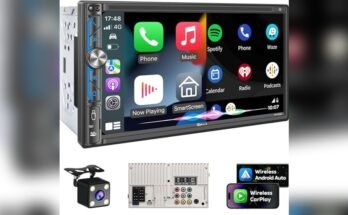
Aftermarket CarPlay solutions offer a practical way to add Apple CarPlay to a used car. These systems replace your car’s original stereo with a new one that supports CarPlay. This gives you access to apps, navigation, and music from your iPhone on your car’s display. It is a popular choice for many drivers who want modern features without buying a new car.
Popular Head Unit Replacements
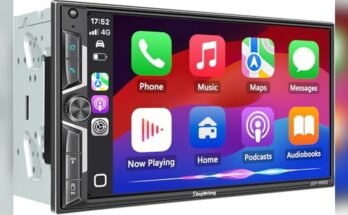
Many brands make head units compatible with CarPlay. Pioneer, Kenwood, and Alpine are well-known options. These units fit into most car dashboards and have touchscreens. They support both wired and wireless CarPlay connections. Some models also include Android Auto for Android users.
Installation Requirements
Installing an aftermarket CarPlay system usually needs some technical work. You may need to remove the old stereo and connect new wiring. Some cars require special adapters for steering wheel controls and backup cameras. Professional installation is recommended for the best results and safety.
Cost Considerations
Aftermarket CarPlay units range from $200 to $800 or more. Higher-end models come with bigger screens and extra features. Installation costs vary depending on your car and the complexity of the job. Budget for both the unit and installation to avoid surprises.
Wireless Vs Wired Carplay
Choosing between wireless and wired CarPlay affects your driving experience. Both types let you use apps like maps, music, and messages on your car’s screen. Each has unique features and limits. Understanding these can help you decide which suits your used car best.
Pros And Cons Of Wireless Setup
Wireless CarPlay offers freedom from cables. You connect your phone without plugging it in. This setup keeps your dashboard neat and avoids tangled wires.
Wireless connection starts quickly after setup. Your phone pairs with the car automatically. It works well for short trips or frequent stops.
Battery drain is a downside. Wireless CarPlay uses more power, so your phone battery may drop faster. Signal interruptions can happen, causing brief connection loss. Wireless setups may also have a slight delay in response time.
Benefits Of Wired Connection
Wired CarPlay provides a stable and fast connection. Your phone charges while connected, solving battery drain issues. This setup is less likely to have signal problems or delays.
Plugging in is simple and reliable. The connection works every time you start the car. It is ideal for longer drives where constant use matters.
The only downside is managing the cable. Some drivers find it less convenient due to the wire. Despite this, wired CarPlay remains popular for its reliability and speed.
Diy Installation Tips
Installing CarPlay in a used car can be a smart way to upgrade your driving experience. Doing it yourself saves money and lets you learn new skills. This section covers easy DIY tips for a smooth installation.
Necessary Tools And Materials
Start by gathering all needed tools. You will need a screwdriver set, wire strippers, and electrical tape. A digital multimeter helps check connections. Get a compatible CarPlay head unit for your car model. Also, have a wiring harness and mounting kit ready.
Step-by-step Installation Guide
First, disconnect your car battery for safety. Remove the old stereo carefully using screwdrivers. Keep screws safe for later use. Connect the wiring harness to the new CarPlay unit. Match wires by color and function. Secure connections with electrical tape. Place the new unit into the dashboard. Screw it tightly and reconnect the battery. Turn on the car and test the CarPlay system. Follow the on-screen setup to finish.
Troubleshooting Common Issues
Check all wire connections if CarPlay does not turn on. Ensure the head unit is compatible with your car. Restart your car system if the screen freezes. Use the multimeter to test power supply. Update the firmware of the CarPlay unit if needed. Consult the manual for error codes or beeps. Replace any damaged wires or connectors promptly.
Professional Upgrade Services
Professional upgrade services offer a simple way to add CarPlay to a used car. Experts handle the complex tech and ensure the system works well. This method avoids DIY risks and saves time. Trusting certified installers means the upgrade will be safe and reliable.
Finding Certified Installers
Certified installers have the skills and tools to install CarPlay correctly. Many car audio shops and dealerships offer this service. Search for installers with good reviews and proper certification. Check their experience with your car model. A certified installer ensures a clean and functional setup.
Service Pricing And Warranty
Prices for CarPlay upgrades vary by car model and system type. Some shops offer package deals including parts and labor. Ask about warranty coverage on both parts and installation. A warranty protects your investment from defects or problems. Compare prices and warranty terms before choosing a service.
What To Expect During Installation
The installer will first inspect your car’s dashboard and wiring. They may remove the old stereo to access connections. Next, they connect the CarPlay system, ensuring compatibility and power. Installation usually takes a few hours. After setup, the installer tests the system for smooth operation.
Alternative Smart Driving Features
Alternative smart driving features can improve your driving experience in a used car. These options bring convenience and safety without needing Apple CarPlay. Many drivers find these features useful for hands-free control and easy access to apps.
Android Auto Compatibility
Android Auto works similarly to CarPlay but is for Android users. Many used cars support Android Auto through their infotainment systems. It connects your phone to the car and shows apps on the dashboard screen. You can use maps, music, and calls safely while driving.
Bluetooth And Voice Commands
Bluetooth lets you connect your phone wirelessly to the car’s audio system. You can make calls and play music without cables. Voice commands allow hands-free control by speaking simple instructions. This keeps your focus on the road and your hands on the wheel.
Navigation And Entertainment Apps
Many smartphones have navigation apps like Google Maps or Waze. You can use these apps on your phone or through the car’s screen if compatible. Entertainment apps such as Spotify or Audible provide music and audiobooks. These apps keep you entertained and informed during drives.

Frequently Asked Questions
How Can I Add Carplay To My Used Car?
You can add CarPlay by installing an aftermarket head unit compatible with CarPlay. These units connect easily and provide full integration with your iPhone.
Is Carplay Installation Expensive For Used Cars?
CarPlay installation costs vary but typically range from $300 to $800. Prices depend on the head unit and professional installation fees.
Will Carplay Work With Any Iphone Model?
CarPlay supports iPhone 5 and newer models running iOS 7. 1 or later. Ensure your iPhone software is updated for best compatibility.
Can I Install Carplay Myself In A Used Car?
If you have basic car audio experience, DIY installation is possible. However, professional installation ensures proper setup and avoids wiring issues.
Conclusion
Getting CarPlay in a used car is easier than it seems. Many options fit different budgets and car models. Choose a method that suits your needs and skills. Enjoy safer driving with hands-free controls and easy access to apps. Take your time to research and compare choices.
Soon, your older car can feel modern and connected. Small upgrades can make a big difference. Start your CarPlay journey today and drive smarter.