
Are you struggling to get the perfect sound from your speakers? Setting the right crossover frequency can make all the difference.
It controls how your audio system splits sound between subwoofers and speakers, ensuring every note is clear and balanced. But if you’re unsure where to start, this guide will walk you through simple steps to find the ideal crossover point for your setup.
By the end, you’ll know exactly how to tune your system for crisp highs and deep lows, making your music and movies sound better than ever. Keep reading to unlock the secret to flawless sound!
Basics Of Crossover Frequency
The basics of crossover frequency are key to good sound quality. Understanding it helps you control how sounds split between speakers. This makes music clear and balanced. Knowing these basics is the first step in setting your own crossover frequency.
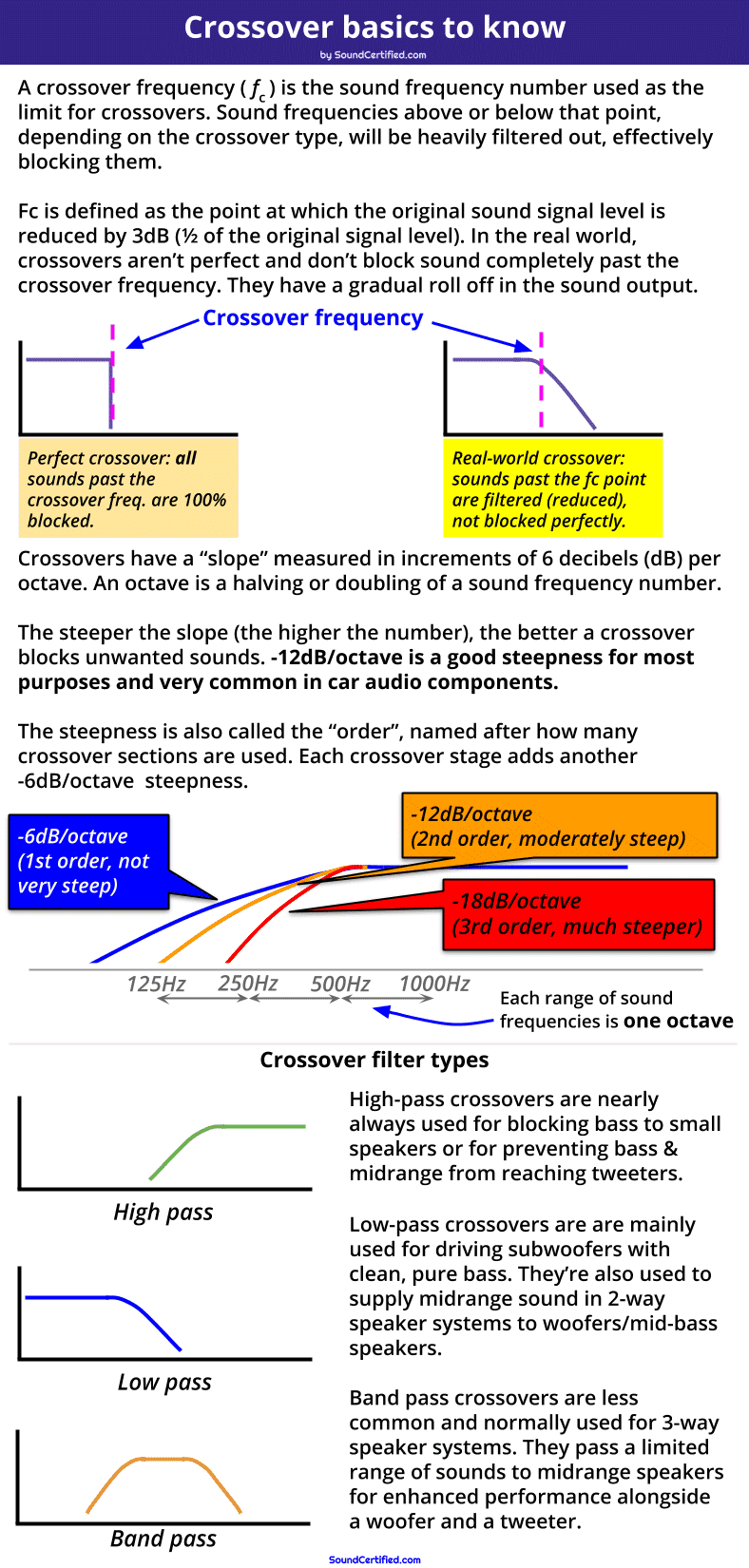
What Is Crossover Frequency
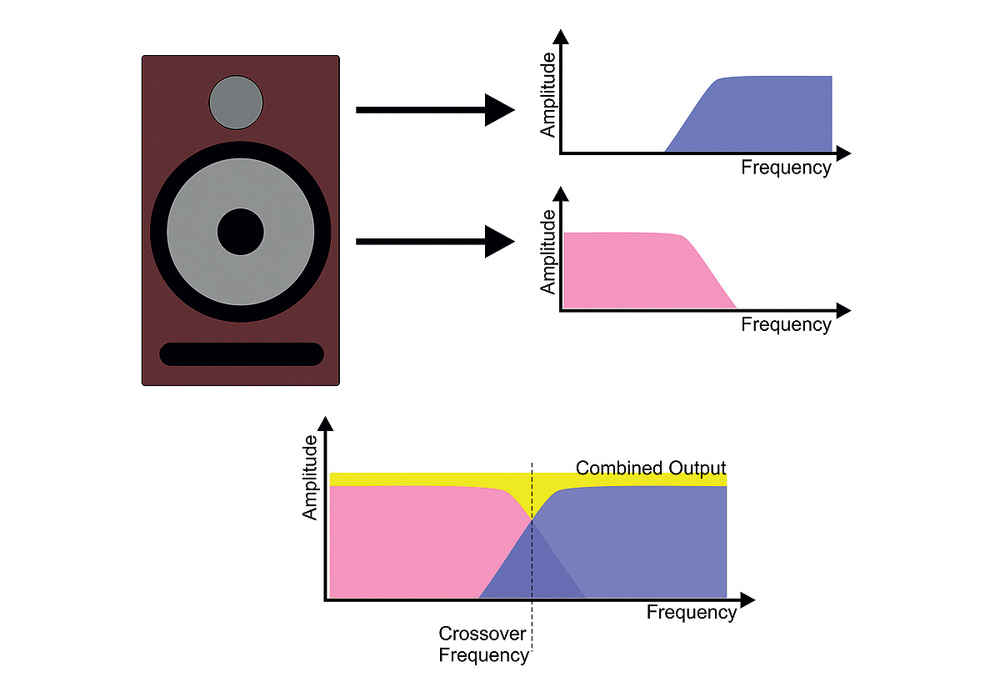
Crossover frequency is the point where sound splits between speakers. It sends low sounds to subwoofers and high sounds to tweeters. This division helps each speaker play sounds best suited to it. The right crossover frequency stops sound from overlapping or gaps.
Types Of Crossovers
There are mainly two types of crossovers: passive and active. Passive crossovers use simple parts like capacitors and coils. They work after the amplifier sends sound. Active crossovers work before the amplifier. They use electronic circuits and need power. Each type has its own uses and benefits.
Role In Sound Systems
The crossover frequency controls sound flow in systems. It keeps bass, midrange, and treble clear and separate. This creates a smooth listening experience. Without a good crossover, sounds can clash or feel weak. It helps speakers work together, not against each other.
Factors Influencing Crossover Settings
Setting the right crossover frequency is key to good sound quality. Several factors affect these settings. Understanding them helps you get clear and balanced audio.
Speaker Specifications
Each speaker has a frequency range it handles best. Tweeters work with high frequencies. Woofers manage low sounds. The crossover should match these ranges. This avoids distortion and damage. Check your speaker manual for frequency limits. Use this info to set crossover points correctly.
Room Acoustics
Room size and materials change how sound travels. Hard surfaces reflect sound waves. Soft materials absorb them. These effects impact bass and treble clarity. A large room may need a lower crossover frequency. This helps bass fill the space well. Test different settings to find what sounds best in your room.
Listening Preferences
People like different sound styles. Some prefer strong bass. Others want clear vocals or instruments. Adjust crossover frequency to match your taste. Lower settings boost bass presence. Higher settings emphasize mids and highs. Experiment with settings until the sound feels right to you.
Choosing The Right Crossover Frequency
Choosing the right crossover frequency is key to good sound quality. It controls how audio signals split between speakers. Setting it right helps each speaker play the sounds it handles best. This improves clarity and avoids distortion. Let’s explore how to pick the best crossover frequency for your setup.
Frequency Response Matching
Each speaker has a range of frequencies it plays well. The crossover frequency should match these ranges. Match the crossover point to where one speaker’s sound fades and the next speaker’s sound starts. This balance keeps sound smooth and natural. It prevents one speaker from struggling to play sounds it cannot handle.
Avoiding Frequency Overlap
Overlapping frequencies cause muddled sound. Avoid setting crossover points too close together. If two speakers play the same frequencies, the sound may become unclear. Keep a small gap between crossover points to ensure a clear handoff. This creates clean transitions between speakers.
Handling Speaker Size
Speaker size affects the best crossover frequency. Large speakers handle low frequencies well. Small speakers are better for high frequencies. Set crossover frequencies so large speakers play bass and mids. Let small speakers focus on treble. This setup prevents damage and improves sound balance.
Setting Up The Crossover Frequency
Setting up the crossover frequency is key to clear and balanced sound. This process splits audio signals between speakers. Proper setup makes sure bass, mids, and highs play in the right places. It improves sound quality and speaker performance. The steps vary depending on your equipment type and preferences.
Using Audio Equipment Controls
Many speakers and amplifiers have built-in controls for crossover frequency. These controls often use knobs or switches. Turn the knob to set the frequency where the sound splits. Check the manual to find the range for your device. Start at a middle setting and adjust up or down. This helps match the speaker’s size and role.
Digital Vs. Analog Adjustments
Digital crossovers use software or apps to set frequencies. They allow precise control and easy changes. Analog crossovers use physical parts like capacitors and resistors. Adjusting analog devices can be less exact but still effective. Digital setups offer presets and visual feedback. Choose the method that fits your gear and skill level.
Testing And Fine-tuning
After setting the crossover, test the sound with music or tones. Listen carefully to how bass and treble blend. Adjust the frequency slightly if bass sounds weak or muffled. Move the crossover point until the sound feels natural. Use different audio tracks for better results. Repeat testing to ensure balance and clarity.
Common Mistakes To Avoid
Setting the right crossover frequency is important for good sound quality. Many people make simple mistakes that hurt their audio experience. Avoiding these common errors helps your speakers work better together.
Setting Too High Or Too Low
Choosing a crossover frequency that is too high can make the sound thin and harsh. Too low, and the bass may become weak or muddy. Find a balance that matches your speakers’ capabilities.
Check the speaker specs to see their best frequency range. Adjust the crossover to fit within those limits for clear sound.
Ignoring Phase Issues
Phase problems cause sounds from different speakers to cancel out. This leads to weak or hollow audio. Make sure the speakers are in phase at the crossover point.
Use phase controls or flip the polarity on one speaker if needed. Listen carefully to find the smoothest sound.
Overlooking Speaker Placement
Where you place your speakers affects how frequencies blend. Too close or too far apart can cause gaps or overlaps in sound. Position speakers to allow smooth frequency handoff.
Test different placements and listen for clear, balanced audio. Proper placement reduces the need for extreme crossover settings.
Advanced Tips For Perfect Sound
Setting the crossover frequency right can change your audio experience. Fine-tuning this setting brings clarity and balance to your sound system. Use these advanced tips to get the best sound quality from your speakers and subwoofers.
Using Measurement Tools
Measurement tools help you find the exact crossover point. Use a sound level meter or microphone with software. These tools show how different frequencies play in your room. Adjust the crossover frequency based on the readings. This method reduces guesswork and improves sound accuracy.
Customizing For Different Genres
Music styles need different crossover settings. For bass-heavy music, set a higher crossover frequency. This lets the subwoofer handle more low-end sounds. For vocal-focused genres, lower the crossover point. It keeps voices clear and natural. Change settings to match the music for best results.
Integrating With Equalizers
Equalizers shape the sound after crossover settings. Use the equalizer to fix any frequency peaks or dips. This helps balance the audio across all speakers. Adjust bass, midrange, and treble to fit your room. Integration of equalizers with crossover creates a smooth sound blend.

Frequently Asked Questions
What Is A Crossover Frequency In Audio Systems?
Crossover frequency is the point where audio signals split between speakers. It directs low and high frequencies to the correct drivers. Properly setting it ensures clear sound and prevents speaker damage. It’s crucial for balanced audio performance in any sound system.
How Do I Choose The Right Crossover Frequency?
Choose based on speaker size and type. Smaller speakers need higher crossover points to avoid distortion. Larger woofers handle lower frequencies better. Refer to manufacturer guidelines for best results. Experimentation can help find the ideal crossover for your system.
Why Is Setting Crossover Frequency Important?
Setting crossover frequency optimizes sound clarity and speaker protection. It prevents overlapping frequencies that cause distortion. Proper settings improve bass response and overall audio balance. This enhances listening experience and prolongs speaker lifespan.
Can Wrong Crossover Frequency Damage Speakers?
Yes, incorrect crossover settings can cause speaker damage. Sending low frequencies to tweeters can blow them out. High frequencies to woofers cause distortion. Always set crossover within recommended ranges for your speakers.
Conclusion
Setting the right crossover frequency improves your sound system’s clarity. It helps different speakers work smoothly together. Test different frequencies to find what sounds best to you. Small changes can make a big difference in audio quality. Keep your setup simple and adjust step by step.
Clear sound makes listening more enjoyable and balanced. Practice and patience lead to better results over time.




