Are you wondering if Apple CarPlay is truly worth having in your car? You’ve probably heard about how it can make driving safer and more fun.
But does it really live up to the hype? You’ll discover the real benefits and possible downsides of Apple CarPlay. By the end, you’ll know if it’s the right choice for you and your daily drive. Keep reading to find out how this technology could change the way you use your phone on the road.
What Is Apple Carplay
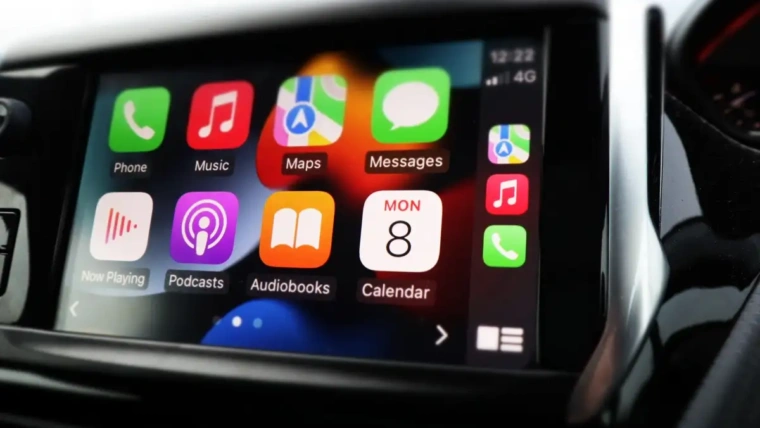
Apple CarPlay is a system that connects your iPhone to your car’s display. It lets you use apps safely while driving. You can control it using your car’s touchscreen, buttons, or voice commands.
The main goal is to keep your eyes on the road. It shows maps, messages, music, and calls on your car screen. This makes driving simpler and safer.
How Apple Carplay Works
Connect your iPhone to the car using a cable or wirelessly. The car screen then shows a simple menu. You can tap icons or use voice control with Siri. It works with many popular apps from your phone.
Compatible Devices And Cars
Apple CarPlay works with iPhones running iOS 7.1 or later. Many car brands include CarPlay in their newer models. Some older cars can add CarPlay with an aftermarket system.
Main Features Of Apple Carplay
CarPlay offers navigation with Apple Maps and other apps. It lets you make calls and send messages by voice. You can listen to music, podcasts, or audiobooks easily. Siri helps keep your hands free and focus on driving.
Key Features And Benefits
Apple CarPlay offers several features that enhance driving safety and convenience. It connects your iPhone directly to your car’s display. This makes it easier to access apps and functions without distraction. The system is designed to keep your focus on the road. It also brings familiar iPhone controls to your vehicle’s dashboard.
Here are some key features and benefits that Apple CarPlay provides. Each one helps improve your driving experience and keeps your smartphone use simple and safe.
Seamless Smartphone Integration
Apple CarPlay links your iPhone to your car’s screen smoothly. It automatically shows compatible apps on the car display. No need to handle your phone while driving. This integration keeps your phone functions within easy reach. It works with most recent iPhone models and many car brands.
Voice Control With Siri
Siri voice control lets you operate your phone hands-free. You can send messages, make calls, or play music by speaking. Siri listens to your commands clearly and responds fast. This feature reduces distractions and keeps your hands on the wheel. Using voice control boosts safety during your drive.
Navigation And Maps
Apple CarPlay offers access to Apple Maps and other navigation apps. It provides clear turn-by-turn directions on your car screen. Real-time traffic updates help you avoid delays. Voice instructions guide you without needing to look away. The navigation feature helps you reach your destination easily.
Entertainment Options
You can enjoy music, podcasts, and audiobooks through CarPlay. It supports popular apps like Apple Music and Spotify. Playback controls appear on your car’s screen for simple use. Audio quality stays high, making your drive more enjoyable. Entertainment is just a tap or voice command away.
Messaging And Calls
CarPlay allows you to send and receive messages safely. Siri reads incoming texts aloud and lets you reply by voice. Making and answering phone calls is hands-free and quick. These features help you stay connected without taking your eyes off the road. Messaging and calls become less distracting while driving.
Compatibility And Requirements
Apple CarPlay offers a smart way to use your iPhone while driving. It shows apps on your car’s display. This helps keep your focus on the road. Before using it, you need to check if your car and phone work with CarPlay. This section explains the main compatibility and requirements.
Supported Vehicles And Head Units
Many car brands support Apple CarPlay. Most new models include it as a feature. Some older cars may not have CarPlay built-in. You can add it with a compatible aftermarket head unit. These are special car stereos made to work with CarPlay. Check the list of supported vehicles or ask your dealer.
Iphone Models And Ios Versions
Apple CarPlay works with iPhones running iOS 7.1 or later. The phone must be an iPhone 5 or newer model. Older iPhones do not support CarPlay. Keep your iPhone’s software updated for the best experience. CarPlay needs a Lightning cable or wireless connection to your car.
User Experience And Interface
Apple CarPlay offers a smart way to use your iPhone in the car. It brings many iPhone features to your car’s display. This section explores how easy it is to use, the customization options, and safety factors. Understanding these can help you decide if CarPlay fits your driving style.
Ease Of Use
CarPlay has a simple and clean design. The icons are large and easy to see. You can control it using touch, voice, or car buttons. Siri voice commands let you keep your hands on the wheel. Starting calls, sending messages, or playing music is quick. The interface feels familiar for iPhone users. It reduces distraction by showing only key apps.
Customization Options
You can change which apps appear on the CarPlay screen. This helps keep your most-used apps within reach. Rearranging app order is easy on your iPhone settings. Some apps offer different modes for driving. For example, music apps may show playlists or radio stations. Custom settings make the experience personal and efficient.
Safety Considerations
CarPlay focuses on safe driving. It limits what you can do while the car moves. Siri reads texts aloud and lets you reply by voice. This keeps your eyes on the road and hands on the wheel. The interface avoids clutter, showing only important information. Using CarPlay reduces the risk of distractions compared to phone use. It supports safer driving habits.
Limitations And Drawbacks
Apple CarPlay offers many benefits, but it also has its limits. These limits can affect how useful and enjoyable the system is. Knowing these drawbacks helps you decide if it fits your needs.
App Availability Restrictions
CarPlay only supports certain apps approved by Apple. Not all popular apps are available. You might miss some apps you use daily. This limits your choices while driving. The focus stays on safety, so some apps are blocked.
Connectivity Issues
CarPlay needs a strong connection to work well. Sometimes the connection drops or lags. Wireless CarPlay can have more interruptions than wired. Poor connection affects navigation and calls. It can get frustrating during long drives.
Cost Factors
Using CarPlay may require extra costs. Some cars include it, but others charge for it. You might need to buy a new stereo for CarPlay. Also, some apps may have in-app purchases. These costs add up over time.

Comparison With Android Auto And Other Systems
Apple CarPlay offers a clean, easy-to-use interface compared to Android Auto and other systems. It works well with iPhones but may lack some app choices. Choosing the right system depends on your phone and what features matter most.
Apple Carplay Vs Android Auto: User Interface
Apple CarPlay offers a clean and simple interface. It uses large icons and clear text. The layout is easy to navigate without distractions. Android Auto also has a straightforward design but feels more customizable. It allows widgets and different app arrangements. Both systems focus on safety and ease of use while driving.
App Compatibility And Features
CarPlay supports many popular apps like Apple Maps, Spotify, and Messages. It integrates well with iPhone apps. Android Auto works with a wider range of apps due to Android’s openness. It supports Google Maps, Waze, and more messaging apps. Both systems update regularly to add new features and apps.
Voice Control And Assistant Integration
Apple CarPlay uses Siri for voice commands. Siri understands natural language and handles many tasks hands-free. Android Auto uses Google Assistant, known for strong voice recognition. Google Assistant often provides more detailed answers and controls smart home devices. Both assistants help drivers keep their eyes on the road.
Hardware And Vehicle Compatibility
CarPlay requires an iPhone and compatible car system. Many car brands support CarPlay, but not all models do. Android Auto supports a broader range of phones and vehicles. It works with both phones and some aftermarket head units. Users should check their car’s compatibility before choosing.
Overall Performance And User Experience
CarPlay runs smoothly with quick response times. It feels like a natural extension of the iPhone. Android Auto offers flexibility and customization options. It may have slight delays on older phones. Both systems improve driving safety by minimizing phone use while driving.
Real User Reviews And Feedback
Real user reviews and feedback offer a clear view of Apple CarPlay’s value. Actual users share their experiences and point out both benefits and issues. This insight helps potential buyers decide if the system fits their needs.
Many users praise the easy access to apps while driving. Navigation, music, and messaging become simpler and safer. Yet, some mention occasional connectivity problems or limits with certain apps.
Positive Experiences With Apple Carplay
Users often highlight the intuitive interface. It looks familiar and is easy to control. Voice commands work well for many, reducing distractions. The seamless integration with iPhones is a common plus.
Several drivers enjoy using Apple Maps or Google Maps via CarPlay. Directions are clear, and rerouting is fast. Access to favorite playlists and podcasts also adds to the appeal.
Common Complaints From Users
Some users report slow startup or connection drops. Bluetooth or USB links may fail occasionally. A few find the app selection limited compared to the phone itself. Others want more customization options for the home screen.
Criticism also includes the system’s dependency on the iPhone. Without the phone, CarPlay does not work. This can be inconvenient if the phone battery dies or is misplaced.
Suggestions For Improvement
Users suggest better app support and more reliable connections. A faster boot time would improve the experience. More flexible settings for the interface could help drivers personalize their view.
Expanding compatibility beyond iPhones is another common request. Some hope for added features that work offline. These changes could make CarPlay more user-friendly and versatile.
Is It Worth The Investment
Apple CarPlay offers a convenient way to use your iPhone in the car. It shows apps on your car’s display, making it safer to use your phone while driving. Many drivers wonder if the cost matches the benefits. Let’s break down the value and long-term gains.
Cost Vs. Value Analysis
Apple CarPlay usually comes built-in or as an extra feature in many cars. If not included, adding it can cost from $300 to $700. This price includes hardware and installation. Some older cars need new head units to support it. The cost may seem high at first glance.
Still, CarPlay improves safety by reducing phone distractions. It offers easy access to maps, calls, and music. This convenience can justify the expense for many users. It helps keep your focus on the road.
Long-term Benefits
Using Apple CarPlay can reduce phone use while driving. This lowers the risk of accidents caused by distraction. It also keeps your device charged and connected. The system updates with new apps and features over time.
CarPlay supports hands-free control with voice commands. This saves time and effort on the road. It also integrates well with other Apple devices. Over years of use, these benefits add up. They make your driving experience safer and smoother.

Frequently Asked Questions
What Devices Are Compatible With Apple Carplay?
Apple CarPlay works with iPhones running iOS 7. 1 or later. It supports iPhone 5 and newer models, ensuring broad compatibility.
Does Apple Carplay Improve Driving Safety?
Yes, Apple CarPlay enhances safety by providing hands-free calls, messages, and navigation. It helps drivers stay focused on the road.
Can I Use Apple Carplay With Non-apple Apps?
Apple CarPlay supports many third-party apps like Spotify, WhatsApp, and Audible. However, app availability depends on developer support and updates.
Is Apple Carplay Worth The Cost In New Cars?
Apple CarPlay adds convenience and safety, often included in new vehicles. Its value depends on how much you use smartphone features while driving.
Conclusion
Apple CarPlay offers easy access to apps while driving. It helps you stay focused and use your phone safely. The interface is simple and works well with many cars. You can listen to music, get directions, and send messages hands-free.
It may cost extra, but many find it useful daily. Consider how often you drive and use your phone in the car. For some, it adds comfort and safety. For others, it might not be worth the price. Think about your needs before deciding.