Have you ever wondered which apps truly make your drive safer and more enjoyable with Apple CarPlay? You’re not alone.
Knowing the right apps to use can transform your car’s dashboard into a powerful tool that keeps you connected, entertained, and focused on the road. You’ll discover the best apps that work seamlessly with Apple CarPlay—apps that fit your lifestyle and make every trip smoother.
Keep reading, and you’ll unlock the full potential of your driving experience.

Popular Navigation Apps
Navigation apps are essential for driving with Apple CarPlay. They guide you safely and quickly. These apps show maps, traffic, and directions on your car’s screen. You can choose from several popular options. Each app offers unique features and easy controls.
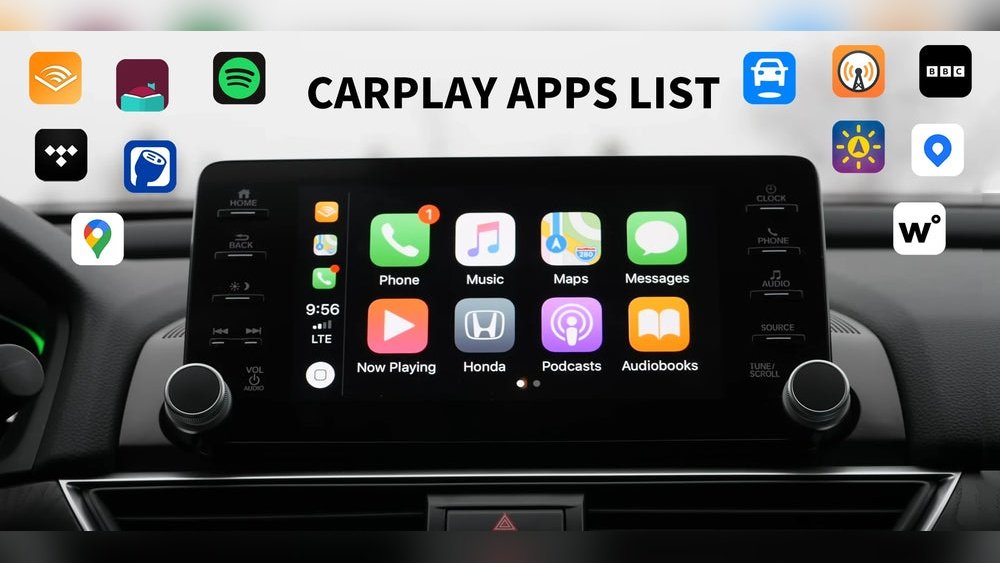
Here are some popular navigation apps that work well with Apple CarPlay. They help you reach your destination without hassle.
Apple Maps
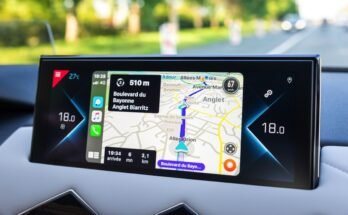
Apple Maps comes pre-installed on all Apple devices. It integrates smoothly with CarPlay. The app offers turn-by-turn directions, traffic updates, and lane guidance. It also shows nearby places like gas stations and restaurants. Voice commands work well for hands-free use. Updates improve map accuracy regularly. Apple Maps is simple and reliable for everyday driving.
Google Maps
Google Maps is a widely used app with detailed maps. It provides real-time traffic info and route options. The app helps avoid traffic jams with alternate routes. You can search for places easily with voice or touch. It shows reviews and photos of businesses along your route. Google Maps is perfect for exploring new areas and getting precise directions.
Waze
Waze focuses on community-based navigation. Users share live traffic reports and road hazards. This app updates routes based on current road conditions. It warns about accidents, police, and speed cameras. Waze uses simple icons and clear alerts on CarPlay. The app helps save time and avoid trouble on the road. It is great for drivers who want real-time info from other users.
Best Music And Audio Apps
Apple CarPlay supports many music and audio apps to keep you entertained on the road. These apps let you play songs, podcasts, and audiobooks safely while driving. They offer easy controls and clear sound through your car’s system. Here are some of the best music and audio apps that work with Apple CarPlay.
Apple Music
Apple Music is a popular choice for CarPlay users. It offers millions of songs and curated playlists for every mood. You can ask Siri to play your favorite tracks or artists. The app updates regularly with new releases and hits. It works smoothly with CarPlay’s interface, making it easy to browse while driving.
Spotify
Spotify is another top app for music lovers. It has a huge library of songs and personalized playlists. Spotify lets you create your own playlists and download music for offline listening. The CarPlay version is simple to use and responds well to voice commands. It keeps your music experience seamless on the road.
Pandora
Pandora offers music streaming with a focus on radio-style stations. It creates stations based on your favorite songs or artists. Pandora learns your tastes and suggests new music you might like. The app integrates well with CarPlay, giving you easy access to your stations and playlists.
Audiobooks And Podcasts
Apple CarPlay supports apps for audiobooks and podcasts, perfect for long drives. Audible is a top choice for audiobooks, offering thousands of titles across genres. Podcasts apps like Apple Podcasts and Overcast give access to millions of shows. These apps provide clear audio and simple controls on CarPlay. They help you enjoy stories and discussions while staying focused on driving.
Messaging And Communication
Messaging and communication apps make Apple CarPlay very useful. They help drivers stay connected without losing focus on the road. You can send messages, make calls, and chat easily. These functions improve safety and convenience during travel.
Hands-free Messaging
Apple CarPlay allows hands-free messaging through voice commands. Siri reads incoming messages aloud. You can reply by speaking your message. This feature keeps your hands on the wheel and eyes on the road. It supports SMS and iMessages natively.
Phone Calls With Siri
Making phone calls is simple with Siri on CarPlay. Just say the name or number to call. Siri dials the number and manages the call. You can answer or end calls without touching your phone. This keeps driving safe and distraction-free.
Third-party Messaging Apps
CarPlay supports many third-party messaging apps. Apps like WhatsApp, Telegram, and Signal work well. They let you send and receive messages through Siri. These apps appear on the CarPlay screen for easy use. Always use voice commands to keep your focus.
Useful Travel And Parking Apps
Traveling by car becomes easier with the right apps on Apple CarPlay. These apps help drivers find fuel, parking, and help during emergencies. They save time and reduce stress on the road. Below are some useful travel and parking apps that work well with Apple CarPlay.
Gas Station Finders
Gas station finder apps show nearby fuel stations on your CarPlay screen. They display prices, fuel types, and open hours. Apps like GasBuddy and Fuelio help drivers choose the best place to fill up. This saves money and time during long trips.
Parking Spot Locators
Parking spot locator apps guide you to free or paid parking spaces. They show real-time availability and prices. Apps such as ParkWhiz and SpotHero make finding parking quick and simple. This reduces the hassle of searching for a spot in busy areas.
Roadside Assistance Apps
Roadside assistance apps provide quick help during car troubles. They connect you with towing, battery jump-starts, or locksmiths nearby. Examples include AAA Mobile and Honk. These apps ensure safety and peace of mind on the road.
Entertainment And Media Apps
Entertainment and media apps make driving more enjoyable. They bring music, news, and stories right to your car’s screen. Apple CarPlay supports many apps that keep you entertained safely while driving. These apps work well with your car’s controls and display.
Listening to your favorite audio content helps pass time and stay informed. Apple CarPlay offers a smooth way to access various entertainment apps. Here are some popular types of apps that work perfectly with Apple CarPlay.
Radio And News Apps
Radio apps let you listen to live stations from around the world. Apps like TuneIn and iHeartRadio offer thousands of channels. News apps provide updates on current events and weather. NPR One and CBS News keep you informed without distraction.
Audiobook Platforms
Audiobooks turn books into stories you can hear. Apps such as Audible and Libby offer vast libraries. You can enjoy novels, biographies, or self-help books on the go. These apps remember your place and adjust to your car controls.
Podcast Players
Podcasts cover many topics from comedy to education. Apple Podcasts and Overcast are popular podcast players on CarPlay. They let you browse, subscribe, and listen easily. Podcasts make long drives more interesting and fun.

Fitness And Wellness Apps
Fitness and wellness apps on Apple CarPlay help drivers stay healthy and calm. These apps offer simple ways to relax and remind you to take breaks. They support a better driving experience by reducing stress and fatigue.
Meditation And Relaxation
Apps like Calm and Headspace provide guided meditation through CarPlay. They play soothing sounds and voice instructions. Listening helps lower stress and keeps focus on the road. Short sessions fit easily into daily driving routines. This makes long trips less tiring and more peaceful.
Driving Break Reminders
Break reminder apps alert you to stop and rest during trips. They track driving time and suggest breaks at regular intervals. Taking breaks helps avoid tiredness and maintains alertness. These apps promote safer driving by preventing fatigue. Simple alerts make it easy to follow healthy habits.
Car Maintenance And Monitoring
Car maintenance and monitoring apps help drivers keep their vehicles in good shape. These apps provide useful information about your car’s health and performance. They make it easy to spot problems early and save money on repairs. Apple CarPlay supports many of these apps, so you can check your car’s status on the go.
Vehicle Diagnostics
Vehicle diagnostic apps show real-time data from your car’s computer. They read error codes and tell you what might be wrong. You can check engine issues, battery health, and other key parts. These apps help you avoid surprises on the road. Apple CarPlay lets you view this info safely while driving.
Fuel Tracking Apps
Fuel tracking apps help you monitor how much gas your car uses. They record mileage and fuel costs automatically. This way, you can see if your car uses more fuel than usual. Some apps also find nearby gas stations with low prices. Using them with Apple CarPlay keeps your focus on driving.

Tips For Choosing Carplay Apps
Choosing the right apps for Apple CarPlay makes driving safer and more fun. Apps should fit your needs and work well with your car’s system. Consider these tips to pick apps that improve your driving experience.
Good apps help you stay focused on the road. They offer easy controls and clear displays. Apps that update often add new features and fix bugs. Keep these points in mind to find the best CarPlay apps.
Compatibility And Updates
Check if the app supports Apple CarPlay before downloading. Not all apps work with CarPlay. Choose apps updated regularly for better performance and security. Updates often add new features or fix problems. This keeps your app running smoothly on your car’s system.
User Interface And Safety
Pick apps with simple, clear designs. Large buttons and easy menus reduce distraction. Apps should allow voice control for safer use. Avoid apps with complex screens or many steps. A clean interface helps you focus on driving.
App Permissions
Look at the permissions an app asks for. Only allow permissions needed for the app to work. Avoid apps requesting unnecessary access to your data. This protects your privacy and security. Apps with fewer permissions are usually safer to use in the car.
Frequently Asked Questions
What Popular Apps Are Compatible With Apple Carplay?
Apple CarPlay supports apps like Apple Maps, Google Maps, Waze, Spotify, Apple Music, Audible, and WhatsApp. These apps enhance navigation, music, messaging, and podcast experiences while driving. Compatibility depends on app updates and developer support.
Can I Use Messaging Apps With Apple Carplay?
Yes, Apple CarPlay supports messaging apps like iMessage, WhatsApp, and Messages. You can send and receive texts using voice commands to stay focused on the road and maintain hands-free communication safely.
Are There Any Music Streaming Apps For Apple Carplay?
Yes, Apple CarPlay supports popular music apps such as Spotify, Apple Music, Pandora, and Amazon Music. These apps allow you to stream music, playlists, and podcasts directly through your car’s infotainment system.
Does Apple Carplay Support Navigation Apps Besides Apple Maps?
Yes, besides Apple Maps, CarPlay supports Google Maps and Waze. These apps provide real-time traffic updates, alternate routes, and voice-guided navigation to improve your driving experience.
Conclusion
Apple CarPlay works with many popular apps for music, maps, and messages. It helps you stay connected safely while driving. You can use apps like Spotify, Apple Maps, and WhatsApp easily on your car screen. These apps make your drive more enjoyable and less distracting.
Always check if your favorite app supports CarPlay before driving. Using these apps keeps your hands on the wheel and eyes on the road. Apple CarPlay brings convenience and safety together in one system. Try different apps to find what suits your needs best.