Have you ever plugged your iPhone into your car to charge, only to find that Apple CarPlay suddenly disconnects? It’s frustrating when your music stops, navigation cuts out, and hands-free calls drop just as you’re getting comfortable.
You might wonder why this keeps happening and how to fix it. Understanding the reasons behind CarPlay disconnecting while charging can save you time and stress on every drive. Keep reading, and you’ll discover simple solutions to keep your connection steady and your ride smooth.

Common Causes Of Carplay Disconnects
CarPlay disconnects while charging can frustrate many drivers. Understanding common causes helps find quick solutions. Several factors often lead to these interruptions. Knowing them can keep your connection steady and reliable.
Faulty Charging Cables
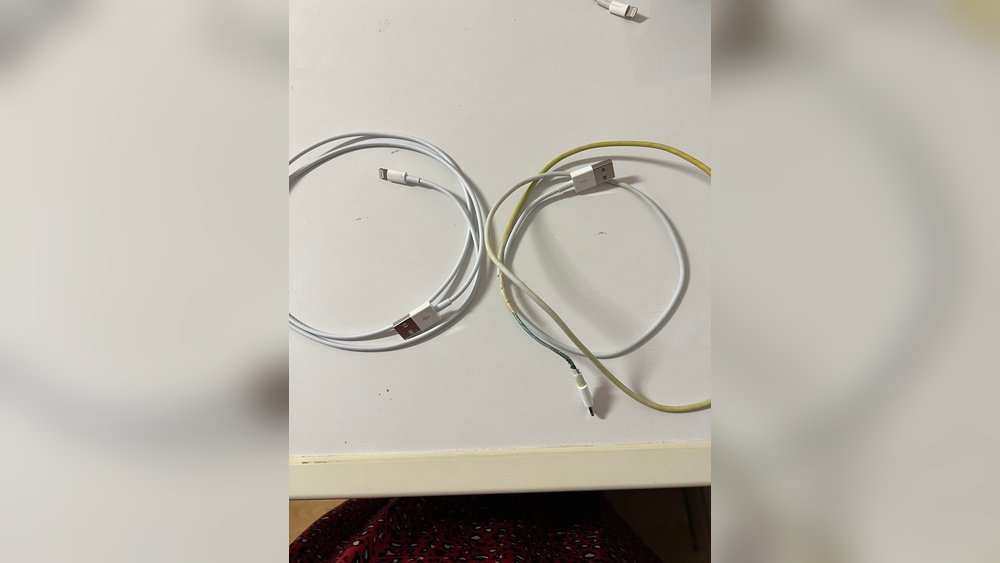
Damaged or poor-quality cables often cause CarPlay to disconnect. Worn-out wires can interrupt data transfer. Using non-certified cables may also cause issues. Always choose cables made for your device. Check cables for visible damage regularly.
Software Glitches
Sometimes, bugs in iOS or car software cause disconnects. Outdated software may not work well with CarPlay. Restarting your phone or car system can fix minor glitches. Keeping software updated reduces connection problems.
Incompatible Accessories
Not all accessories work smoothly with CarPlay. Some adapters or hubs can block signals. They may also draw too much power, causing drops. Use only accessories tested for CarPlay compatibility.
Power Surge Issues
Power surges from the car’s electrical system can disrupt CarPlay. Sudden voltage changes may cause the connection to drop. Faulty car batteries or alternators can trigger surges. Regular car maintenance helps prevent these problems.
How Charging Affects Carplay Connection
Charging your phone while using CarPlay can sometimes cause the connection to drop. This happens because the charging process can interfere with the data signal between your phone and the car’s system. Understanding how charging affects CarPlay helps you find ways to keep it stable and reliable.
Power Interference
Charging sends electrical power through the cable to your phone. This power can cause electrical noise or interference. The interference affects the data transfer needed for CarPlay. As a result, the connection might drop or become unstable.
Some cars and chargers have better shielding to reduce this noise. Others may not, causing more frequent disconnects. Power interference is a common reason for CarPlay issues during charging.
Cable Quality Impact
The quality of your charging cable plays a big role in CarPlay stability. Low-quality cables may not handle data and power well at the same time. Cheap or damaged cables can cause poor connection or signal loss.
Using a high-quality, Apple-certified cable can improve performance. Good cables reduce interference and maintain a steady data flow. This helps CarPlay stay connected even while charging.
Quick Fixes To Stop Carplay Disconnecting
CarPlay disconnecting while charging can be frustrating. Simple steps can help fix this issue fast. These quick fixes improve connection and keep CarPlay working smoothly.
Use Certified Cables
Always use Apple-certified cables. Cheap or damaged cables cause connection problems. Certified cables ensure stable data and power flow. This reduces CarPlay disconnecting during charging.
Restart Your Devices
Turn off your iPhone and car’s system. Wait a few seconds and turn them back on. Restarting clears temporary glitches. It often solves CarPlay disconnection issues quickly.
Update Software
Keep your iPhone and car system updated. Software updates fix bugs and improve compatibility. Updated software helps maintain a strong CarPlay connection.
Check Charging Ports
Inspect your iPhone and car charging ports. Dirt, dust, or damage can disrupt the connection. Clean ports gently with a soft brush or cloth. Ensure ports are free from debris to prevent disconnects.

Advanced Solutions For Persistent Issues
Some CarPlay issues persist even after basic fixes. Advanced solutions help solve these stubborn problems. They focus on deeper settings and hardware checks. These steps aim to restore smooth CarPlay use during charging.
Reset Network Settings
Resetting network settings can fix connection bugs. This action clears saved Wi-Fi and Bluetooth data. It can remove glitches causing CarPlay to drop. To reset, go to your iPhone’s settings. Choose “General,” then “Reset,” and tap “Reset Network Settings.” Your phone will restart, and connections refresh.
Inspect Car’s Usb System
Check your car’s USB ports for damage or dirt. A faulty port can disrupt power and data flow. Clean the ports gently with a dry cloth or compressed air. Test with another USB cable to rule out cable problems. If issues remain, the car’s USB system might need repair.
Consult Manufacturer Support
Manufacturer support can provide expert help. They know specific issues with your car and iPhone model. Contact them for advice or software updates. They may guide you through advanced diagnostics. This step ensures you get precise and safe fixes.
Tips To Maintain Stable Carplay Connection
Maintaining a stable CarPlay connection can be tricky, especially while charging. Many users face sudden disconnections that interrupt their driving experience. Following simple tips can help keep your connection strong and reliable. These easy steps protect your CarPlay setup from common problems.
Focus on your cables, app usage, and software updates. These factors play a key role in connection stability. Small efforts in these areas bring big improvements.
Regular Cable Maintenance
Check your charging cable often for damage or wear. A worn-out cable can cause connection breaks. Use cables with good quality and proper certification. Avoid bending or twisting the cable sharply. Keep the connectors clean and free from dust. Replace cables that show signs of fraying or loose ends.
Avoid Charging While Using Heavy Apps
Heavy apps consume more power and data. Running them while charging can overload your connection. Limit apps like navigation, streaming, or games during charging. Use only essential apps for smooth performance. This reduces strain on your device and CarPlay system.
Keep Software Up To Date
Update your iPhone and car infotainment system regularly. Software updates fix bugs that cause disconnections. They improve compatibility and system stability. Check for updates every few weeks. Install them as soon as they become available. Updated software ensures a smoother CarPlay experience.

Frequently Asked Questions
Why Does Carplay Disconnect When Charging My Iphone?
CarPlay may disconnect due to faulty cables, loose connections, or software glitches on your iPhone or vehicle system. Using low-quality cables or outdated software can cause interruptions during charging and CarPlay use.
Can A Bad Charging Cable Cause Carplay To Disconnect?
Yes, a damaged or low-quality charging cable can cause CarPlay to disconnect. Faulty cables may fail to maintain a stable connection, leading to interruptions in both charging and CarPlay functionality.
How Does Software Affect Carplay Disconnection During Charging?
Outdated iOS or vehicle infotainment system software can cause compatibility issues. Updating both your iPhone and car system often resolves disconnection problems during CarPlay use.
Is Carplay Disconnection Related To Phone Battery Health?
Poor battery health can affect charging efficiency but rarely causes CarPlay disconnection. Most disconnections stem from cable issues or software conflicts rather than battery condition.
Conclusion
CarPlay disconnects while charging due to cable or port issues. Poor cable quality or damaged ports often cause interruptions. Electrical interference from chargers can also disrupt the connection. Restarting your phone or car system may help fix this. Using original or certified cables reduces problems.
Keeping software updated ensures smoother operation. Small fixes can improve your CarPlay experience greatly. Stay patient and try different solutions to find what works. This will help maintain a stable connection every time.