Is your dash cam refusing to turn on when you need it most? It’s frustrating, especially when you rely on it for safety and evidence on the road.
You might be wondering what’s causing this sudden problem and how to fix it quickly. You’ll discover the common reasons why your dash cam won’t power up and easy steps you can take to get it working again. Don’t let a simple issue leave you unprotected—keep reading to find the solution that fits your situation.
Common Power Issues
Dash cams need steady power to work properly. Power problems are the main reason a dash cam won’t turn on. Checking the power supply is the first step to fix this. Simple fixes can save time and money.
Check The Power Source
Verify if the car’s power outlet is working. Try plugging another device to see if it gets power. Sometimes the outlet stops working after a car battery issue. Also, ensure the dash cam is connected to the right port. Some cars have multiple outlets with different power states.
Inspect The Power Cable
Look closely at the power cable for damage. Small tears or bends can stop power flow. Use a different cable if available to test. Loose connections at the cable ends can cause power loss too. Secure the cable firmly into the dash cam and outlet.
Verify The Fuse Status
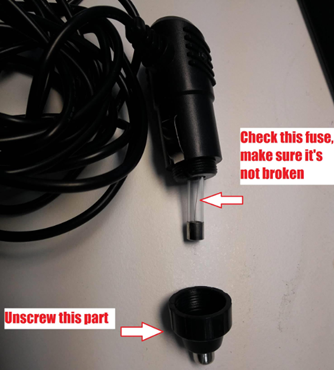
Check the fuse linked to the dash cam’s power line. A blown fuse cuts off power instantly. Find the fuse box in your car and locate the correct fuse using the manual. Replace the fuse with the same type and rating. This simple step often restores power to the dash cam.
Battery Problems
Battery problems often cause dash cams to fail to turn on. The battery may be dead, damaged, or not holding a charge. Sometimes, the built-in battery stops working properly. This issue is common in older dash cams. Checking the battery is the first step to fix the problem.
Test The Built-in Battery
Start by testing the built-in battery. Remove the dash cam from its mount. Look for any signs of swelling or damage. Use a multimeter to check the battery voltage. The voltage should be close to the battery’s rated level. If the voltage is low, the battery may need charging or replacement. Some dash cams show a low battery warning on the screen. If the camera does not respond at all, the battery could be dead.
Replace A Faulty Battery
Replacing a faulty battery can restore your dash cam’s power. Find the correct replacement battery for your model. Use a small screwdriver to open the battery compartment. Remove the old battery carefully. Insert the new battery in the correct direction. Close the compartment and test the dash cam. A fresh battery should power the device easily. If the dash cam still does not turn on, other issues might be causing the problem.
Device Settings And Software
Device settings and software play a big role in your dash cam’s ability to turn on. Sometimes, incorrect settings or outdated software cause the device to fail. Checking these areas can fix the problem quickly. Simple adjustments may bring your dash cam back to life.
Reset To Factory Settings
Resetting the dash cam returns it to its original state. This step clears any wrong settings causing the issue. Look for the reset option in the menu or press a small reset button. Keep in mind, this deletes all saved data and settings.
Update Firmware
Firmware is the software that runs your dash cam. Outdated firmware may cause it not to start. Visit the manufacturer’s website to download the latest version. Follow the instructions carefully to update the device. This often fixes bugs and improves performance.
Check Auto Power On Settings
Some dash cams have an auto power on feature. It turns the camera on with the car’s ignition. If this is off, the dash cam won’t start automatically. Check your device’s settings to make sure this option is enabled. Adjust it if needed to get the camera working.
Hardware Malfunctions
Hardware malfunctions are a common reason your dash cam does not turn on. These issues involve physical parts inside or outside the device. Small damages or faults can stop your dash cam from working properly.
Look For Physical Damage
Check your dash cam for cracks, dents, or loose parts. These signs may show the device suffered a fall or hit. Damage to the power button or screen can prevent it from turning on. Also, examine the power cable and connector for wear or breaks. Replace any damaged parts to restore power.
Identify Internal Component Issues
Internal parts can fail without visible damage. Faulty circuit boards or batteries often cause power issues. A worn-out battery may not hold a charge. Sometimes, internal wiring can become loose or broken. A professional can open the device to test these parts. Fixing or replacing internal components can bring your dash cam back to life.
Power Supply Alternatives
Power supply issues often cause dash cams not to turn on. Trying different power options can solve this problem. A failing adapter or weak battery might stop your device from working. Testing alternative power sources helps find the exact cause. It also ensures your dash cam gets the power it needs to function properly.
Use A Different Power Adapter
The power adapter might be faulty or incompatible. Swap it with another adapter that matches your dash cam’s voltage and current needs. This simple step can restore power quickly. Avoid using low-quality or damaged adapters. Check the cable for breaks or frays. A working adapter delivers steady power and keeps your dash cam on.
Try An External Battery Pack
An external battery pack offers a portable power source. It works well if your car’s power outlet is unreliable. Connect your dash cam to a fully charged battery pack. This method provides stable power on the go. Choose a battery pack with enough capacity for long use. It also protects your dash cam during sudden power cuts.
Professional Repair Options
When your dash cam does not turn on, professional repair can help. These options ensure the problem is fixed safely and correctly. They also protect your device’s warranty and performance.
Choosing professional repair saves time and avoids further damage. Experts have the tools and knowledge to diagnose issues quickly. They can repair hardware or software problems that you cannot fix alone.
Contact Manufacturer Support
Start by contacting the dash cam manufacturer’s support team. They offer guidance based on your device model. Support may provide troubleshooting steps or firmware updates.
Some manufacturers allow repairs or replacements under warranty. They can arrange sending your dash cam to an authorized service center. This option keeps your warranty intact and ensures quality service.
Visit A Certified Technician
Certified technicians specialize in dash cam repairs. They have official training and use genuine parts. Visiting a certified technician guarantees safe repairs and reliable results.
Technicians can fix power issues, screen problems, or internal damage. They also test your dash cam to confirm the repair success. This professional service extends your dash cam’s lifespan.
Frequently Asked Questions
Why Won’t My Dash Cam Power On?
Your dash cam may not power on due to a dead battery, faulty power cable, or a blown fuse. Check these components first to identify the issue quickly. Also, ensure the power source, like your car’s cigarette lighter, is functioning properly.
How Do I Fix A Dash Cam That Won’t Start?
To fix a dash cam that won’t start, verify the power connection and replace any damaged cables. Test your car’s fuse related to the dash cam circuit. Restart your vehicle and try again. If problems persist, consult the manufacturer’s troubleshooting guide.
Can A Faulty Fuse Stop Dash Cam From Turning On?
Yes, a blown or faulty fuse can prevent your dash cam from turning on. Inspect the fuse in your car’s fuse box linked to the dash cam. Replace it if damaged to restore power and get your dash cam working again.
Does Battery Life Affect Dash Cam Startup?
Battery life can affect dash cam startup if the internal battery is drained. Many dash cams rely on the car’s power or an internal battery backup. If the battery is dead or weak, the camera may fail to turn on.
Conclusion
A dash cam not turning on can cause real frustration. Check the power source and connections carefully. Sometimes, a simple reset solves the problem. Battery or fuse issues might also stop it from starting. Keep the device clean and updated for best results.
Regular checks help avoid unexpected failures. Understanding these steps saves time and stress. Your dash cam should work smoothly with basic care. Don’t ignore small signs of trouble. Stay prepared and keep your drives safe.




