Keeping your car reliable starts with good battery care. One of the most overlooked but important jobs is cleaning the car battery terminals. Dirty or corroded terminals can cause many problems, from a car that won’t start to electrical issues and even damage to your battery or car’s electrical system. Learning how to clean car battery terminals is not just for experts—anyone can do it with some simple steps. In this article, you’ll find everything you need to know, from tools you need to safety tips, step-by-step instructions, and even what to do if things go wrong.
Why Clean Car Battery Terminals?
Many car owners only think about their battery when their car refuses to start. The truth is, battery terminals are exposed to heat, moisture, and chemicals every day. Over time, they develop corrosion—a white, blue, or green powdery build-up. This layer acts like an insulator, blocking the flow of electricity. The result? Your car might crank slowly, dashboard lights could flicker, or you might hear clicking but the engine won’t turn over.

49% off Today's Exclusive Deals
Limited-time Exclusive Deals. Check current discount on Amazon.
Check Price on Amazon As an Amazon Associate I earn from qualifying purchases.Regular cleaning offers several benefits:
- Better electrical contact: Clean terminals let power flow smoothly.
- Longer battery life: Less resistance means less stress on your battery.
- Prevents breakdowns: You avoid being stranded with a dead car.
Many new drivers don’t realize that even a little corrosion can reduce power by over 30%. Over months, this can wear out your battery or starter motor, leading to expensive repairs.
Signs Your Battery Terminals Need Cleaning
Don’t wait until your car fails to start. Look for these common signs:
49% off Today's Exclusive Deals
Limited-time Exclusive Deals. Check current discount on Amazon.
Check Price on Amazon As an Amazon Associate I earn from qualifying purchases.- White or blue-green crust on the battery terminals or cables.
- Difficulty starting the engine, especially in cold weather.
- Dim headlights or weak electrical accessories.
- Visible moisture or acid leaks around the battery.
- Dashboard warning lights for battery or charging system.
A simple visual inspection every month can save you trouble. If you notice any of these signs, it’s time to clean your car battery terminals.
Safety First: Precautions Before You Start
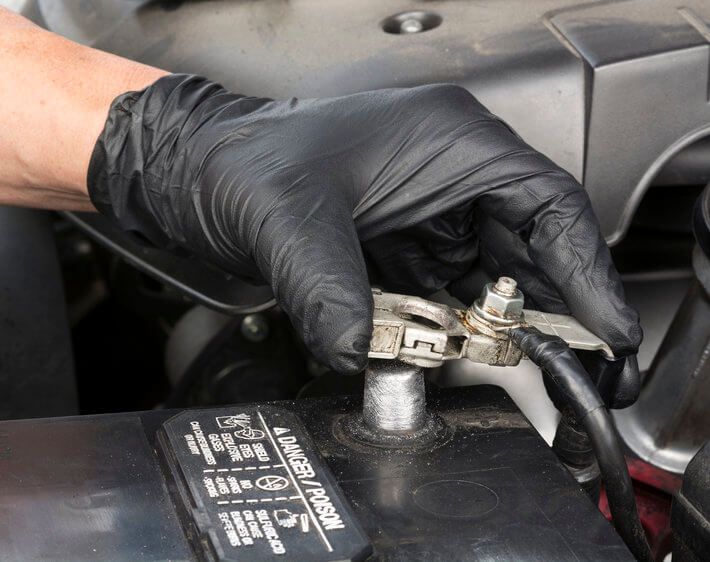
Cleaning battery terminals is safe if you use the right steps. But car batteries contain acid, which can burn skin and eyes. They also store a lot of energy and can spark.
Follow these safety precautions:
- Turn off the engine and remove the key.
- Wear gloves and safety glasses to protect skin and eyes.
- Keep metal objects like tools or jewelry away from the battery.
- Work in a well-ventilated area to avoid breathing any fumes.
- Never smoke or use open flames near the battery.
- If you feel unsure, ask a friend for help or call a professional.
Many beginners forget to remove jewelry. Even a simple ring can cause an accidental short circuit, leading to burns or a shock.
49% off Today's Exclusive Deals
Limited-time Exclusive Deals. Check current discount on Amazon.
Check Price on Amazon As an Amazon Associate I earn from qualifying purchases.Tools And Materials You’ll Need
You don’t need special equipment to clean battery terminals. Most items can be found at home or easily bought at an auto parts store.
Here’s what you’ll need:
- Adjustable wrench (or a 10mm wrench, most common for battery terminals)
- Baking soda
- Water
- Old toothbrush or a special battery terminal cleaning brush
- Clean rags or paper towels
- Gloves and safety glasses
- Petroleum jelly (optional, for after cleaning)
For heavy corrosion, a spray bottle and a battery terminal cleaner can make the job easier. You may also want a wire brush for stubborn build-up.

Step-by-step Guide: How To Clean Car Battery Terminals
You’re now ready to clean the terminals. Follow these detailed steps for best results.
1. Park And Prepare
- Park your car in a safe, open space with the engine off.
- Open the hood and locate the battery. Most are easy to find, but some newer cars hide them under covers or in the trunk.
- Remove any plastic covers over the battery terminals.
- Put on your gloves and safety glasses.
2. Disconnect The Battery
- Always disconnect the negative terminal (usually marked with a minus “–” or black color) first. This reduces the risk of a short circuit.
- Use your wrench to loosen the nut. Gently wiggle the cable and pull it off.
- Next, disconnect the positive terminal (marked with a plus “+” or red color).
- Set the cables aside, making sure they do not touch each other or any metal parts.
Pro Tip: If the clamps are stuck, twist them gently or use a battery terminal puller. Never force them off with a screwdriver—you could damage the battery or cause a spark.
3. Inspect The Battery And Terminals
- Look for signs of cracks, leaks, or swelling in the battery case. If you see any, the battery may be damaged and should be replaced.
- Check the battery cables for frayed wires or loose connections.
4. Mix Cleaning Solution
- In a small container, mix one tablespoon of baking soda with one cup of water. Stir until the baking soda dissolves.
- For convenience, you can pour the solution into a spray bottle.
5. Scrub Away Corrosion
- Dip the old toothbrush or cleaning brush into the solution.
- Scrub the battery terminals and cable clamps. The baking soda will fizz as it reacts with the corrosion—this is normal.
- For heavy build-up, let the solution sit for a few minutes before scrubbing again.
- Wipe away loosened corrosion with a clean rag.
Non-Obvious Insight: If the corrosion is very stubborn, try dipping the brush in hot water before adding baking soda. Heat speeds up the cleaning reaction.
6. Rinse And Dry
- Pour a small amount of clean water over the terminals to wash away any leftover baking soda.
- Wipe everything dry with a rag or paper towel. Make sure the terminals and clamps are completely dry before reconnecting.
Important: Never let water get inside the battery’s cell caps. If it does, it can dilute the acid and reduce battery life.
7. Apply Protective Coating
- Once dry, rub a small amount of petroleum jelly or dielectric grease onto the terminals. This creates a barrier against future corrosion.
- Don’t use too much—a thin layer is enough.
8. Reconnect The Battery
- Attach the positive cable first. Tighten the nut so the clamp is snug but not overtight.
- Next, attach the negative cable.
- Replace any plastic covers you removed earlier.
9. Start The Car And Check
- Start your car and check for smooth engine cranking.
- Make sure all electrical items (lights, radio, windows) work as expected.
- If you notice any problems, double-check your connections.
What If The Terminals Are Still Corroded?
Sometimes, regular cleaning is not enough. For example, if the battery terminal is covered in a thick, hard crust or the metal is pitted, you may need extra steps.
Try these solutions:
- Use a wire brush or a battery post cleaner for deep corrosion.
- Soak the clamps in baking soda solution for 10–15 minutes, then scrub again.
- For extreme cases, replace the battery terminals or cables completely.
Non-Obvious Insight: Some batteries leak acid due to overcharging from a faulty alternator. Cleaning the terminals helps, but check the charging system if corrosion returns quickly.
Choosing Commercial Battery Terminal Cleaners Vs. Diy
Many auto stores sell battery terminal cleaners in spray cans or as gel. Are they better than baking soda?
Here’s a quick comparison:
| Cleaning Method | Pros | Cons | Best For |
|---|---|---|---|
| Baking Soda & Water | Cheap, safe, easy to find | Requires rinsing, not as fast on heavy corrosion | Most home users |
| Commercial Cleaner | Fast, strong, no mixing needed | Costs more, may contain harsh chemicals | Professional mechanics, severe corrosion |
Both options work well. If you clean your battery every few months, baking soda is usually enough.
How Often Should You Clean Battery Terminals?
How often you clean depends on your driving habits and climate:
- Every 3–6 months for most drivers.
- Every 1–2 months if you live in a humid or coastal area (salt air increases corrosion).
- Before long trips or if you see signs of corrosion.
Regular checks are important for older cars or vehicles with heavy electrical loads. If you notice corrosion coming back quickly, get your battery and charging system tested.

Common Mistakes To Avoid
Many beginners make simple errors when cleaning battery terminals. These mistakes can cause damage or even injury.
- Not disconnecting the battery: Always remove the negative cable first to prevent sparks.
- Using metal tools carelessly: Dropping a wrench on both terminals can cause a dangerous short circuit.
- Letting water enter the battery cells: This can ruin the battery.
- Skipping protective grease: Without a barrier, corrosion returns quickly.
- Over-tightening the clamps: This can break the battery posts.
Another common mistake is cleaning only the outside of the clamps. The inside, where the metal touches the terminal, must be clean for a good connection.
When To Replace Terminals Or Cables
Cleaning is effective for most cases, but sometimes you need to replace parts. Look for these signs:
- Terminals are cracked or badly pitted.
- Cables are frayed or wires are exposed.
- Clamps will not tighten or keep slipping off.
- Corrosion returns within weeks, even after cleaning.
Replacement is simple and inexpensive. Many auto parts stores sell universal battery terminals for under $10.
Here’s a quick reference:
| Part | When to Replace | Estimated Cost |
|---|---|---|
| Battery Terminal | Cracked, cannot tighten, severe corrosion | $5–$15 each |
| Battery Cable | Frayed, broken wires, loose fit | $10–$40 each |
| Battery | Leaking, swollen, fails to hold charge | $80–$200 |
Don’t try to patch damaged cables with tape. This is a temporary fix and could cause electrical problems.
Extra Tips For Preventing Battery Terminal Corrosion
Keeping terminals clean is about prevention as much as cleaning. Here are some extra tips:
- Check your battery’s hold-down bracket: If the battery moves, vibrations can loosen terminals and create more corrosion.
- Install felt washers: These inexpensive rings fit under the terminal and soak up acid.
- Use anti-corrosion sprays: Available at auto parts stores, they create a protective film.
- Keep the battery case clean: Dirt and moisture help corrosion spread.
- Maintain your charging system: Overcharging can force acid out, causing corrosion.
Example: Many car owners are surprised to find their battery covered in corrosion after a hot summer. Heat speeds up acid evaporation, so regular checks during extreme weather are smart.
Environmental And Disposal Concerns
When cleaning, avoid letting battery acid or old corrosion fall onto the ground. These chemicals are harmful to the environment and can damage concrete or paint.
- Always clean over a drip tray or use old newspapers.
- Dispose of used rags and corrosion carefully. Many auto shops accept old car batteries for recycling.
- Never pour cleaning solution or acid down the drain.
If you need to dispose of an old battery, take it to a recycling center or auto parts store. They handle hazardous materials safely. For more details, you can check resources like the EPA’s Battery Recycling Guide.
Troubleshooting: What If Your Car Still Won’t Start?
You cleaned the terminals, but your car still won’t start. What’s next?
- Check the battery voltage: A healthy battery should read around 12.6 volts when the car is off.
- Listen for clicks or silence: A click usually means the battery is weak or the terminals are still dirty. No sound may mean a starter problem.
- Jump-start the car: If it starts, your battery may be weak or old.
- Check fuses and wiring: Sometimes, a blown fuse or loose ground wire can cause problems.
If all else fails, your battery may need replacement, or there could be an issue with the starter or alternator.
How Clean Terminals Affect Your Car’s Performance
You might wonder if such a small task really matters. The answer is yes. Clean battery terminals ensure:
- Maximum power: Your starter motor gets the full battery voltage.
- Reliable electronics: Modern cars depend on stable power for sensors and computers.
- Longer component life: Less resistance means less heat and wear.
Statistic: According to battery manufacturers, over 50% of “bad” batteries returned under warranty only have dirty or loose terminals, not a real fault.
Frequently Asked Questions
How Do I Know If My Battery Terminals Are Corroded?
Look for a white, blue, or green powdery substance around the battery posts or cable clamps. This is corrosion. You may also notice a rotten egg smell or see moisture. If your car has trouble starting or the lights are dim, check the terminals.
Can I Use Cola Or Vinegar Instead Of Baking Soda To Clean Terminals?
Cola can work because it is acidic, but it leaves a sticky residue. Baking soda is better because it’s safe, cheap, and neutralizes battery acid. Vinegar is also acidic and can clean corrosion, but always rinse well after using it. Baking soda is safest for most people.
Is It Safe To Clean Battery Terminals While The Battery Is Still Connected?
No. Always disconnect the negative terminal first before cleaning. This prevents accidental short circuits, sparks, and injury. Never clean or touch both terminals at the same time with tools or hands.
How Do I Prevent Corrosion From Coming Back?
Apply a thin layer of petroleum jelly or use anti-corrosion spray after cleaning. Check your battery regularly, keep the case clean, and make sure the charging system is working properly. Installing felt washers under the terminals also helps.
What Should I Do If My Battery Cable Is Stuck?
If a cable won’t come off, try twisting it gently back and forth. Use a battery terminal puller if needed. Never force the cable off with a screwdriver or hammer—you could break the terminal or battery post.
Keeping your car battery terminals clean is a simple job that pays big rewards. With a little effort and the right tools, you can avoid most electrical problems and extend the life of your battery. Remember to check your battery every few months, act quickly if you see corrosion, and always put safety first. Clean terminals mean a happier car—and a driver who’s never left stranded.