Sony MEX-XB100BT troubleshooting usually comes down to power, pairing, wiring, or simple reset issues.
If you have been fighting with a Sony MEX-XB100BT that will not turn on, will not pair, or keeps cutting out, you are not alone. I have seen this unit behave like a great budget stereo one minute and a stubborn puzzle the next, usually because of a small setup issue rather than a dead head unit. In this guide, I will walk you through Sony MEX-XB100BT troubleshooting in a clear, practical way so you can find the real cause fast and get back to listening.

49% off Today's Exclusive Deals
Limited-time Exclusive Deals. Check current discount on Amazon.
Check Price on Amazon As an Amazon Associate I earn from qualifying purchases.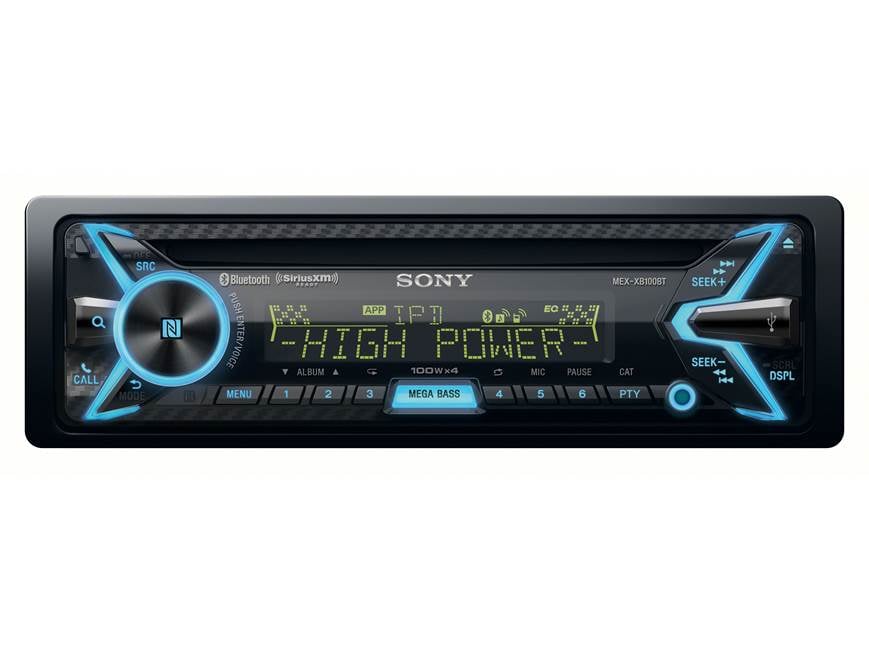
Common Reasons the Sony MEX-XB100BT Stops Working
The Sony MEX-XB100BT is a simple unit on paper, but car audio systems can be messy in real life. Most problems trace back to a few familiar areas: power, ground, fuse, Bluetooth pairing, speaker wiring, or a setting that got changed by accident.
Here are the most common causes I have run into or seen while helping with Sony MEX-XB100BT troubleshooting:
49% off Today's Exclusive Deals
Limited-time Exclusive Deals. Check current discount on Amazon.
Check Price on Amazon As an Amazon Associate I earn from qualifying purchases.- No power from the car’s accessory circuit
- A blown fuse on the head unit or vehicle side
- Weak or bad ground connection
- Incorrect speaker wire connections
- Bluetooth pairing errors or memory conflicts
- Phone volume, media output, or app settings
- The unit needing a reset after a glitch
- Ignition switch or wiring harness issues
The good news is that most of these problems are fixable without replacing the stereo. A calm step-by-step check usually finds the answer faster than random guessing.

Sony MEX-XB100BT Troubleshooting When the Unit Will Not Turn On
When the stereo stays dark, start with power first. That is the quickest way to narrow things down, and in my experience, it solves more cases than anything else.
Check these points in order:
49% off Today's Exclusive Deals
Limited-time Exclusive Deals. Check current discount on Amazon.
Check Price on Amazon As an Amazon Associate I earn from qualifying purchases.- Make sure the ignition is in ACC or ON.
- Check the car fuse for the radio circuit.
- Check the stereo fuse on the Sony harness or back of the unit.
- Confirm the yellow constant power wire has 12V.
- Confirm the red accessory wire has 12V with the key on.
- Make sure the black ground wire is tied to clean metal.
A loose ground is one of the most common mistakes. If the ground touches paint, rust, or a weak bolt, the Sony MEX-XB100BT may act dead or reboot on bumps. I once saw a unit fail for weeks because the installer had grounded it to a painted bracket instead of bare chassis metal.
If the wiring checks out, try a hard reset. Power glitches and interrupted installs can leave the unit stuck in a bad state. A reset often brings it back to life when everything else looks fine.
Sony MEX-XB100BT Troubleshooting for Bluetooth Pairing Problems
Bluetooth issues are very common with the Sony MEX-XB100BT, especially when the phone has paired to several cars or old devices. Phones love to remember too much, and that can create a little digital confusion.
Try this:
- Delete the stereo from your phone’s Bluetooth list
- Delete the phone from the Sony unit if it is already saved
- Turn Bluetooth off and back on
- Restart the phone
- Put the stereo into pairing mode again
- Reconnect from scratch
If the unit still does not pair, check whether another device is connected. The Sony MEX-XB100BT may refuse a new connection if it thinks an old one is active. Also make sure the phone is not connected to a smartwatch, earbuds, or another car system that is taking the audio signal first.
Another thing I have seen is app-level interference. Some phones hold media permissions too tightly, and the stereo connects for calls but not music. If that happens, open Bluetooth settings on the phone and confirm media audio is enabled.
Sony MEX-XB100BT Troubleshooting for No Sound
This is one of the most frustrating problems because the screen may look normal, but silence still fills the cabin. Usually, the unit is working, but the audio path is broken somewhere between the source and the speakers.
Check the following:
- Make sure volume is not all the way down
- Confirm mute is not active
- Check balance and fade settings
- Verify speaker wiring polarity
- Test with radio, Bluetooth, and USB to isolate the source
- Make sure external amps, if used, are turned on
A bad speaker wire connection can make one side or the whole system sound dead. If the unit has power and Bluetooth connects but no sound comes out, the issue often sits in the speaker wiring or amplifier trigger wire. On some installs, the blue/white remote wire is the missing piece that keeps an amp from waking up.
If only one speaker works, swap the balance left to right. That tells you fast whether the problem is on the head unit side or the speaker side. This simple test saves a lot of time.
Sony MEX-XB100BT Troubleshooting for Poor Sound Quality
If the sound is weak, distorted, or thin, do not assume the stereo is broken. The Sony MEX-XB100BT is built for simple everyday use, but sound quality still depends on setup, source quality, and speaker condition.
Common causes include:
- Low-quality music files
- Dirty Bluetooth signal or weak phone connection
- Clipping from high volume on the phone
- Damaged speakers
- Loose wiring
- EQ settings pushed too hard
I have made this mistake myself before: turning bass and loudness too high and then blaming the stereo for distortion. In reality, the signal was being overdriven long before it reached the speakers. A cleaner setting often sounds better than an aggressive one.
Try lowering the phone volume to about 75 to 85 percent, then use the head unit for final volume control. That usually reduces clipping. If the sound improves, the issue was source distortion, not the Sony MEX-XB100BT itself.
Sony MEX-XB100BT Troubleshooting for USB and AUX Issues
USB and AUX problems are usually simpler than they seem. Most of the time, the stereo is fine, but the cable, format, or connected device is the weak link.
For USB problems:
- Try a different cable
- Use a known good flash drive
- Confirm the file format is supported
- Remove dirt from the USB port
- Test another phone or device
For AUX problems:
- Check the cable for bends or broken ends
- Try another 3.5 mm cable
- Make sure the phone is set to output audio to the correct port
- Raise the source device volume
One real-world pattern I have seen is a “bad USB port” that was actually just a cheap cable with a broken internal wire. The cable looked fine from the outside, which made the issue feel bigger than it was. Swapping the cable solved it in seconds.
If the unit reads USB but will not play certain files, the file type may be the problem. Simpler formats are usually safer than heavily compressed or oddly named files.
Sony MEX-XB100BT Troubleshooting for Reset and Frozen Screen Problems
When the unit freezes, acts slow, or stops responding, a reset is often the best next move. Electronics sometimes need a clean restart, just like a phone or laptop.
Use these steps:
- Turn off the car.
- Remove the faceplate if needed.
- Press the reset button on the unit.
- Wait a few moments.
- Turn the car back on and test again.
If the problem keeps coming back, the root cause may be unstable power. That can happen if the car battery is weak, the wiring is loose, or the ignition circuit is dropping voltage. In my experience, repeated freezing is often a clue, not the final problem.
If you recently installed the stereo, double-check every connector. A half-seated harness can cause weird behavior that looks like software trouble but is really just a bad connection.
Sony MEX-XB100BT Troubleshooting for Speaker Wiring Mistakes
Speaker wiring is one of the easiest places to go wrong, especially in older cars or aftermarket installs. A small wiring mistake can make the Sony MEX-XB100BT seem faulty when it is actually doing its job.
Watch for these issues:
- Positive and negative wires swapped
- Bare wire touching metal
- Two wires shorting together
- Missing speaker connection
- Wrong harness adapter used
- Factory amp not being triggered
If the speakers sound thin or hollow, one of them may be wired out of phase. That means the speaker cones move in opposite directions, which can cancel bass and make the sound feel weak. It is a tiny mistake with a big effect.
A quick test is to compare the wiring on both sides and confirm each speaker pair is matched correctly. If you are using a factory harness adapter, make sure it fits the exact vehicle and trim level. That matters more than people think.
Sony MEX-XB100BT Troubleshooting for Phone and App Issues
Sometimes the stereo is fine and the phone is the real troublemaker. Modern phones can be picky about media permissions, Bluetooth profiles, and audio routing.
Try these fixes:
- Restart the phone
- Update the phone software
- Update music or Bluetooth apps
- Recheck audio output settings
- Disable battery saver for the app if needed
- Test with another phone
If one phone works and another does not, the unit is probably not the problem. That is a useful clue. I always recommend testing with a second device before tearing the dash apart.
Also, some apps hold onto old audio sessions. If music does not start properly, force close the app and reconnect Bluetooth. It sounds basic, but that simple step solves a lot of headaches.
Sony MEX-XB100BT Troubleshooting Tips I Use in Real Life
After enough installs and repairs, you start to notice patterns. The same small mistakes keep showing up, and they are usually easy to fix once you know where to look.
Here are a few practical tips that save time:
- Start with power before chasing audio problems
- Test one change at a time
- Use a multimeter instead of guessing
- Keep a known good phone and USB cable for testing
- Check ground quality before replacing parts
- Reset the unit after wiring changes
- Write down what changed before the problem began
One of the biggest lessons I learned is not to assume a new part is bad. Many “dead” Sony MEX-XB100BT units I have seen were actually suffering from one weak wire or one bad fuse. That is why patient testing beats random replacement every time.
A multimeter is your best friend here. It turns guesswork into facts. Even a basic one can tell you whether power, ground, and accessory voltage are present.
When to Suspect the Sony MEX-XB100BT Itself Is Faulty
Most problems are not caused by the stereo unit, but sometimes the unit really is the issue. That is more likely if you have confirmed clean power, solid ground, correct wiring, and the same problem still happens across different sources and phones.
Signs the unit may be failing include:
- It randomly reboots with stable voltage
- Buttons stop responding after reset
- Bluetooth never works with any device
- Sound cuts out across all sources
- The screen behaves erratically even after wiring checks
At that point, the unit may need professional service or replacement. I like to be careful here, because replacing a head unit too early can waste money if the real issue is still in the wiring. But if every test points back to the stereo, trust the evidence.
Frequently Asked Questions of Sony MEX-XB100BT Troubleshooting
Why does my Sony MEX-XB100BT turn on but have no sound?
This usually means the power side is fine, but the audio path has a problem. Check mute, volume, balance, fade, speaker wiring, and any external amp trigger wire.
Why won’t my phone connect to the Sony MEX-XB100BT Bluetooth?
Old pairings often cause this. Delete the stereo from your phone, clear saved devices on the unit, then pair again from scratch.
Why does my Sony MEX-XB100BT keep resetting while driving?
A weak ground, loose harness, or unstable accessory power is the most common cause. Voltage drops from a tired battery can also trigger resets.
Why does the sound distort at higher volume?
Distortion usually comes from clipping, weak speaker wiring, or damaged speakers. Try lowering the phone volume and adjusting the head unit volume instead.
Can I fix Sony MEX-XB100BT problems without replacing the unit?
Yes, in many cases you can. Most issues come from wiring, fuses, Bluetooth settings, or a simple reset rather than a bad head unit.
Conclusion
Sony MEX-XB100BT troubleshooting gets much easier when you treat it like a checklist instead of a guessing game. Start with power, ground, fuses, and wiring, then move to Bluetooth, sound settings, USB, and reset steps. In most cases, the fix is smaller than it first appears.
If you are dealing with this stereo right now, take it one step at a time and test carefully. That patient approach will save you time, money, and a lot of frustration. If this guide helped, keep exploring more car audio tips or leave a comment with the issue you are seeing.





