Sony MEX-XB120BT troubleshooting usually comes down to power, wiring, Bluetooth, or speaker connection issues.
If you have spent time with the Sony MEX-XB120BT, you already know it is a strong little head unit with plenty of bass and a simple layout. But like any car stereo, it can act up in ways that feel confusing at first. In this guide, I’ll walk you through Sony MEX-XB120BT troubleshooting step by step, using clear fixes, practical checks, and real-world advice so you can get your system working again without guesswork.

49% off Today's Exclusive Deals
Limited-time Exclusive Deals. Check current discount on Amazon.
Check Price on Amazon As an Amazon Associate I earn from qualifying purchases.
Common Sony MEX-XB120BT Problems and What They Usually Mean
When a Sony MEX-XB120BT stops working right, the problem is often easier to solve than it looks. In my experience, most issues come from one of five areas: no power, bad wiring, Bluetooth pairing trouble, sound output problems, or a settings glitch.
A lot of people jump straight to replacing the unit, but that is rarely the first move you should make. Think of troubleshooting like checking the plumbing before you blame the faucet. Small things often cause the biggest headaches.
49% off Today's Exclusive Deals
Limited-time Exclusive Deals. Check current discount on Amazon.
Check Price on Amazon As an Amazon Associate I earn from qualifying purchases.Common symptoms include:
- The unit will not turn on
- The display lights up, but there is no sound
- Bluetooth will not connect
- The radio has poor reception
- The sound cuts in and out
- The stereo keeps resetting
- The USB input does not read a device
The good news is that Sony MEX-XB120BT troubleshooting usually starts with basic checks that take only a few minutes. Most fixes are simple if you go one step at a time.
Start With the Power Supply
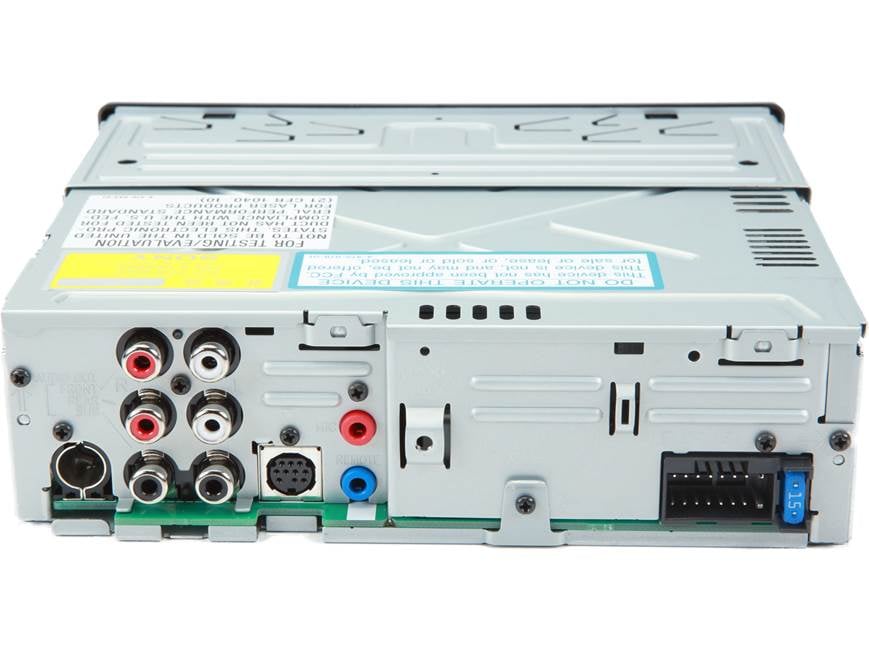
If the Sony MEX-XB120BT will not turn on, power should be your first stop. This is the most common failure point I have seen when helping with aftermarket car stereo installs.
49% off Today's Exclusive Deals
Limited-time Exclusive Deals. Check current discount on Amazon.
Check Price on Amazon As an Amazon Associate I earn from qualifying purchases.Check these items first:
- Make sure the yellow constant power wire has power
- Make sure the red accessory wire gets power when the key is on
- Check the ground wire for a clean, tight connection
- Inspect the fuse on the stereo and the vehicle fuse box
- Look for loose harness connections behind the dash
A weak ground can cause strange behavior. I once saw a unit that powered on only when the climate controls were off, and the problem ended up being a poor ground on painted metal. Once we cleaned the contact point and tightened it, the stereo worked normally.
If the unit powers on and off randomly, the issue may be voltage drop. That can happen if the wiring is thin, damaged, or poorly crimped. Use a multimeter if you have one, because voltage checks are much more reliable than guessing.
Fixing Bluetooth Pairing and Connection Issues
Bluetooth problems are very common in Sony MEX-XB120BT troubleshooting. The stereo may not appear on your phone, may connect and disconnect, or may connect with no audio.
Try this process:
- Turn Bluetooth off on your phone, then turn it back on
- Delete the Sony MEX-XB120BT from your phone’s saved devices
- Clear the stereo’s Bluetooth memory if needed
- Put the unit in pairing mode again
- Pair it fresh, as if it were the first time
If the phone still refuses to connect, check whether another phone is already paired. Some devices reconnect so fast that they block a new connection. I have seen this happen in family cars where one driver’s phone keeps winning the Bluetooth race without anyone noticing.
Also, keep the phone close during pairing. Bluetooth can act like a shy person at a crowded party. If the signal is weak, pairing may fail or the connection may drop during the first few seconds.
Solving No Sound or Low Sound Problems
A Sony MEX-XB120BT that turns on but produces no sound usually has a speaker, wiring, or output setting issue. Do not assume the head unit is dead just because the display works.
Check the following:
- Make sure the volume is not muted
- Confirm the fader and balance settings are centered
- Check if the amplifier, if installed, is turning on
- Inspect speaker wires for shorts or breaks
- Verify that the speakers are connected to the correct outputs
If you hear sound from only one side, the problem may be a bad speaker wire or a damaged speaker. One mistake I see often is speaker wires touching metal behind the dash or inside the door panel. That can trip protection mode or mute the output.
If the sound is very low, check the source first. A phone with low media volume can make the stereo seem weak. Also, some apps and streaming services have separate volume controls, which can cause confusion.
Dealing With Stereo Resetting or Losing Memory
When the Sony MEX-XB120BT keeps resetting, the most likely cause is loss of constant power. That yellow wire is what keeps memory settings alive when the car is off.
Check for these causes:
- Loose yellow wire connection
- Blown fuse on the constant power circuit
- Weak battery voltage
- Bad ground connection
- Wiring harness mismatch
If the clock resets every time you turn the car off, that is a classic sign the constant power wire is not getting steady voltage. In some installs, the red and yellow wires are swapped by mistake. That can make the stereo seem fine while driving but wipe settings when the key is removed.
A simple test with a multimeter can save a lot of time here. Check for 12 volts on the yellow wire even when the key is off. If it is missing, the issue is in the vehicle wiring, not the stereo itself.
Troubleshooting Radio Reception Problems
Weak radio reception is another common complaint during Sony MEX-XB120BT troubleshooting. If FM stations sound fuzzy or cut out, the antenna is often the real issue.
Look at these points:
- Make sure the antenna plug is fully seated
- Check whether the vehicle uses an antenna adapter
- Inspect the antenna cable for damage
- Confirm the antenna power lead, if your car needs one, is connected
- Try another station to rule out weak broadcast signal
Many modern vehicles need a powered antenna adapter or antenna amplifier lead. If that wire is not connected, FM reception can get much worse. I have seen people blame the head unit when the real problem was just an adapter left unplugged behind the dash.
Also, reception problems can be location-based. In tunnels, parking garages, or rural areas, even a working stereo may lose signal. That does not always mean something is broken.
Checking USB Playback and Device Recognition
If your USB device is not recognized, Sony MEX-XB120BT troubleshooting should start with the device itself. The stereo is often fine, but the file format or cable is the real problem.
Try the following:
- Use a different USB cable
- Test a different flash drive
- Make sure the drive is formatted correctly
- Remove very large or corrupted files
- Check whether the device needs more power than the stereo can provide
Some phones and drives are pickier than others. A cable that charges well may still fail for data. I have found that swapping the cable solves more USB issues than almost anything else.
If music files do not play, check the format. Simple formats like MP3 usually work best. If you loaded the drive with unusual file types, the stereo may skip them or not read the drive at all.
Checking for Protection Mode or Overheating
If the Sony MEX-XB120BT shuts down after a short time, it may be entering protection mode. That usually means the unit sensed a short, overload, or wiring fault.
Common causes include:
- Shorted speaker wires
- Speaker impedance that is too low
- Poor ventilation
- Internal wiring damage
- Faulty amplifier connections
This is one of those problems where patience matters. Don’t keep cycling the power again and again. That is like slamming a door that is already stuck. Instead, disconnect the speaker wires and test the head unit by itself if needed.
If the stereo works with speakers disconnected, then the problem is in the speaker circuit, not the unit. Reconnect speakers one by one until the fault returns. That method saves a lot of time and reduces guesswork.
Factory Reset and Settings Checks
Sometimes Sony MEX-XB120BT troubleshooting is not about hardware at all. A settings issue can make the unit seem broken when it is not.
Look at these settings:
- Loudness
- Fader and balance
- Source selection
- Bluetooth audio volume
- AUX input mode
- Dimmer or display settings
If nothing seems wrong but the unit still acts strange, a factory reset may help. A reset can clear pairing problems, glitchy behavior, and strange display issues. Just remember that it will also erase saved settings, so use it only after basic checks.
In my experience, resets are useful, but they should not be the first move. Fix the obvious stuff first. Otherwise, you may erase useful settings and still have the same problem.
When to Suspect a Hardware Failure
Not every Sony MEX-XB120BT troubleshooting case has a simple fix. Sometimes the head unit itself has failed. That is more likely if the unit has no power, no display, burned smell, or repeated failure after all wiring checks pass.
Signs of possible hardware failure:
- The unit has correct power and ground but stays dead
- The display flickers even with stable voltage
- Buttons do not respond after a reset
- The unit overheats with normal wiring
- Internal fuse replacement does not solve the issue
At that point, repair or replacement may be the better choice. Still, I always recommend proving the wiring is correct before deciding the unit is bad. A lot of “dead” stereos turn out to be wiring mistakes hiding behind the dash.
Practical Troubleshooting Checklist
If you want a fast way to work through Sony MEX-XB120BT troubleshooting, use this checklist.
- Check the fuse on the stereo
- Confirm yellow constant power
- Confirm red accessory power
- Verify ground connection
- Test speaker wiring for shorts
- Re-pair Bluetooth from scratch
- Try a different phone
- Test with another USB cable or drive
- Inspect antenna and adapter connections
- Reset the unit only after basic checks
This kind of step-by-step approach keeps you from chasing the wrong problem. It also makes it easier to explain the issue if you need help from a car audio shop or installer.
Preventing Future Sony MEX-XB120BT Problems
The best Sony MEX-XB120BT troubleshooting is the kind you never have to do again. Good installation and regular checks go a long way.
Here are a few habits that help:
- Use quality crimp connectors or soldered joints
- Keep wiring neat and secure behind the dash
- Make sure grounds are on clean bare metal
- Do not overload speaker outputs
- Use the right antenna adapter for your vehicle
- Update or reset your phone Bluetooth if pairing gets flaky
A clean install is like a good foundation under a house. You may not see it, but everything above it depends on it. A few extra minutes during install can prevent hours of frustration later.
Frequently Asked Questions of Sony MEX-XB120BT Troubleshooting
Why won’t my Sony MEX-XB120BT turn on?
The most common reason is a power wiring issue, especially with the red accessory wire, yellow constant power wire, or ground. Check the fuse first, then test for 12 volts with a multimeter.
Why does my Sony MEX-XB120BT connect to Bluetooth but play no sound?
This usually happens when the phone volume is low, the stereo source is set wrong, or the audio output is routed to another device. Remove the pairing, reconnect, and make sure Bluetooth audio is selected as the source.
Why does my Sony MEX-XB120BT keep resetting?
A missing or weak constant power connection is the usual cause. The yellow wire may be loose, swapped, or not getting steady voltage when the ignition is off.
Why is there no sound from my speakers?
No sound can come from muted settings, bad speaker wiring, a short circuit, or a failed amplifier connection. Start by checking balance, fader, and wiring before assuming the head unit is damaged.
Can I fix Sony MEX-XB120BT problems myself?
Yes, many issues are basic and can be fixed at home with simple tools. If the problem involves internal damage, repeated shutdowns, or wiring you do not feel comfortable testing, it is safer to get professional help.
Conclusion
Sony MEX-XB120BT troubleshooting is usually a process of checking the simple things first and moving step by step. Power, ground, Bluetooth pairing, speaker wiring, antenna connections, and settings cause most of the problems people run into. When you take your time and test carefully, the fix is often much easier than it first appears.
If your stereo is giving you trouble, start with the checklist in this guide and work through it calmly. That small bit of patience can save money, time, and a whole lot of frustration. If you found this helpful, keep learning, share it with someone who needs it, or leave a comment with the issue you are facing.





