Most JVC KW-M580BT issues come from wiring, Bluetooth pairing, settings, or firmware glitches.
If you are dealing with JVC KW-M580BT troubleshooting, you are probably trying to fix a screen issue, sound problem, Bluetooth hiccup, or a unit that just will not behave. I have worked through enough head-unit installs and resets to know that this model is usually fixable with a calm, step-by-step approach. In this guide, I will walk you through the most common problems, what they really mean, and the practical fixes that save time, money, and a lot of frustration.

49% off Today's Exclusive Deals
Limited-time Exclusive Deals. Check current discount on Amazon.
Check Price on Amazon As an Amazon Associate I earn from qualifying purchases.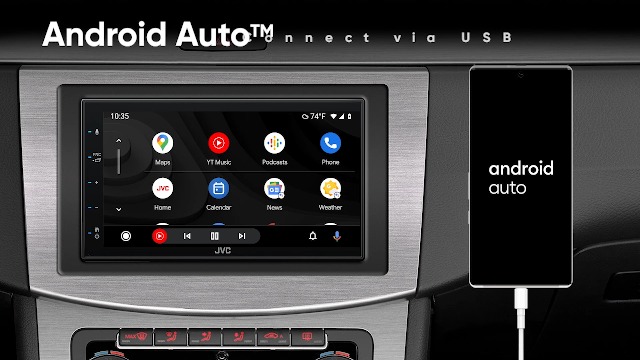
Common JVC KW-M580BT Problems and What They Usually Mean
The JVC KW-M580BT is a solid double-DIN multimedia receiver, but like any car stereo, it can act up for a few clear reasons. Most problems trace back to power, grounding, speaker wiring, phone pairing, or settings that changed after install or a battery disconnect.
Here are the issues I see most often:
49% off Today's Exclusive Deals
Limited-time Exclusive Deals. Check current discount on Amazon.
Check Price on Amazon As an Amazon Associate I earn from qualifying purchases.- The unit will not turn on
- The screen is black or frozen
- Bluetooth will not pair or keeps disconnecting
- No sound comes from the speakers
- Apple CarPlay or Android Auto does not start
- The radio works, but media sources fail
- Touch controls feel slow or unresponsive
A lot of users jump straight to replacing the unit, but that is usually the wrong move. In my experience, the first fix is often the simple one people skipped.
Power and Startup Troubleshooting
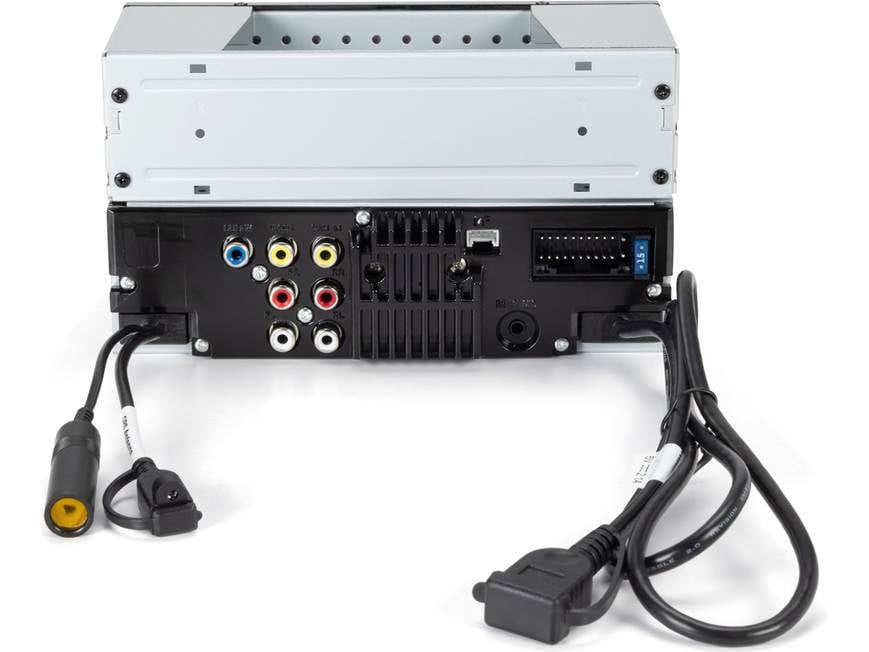
When the JVC KW-M580BT will not power on, start with the basics. A head unit needs steady constant power, switched power, and a good ground. If one of those is weak or missing, the unit may stay dead, reboot, or act random.
Check these items first:
- Make sure the yellow constant power wire has voltage
- Make sure the red accessory wire gets power when the key is on
- Confirm the black ground wire is attached to clean bare metal
- Inspect the fuse on the radio harness and the vehicle fuse panel
- Look for loose crimp connectors or a weak adapter harness connection
A mistake I have seen more than once is a ground wire bolted to painted metal. That can create just enough resistance to cause weird startup problems. If the unit powers on only sometimes, the ground is one of the first things I would inspect.
49% off Today's Exclusive Deals
Limited-time Exclusive Deals. Check current discount on Amazon.
Check Price on Amazon As an Amazon Associate I earn from qualifying purchases.If the unit still does not start, disconnect the battery for a few minutes, then reconnect it and try again. This can clear a temporary lockup, especially after a voltage dip or install mistake.
Screen Problems, Freezing, and Touch Issues
If the display is black, dim, frozen, or slow to respond, the problem may be software, power, or display settings. The KW-M580BT screen is usually reliable, so any odd behavior is worth checking carefully.
Try these steps:
- Increase brightness in the display settings
- Check whether the unit is stuck in a boot loop
- Perform a soft reset if the screen freezes
- Remove any dirty screen protectors or residue
- Confirm that the parking brake wire is connected properly if video-related features are blocked
Sometimes the issue is not the screen itself. A low-voltage condition can make the display look broken when the real cause is unstable power. I have seen a unit seem dead during cranking, then come back as soon as the battery and charging system were checked.
If touch input is off or laggy, restart the unit and check for firmware updates. If the screen remains unresponsive, a full reset may help, but only after you save any important settings you want to keep.
Bluetooth Pairing and Connection Problems
Bluetooth issues are among the most common JVC KW-M580BT troubleshooting complaints. One phone pairs fine, then another will not. Or the unit connects, but audio cuts out or disconnects after a few minutes.
Use this checklist:
- Delete the JVC unit from your phone’s Bluetooth list
- Remove old phone pairings from the head unit
- Turn Bluetooth off and back on for both devices
- Restart the phone and the receiver
- Keep the phone close during pairing
- Avoid pairing too many devices at once
If the JVC KW-M580BT keeps disconnecting, interference may be part of the problem. I have seen this happen when the phone is in a pocket near other electronics or when multiple Bluetooth devices are active in the car.
Also, make sure your phone’s software is current. Bluetooth compatibility is better when both the phone and the receiver are updated. If pairing still fails, delete all saved pairings and start from scratch. That clean reset solves more cases than people expect.
No Sound or Weak Sound Output
No sound is one of the most stressful problems because it makes the unit seem broken even when it is working. Before you blame the JVC KW-M580BT itself, check the amplifier, wiring, and audio settings.
Look at these possible causes:
- Speaker wires are crossed or shorted
- The amplifier remote wire is not sending power
- Fader, balance, or mute settings are wrong
- The source volume is too low
- The system is in line output mode instead of speaker output mode
- A factory amp interface was not wired correctly
If the sound is low on one side, test balance and fader first. If there is no sound at all, check whether the unit is muted or the volume is tied to a source with very low output. It sounds basic, but I have fixed “dead” systems with nothing more than a bad mute setting.
For amplified systems, make sure the remote turn-on lead is active. If the amplifier never wakes up, the JVC unit can work perfectly while the speakers stay silent.
Apple CarPlay and Android Auto Troubleshooting
If CarPlay or Android Auto is not launching, the problem is often the cable, the phone, or a permission setting. These features need a strong data connection, not just any charging cable.
Try this:
- Use a high-quality USB cable that supports data transfer
- Plug into the correct USB port on the receiver
- Unlock the phone before connecting it
- Check phone permissions for CarPlay or Android Auto
- Restart both the phone and the JVC unit
- Remove and re-add the device if needed
A cheap charging cable can be the hidden culprit. I have watched people swap phones, reset the radio, and change settings when the real issue was a cable that only charged and did not pass data.
If the system recognizes the phone but the app will not load, check for software updates on both ends. Small software mismatches can break the handshake between the phone and receiver.
Radio Reception and Source Switching Issues
If AM/FM reception is weak or the unit will not switch sources correctly, the antenna and source settings deserve attention. Poor reception is often a sign of an antenna adapter issue or a loose connection behind the dash.
Check the following:
- Confirm the antenna plug is fully seated
- Make sure the antenna adapter matches the vehicle
- Verify the source is not locked or disabled in settings
- Test whether the issue happens on all sources or only one
- Check for damaged coax or pinched antenna cable
Sometimes the source button appears to fail when the unit is really waiting for a valid signal or input. In one install I helped with, the owner thought the radio was broken, but the antenna adapter was the wrong type for the vehicle. Once replaced, reception came back right away.
Resetting the JVC KW-M580BT the Right Way
A reset can fix many small software problems, but it should be done carefully. Think of it like restarting a stuck laptop. It does not repair bad wiring, but it can clear temporary glitches.
Common reset options include:
- Soft reset: Used when the screen freezes or the UI stops responding
- Full factory reset: Used when settings, pairing, or source behavior seem corrupted
Before resetting, note any custom settings you care about. That includes audio tuning, phone pairings, and display preferences. A factory reset can erase those, so use it when needed, not just as a first guess.
If the unit is stuck after a battery disconnect, a full reset often restores normal behavior. If the issue returns after reset, that usually points back to wiring, firmware, or a hardware fault.

Firmware, Compatibility, and Update Checks
Firmware updates can improve stability, fix bugs, and help with device compatibility. For JVC KW-M580BT troubleshooting, updates are worth checking if you have recurring Bluetooth, CarPlay, or touch issues.
A good update habit includes:
- Checking for the latest firmware release
- Following the update instructions exactly
- Using a stable USB drive if required
- Not interrupting power during the update
- Testing the unit after the update is finished
I always tell people not to guess during updates. A failed update can create a bigger issue than the one you started with. If you are not comfortable doing it, get help from a shop that has done JVC updates before.
Compatibility matters too. An older phone, an outdated OS, or an unsupported cable can create symptoms that look like a receiver fault. Sometimes the head unit is fine, and the ecosystem around it needs attention.
Installation Mistakes That Cause Repeat Problems
A lot of JVC KW-M580BT problems start at installation, even when the unit itself is good. That is why troubleshooting should include a careful look at the install work.
Watch for these common mistakes:
- Loose power or ground connections
- Incorrect wire pairing
- Poorly insulated splices
- No parking brake connection for certain functions
- Wrong antenna adapter
- Missing amplifier turn-on lead
- Pinched wires behind the dash
One lesson I learned early was this: a clean install saves endless future troubleshooting. A wire that barely holds today can become a mystery problem next month when temperature changes or road vibration hit it.
If the unit fails only when driving over bumps, think mechanical first. Loose harnesses and poor crimps love to act up when the car moves.
When the Problem May Be Hardware Failure
Not every issue is fixable with resets or wiring checks. Sometimes the JVC KW-M580BT has a real hardware fault, such as a failing display, damaged internal board, or bad USB port.
Hardware failure is more likely when:
- The same problem continues after a reset
- Power and ground test fine
- Multiple phones and cables fail the same way
- The screen shows permanent damage
- The USB port feels loose or nonfunctional
- The unit randomly reboots even with stable voltage
At that point, repair or replacement may be the best route. If the unit is still under warranty, document what you tested first. That makes support conversations much easier and helps avoid back-and-forth.
Best Troubleshooting Order for Faster Results
If you want a simple path, use this order. It saves time and keeps you from chasing the wrong problem first.
- Check power, fuse, and ground
- Test the screen and reset the unit
- Re-pair Bluetooth devices
- Inspect speaker and amplifier wiring
- Test CarPlay or Android Auto with a known good cable
- Verify antenna and source settings
- Check for firmware updates
- Consider hardware failure only after the steps above
This order works because it follows the most common failure points first. In real life, that usually gets you to the answer faster than random guessing.
Frequently Asked Questions of JVC KW-M580BT Troubleshooting
Why does my JVC KW-M580BT keep rebooting?
Frequent rebooting usually points to unstable power, a weak ground, or a wiring short. It can also happen if the vehicle voltage drops during startup or if the unit has a software issue.
Why is my JVC KW-M580BT connected to Bluetooth but has no sound?
This is often caused by the phone sending audio to the wrong output, the source being muted, or a bad audio setting in the head unit. Re-pairing the device and checking volume on both the phone and receiver usually helps.
How do I reset my JVC KW-M580BT?
You can usually start with a soft reset if the unit is frozen. If the problem is deeper, perform a factory reset through the settings menu or the reset method listed in the manual, then set up the unit again.
Why does Apple CarPlay not work on my JVC KW-M580BT?
The most common reasons are a bad USB cable, the wrong USB port, or missing phone permissions. Make sure the cable supports data, not just charging, and restart both the phone and the receiver.
What should I do if my JVC KW-M580BT screen is black?
First check brightness settings, power wiring, and fuse connections. If the unit has power but the screen stays black, a reset or firmware check may help, but a hardware issue is also possible.
Conclusion
JVC KW-M580BT troubleshooting becomes much easier when you work from the basics and move step by step. Most issues come down to wiring, Bluetooth pairing, source settings, cables, or a simple reset, not a major failure. The more carefully you check power, ground, and connections, the faster you get your system back to normal.
If you are still stuck, review your install, test with known good cables and devices, and do not rush to replace the unit before ruling out the simple fixes. Take the process one step at a time, and you will usually find the problem. If this guide helped, keep it handy, share it with a friend, or leave a comment with the issue you are trying to solve.





