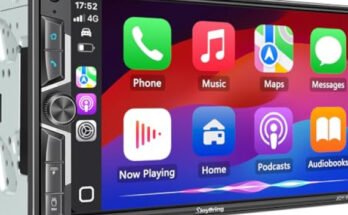
Are you looking to boost your car’s sound system but don’t have RCA cables handy? Adding an amplifier without RCA might seem tricky, but it’s easier than you think.
You don’t need fancy equipment or complicated setups to get louder, clearer sound. In this guide, you’ll discover simple, effective ways to connect your amplifier and upgrade your audio experience. Keep reading, and you’ll be enjoying powerful sound in no time!

49% off Today's Exclusive Deals
Limited-time Exclusive Deals. Check current discount on Amazon.
Check Price on Amazon As an Amazon Associate I earn from qualifying purchases.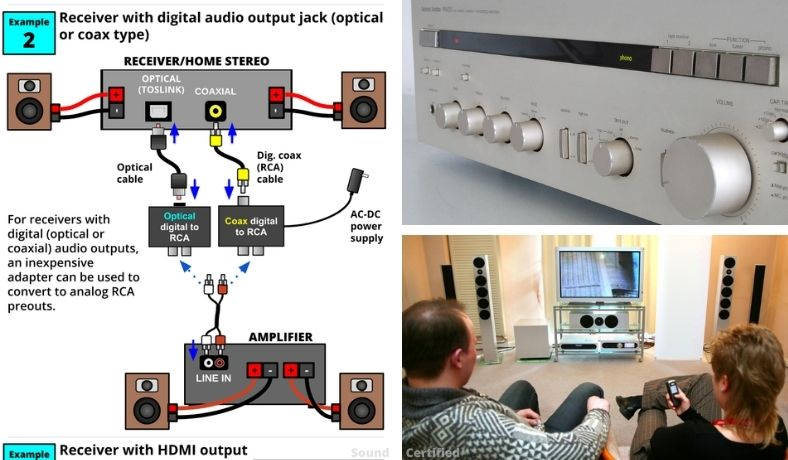
Choosing The Right Amplifier
Choosing the right amplifier is key to getting clear, powerful sound. Not all amplifiers work the same way, especially without RCA connections. Picking an amplifier that fits your setup ensures better sound quality and easier installation. This guide will help you understand the types of amplifiers and their compatibility with your system.
Types Of Amplifiers
There are several types of amplifiers to consider. Mono amplifiers power one channel and are good for subwoofers. Stereo amplifiers have two channels for left and right speakers. Multi-channel amplifiers can power many speakers at once. Each type offers different power levels and sound clarity. Choose based on your speaker setup and audio needs.
Amplifier Compatibility
Check if the amplifier works with your speakers and source device. Some amps need RCA cables, but others use speaker-level inputs. Make sure the amplifier can connect without RCA. Also, match the amplifier’s power output with your speakers’ capacity. This prevents damage and ensures good sound. Compatibility keeps your system safe and sounds great.
49% off Today's Exclusive Deals
Limited-time Exclusive Deals. Check current discount on Amazon.
Check Price on Amazon As an Amazon Associate I earn from qualifying purchases.
Alternative Connection Methods
Adding an amplifier without RCA cables is possible using other connection methods. These alternatives help connect your amplifier to your audio system easily. They work well if your device lacks RCA outputs or if you want a simpler setup.
Using Speaker-level Inputs
Speaker-level inputs allow you to connect the amplifier directly to your car speakers. This method uses the same wires that power your speakers. It sends the audio signal from the head unit to the amplifier without RCA cables. This option suits most factory audio systems. It keeps the sound clear and strong.
Employing Line Output Converters
Line output converters change speaker-level signals to RCA-level signals. They let you connect the amplifier through RCA inputs without RCA outputs on your head unit. These devices are small and easy to install. They help reduce noise and distortion in the audio signal. This method works well for factory radios.
Connecting Via Headphone Jacks
You can use a headphone jack to connect an amplifier in some cases. This method uses a 3.5mm audio cable to feed the signal to the amp. It is common with portable devices like phones or MP3 players. The sound quality might be lower than RCA connections. Still, it is a simple and quick way to add an amplifier.
49% off Today's Exclusive Deals
Limited-time Exclusive Deals. Check current discount on Amazon.
Check Price on Amazon As an Amazon Associate I earn from qualifying purchases.Step-by-step Installation Guide
Adding an amplifier without RCA cables may seem tricky. This guide breaks down the process into clear steps. Follow each step carefully to get the best sound from your amplifier.
Gathering Necessary Tools
Start by collecting all tools needed for installation. You will need wire strippers, electrical tape, a screwdriver, and a multimeter. Also, prepare speaker wire and a power wire with a fuse holder. Having all tools ready saves time and avoids interruptions.
Wiring The Amplifier
Locate the speaker wires from your car stereo. Strip the ends carefully to expose the metal. Connect the amplifier’s input wires directly to these speaker wires. Match the positive and negative wires correctly to avoid damage. Use the power wire to connect the amplifier to the car battery. Don’t forget to include the fuse close to the battery for safety.
Securing Connections
Check all wire connections to ensure they are tight and secure. Use electrical tape to cover any exposed wire. This prevents shorts and protects the wires from damage. Secure the amplifier in a dry, stable spot inside your vehicle. Avoid places with high heat or moisture.
Testing The Setup
Turn on your car stereo and amplifier. Listen for clear sound without distortion or noise. Use the multimeter to check voltage at the amplifier terminals. Ensure the amplifier gets enough power and ground connection is solid. Adjust volume and settings gradually to avoid speaker damage.
Optimizing Sound Quality
Optimizing sound quality is key when adding an amplifier without RCA cables. Clear, strong sound makes your music more enjoyable. Small changes can improve the audio significantly.
Focus on settings and connections. These affect the final sound output. Pay attention to gain and filters first. Then, reduce noise and interference for clean sound.
Adjusting Gain And Filters
Gain controls the amplifier’s input strength. Set it too high, and sound distorts. Set it too low, and sound is weak. Find a balance that keeps sound clean and loud.
Filters help remove unwanted frequencies. Use them to cut out harsh or muddy sounds. This clears the audio and enhances clarity.
Avoiding Noise And Interference
Noise can spoil the listening experience. Keep cables away from power lines and devices that cause interference. Use shielded cables to protect the signal.
Check ground connections to prevent hum and buzz. Secure all wiring tightly. Clean connections reduce noise and improve sound quality.
Troubleshooting Common Issues
Troubleshooting is key when adding an amplifier without RCA cables. It helps fix problems fast and keeps your sound clear. This section covers common issues you may face and simple ways to solve them.
No Sound Or Distortion
Check all connections first. Loose wires cause no sound or bad noise. Make sure the speaker wires are tight and correct. Verify the amplifier power is on. Distortion can happen if the volume is too high. Lower the volume and test again. Also, inspect the ground wire. A poor ground leads to noise and distortion.
Overheating Amplifier
Amplifiers get hot during use. But too much heat harms the device. Ensure your amp has enough space around it. Good airflow stops overheating. Avoid placing the amp near heat sources. Check the wiring for shorts or wrong gauge. Both increase heat. If it still overheats, reduce the volume or play time.
Connection Problems
Without RCA, connections can be tricky. Double-check all wire colors and terminals. Match positive to positive and negative to negative. Use quality wire for better contact. Clean any dirty or rusty connectors. Loose wires cause cutting sound or no sound. Test the cables with a multimeter if needed. Proper wiring ensures steady signal flow.

Frequently Asked Questions
How To Connect An Amplifier Without Rca Cables?
You can connect an amplifier without RCA by using speaker-level inputs. These inputs accept speaker wire signals directly from your head unit. This method bypasses the need for RCA cables and works well for factory-installed stereos without preamp outputs.
Can I Use Speaker Wires To Add An Amplifier?
Yes, speaker wires can be used to add an amplifier via speaker-level inputs. This method sends amplified signals to your amplifier without RCA connections. Ensure your amplifier supports high-level inputs for proper sound quality and system compatibility.
Will Adding An Amplifier Without Rca Affect Sound Quality?
Adding an amplifier without RCA may slightly affect sound quality. Speaker-level inputs can introduce minor noise compared to RCA cables. However, a quality amplifier and proper installation can minimize these issues and provide satisfactory audio performance.
Is It Safe To Connect An Amp Without Rca Cables?
Yes, it is safe to connect an amplifier without RCA cables if done correctly. Use speaker-level inputs designed for this purpose. Avoid improper wiring to prevent damage to the amplifier or your vehicle’s audio system.
Conclusion
Adding an amplifier without RCA cables is simple and doable. Use speaker-level inputs or adapters to connect your devices. Double-check all connections before powering on. This method saves money and works well for many setups. Enjoy better sound without extra complicated parts.
Try these steps and hear the difference today.