Pioneer MVH-S322BT troubleshooting usually comes down to power, wiring, Bluetooth pairing, or speaker settings.
If your Pioneer MVH-S322BT is acting up, you are not alone. I have seen this model behave like a calm little workhorse one minute and act strangely the next, usually because of a simple setting, a loose wire, or a Bluetooth hiccup. The good news is that Pioneer MVH-S322BT troubleshooting is usually very manageable once you know where to look, and this guide will walk you through the fixes in a clear, practical way.

49% off Today's Exclusive Deals
Limited-time Exclusive Deals. Check current discount on Amazon.
Check Price on Amazon As an Amazon Associate I earn from qualifying purchases.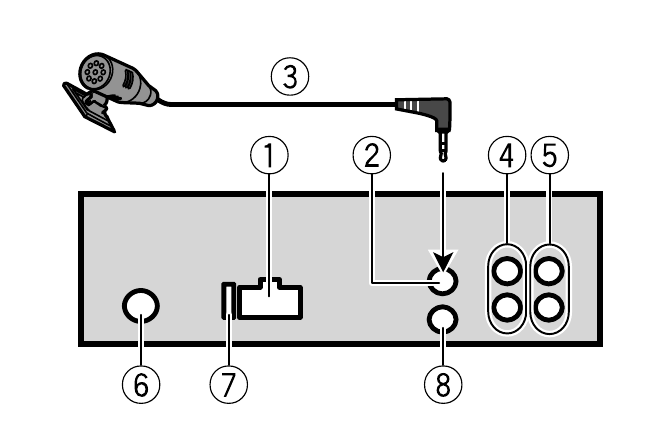
Common Pioneer MVH-S322BT Problems and What They Usually Mean
When a Pioneer MVH-S322BT stops working the way it should, the cause is often one of a few familiar issues. In my experience, most problems are not major failures. They are usually tied to power, audio output, Bluetooth pairing, or a setting that changed without anyone noticing.
Here are the most common symptoms:
- The unit does not turn on
- There is no sound from the speakers
- Bluetooth will not connect
- The display is on, but audio is missing
- The radio works, but phone audio does not
- The unit keeps resetting
- Sound cuts in and out
Pioneer MVH–S322BT troubleshooting works best when you move from the easiest checks to the more detailed ones. That saves time and helps you avoid replacing parts you do not need.
49% off Today's Exclusive Deals
Limited-time Exclusive Deals. Check current discount on Amazon.
Check Price on Amazon As an Amazon Associate I earn from qualifying purchases.
Source: reddit.com
Start with Power and Wiring Checks
Power problems are the first thing I check because they cause so many false alarms. A stereo can look dead even when the issue is just one loose connection or a blown fuse.
Check the fuse
The head unit fuse and vehicle fuse both matter. If either one is blown, the Pioneer MVH-S322BT may not turn on at all.
Look for:
49% off Today's Exclusive Deals
Limited-time Exclusive Deals. Check current discount on Amazon.
Check Price on Amazon As an Amazon Associate I earn from qualifying purchases.- A blown fuse on the back of the stereo
- A damaged fuse in the car’s fuse box
- Corrosion or heat damage around the fuse holder
If you replace a fuse and it blows again right away, stop and inspect the wiring. That usually points to a short circuit.
Inspect the ground wire
A weak ground can create random problems like shutdowns, noise, or poor Bluetooth behavior. I once saw a system that kept rebooting every time the bass hit hard, and the ground was the whole problem.
Make sure the ground wire:
- Is attached to bare metal
- Has a short path to chassis ground
- Is not loose or rusted
Verify constant and accessory power
The Pioneer MVH-S322BT needs both constant power and switched accessory power. If these are reversed or disconnected, the unit may lose memory or fail to turn on properly.
Check that:
- Yellow wire goes to constant 12V
- Red wire goes to accessory power
- Black wire goes to ground
If the wiring was done by someone else, this is worth rechecking carefully. Many Pioneer MVH-S322BT troubleshooting cases start right here.
Fix No Sound Problems
A powered-on stereo with no sound is frustrating, but the fix is often simple. The key is to find out whether the problem is in the head unit, the speakers, or the wiring between them.
Check mute and volume settings
It sounds obvious, but I have seen people chase bigger problems when the unit was muted or the phone volume was low. Always check the basics first.
Try this:
- Raise the volume on the head unit
- Raise the volume on the phone
- Make sure mute is off
- Turn off any audio pause setting
Confirm speaker balance and fader settings
If sound is only coming from one side or none at all, balance and fader settings may be the reason. These settings can shift during use and make it seem like a speaker has failed.
Check:
- Balance is centered
- Fader is centered
- No speaker channel is turned down
Inspect speaker wiring
If a wire is pinched, broken, or touching metal, the unit may shut off that channel. This is one of those quiet failures that can waste a lot of time if you do not test it methodically.
Look for:
- Loose speaker connections
- Damaged insulation
- Shorted wires
- Incorrect speaker polarity
If you are using aftermarket speakers, confirm the impedance matches the unit’s safe range. Mismatched loads can cause weak output or protection mode behavior.
Solve Bluetooth Pairing and Connection Issues
Bluetooth is one of the most common parts of Pioneer MVH-S322BT troubleshooting. It is also one of the most misunderstood. Bluetooth issues often look complicated, but they are usually caused by a stale pairing, interference, or phone settings.
Delete and re-pair the device
If the phone used to connect fine but no longer does, clear the old pairing from both sides.
Try this:
- Remove the Pioneer unit from your phone’s Bluetooth list
- Clear the phone from the Pioneer memory if needed
- Restart both devices
- Pair them again from scratch
This simple reset fixes a lot of connection problems.
Check Bluetooth visibility and permissions
Some phones block access unless permissions are granted. That can stop music or hands-free calling from working properly.
Make sure:
- Bluetooth is turned on
- Location permission is allowed if required by the phone
- Contacts and microphone access are enabled for calling
- The phone is not connected to too many other devices
Watch for interference
Bluetooth can get flaky in crowded signal areas. Wi-Fi, other devices, and even a weak battery on the phone can make the link unstable.
If pairing keeps failing:
- Move the phone closer to the unit
- Turn Bluetooth off on nearby devices
- Restart the phone
- Test with a different phone
When troubleshooting Pioneer MVH-S322BT Bluetooth issues, I always test a second phone if possible. That helps separate a stereo problem from a phone problem very quickly.
Fix Audio Cutting In and Out
Intermittent audio is one of the most annoying issues because it feels random. In reality, it usually has a pattern. A loose wire, weak ground, unstable Bluetooth connection, or failing speaker can cause audio dropouts.
Test the source
First, find out whether the problem happens with every source or only one.
Check:
- Bluetooth audio
- Radio
- USB playback
- AUX input if used
If only Bluetooth cuts out, the issue is likely wireless. If all sources fail, the problem is more likely power, wiring, or speaker-related.
Inspect the antenna and signal
For radio problems, a loose or damaged antenna can create static or dropouts. Make sure the antenna plug is seated fully.
Also check:
- Antenna adapter
- Signal strength in your area
- FM preset quality
Look at heat and vibration
Car audio systems live in a rough environment. Heat and road vibration can loosen connections over time. I have seen units behave perfectly in the shop and fail only after a few bumps on the road.
If audio cuts out when driving over rough pavement, inspect:
- Behind the dash connections
- Speaker terminals
- Ground point
- Wire crimps
Fix Reset and Memory Problems
If the Pioneer MVH-S322BT keeps losing settings, date, or radio presets, the most likely cause is a power issue. This usually means the yellow constant power wire is not getting steady voltage.
Check the memory wire
The yellow wire should keep the unit’s memory alive even when the car is off. If it is connected wrong, disconnected, or tied into a switched source, the stereo may reset every time you turn off the ignition.
Symptoms include:
- Lost presets
- Reset clock
- Repeated initial setup
- Paired devices disappearing
Inspect battery voltage
A weak car battery can also cause the stereo to behave strangely. Low voltage may not fully shut the unit off, but it can make it lose memory or reboot.
If needed, test the battery and charging system with a multimeter. Stable voltage helps prevent false troubleshooting paths.
Use the Reset Button the Right Way
A reset can solve software glitches, but it should not be the first move for every issue. I treat reset like a clean restart, not a magic fix.
Use it when:
- Bluetooth is stuck
- The screen or controls are frozen
- Settings behave strangely
- Audio functions stop responding
Before resetting:
- Save pairing info if possible
- Note custom settings
- Make sure wiring is stable
After resetting, test the unit again in steps. If the same issue returns immediately, the root cause is probably physical, not software.
Check USB, AUX, and Source Selection
Sometimes Pioneer MVH-S322BT troubleshooting is as simple as the wrong source being selected. I have seen people think the stereo failed when it was just set to Bluetooth with no phone connected.
Confirm the active source
Make sure the unit is on the right input:
- Bluetooth Audio
- USB
- AUX
- Radio
Inspect cables and ports
A damaged USB cable or dirty port can stop playback or charging. AUX cables can also fail internally without showing visible damage.
Try:
- A different cable
- A different device
- A different USB port if available
- Cleaning the port gently
If the unit works with one cable but not another, the cable is likely the problem.
When to Suspect a Speaker or Amp Issue
If the head unit seems fine but audio is still weak or distorted, the speakers or amplifier may be the real issue. This is especially true in upgraded systems with added amps, crossovers, or subwoofers.
Signs the issue is beyond the head unit
- Sound is distorted at low volume
- One speaker sounds thin or scratchy
- Bass is missing from the whole system
- External amplifier does not turn on
What to check
- Speaker impedance
- RCA connections
- Amp remote turn-on wire
- Power and ground to the amplifier
- Speaker wire shorts
If the Pioneer MVH-S322BT is installed in a custom setup, the fault may be in the add-on gear, not the radio itself. That is why it helps to test each section one by one.
Practical Troubleshooting Steps I Recommend First
When I troubleshoot a Pioneer MVH-S322BT, I follow a simple order. It keeps things calm and prevents guesswork.
- Confirm power on the unit
- Check fuses
- Inspect ground and wiring
- Test sound with radio and Bluetooth
- Re-pair the phone
- Try a second phone or music source
- Reset the unit if needed
- Inspect speakers and amp connections
This step-by-step method works because it narrows the problem fast. It also keeps you from replacing good parts before you find the real fault.
Prevention Tips to Avoid Future Problems
The best Pioneer MVH-S322BT troubleshooting is the kind you never need. A little care during installation and use can save a lot of frustration later.
Here are a few habits that help:
- Use solid wire connections, not loose twists
- Secure wires behind the dash so they do not rub
- Keep the ground point clean and tight
- Update your phone if Bluetooth becomes unstable
- Avoid cranking the volume with weak speakers
- Replace damaged cables early
Good car audio setup is like good plumbing. If the flow is clean at the start, the whole system runs smoother.
Frequently Asked Questions of Pioneer MVH-S322BT Troubleshooting
Why won’t my Pioneer MVH-S322BT turn on?
The most common cause is a power or fuse issue. Check the yellow, red, and black wires first, then inspect the stereo fuse and vehicle fuse.
Why is there no sound even though the unit powers on?
This usually points to a mute setting, bad speaker wiring, or a balance and fader problem. If the issue affects every source, check the wiring and speakers next.
Why does Bluetooth keep disconnecting?
Bluetooth drops can happen because of stale pairing, phone permission issues, or interference. Delete the pairing on both devices and reconnect from scratch.
Why does my Pioneer MVH-S322BT keep resetting?
A weak or miswired constant power connection is the most common reason. The yellow memory wire should always have steady power, even when the car is off.
Can I fix Pioneer MVH-S322BT problems myself?
Yes, many common issues are simple and safe to check, like fuses, wiring, pairing, and settings. If you find a short circuit, burning smell, or repeated fuse failure, stop and get help from a professional.
Conclusion
Pioneer MVH-S322BT troubleshooting becomes much easier when you break it into small checks. Most problems come from power, wiring, Bluetooth pairing, source settings, or speaker connections, and many of them can be fixed without replacing the unit.
The biggest lesson I have learned is to stay methodical and patient. Start with the simplest causes, test one thing at a time, and trust the process. If you follow the steps in this guide, you will have a much better chance of getting your Pioneer MVH-S322BT working smoothly again, and you will know exactly what to check the next time something feels off.
If this guide helped, save it for later, share it with someone working on their car audio, or leave a comment with the issue you are seeing.





