Most Kenwood KDC-X704 problems come from wiring, power, Bluetooth, or simple reset issues.
The Kenwood KDC-X704 is a solid head unit, but like any car stereo, it can act up when power is weak, settings get corrupted, or the wiring is off. I’ve seen the same handful of issues show up again and again in real installs, and the good news is that most of them are fixable without replacing the unit. If you want clear, practical Kenwood KDC-X704 troubleshooting help, this guide walks you through the likely causes, smart checks, and proven fixes step by step.

49% off Today's Exclusive Deals
Limited-time Exclusive Deals. Check current discount on Amazon.
Check Price on Amazon As an Amazon Associate I earn from qualifying purchases.Common Kenwood KDC-X704 Problems
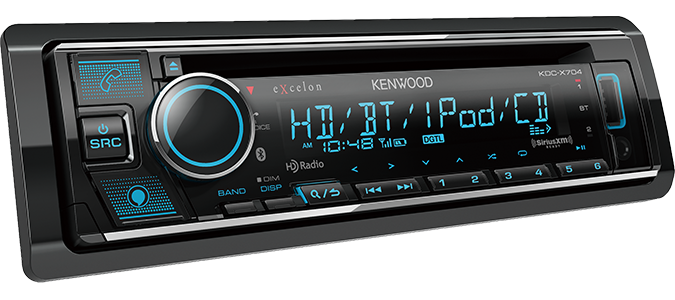
When people search for Kenwood KDC-X704 troubleshooting, they usually run into one of a few repeat issues. The unit may not turn on, the display may freeze, Bluetooth may not connect, or sound may cut in and out. These problems often look serious at first, but many are caused by basic power, ground, or setting issues.
From my experience, the fastest way to solve stereo problems is to start simple. Check power first, then wiring, then settings, and only after that look at deeper faults. That order saves time and keeps you from chasing the wrong problem.
49% off Today's Exclusive Deals
Limited-time Exclusive Deals. Check current discount on Amazon.
Check Price on Amazon As an Amazon Associate I earn from qualifying purchases.Kenwood KDC-X704 Troubleshooting: Start With Power and Wiring
A huge number of Kenwood KDC-X704 problems trace back to installation basics. If the stereo does not power on, resets itself, or acts random, the wiring should be your first stop.
Here’s what to check:
- Constant 12V power wire
Make sure the yellow wire has steady battery power. - Accessory power wire
The red wire should get power when the key is in ACC or ON. - Ground connection
The black wire must be tied to a clean, bare metal point. - Fuse condition
Check both the stereo fuse and the vehicle fuse. - Harness connections
Look for loose crimps, weak splices, or reversed wires.
A weak ground can cause weird behavior that feels like a software bug. I once saw a Kenwood unit reboot every time the bass hit hard, and the entire issue was a loose ground bolt under the dash. Tightening that single point fixed the whole system.
If you suspect wiring trouble, disconnect the battery before touching the harness. That small step protects both you and the head unit.
49% off Today's Exclusive Deals
Limited-time Exclusive Deals. Check current discount on Amazon.
Check Price on Amazon As an Amazon Associate I earn from qualifying purchases.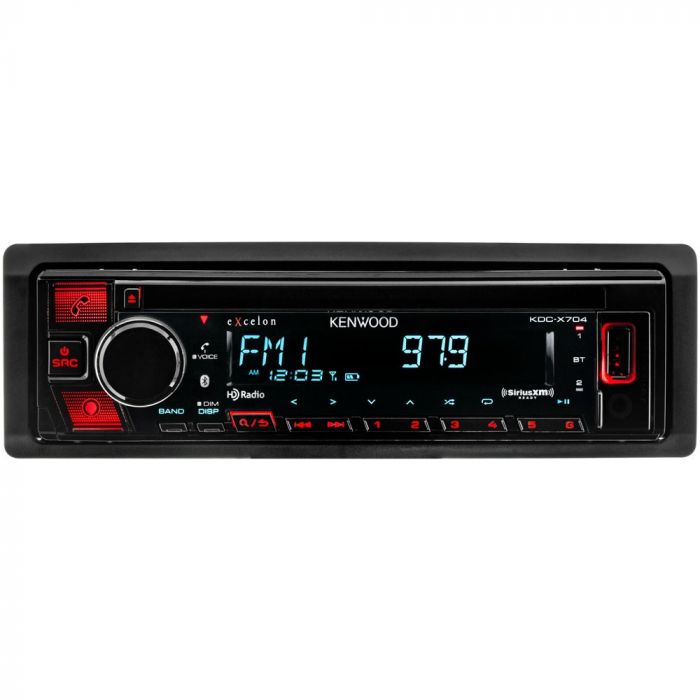
Kenwood KDC-X704 Not Turning On
If your Kenwood KDC-X704 will not power on, there are a few likely causes. This is one of the most common troubleshooting cases, and it usually comes down to missing power, a blown fuse, or a bad ground.
Try these steps in order:
- Confirm the vehicle is in ACC or ON.
- Check the stereo fuse on the wiring harness.
- Test the yellow constant power wire with a multimeter.
- Test the red accessory wire for switched power.
- Verify the black ground wire is secure and on bare metal.
- Inspect the wiring harness for damage or loose pins.
A multimeter is your best friend here. If the stereo has one power wire but not the other, it may stay dead or behave oddly. The Kenwood KDC-X704 needs both proper constant power and switched power to work the way it should.
If the fuse keeps blowing, stop there and inspect the wiring for a short. Replacing the fuse over and over will not fix the root cause.
Display Problems and Screen Issues
Sometimes the unit powers on, but the display is blank, dim, stuck, or unreadable. This can be caused by brightness settings, a loose connector, or a deeper internal fault.
Here are the most useful checks:
- Increase display brightness in the settings
- Check the illumination wire if your install uses one
- Remove and reseat the front panel if applicable
- Power-cycle the unit by turning the car off and back on
- Inspect the wiring harness for partial connection
If the screen is on but hard to read, it may simply be set too dim for daylight use. I’ve had people think the display was failing when the brightness was just turned way down after a battery disconnect.
If the screen remains blank after confirming power, the unit may need a reset or service. At that point, the issue may be internal rather than installation-related.
Kenwood KDC-X704 Bluetooth Troubleshooting
Bluetooth problems are another big part of Kenwood KDC-X704 troubleshooting. Pairing may fail, connections may drop, or audio may sound delayed or choppy.
Common causes include:
- Too many saved devices on the stereo
- Old pairing data on the phone
- Bluetooth interference from nearby electronics
- Outdated phone software
- Weak signal from poor antenna or wiring conditions
Use this process:
- Delete the Kenwood unit from your phone’s Bluetooth list.
- Clear the phone from the stereo’s paired device memory.
- Restart both the phone and the head unit.
- Pair again from scratch.
- Test with a second phone if possible.
One practical tip from the field: do not keep testing with the same corrupted pairing profile. Start fresh. Bluetooth pairing can get messy after multiple failed attempts, and a clean reset often solves the problem faster than anything else.
If audio skips during Bluetooth playback, try moving the phone closer and turning off other wireless devices. In some vehicles, nearby USB chargers or aftermarket electronics can add interference.
Sound Problems: No Audio, Low Audio, or Distorted Audio
If the Kenwood KDC-X704 turns on but you hear nothing, the issue may be in the speaker wiring, RCA outputs, amp settings, or source selection. Sound problems are especially common after a new install or after a battery reset.
Check these items:
- Make sure the correct source is selected
- Raise the volume and check mute
- Confirm the fade and balance settings
- Inspect speaker wires for shorts
- Test with another audio source
- Check amplifier remote turn-on wiring if using an external amp
If the sound is distorted, the gain may be too high somewhere in the system. That can happen in the head unit settings or on the amplifier. Clipping sounds harsh and can damage speakers over time, so it is worth fixing early.
For external amp setups, make sure the remote wire is getting signal. If the amp does not wake up, the head unit may appear to work while producing no sound.
Kenwood KDC-X704 Reset and Reboot Issues
A reset is one of the easiest Kenwood KDC-X704 troubleshooting tools. If the stereo freezes, acts slow, or forgets settings, a reset can clear temporary software issues.
Use a reset when:
- The unit is stuck on a screen
- Buttons stop responding
- Bluetooth fails after repeated pairing attempts
- Settings seem corrupted after a power loss
Before resetting, note any settings you want to save. A reset can clear custom audio settings, paired devices, and radio presets. That is normal, but it can feel annoying if you were not ready for it.
I usually treat a reset like rebooting a phone. It is not a magic fix for bad wiring, but it often clears temporary glitches that make the unit seem worse than it really is.
Speaker and Amplifier Troubleshooting
The Kenwood KDC-X704 can work fine on its own and still seem broken if the amplifier or speakers are the real problem. That is why system-level checking matters.
Look for these signs:
- One speaker is dead
- One side is louder than the other
- Bass cuts out at higher volume
- Amp turns on and off randomly
- Sound works only on certain sources
If one speaker is out, swap speaker leads side to side if you can. This helps tell you whether the problem is the speaker, the wire, or the head unit output. It is a simple test, but it saves a lot of guessing.
For amplifier systems, confirm:
- RCA cables are seated firmly
- Ground wire is short and solid
- Gain is not set too high
- Crossover settings match the speaker type
- Remote turn-on wire is connected
A clean install matters more than people think. Poor grounding and bad RCA routing can create hum, hiss, or signal dropouts that look like Kenwood faults but are actually system layout issues.
Kenwood KDC-X704 Settings That Can Cause Trouble
Sometimes the stereo is fine, but the settings are working against you. The Kenwood KDC-X704 has audio, display, and source settings that can make the unit seem broken when it is not.
Double-check these:
- Demo mode
Turn it off if the unit keeps cycling visuals. - Loudness and EQ
Excessive boosts can distort audio. - Source level adjustment
One source may be much quieter than another. - Auto connection settings
Bluetooth auto-connect may need cleanup. - Dimmer and illumination settings
Screen brightness may be too low for daytime use.
A lot of users mistake a setting issue for hardware failure. I have seen people ready to replace a whole head unit when the real issue was just an aggressive EQ curve or a dimmer setting that made the screen nearly invisible.
When in doubt, restore basic settings one change at a time. That helps you find the exact cause without making the problem harder to trace.
When the Problem Is the Vehicle, Not the Kenwood Unit
Not every issue is caused by the stereo itself. Sometimes the car’s electrical system is the weak link. Low battery voltage, bad ignition switch behavior, or vehicle-specific wiring quirks can confuse the Kenwood KDC-X704.
Watch for these warning signs:
- The stereo cuts out when starting the car
- Voltage drops when accessories are turned on
- Multiple electronics act strange at once
- The problem started after battery work
- The unit only fails in one vehicle
If the battery is weak, the head unit may reboot during cranking. That does not always mean the Kenwood is bad. A healthy battery and solid charging system are part of good audio performance.
If your vehicle has a factory amplifier, steering wheel control module, or data interface, those parts can also create trouble if they are wired incorrectly. In mixed factory and aftermarket systems, patience pays off.
Preventive Tips to Avoid Future Kenwood KDC-X704 Problems
The best Kenwood KDC-X704 troubleshooting is the kind you never need. A careful install and a few habits can prevent many common failures.
Here are my best prevention tips:
- Use proper crimp or solder connections
- Keep grounds short and clean
- Secure the harness so it does not pull loose
- Avoid stacking too many devices on one power source
- Update phone software when Bluetooth acts up
- Save your audio settings after setup
- Check fuses after battery work or accessory changes
Think of the install like building a chair. If one leg is weak, the chair may still stand for a while, but it will wobble the moment pressure hits it. The same idea applies to car audio wiring.
Frequently Asked Questions of Kenwood KDC-X704 Troubleshooting
Why does my Kenwood KDC-X704 keep resetting?
This usually happens because of unstable power, a bad ground, or a loose harness connection. A weak battery or voltage drop during cranking can also trigger resets.
Why is my Kenwood KDC-X704 not connecting to Bluetooth?
The most common cause is bad saved pairing data on the phone or stereo. Delete the old pairing on both devices, restart them, and pair again from scratch.
Why is there no sound from my Kenwood KDC-X704?
No sound can come from mute settings, bad speaker wiring, amplifier issues, or the wrong source being selected. Start with volume, balance, fade, and speaker wire checks before assuming the unit has failed.
How do I reset my Kenwood KDC-X704?
Use the reset procedure in the unit’s controls or manual, then set the device up again. A reset can clear frozen screens, Bluetooth problems, and odd software behavior.
Why does my Kenwood KDC-X704 turn on but the screen stays blank?
This can happen if brightness is turned too low, the display connection is loose, or the unit has an internal fault. Check the dimmer settings first, then verify power and connections.
Can a bad car battery affect my Kenwood KDC-X704?
Yes, a weak battery can cause rebooting, display glitches, and random shutdowns. If the unit acts up mostly during startup, low voltage is a likely cause.
Conclusion
Kenwood KDC-X704 troubleshooting becomes much easier when you follow a simple order: check power, ground, wiring, settings, and then the rest of the system. Most problems are not mysterious, and many can be fixed with a reset, a better connection, or a careful look at the vehicle’s electrical health.
If you take your time and test one thing at a time, you will usually find the real cause without wasting money on parts you do not need. Use the steps above, stay patient, and trust the process. If this guide helped you, keep exploring more car audio tips, share your own fix, or leave a comment with the issue you ran into.





