Most JVC KW-V660BT issues come from wiring, settings, Bluetooth pairing, or a weak power connection.
If your JVC KW-V660BT is acting up, you are not alone. I have seen this unit work beautifully in one car and act stubborn in another, usually because of a small setup issue that hides in plain sight. This guide on JVC KW-V660BT Troubleshooting walks you through the real fixes, the common mistakes, and the small checks that save a lot of time.

49% off Today's Exclusive Deals
Limited-time Exclusive Deals. Check current discount on Amazon.
Check Price on Amazon As an Amazon Associate I earn from qualifying purchases.
Common JVC KW-V660BT Problems and What They Usually Mean
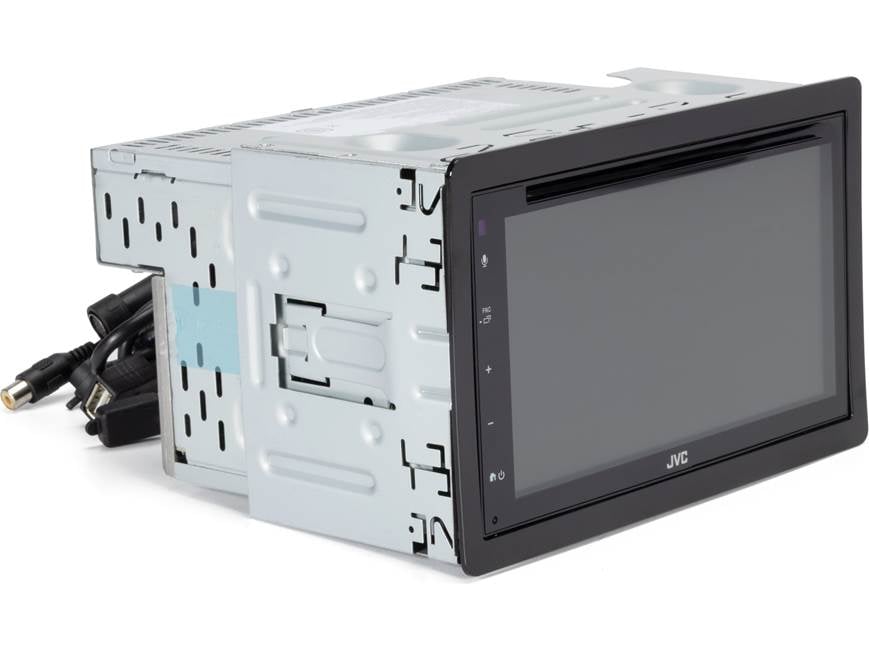
The JVC KW-V660BT is a feature-rich double-DIN receiver, so its problems often look more serious than they are. In many cases, the root cause is simple, like a loose ground wire, a bad Bluetooth pairing, or the wrong audio setting.
Here are the most common signs users report:
49% off Today's Exclusive Deals
Limited-time Exclusive Deals. Check current discount on Amazon.
Check Price on Amazon As an Amazon Associate I earn from qualifying purchases.• The unit will not turn on
• The screen stays black or frozen
• Bluetooth will not connect
• No sound comes from the speakers
• Apple CarPlay or Android Auto does not launch
• The radio keeps losing presets
• The touchscreen feels laggy or unresponsive
When I troubleshoot a JVC KW-V660BT, I always start with power, then move to wiring, then settings, then phone pairing. That order saves time because most failures happen in those layers.
Check the Power First
Power problems are the first place to look in JVC KW-V660BT Troubleshooting. If the radio does not boot, shuts off randomly, or resets every time you turn the car off, the issue is often electrical.
49% off Today's Exclusive Deals
Limited-time Exclusive Deals. Check current discount on Amazon.
Check Price on Amazon As an Amazon Associate I earn from qualifying purchases.Inspect the yellow, red, and black wires
The JVC KW-V660BT depends on three key connections:
• Yellow wire for constant 12V power
• Red wire for ignition-switched power
• Black wire for ground
If the yellow wire is not getting constant voltage, the unit may forget settings. If the red wire has no switched power, the unit may never turn on. If the ground is weak, the system can behave like a phone with a loose charger: it works for a moment, then drops out.
Check the fuse
A blown fuse is one of the easiest fixes in JVC KW-V660BT Troubleshooting. Look at the radio fuse and the vehicle fuse tied to the head unit circuit. Replace only with the same rating listed in the manual or on the fuse itself.
Test the vehicle battery and ignition
Low battery voltage can cause strange behavior, especially after installation or jump-starting. If the car battery is weak, the receiver may freeze or restart during startup.
What I learned from real installs
A mistake I see often is assuming the stereo is bad when the real issue is the car harness adapter. One time, I spent nearly an hour checking the receiver itself, only to find a pin in the adapter had backed out slightly. A tiny connection problem can create a big headache.

Fix Screen, Touch, and Display Issues
A blank, dim, flickering, or frozen display is another common part of JVC KW-V660BT Troubleshooting. These issues are often caused by settings, wiring, or a failed reset sequence.
Make sure the dimmer setting is not enabled
The screen may look dead when it is just very dim. Check the brightness and dimmer settings in the menu. Night mode settings can also make the display seem darker than expected.
Perform a soft reset
If the touchscreen freezes, use the reset function if available on the unit. A reset can clear temporary software glitches without deleting all settings.
Inspect the parking brake wire setup
Some features on the JVC KW-V660BT require the parking brake wire to be connected correctly. If that wire is miswired, certain menus or video functions may not behave as expected.
Clean the screen gently
Fingerprint buildup, dust, and oily residue can make the display look worse than it is. Use a soft microfiber cloth and avoid harsh cleaners.
Solve Bluetooth Pairing and Connection Problems
Bluetooth is one of the most searched topics in JVC KW-V660BT Troubleshooting. The good news is that most Bluetooth issues are fixable in a few minutes.
Remove old pairings
If the unit refuses to connect, delete the JVC system from your phone and delete the phone from the radio’s saved devices list. Then pair again from scratch.
Turn off nearby conflicting devices
If you keep multiple phones, smartwatches, or tablets nearby, the wrong device may auto-connect. This is especially common in family cars or shared vehicles.
Reset network-related settings
If Bluetooth acts unstable, try clearing the Bluetooth history or resetting the head unit’s wireless-related settings. Then reconnect carefully and allow all prompts on your phone.
Keep firmware and phone software current
I have seen Bluetooth problems disappear after a phone update. The same can happen after a JVC firmware update, if one is available for your model and region. Always check compatibility, especially after a major iOS or Android update.
A practical tip from experience
When pairing fails repeatedly, I tell people to stand outside the car, turn the ignition fully on, and keep the phone close to the unit during setup. It sounds small, but Bluetooth pairing sometimes fails because the phone and head unit are both trying to “win” the connection too fast.

Fix No Sound or Weak Sound
No sound is one of the most frustrating parts of JVC KW-V660BT Troubleshooting because the screen looks fine, but nothing comes out of the speakers. This usually points to wiring, amp settings, or speaker-level issues.
Check the mute and volume settings
It sounds basic, but mute mode or extremely low volume is easy to miss. Also check balance, fader, and source volume settings.
Inspect speaker wiring
Look for these common problems:
• Loose speaker connections
• Reversed polarity
• Pinched speaker wires
• Shorted wires touching metal
• Incorrect harness color matching
A single shorted speaker wire can shut down audio output or trigger protection mode.
Check for amplifier issues
If your car uses an external amp, confirm the remote turn-on wire is connected. If the amp never wakes up, the head unit may appear to work while the speakers stay silent.
Look at the audio output settings
The JVC KW-V660BT may have output settings for speaker size, crossover, subwoofer, and source levels. If these settings are wrong, sound can seem weak, thin, or missing from certain channels.
Test one source at a time
Try radio, Bluetooth, USB, and CarPlay or Android Auto. If only one source has no sound, the issue may be the input path rather than the whole system.
Fix CarPlay, Android Auto, and USB Problems
Smartphone integration is a major reason people buy the JVC KW-V660BT, so problems here can feel like the whole unit is broken. In reality, USB and projection issues often come down to cable quality or phone permissions.
Use a good data cable
A charge-only cable will not work for CarPlay or Android Auto. Use a certified high-quality cable that supports data transfer.
Try a different USB port or cable
If the connection drops, swap the cable first. In many real-world cases, the cable is the weak link, not the receiver.
Check phone permissions
Your phone may block CarPlay or Android Auto until you approve the prompts. Unlock the phone and accept the required permissions.
Restart both devices
Power-cycle the phone and the head unit. That simple step clears temporary handshake errors surprisingly often.
Watch for heat and movement
If the USB cable gets tugged or bent, the connection may cut in and out. I have seen this happen more than once with center-console installs where the cable sat under stress.

Reset the JVC KW-V660BT the Right Way
Sometimes JVC KW-V660BT Troubleshooting needs a full reset. A reset can fix software glitches, strange menu behavior, and stubborn connection problems.
Soft reset versus full reset
A soft reset usually restarts the system without wiping all personal settings. A full reset may restore the receiver to factory defaults and erase saved preferences.
When to reset
Consider a reset if:
• The screen freezes often
• Bluetooth keeps failing
• Audio settings seem corrupted
• The unit behaves differently after a power loss
• Menus stop responding correctly
What to do before resetting
Write down important settings first. Save radio presets, sound tweaks, and paired devices if possible. This avoids having to rebuild everything later.
After the reset
Recheck the basics in this order:
• Power and ground
• Date and time
• Bluetooth pairing
• Speaker settings
• Phone connection settings
A reset is not magic, but it can clean up software confusion like wiping a fogged window.
Inspect the Wiring Harness and Installation
A lot of JVC KW-V660BT Troubleshooting comes back to installation quality. Even a premium receiver cannot overcome poor wiring.
Verify the harness adapter
Make sure the adapter matches your vehicle model and trim. Some cars need extra interfaces for steering wheel controls, factory amps, or data retention.
Look for loose crimps or tape-only connections
Tape alone is not ideal for long-term reliability. Crimp connectors, soldered joints, or proper terminal fittings are safer and more stable.
Check the antenna connection
Weak radio reception may come from a loose antenna plug or a missing antenna adapter. This is easy to miss during installation.
Confirm parking brake and reverse signal wiring
These wires affect certain functions like video display and camera behavior. If they are not connected properly, features may be limited or disabled.
One installer lesson that matters
I once saw a JVC unit act perfectly except for one annoying reboot issue. The fix turned out to be a ground point painted over by the installer. Once the paint was removed and the ground tightened to bare metal, the problem stopped. Good wiring is like a strong foundation; if it is shaky, everything on top feels unstable.
Update Firmware and Check Compatibility
Firmware updates are not always the first thing people think about in JVC KW-V660BT Troubleshooting, but they can help when bugs persist. Compatibility with modern phones can change over time.
Why firmware matters
Firmware helps the receiver communicate with phones, USB devices, and system functions. If the software is outdated, new phones may not pair as well or may lose features.
Check the update process carefully
Only use the correct file for your exact model. Follow the instructions closely and never interrupt power during the update.
Know the limits
Firmware will not fix bad wiring or a damaged screen. It helps with software-related issues, not hardware failures.
When the Problem Is Not the Head Unit
Sometimes the JVC KW-V660BT is innocent, and the issue is somewhere else in the car. That is important to know because replacing the unit too early wastes money.
Possible outside causes include:
• Vehicle wiring faults
• Bad factory amplifier
• Blown speaker
• Weak car battery
• Faulty harness adapter
• Phone software conflict
If the same issue appears with multiple sources and devices, start looking at the vehicle side instead of the receiver side.
Maintenance Tips to Prevent Future Problems
Good troubleshooting is not just about fixing issues. It is also about stopping them from coming back.
Keep connections secure
Check the back of the unit after the first week of driving. Vibration can loosen poor connections.
Avoid cheap cables
For USB and smartphone connections, use dependable cables. A low-quality cable can cause random disconnects that look like radio failure.
Protect the unit from heat
Heat is hard on electronics. If your dash gets very hot, give the system time to cool before heavy use.
Save a known-good setup
Once everything works, note your settings. That makes later troubleshooting much easier.
Frequently Asked Questions of JVC KW-V660BT Troubleshooting
Why does my JVC KW-V660BT keep restarting?
Random restarts usually point to a power or ground issue. Check the yellow, red, and black wires first, then inspect the fuse and vehicle battery.
Why won’t my phone connect to Bluetooth?
Old pairings, weak signal, or software conflicts are the most common reasons. Delete the saved connection on both devices and pair again from scratch.
Why is there sound on the radio but not on Bluetooth?
This often means the Bluetooth audio path or phone settings are the issue. Check the phone volume, app volume, and the receiver’s source settings.
Why does my JVC KW-V660BT screen stay black?
A black screen can come from dimmer settings, a loose power wire, or a frozen unit. Try adjusting brightness first, then perform a reset if needed.
Why does CarPlay not work with my JVC KW-V660BT?
Most CarPlay problems come from the cable, the phone permissions, or an unstable USB connection. Use a certified data cable and reconnect with the phone unlocked.
Can a bad ground cause JVC KW-V660BT problems?
Yes, a poor ground can cause resets, noise, freezing, or no power at all. Make sure the ground is tight, clean, and attached to bare metal.
Conclusion
JVC KW-V660BT Troubleshooting is usually less about mystery and more about method. Start with power, then check wiring, then move to Bluetooth, sound, USB, and settings. Most problems can be solved with patient testing and a clear step-by-step approach.
If you use the checks in this guide, you will save time and avoid replacing parts you do not need. Take a calm, methodical approach, and your JVC KW-V660BT will usually tell you what is wrong long before you need to buy a new one. If this helped, keep exploring car audio tips, share your own fix, or leave a comment with the issue you are facing.





