Your dash cam captures every important moment on the road, but if the lens is dirty or smudged, those moments can become blurry or unclear. You might not even realize how much dirt, dust, or fingerprints affect your video quality until it’s too late.
Cleaning your dash cam lens properly is simple, but doing it wrong can cause damage or leave streaks. In this guide, you’ll learn easy, effective steps to keep your dash cam lens spotless and your recordings sharp. Keep reading to make sure your dash cam always delivers the clear footage you need.

49% off Today's Exclusive Deals
Limited-time Exclusive Deals. Check current discount on Amazon.
Check Price on Amazon As an Amazon Associate I earn from qualifying purchases.
Why Clean Dash Cam Lens Matters
Keeping your dash cam lens clean is very important. A clear lens captures sharp and detailed videos. Dirt or smudges on the lens can blur or block important parts of the footage. This can make it hard to see license plates, road signs, or events during an accident. Clean lenses help the dash cam work at its best every time you drive.
Impact On Video Quality
A dirty lens reduces the video quality significantly. Dust, fingerprints, or water spots cause blurry or foggy images. Poor video quality may hide important details like car numbers or street names. A clean lens ensures the footage is clear and sharp. This is important for evidence in case of accidents or disputes. Good video quality also helps with better night vision and color accuracy.
Common Causes Of Lens Dirt
Lens dirt comes from many sources. Dust and pollen settle on the lens over time. Fingerprints happen when you touch the lens without cleaning hands. Rain or water splashes leave spots that block the view. Bugs and road grime also stick to the lens during drives. Regular cleaning removes these dirt sources and keeps the lens clear. This simple step improves recording quality and camera performance.
49% off Today's Exclusive Deals
Limited-time Exclusive Deals. Check current discount on Amazon.
Check Price on Amazon As an Amazon Associate I earn from qualifying purchases.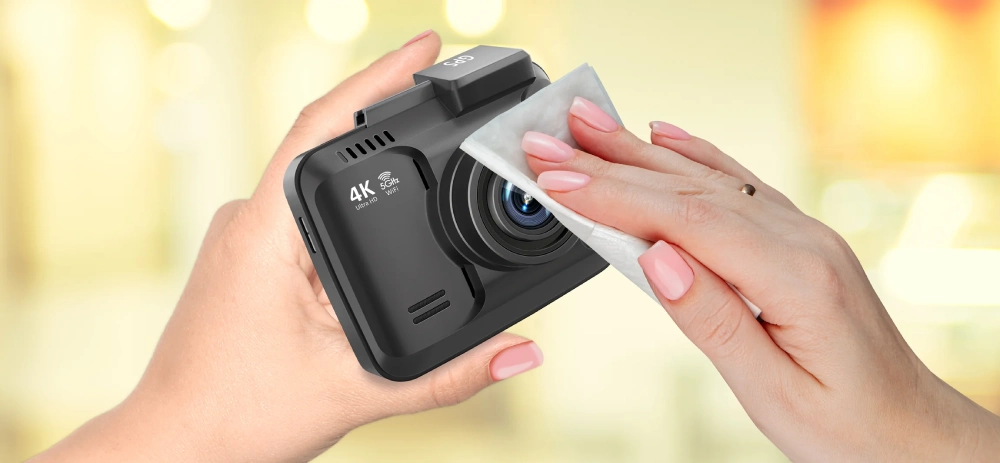
Tools Needed For Cleaning
Cleaning your dash cam lens requires the right tools. These tools help remove dirt without damaging the lens. Using the correct items keeps your camera clear and functional.
Microfiber Cloths
Microfiber cloths are soft and gentle on the lens. They remove dust and smudges without scratching. Avoid using paper towels or rough fabrics that can harm the surface.
Lens Cleaning Solutions
Use lens cleaning solutions made for camera lenses. These solutions dissolve grease and dirt easily. Avoid household cleaners that may leave residue or damage coatings.
Compressed Air
Compressed air helps remove dust from hard-to-reach spots. It blows away loose particles without touching the lens. Use short bursts to avoid moisture buildup inside the camera.
49% off Today's Exclusive Deals
Limited-time Exclusive Deals. Check current discount on Amazon.
Check Price on Amazon As an Amazon Associate I earn from qualifying purchases.Step-by-step Cleaning Process
Keeping your dash cam lens clean is essential for clear video recording. A simple cleaning process can improve video quality and help you catch important details. Follow these steps carefully for the best results.
Removing Dust And Debris
Start by gently brushing off loose dust from the lens surface. Use a soft, clean microfiber cloth or a small air blower. Avoid wiping hard or using rough materials. This step prevents scratches during cleaning.
Applying Cleaning Solution
Use a lens-safe cleaning solution or make a mix of water and a tiny drop of mild soap. Lightly dampen the microfiber cloth with the solution. Do not apply liquid directly on the lens. Gently wipe the lens in small circles to remove smudges and dirt.
Polishing The Lens
After cleaning, take a dry microfiber cloth and softly polish the lens. Use gentle, circular motions to remove any streaks or remaining moisture. Let the lens air dry for a few minutes before using the dash cam again.
Tips To Avoid Lens Damage
Cleaning a dash cam lens needs care to avoid damage. Scratches or smudges can reduce video quality. Follow simple tips to keep the lens safe while cleaning.
Choosing The Right Cleaning Materials
Use a soft microfiber cloth for cleaning. Avoid paper towels or rough fabrics that can scratch. Use lens cleaning solution or a little water. Do not spray liquid directly on the lens. Apply liquid to the cloth first, then wipe gently.
Handling The Dash Cam Carefully
Hold the dash cam firmly but gently. Avoid pressing hard on the lens. Clean in a circular motion to prevent streaks. Do not twist or shake the device while cleaning. Keep the dash cam in a safe place during cleaning to avoid drops.
Maintaining Lens Cleanliness
Keeping your dash cam lens clean is key to clear video recording. Dirt, dust, and smudges can blur the image and reduce video quality. Regular care helps capture sharp and reliable footage every time. A clean lens also extends the camera’s life.
Regular Cleaning Schedule
Set a routine to clean the lens often. Wipe it gently with a soft microfiber cloth. Avoid rough materials that might scratch the glass. Use lens cleaning solution or water if needed. Clean more often in dusty or rainy areas. Checking the lens before each drive is a good habit.
Protective Covers And Placement
Use a lens cover when the dash cam is not in use. Covers block dust and prevent scratches. Place the dash cam where it faces away from direct sunlight. Avoid spots near vents or windows that bring dirt. Proper placement reduces the need for frequent cleaning. It also keeps the lens safe during travel.

Troubleshooting Common Issues
Dash cam lenses can face common issues that affect video clarity. Cleaning the lens alone may not fix every problem. Some issues need special care and attention. Knowing how to troubleshoot these problems can keep your dash cam working well.
Dealing With Scratches
Scratches on the lens reduce video quality. Small scratches can cause blurry or distorted images. Avoid using rough cloth or abrasive cleaners. Use a microfiber cloth with a gentle lens cleaner. For deeper scratches, consider a professional repair. Protect the lens with a clear cover to prevent future damage.
Addressing Foggy Or Smudged Lenses
Fog or smudges blur the video clearly. Use a soft, dry microfiber cloth to wipe the lens gently. If smudges remain, apply a small amount of lens cleaning solution. Wipe in a circular motion to avoid streaks. Keep the dash cam in a dry place to reduce fog buildup. Avoid touching the lens with fingers to prevent oils from causing smudges.
Frequently Asked Questions
How Often Should I Clean My Dash Cam Lens?
Clean your dash cam lens every two weeks for clear footage. Frequent cleaning prevents dust and smudges from blurring the video quality. Adjust frequency based on driving conditions, such as dusty or rainy environments.
What Materials Are Best For Cleaning Dash Cam Lenses?
Use a microfiber cloth and lens cleaning solution for best results. Avoid paper towels or abrasive materials that can scratch the lens. Gentle wiping ensures no damage while removing dust and fingerprints effectively.
Can I Use Household Cleaners On Dash Cam Lenses?
No, avoid household cleaners with harsh chemicals. These can damage the lens coating and reduce image clarity. Always use cleaners specifically designed for camera lenses or mild soap diluted in water.
How Do I Safely Remove Stubborn Dirt From The Lens?
Dampen a microfiber cloth with lens cleaner and gently wipe in circular motions. Avoid applying excessive pressure to prevent scratches. For tough dirt, repeat cleaning rather than using rough materials.
Conclusion
Keeping your dash cam lens clean helps capture clear videos every time. Use a soft cloth and gentle cleaner to avoid scratches. Regular cleaning prevents dirt and smudges from blocking the view. It also extends your dash cam’s life. Clean lens means better safety and evidence on the road.
A small effort goes a long way. Stay safe, and keep your dash cam ready to record. Simple steps make a big difference.