Have you ever wondered what your dash cam’s GPS data can reveal? Whether you’re checking a trip’s exact route or verifying a tricky traffic incident, this information holds valuable clues.
But how do you actually access and make sense of it? You’ll discover simple steps to view your dash cam GPS data quickly and easily. By the end, you’ll feel confident unlocking this powerful feature and gaining deeper insight from your recordings.

49% off Today's Exclusive Deals
Limited-time Exclusive Deals. Check current discount on Amazon.
Check Price on Amazon As an Amazon Associate I earn from qualifying purchases.Keep reading—you’re about to turn your dash cam into more than just a video recorder.

Dash Cam Gps Basics
Understanding dash cam GPS basics helps you use your device better. GPS adds valuable information to your recorded videos. It shows where and when events happen on the road. This makes reviewing footage clearer and more useful. Let’s explore what GPS data shows and its benefits.
What Gps Data Shows
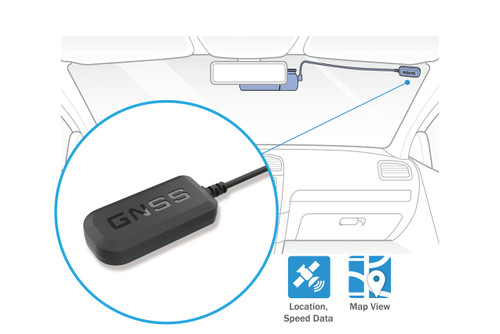
GPS data records your exact location during a trip. It tracks speed and direction in real time. The data also includes the time and date of your journey. Some dash cams show this information on the video itself. Others save it in a separate file for later review.
49% off Today's Exclusive Deals
Limited-time Exclusive Deals. Check current discount on Amazon.
Check Price on Amazon As an Amazon Associate I earn from qualifying purchases.Benefits Of Gps Tracking
GPS tracking helps prove your driving path in case of accidents. It provides clear evidence for insurance claims and police reports. Speed data can show if you were driving safely. GPS also helps track your route for better trip planning. This adds security and peace of mind while driving.
Accessing Gps Data
Accessing GPS data from your dash cam helps track your route and speed. This data is useful for reviewing trips and ensuring safety. Most dash cams save GPS info along with video footage. You can view this data using different methods. Each method offers unique features for easy access and understanding.
Using Dash Cam Software
Dash cam software often comes with the device or is available online. It allows you to open recorded videos and see GPS details on a map. The software shows your exact route and driving speed. Simply connect your dash cam or its memory card to your computer. Open the video file using the software to view GPS data alongside the footage.
Viewing Data On A Computer
You can also view GPS data without special software. Some dash cams store GPS information in standard video files. Media players or GPS tools can read this data. Connect your dash cam or memory card to your computer. Open the video with a compatible player to see GPS info or export it to a map application.
49% off Today's Exclusive Deals
Limited-time Exclusive Deals. Check current discount on Amazon.
Check Price on Amazon As an Amazon Associate I earn from qualifying purchases.Mobile App Options
Many dash cams offer mobile apps for viewing GPS data. These apps connect to your dash cam via Wi-Fi or Bluetooth. The app displays your route on a map and shows speed and location. Mobile apps provide easy, on-the-go access to GPS data. Install the app, connect to your dash cam, and explore your driving details anytime.
Interpreting Gps Information
Understanding GPS data from your dash cam helps you see where you traveled and how fast. This information is useful for reviewing trips or checking any incidents on the road. GPS data shows your exact location, speed, and the time of each recorded moment. Knowing how to read this data makes your dash cam more valuable.
Tracking Routes And Speed
GPS data shows your route on a map. You can see the path your car took during the drive. The map shows turns, stops, and the road you used. Speed data tells how fast you were driving at different points. This helps check if you followed speed limits or drove safely. Tracking routes and speed gives clear details about your trip.
Analyzing Time Stamps
Time stamps mark the exact time of each recorded event. They help match the GPS data with video footage. You can see when you started and ended your trip. Time stamps also show how long you stopped or waited. This information helps in case of accidents or disputes. Analyzing time stamps keeps your records accurate and clear.
Exporting Gps Data
Exporting GPS data from your dash cam lets you review and use the information easily. It helps in tracking routes, analyzing trips, or sharing important details. Proper export makes the data clear and accessible on various devices.
File Formats To Know
GPS data comes in different file formats. The most common are GPX, KML, and CSV. GPX files store route points and waypoints. KML files work well with Google Earth and Maps. CSV files list coordinates and timestamps in a simple table. Choose the format that fits your needs best.
Sharing And Saving Data
Save your exported files in a safe folder on your computer or cloud storage. This keeps data secure and easy to find later. Share files via email or messaging apps to show trips or incidents. Make sure the format is compatible with the receiver’s device or software.
Troubleshooting Gps Issues
Troubleshooting GPS issues on dash cams can be frustrating. GPS data is important for tracking location and speed. Sometimes, the GPS signal may be weak or lost. This affects the accuracy of the information recorded. Understanding common problems and how to fix them helps maintain reliable GPS data.
Common Problems
Weak GPS signals happen in tunnels, tall buildings, or dense trees. Dash cams may lose connection in these places. Another problem is outdated firmware. Old software may cause GPS errors. Incorrect time settings can also affect GPS data. Sometimes, the GPS antenna is damaged or blocked. These issues can lead to missing or wrong location details.
Fixing Gps Signal Errors
Move your vehicle to an open area with a clear sky view. This improves GPS signal reception. Check if the dash cam firmware is up to date. Updating software often fixes GPS bugs. Reset the dash cam to factory settings to clear errors. Make sure the GPS antenna is clean and not covered. If problems continue, contact the device support team for help.

Enhancing Dash Cam Use
Dash cams are more useful with GPS data. This data adds a new layer of information to your recordings. It helps you see not just what happened, but where it happened. Understanding how to use GPS data can make your dash cam more helpful and reliable.
Knowing how to view and use GPS data improves your driving experience. It gives you clear evidence for insurance claims. It also helps track your routes and speeds. This guide shows how combining video and GPS can enhance your dash cam use.
Combining Video And Gps
GPS data links your video to exact locations. This means you can watch the video and see where the car was. You get time, speed, and route details alongside the footage. This combination makes the evidence stronger and clearer.
Most dash cams have software to show GPS on a map. This software syncs the video with location data. It helps you review trips easily and find important moments quickly.
Using Gps Data For Safety
GPS data helps improve driving safety. It shows your speed in real-time and warns about speeding. Some systems alert you about sharp turns or sudden stops. This feedback helps you drive more carefully and avoid accidents.
GPS tracking also helps in emergencies. It can show your exact location to emergency responders. This feature can save time and provide quick help in accidents.
Frequently Asked Questions
How Do I Access Dash Cam Gps Data?
To access GPS data, connect your dash cam to a computer via USB. Use the manufacturer’s software or a compatible app to view location and speed details recorded by the dash cam.
Can I View Gps Data On My Phone?
Yes, many dash cams support mobile apps. Download the app linked to your dash cam brand to easily view GPS routes and coordinates on your smartphone.
What Formats Do Dash Cam Gps Logs Use?
Dash cam GPS data is often saved in GPX or NMEA format. These files can be opened with GPS tracking software or compatible mapping applications.
Is Gps Data Accurate On Dash Cams?
GPS accuracy depends on satellite signal strength and dash cam quality. Most modern dash cams offer reliable GPS data within a few meters of actual location.
Conclusion
Viewing dash cam GPS data helps track your routes and driving habits. Use the right software or app for easy access. Check your dash cam manual for specific steps. Always save your data regularly to avoid loss. Understanding GPS data can improve your safety on the road.
Keep your dash cam updated for the best performance. Small efforts make a big difference in using this feature well. Stay informed and make the most of your dash cam today.