Most Alpine iLX-W670 issues come from wiring, settings, power, Bluetooth, or firmware glitches.
If you are dealing with Alpine iLX-W670 troubleshooting, you are probably trying to fix a problem that feels small but keeps ruining every drive. I have seen that pattern many times: a head unit that will not power on, a screen that freezes, Bluetooth that drops calls, or sound that disappears for no clear reason. The good news is that most Alpine iLX-W670 troubleshooting issues can be solved with a calm, step-by-step check of power, connections, settings, and updates.

49% off Today's Exclusive Deals
Limited-time Exclusive Deals. Check current discount on Amazon.
Check Price on Amazon As an Amazon Associate I earn from qualifying purchases.Understanding Alpine iLX-W670 troubleshooting
Alpine iLX-W670 troubleshooting starts with the basics. This receiver is a feature-rich double-DIN unit, so many issues are tied to installation, compatibility, or software settings rather than a bad unit. When you know where to look first, you save time, money, and a lot of frustration.
In my experience, people often jump straight to replacing parts when the real problem is something simple. A loose ground wire, a bad parking brake connection, or an old firmware version can create symptoms that look serious. The best approach is to work from power to audio to Bluetooth to display, one layer at a time.
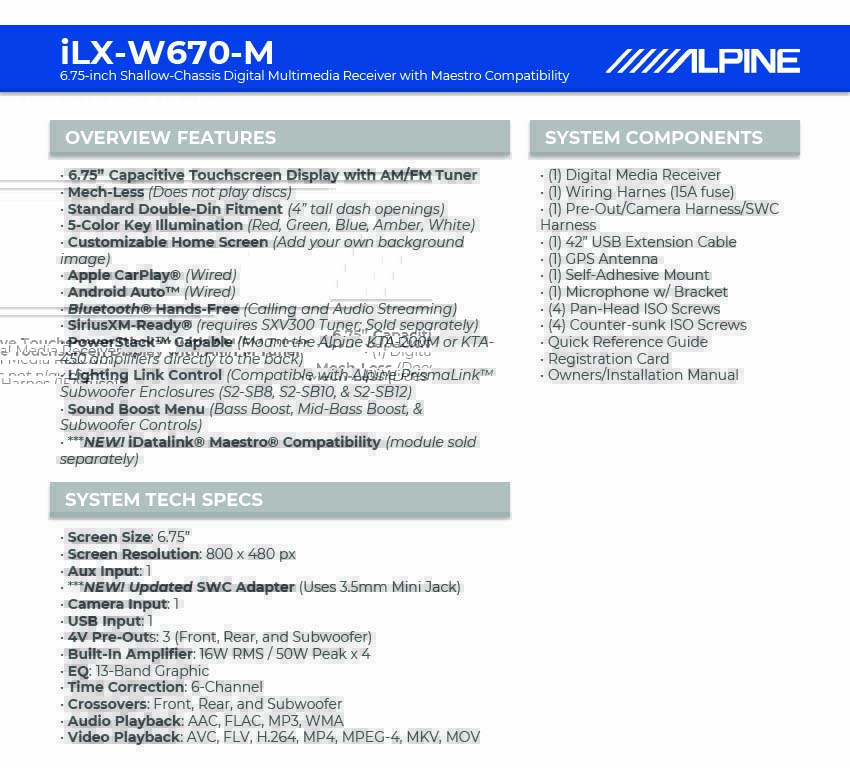
49% off Today's Exclusive Deals
Limited-time Exclusive Deals. Check current discount on Amazon.
Check Price on Amazon As an Amazon Associate I earn from qualifying purchases.Common symptoms and what they usually mean
Alpine iLX-W670 troubleshooting gets much easier when you match the symptom to the likely cause. The unit usually gives clues before it fails completely. You just need to know how to read them.
Common issues include:
- No power: often caused by fuse problems, weak wiring, or a poor ground
- No sound: usually tied to speaker wiring, mute settings, or amp connection issues
- Bluetooth won’t connect: often a pairing issue, memory conflict, or phone setting problem
- Screen freezes or lags: may point to software issues or a reset need
- Backup camera not showing: often related to reverse wire, camera power, or input selection
- Apple CarPlay or Android Auto not launching: usually a cable, phone setting, or USB issue
A helpful rule I learned early is this: do not assume the head unit is bad until you check the install. Most Alpine iLX-W670 troubleshooting cases I have seen were fixed without replacing the radio.

49% off Today's Exclusive Deals
Limited-time Exclusive Deals. Check current discount on Amazon.
Check Price on Amazon As an Amazon Associate I earn from qualifying purchases.Start with power, fuses, and ground
Power issues are the first place to look in Alpine iLX-W670 troubleshooting. If the unit does not turn on at all, or it shuts off while driving, the problem is often in the power path. Think of it like a water hose with a kink; the signal is there, but it cannot flow properly.
Check these items first:
- Verify the yellow constant power wire has steady 12V
- Verify the red accessory wire gets power with the ignition on
- Check the black ground wire for a clean, bare-metal connection
- Inspect the inline fuse and vehicle fuse panel
- Look for pinched, cut, or loose wiring behind the dash
A weak ground is one of the most common mistakes. I once spent nearly an hour chasing a “dead” unit that turned out to be grounded to painted metal. After cleaning the contact point and re-securing the wire, the receiver powered up instantly.
If the unit still does not turn on:
- Disconnect the battery before touching wiring
- Inspect every connection with a multimeter
- Compare readings to the vehicle and unit wiring diagram
- Test with a known good fuse
- Recheck the harness adapter if one is installed

Fixing screen problems, freezes, and touch issues
Display problems are another big part of Alpine iLX-W670 troubleshooting. The screen may go blank, respond slowly, or freeze during startup. These symptoms can feel like a major failure, but many are temporary and fixable.
Try these steps:
- Restart the unit by turning the vehicle off and back on
- Check screen brightness and dimmer settings
- Clean the screen with a soft microfiber cloth
- Remove any protective film that may affect touch response
- Perform a system reset if the menu becomes unresponsive
- Update the firmware if the issue keeps returning
A frozen screen is often the radio’s way of saying it needs a fresh start. I like to compare it to a phone that has too many apps open. A reset clears the clutter and gives the system a clean restart.
If touch response is inaccurate, also check for:
- Extreme heat or cold inside the vehicle
- Incorrect installation pressure on the dash kit
- Loose mounting hardware
- Moisture or dust around the screen edge
Solving Bluetooth pairing and call quality issues
Bluetooth problems are some of the most frustrating Alpine iLX-W670 troubleshooting cases because they interrupt daily driving. One day it works fine, and the next day your phone will not connect or callers hear static. The good news is that Bluetooth problems are usually software or settings related.
Try this process:
- Delete the Alpine unit from your phone’s Bluetooth list
- Delete your phone from the receiver’s paired devices list
- Turn Bluetooth off and back on
- Pair the phone again from scratch
- Make sure your phone is not connecting to another nearby device
- Check that call and media audio permissions are enabled
If calls sound weak or choppy:
- Raise the volume on both the phone and the unit
- Check microphone placement
- Move the microphone away from vents or noisy trim
- Make sure the mic cable is fully seated
- Test with another phone to isolate the problem
I have found that microphone placement matters more than most people expect. If the mic is tucked near a vent or rubbing against the dash, it can pick up noise and make every call sound messy.
Apple CarPlay and Android Auto troubleshooting
CarPlay and Android Auto are major reasons people buy this unit, so USB issues can feel especially annoying. In Alpine iLX-W670 troubleshooting, connection failures here often come down to cables, phone settings, or USB port problems. The system is usually not “broken”; it just needs a clean connection path.
Check the following:
- Use an original or certified USB cable
- Plug directly into the correct USB input
- Restart both the phone and the receiver
- Make sure Siri or Google Assistant permissions are enabled
- Update your phone OS
- Remove old phone profiles from the head unit
If CarPlay or Android Auto connects but acts unstable:
- Try a different cable
- Clean the phone charging port
- Disable any battery saver mode
- Confirm the app and operating system are current
- Test with another phone to rule out device-specific issues
One lesson from real-world use: cheap USB cables cause more trouble than people admit. A cable may charge the phone just fine, yet still fail at data transfer. For Alpine iLX-W670 troubleshooting, that small detail can save you hours.
Audio problems: no sound, distortion, or weak output
When the screen works but the sound does not, Alpine iLX-W670 troubleshooting shifts to the audio path. This can involve speaker wiring, amp settings, balance controls, or signal routing. Many people assume the receiver failed, but the issue is often upstream or downstream from it.
Check these points:
- Confirm the unit is not muted
- Check balance, fader, and subwoofer level settings
- Inspect speaker wiring for shorts or opens
- Verify external amplifier remote turn-on wire
- Check RCA connections if using an amp
- Make sure speaker impedance matches the system setup
If the sound is distorted:
- Lower the volume and test again
- Check for clipped amplifier gain settings
- Verify the speakers are not damaged
- Inspect for loose speaker terminals
- Make sure the equalizer settings are not overly aggressive
A common mistake is boosting bass too much on a weak system. That can make the audio sound louder for a moment, but it also causes distortion fast. Good Alpine iLX-W670 troubleshooting means starting with clean signal, then adjusting taste later.
Backup camera and reverse signal issues
Backup camera problems are common in Alpine iLX-W670 troubleshooting, especially after installation or battery work. The camera may not display, show a black screen, or switch at the wrong time. Usually, the issue is in the reverse trigger, camera power, or video signal.
Check these items:
- Confirm the camera is getting power
- Verify the reverse wire is connected correctly
- Make sure the camera video cable is fully seated
- Check the camera input setting on the unit
- Confirm the vehicle is sending the reverse signal properly
If the camera image appears upside down or mirrored, the camera may need a setting change or may not match the vehicle setup. If the screen stays black when in reverse, test the camera on another display if possible. That helps separate a bad camera from a wiring issue.
In my own experience, reverse trigger problems are often traced to one loose splice behind the dash. It is a tiny fault with a big effect, like a single broken link in a chain.
Firmware updates and factory reset steps
Software matters a lot in Alpine iLX-W670 troubleshooting. Even if the hardware is fine, older firmware or corrupted settings can create strange behavior. Updates can improve stability, compatibility, and system response.
When a firmware update may help:
- Bluetooth issues keep coming back
- The screen freezes often
- CarPlay or Android Auto is unstable
- Menu behavior feels slow or buggy
- The unit acts differently after a power interruption
A factory reset can help when:
- Settings are corrupted
- Audio routing is wrong
- Bluetooth memory is full
- The system behaves unpredictably after installation
Before resetting, write down your key settings. That includes audio tuning, camera settings, and paired devices. A reset can solve a lot, but it also wipes custom setup work.
Step-by-step Alpine iLX-W670 troubleshooting checklist
A simple checklist keeps Alpine iLX-W670 troubleshooting organized. Instead of guessing, move through the system in order. This saves time and reduces the chance of missing the real cause.
Use this order:
- Check power and ground
- Inspect fuses
- Confirm the unit boots normally
- Test sound output
- Test Bluetooth pairing
- Test USB and phone integration
- Test camera and reverse trigger
- Check firmware and reset options
- Inspect wiring if the issue remains
If you are working on your own install, be patient. Alpine iLX-W670 troubleshooting is often about removing one small problem at a time. That method is slower at first, but it is much faster than replacing parts blindly.
Prevention tips that save time later
The best Alpine iLX-W670 troubleshooting is the kind you never need to do. A careful install and a few good habits can prevent most issues from starting in the first place. This is where a little extra effort pays off for years.
Helpful prevention tips:
- Use quality wiring harnesses and connectors
- Secure all grounds to clean bare metal
- Keep USB cables short and certified
- Route signal wires away from power wires
- Mount the microphone in a quiet, open spot
- Update firmware when stable updates are available
- Avoid cramming wires behind the unit
I have learned that neat wiring is not just about looks. It also makes later repairs much easier. If you ever need to revisit the dash, a clean install feels like opening a tidy toolbox instead of a drawer full of knots.
Frequently Asked Questions of Alpine iLX-W670 Troubleshooting
Why won’t my Alpine iLX-W670 turn on?
Most of the time, the issue is power, ground, or a blown fuse. Check the yellow constant wire, red accessory wire, and black ground first.
Why does my Alpine iLX-W670 keep losing Bluetooth connection?
Bluetooth drops usually come from pairing conflicts, phone settings, or interference. Delete the pairing on both devices and set it up again from scratch.
Why is there no sound from my Alpine iLX-W670?
No sound can come from mute mode, bad speaker wiring, amp problems, or incorrect audio settings. Start by checking the balance, fader, and wiring connections.
Why is Apple CarPlay not working on my Alpine iLX-W670?
CarPlay problems often come from a bad USB cable, phone permission settings, or a dirty phone port. Try a certified cable and reconnect the phone after restarting both devices.
How do I reset my Alpine iLX-W670?
A reset is usually done through the unit’s settings or reset button, depending on the issue. If the screen is frozen, a system reboot or factory reset may help clear corrupted settings.
Conclusion
Alpine iLX-W670 troubleshooting becomes much easier when you work in order and stay calm. Most problems trace back to power, wiring, Bluetooth setup, USB connections, or outdated software, not a dead head unit. If you test each part carefully, you can solve many issues without replacing expensive components.
The big takeaway is simple: start with the basics, trust the process, and do not skip the small checks. A clean install and a steady troubleshooting routine will save you time every time. If this guide helped, keep it handy, explore more car audio tips, and leave a comment with the issue you are trying to fix.





