Reset the service light on a Mercedes‑Benz S‑Class via the instrument cluster menu and a long press.
I have worked on Mercedes vehicles for years and have reset service lights on many S‑Class models. This guide explains why the service light appears, when you can safely reset it, and multiple step‑by‑step methods to reset the service light on a Mercedes‑Benz S‑Class — from older analog clusters to the newest MBUX or digital displays. Read on for easy directions, real tips from hands‑on experience, and troubleshooting advice if the light won’t clear.

49% off Today's Exclusive Deals
Limited-time Exclusive Deals. Check current discount on Amazon.
Check Price on Amazon As an Amazon Associate I earn from qualifying purchases.
Why the service light appears and what it means
The service light is a reminder from the car. It asks you to perform scheduled maintenance. It can mean an oil change, inspection, or other service is due.
Most S‑Class models track mileage and time to trigger the service light. Electronics and sensors log service intervals. If a fault exists, a separate warning often appears along with the service reminder.
49% off Today's Exclusive Deals
Limited-time Exclusive Deals. Check current discount on Amazon.
Check Price on Amazon As an Amazon Associate I earn from qualifying purchases.Understanding why the light appears helps decide whether to reset the light or fix the issue first. Never reset the service light if the car needs work. Resetting without service masks real problems.

Preparations before you reset the service light on a Mercedes‑Benz S‑Class
Check the service job first. Confirm oil, filters, fluids, and inspections are done.
Have the owner’s manual handy. It shows model‑specific steps and warnings. For some tasks you may need a scan tool or dealer software.
49% off Today's Exclusive Deals
Limited-time Exclusive Deals. Check current discount on Amazon.
Check Price on Amazon As an Amazon Associate I earn from qualifying purchases.Make sure the battery is healthy. Low voltage can stop the reset sequence. Park the car on level ground and use the parking brake.

Step‑by‑step: Reset the service light on older Mercedes‑Benz S‑Class models (steering stalk models)
These steps suit older S‑Class models with simple instrument clusters.
- Turn ignition to position 1 (accessory), but do not start the engine.
- Press the trip button on the instrument cluster and hold it.
- Turn ignition to position 2 (run) while still holding the trip button.
- Continue holding until the service menu appears or the display counts down.
- Release the button when the service menu shows. Use the trip button to cycle to the service interval.
- Press and hold again to confirm reset. The display will show a confirmation.
If the light does not reset, repeat the steps slowly. If it still fails, a dealer scan tool may be required.

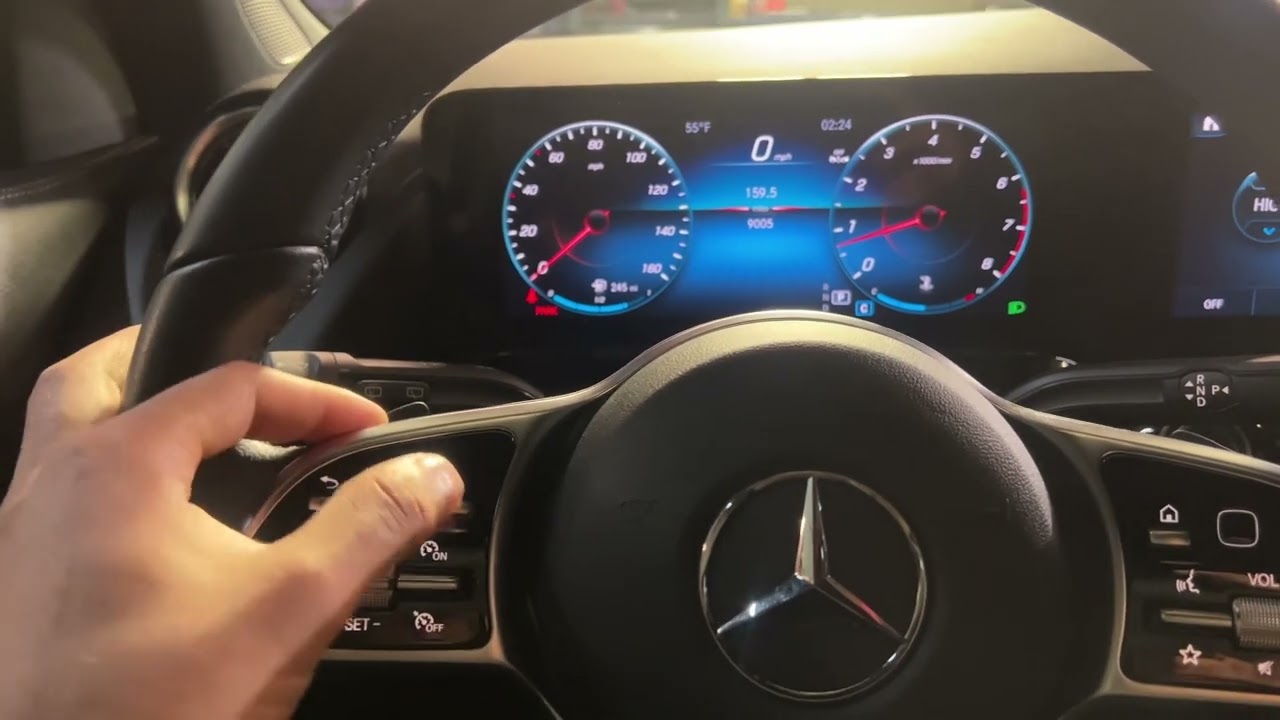
Reset the service light on a Mercedes‑Benz S‑Class with multifunction steering wheel or MBUX
Newer S‑Class models use the steering wheel controls and MBUX screen. These steps are common but may vary slightly by model year.
- Sit in the driver seat and close the doors.
- Turn the ignition to run or switch to accessory mode without starting the engine.
- Use the left steering wheel buttons to open the instrument cluster menu.
- Navigate to “Service” or “Assyst” and select it.
- Select “Clear” or “Reset” for the service item. Confirm when prompted.
- Wait for the confirmation message. Turn the vehicle off and on to verify the light stays off.
If your S‑Class has a touchscreen center display, you may also access service menus there. Always follow on‑screen prompts.
 diagnostic tool to reset the service light”
style=”max-width: 100%; height: auto; border: 2px solid black; border-radius: 10px; display: block; margin: 0 auto;”
loading=”lazy”
/>
Using an OBD2 or dealer-level diagnostic tool to reset the service light
A scan tool often gives the most reliable reset. It also verifies fault codes.
- Connect the OBD2 tool to the vehicle’s port under the dash.
- Turn the ignition to run.
- Use the tool to access Mercedes service or maintenance module.
- Select the maintenance item and choose “Reset” or “Clear.”
- Confirm and turn the car off and on to check.
Professional tools will show stored codes. If a code exists, clear it only after fixing the cause. Resetting codes without repair can lead to repeated warnings.
Common problems and troubleshooting when reset fails
Sometimes the service light won't reset. Here are common causes:
- Battery voltage is low. Charge or replace the battery.
- A fault code exists. Scan and fix the root cause first.
- Wrong reset method for your model year. Check the manual.
- Software bug or calibration issue. A dealer update may be needed.
If the light stays on after a correct reset, read fault codes with a scan tool. Address any ECU or sensor faults before trying again.

Safety, warranty, and legal notes
Do the actual service first. Resetting the service light without maintenance can void warranties or lead to missed repairs.
For vehicles under warranty or with active service plans, consider dealer service. A dealer will log maintenance properly in the car’s service history.
Keep records of service. Note date, mileage, and work done. This helps resale value and ensures accurate maintenance tracking.

Personal tips and lessons learned from real work
I have reset service lights on S‑Class cars for years. Here are a few practical tips I picked up.
- Use a memory saver when the battery is disconnected. It keeps settings intact.
- If the cluster is slow to respond, wait a few seconds during each step. Patience helps.
- For fleet cars, keep a log sheet. It saves time and prevents errors.
- If unsure, take a photo of the cluster menu before clearing. This helps if you need to reverse a mistake.
One time I reset a service light before oil change. The owner returned the next day. Lesson learned: never reset before service.

PAA-style quick questions
How long does a service light reset take?
A reset usually takes a few seconds to a minute, depending on the method. Using a scan tool is often fastest.
Will a service light reset affect car settings?
No, a proper reset targets only the maintenance reminder. It does not change personalization settings.
Can I reset the service light without performing maintenance?
You can, but you should not. Resetting without service hides real needs and can void warranties.
Frequently Asked Questions of How do you reset the service light on a Mercedes‑Benz S‑Class?
How do I reset the service light on a Mercedes‑Benz S‑Class with the steering wheel controls?
Turn the ignition to run, use the left steering buttons to open the service menu, select the service item, and confirm reset. Follow on‑screen prompts until you see confirmation.
Can I reset the service light with an OBD2 scanner?
Yes. Connect the OBD2 tool, access the maintenance or service menu, and choose reset. Make sure to clear any fault codes only after repairs.
What if the service light returns after reset?
Check for stored fault codes and fix any issues. Low battery voltage or unresolved vehicle faults commonly cause repeat lights.
Is it bad to reset the service light myself?
Not if you did the required maintenance. Resetting without service is not recommended and can hide problems.
Do different S‑Class years have different reset methods?
Yes. Older models use the trip button or stalk. Newer models use steering wheel controls, MBUX, or dealer tools. Always consult the manual for your year.
Conclusion
Resetting the service light on a Mercedes‑Benz S‑Class is straightforward when you follow the right steps for your model. First, complete the required maintenance. Then use the correct reset method — instrument cluster button, steering wheel menu, MBUX, or a scan tool. If a reset fails, check battery voltage and stored fault codes, and fix any root causes. Take care and keep service records to protect your car and its value. Try the steps that match your S‑Class, and comment below with your model year if you need step‑by‑step help.