Most Kenwood DMX7706S issues come from wiring, settings, power, Bluetooth, or firmware glitches.
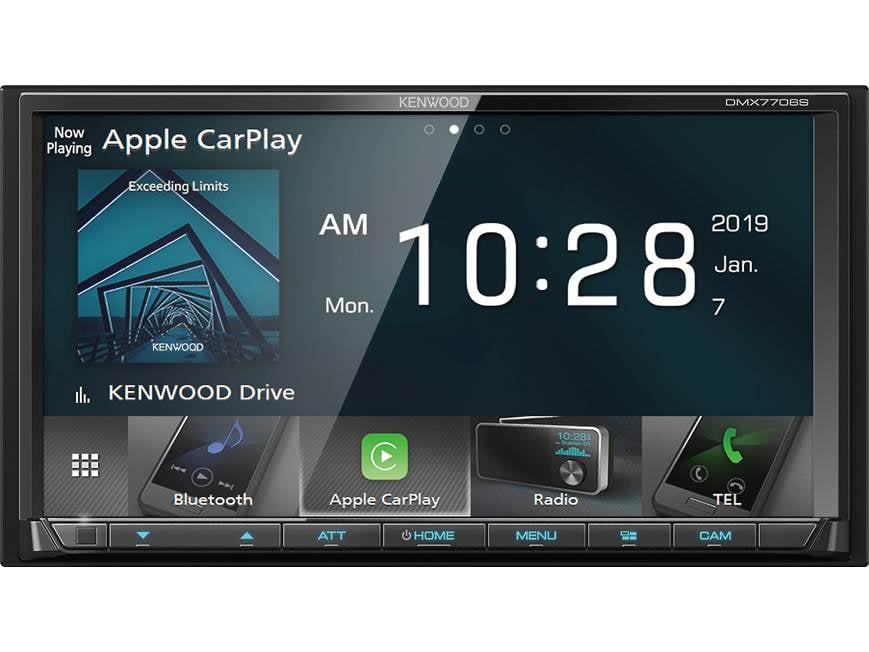
If you own a Kenwood DMX7706S, you already know it is a strong double-DIN receiver with a lot of smart features. But like any in-dash unit, it can act up in ways that feel confusing at first. I’ve spent enough time helping with Kenwood DMX7706S troubleshooting to know the good news: most problems are simple once you break them down the right way.

49% off Today's Exclusive Deals
Limited-time Exclusive Deals. Check current discount on Amazon.
Check Price on Amazon As an Amazon Associate I earn from qualifying purchases.
Common Kenwood DMX7706S Problems and What They Usually Mean
Kenwood DMX7706S troubleshooting starts with one simple idea: most symptoms point to one of a few root causes. The unit may not power on, may lose sound, may freeze, or may not connect to your phone. In many cases, the issue is not the receiver itself but power, grounding, a loose harness, or a setting that changed by accident.
Here are the most common problems I see:
49% off Today's Exclusive Deals
Limited-time Exclusive Deals. Check current discount on Amazon.
Check Price on Amazon As an Amazon Associate I earn from qualifying purchases.- No power at all, often caused by a blown fuse, weak ground, or missing accessory power
- Screen on but no audio, usually tied to speaker wiring, mute settings, or amplifier issues
- Bluetooth not pairing, often caused by old device records or phone permission settings
- Apple CarPlay or Android Auto not launching, often due to USB cable problems or phone compatibility
- Random resets or freezing, usually from low voltage, firmware bugs, or heat
- Dim or blank display, often linked to illumination settings or a bad power connection
The trick is not to guess. Start with the symptom, then work through the most likely cause in a logical order. That saves time and keeps you from swapping parts that are not broken.
How to Troubleshoot Power and Startup Issues
If your Kenwood DMX7706S will not turn on, begin with the basics. I have seen people replace a receiver when the real issue was a loose accessory wire or a blown fuse in the vehicle’s fuse box. That is why power checks should always come first in Kenwood DMX7706S troubleshooting.
Follow these steps:
49% off Today's Exclusive Deals
Limited-time Exclusive Deals. Check current discount on Amazon.
Check Price on Amazon As an Amazon Associate I earn from qualifying purchases.- Check the vehicle fuse for the radio circuit.
- Inspect the Kenwood fuse on the wiring harness.
- Confirm the yellow constant power wire has 12V.
- Confirm the red accessory wire gets power when the key is on.
- Check that the black ground wire is solid and clean.
- Make sure the wiring harness is fully seated behind the dash.
A weak ground can cause strange behavior, not just total failure. The unit may boot and then restart, or the screen may flicker. In my experience, grounding problems often look like a “bad radio” problem until you test them with a meter.
If the unit still does not power on, try a known-good harness connection and confirm the battery is healthy. Low vehicle voltage can make the receiver act dead even when it is technically getting power.
Fixing Audio Problems on the Kenwood DMX7706S
Audio issues are another big part of Kenwood DMX7706S troubleshooting. Sometimes the screen works fine, but no sound comes out. Other times, the sound cuts in and out, or one side of the car goes quiet. That usually points to wiring, speaker impedance, amp settings, or a muted source.
Check these common causes:
- Speaker wires crossed or shorted behind the dash
- Incorrect fading or balance settings
- Mute enabled by accident
- Factory amplifier not turning on
- Wrong amp remote turn-on connection
- Bad RCA cable if using an external amplifier
If you are running an external amp, make sure the blue and white remote wire is connected properly. Without that turn-on signal, the amp may stay asleep. I’ve seen this more than once after a clean install where everything looked perfect but the system had no output because the amp never woke up.
Also check the unit’s audio settings. Sometimes the output level, EQ, or high-pass and low-pass filters can make sound seem weak or missing. If the system works after a reset but fails again later, save your preferred settings one at a time so you can spot the culprit.
Solving Bluetooth Pairing and Connection Problems
Bluetooth problems are very common with infotainment systems, and the Kenwood DMX7706S is no exception. When pairing fails, the issue often sits on the phone side, not the receiver. A full Kenwood DMX7706S troubleshooting check should include both devices.
Try this process:
- Delete the Kenwood device from your phone’s Bluetooth list.
- Clear old phone records from the Kenwood unit.
- Turn Bluetooth off and back on for both devices.
- Restart the phone.
- Pair again from scratch.
- Allow all requested permissions for contacts, audio, and notifications.
Phones can hold old connection data that interferes with a fresh pairing. I once helped a friend who thought his Kenwood was defective, but the phone had six stale pairing records from past cars. Once we cleared them, the unit connected in seconds.
If the unit connects but drops often, check for software updates on your phone and receiver. Bluetooth stability can improve after firmware updates, especially if the system was acting picky with a newer phone OS.
Repairing Apple CarPlay and Android Auto Issues
Many people buy the Kenwood DMX7706S for smartphone integration, so CarPlay and Android Auto problems can be frustrating. The good news is that these issues usually have simple fixes. In most cases, cable quality or phone settings are the real cause.
Look at these common trouble spots:
- Use a good, data-capable USB cable
- Plug into the correct USB port
- Make sure CarPlay or Android Auto is enabled on the phone
- Allow screen time, privacy, and USB permissions
- Update the phone OS and apps
- Restart both the phone and the head unit
Cheap charging cables are a big trap. They may charge the phone but fail at data transfer, which makes CarPlay or Android Auto seem broken. That is one of the first things I check, because it solves more problems than people expect.
If the feature worked before and stopped suddenly, try a full reset of the phone connection profile. That often clears out corrupt pairing data. Also confirm your phone is compatible with the current firmware version on the receiver.
What to Do When the Screen Freezes, Lags, or Reboots
A freezing screen can feel like a major failure, but it is often a software or power stability issue. In Kenwood DMX7706S troubleshooting, a reboot loop usually points to voltage drops, heat, or a corrupted setting. The receiver may also freeze if it is struggling to read a bad USB device.
Here is a practical checklist:
- Remove any USB drive or device and test again
- Check for loose power or ground connections
- Make sure the unit is not overheating in the dash
- Update the firmware if available
- Perform a reset if the unit keeps locking up
Heat matters more than many drivers realize. A head unit in a tight dash cavity can run hot, especially in summer. If the receiver is mounted with little airflow, the screen may lag or reset after long use.
If you must reset the unit, save your settings first if possible. A reset can clear custom audio tuning, Bluetooth pairings, and source preferences. It is helpful, but it should be done carefully.
Display, Touchscreen, and Backlight Troubleshooting
Sometimes the Kenwood DMX7706S powers up, but the screen looks wrong. The display may be too dim, black, partially lit, or unresponsive to touch. These problems often trace back to settings or wiring, not a failed panel.
Check for the following:
- Illumination dimmer setting turned down
- Display brightness set too low
- Parking brake wire not connected properly for certain functions
- Loose power or ground connection
- Screen calibration issue after a reset
If the touchscreen is slow or inaccurate, remove any screen protector and clean the display gently. I have seen touch issues that were really just dirt, dust, or a thick film on the panel. It sounds basic, but basic checks save a lot of time.
If the display is blank but the unit has power, test the lighting and brightness menus. Many users accidentally lower brightness in the settings and think the display has failed. It is a small thing, but it causes a lot of stress.
Resetting the Kenwood DMX7706S the Right Way
A reset is one of the most useful tools in Kenwood DMX7706S troubleshooting. It can clear temporary software problems and restore normal behavior. That said, resetting should be your cleanup step, not your first move.
Use a reset when:
- The unit freezes repeatedly
- Bluetooth will not reconnect
- CarPlay or Android Auto keeps failing
- Audio settings are acting strangely
- The screen becomes unstable after a change
Before resetting, note your custom settings. Write down EQ, crossover, camera settings, and phone pairings if you want to restore them later. I learned this the hard way years ago with another Kenwood unit, and it took longer to rebuild the sound profile than to fix the original issue.
After the reset, test the unit in stages. Power it on, pair one phone, then test audio and USB. That makes it easier to see whether the fix worked.
Firmware Updates and Why They Matter
Firmware updates are easy to ignore until something starts glitching. For Kenwood DMX7706S troubleshooting, firmware can be the difference between a stable system and one that keeps acting up. Updates often improve phone compatibility, bug fixes, and system performance.
Why updates matter:
- They can fix Bluetooth bugs
- They may improve CarPlay or Android Auto support
- They can solve source switching problems
- They may improve general stability
Always follow the update instructions carefully. Use the correct file, a clean USB drive, and a stable vehicle battery. If power drops during an update, you can make a small issue much worse.
I usually recommend checking firmware only after you rule out wiring and phone problems. That keeps the process practical and avoids unnecessary changes.
Preventing Future Problems With the Kenwood DMX7706S
The best Kenwood DMX7706S troubleshooting is the kind you never need to do twice. A clean install and a few simple habits can prevent many issues from coming back. Good wiring is not glamorous, but it is the backbone of a stable system.
Helpful prevention tips:
- Secure all connections with proper crimping or soldering
- Keep power, ground, and remote wires clean and tight
- Use quality USB and phone cables
- Avoid stuffing excess wiring into a cramped dash
- Update firmware when needed
- Keep the screen and ports clean
I always tell people to think of the head unit like a house. If the foundation is weak, even a great system will shake. But if the wiring, voltage, and settings are solid, the Kenwood DMX7706S usually performs very well.
When You Should Stop Troubleshooting and Seek Help
There is a point where further guessing is not useful. If basic Kenwood DMX7706S troubleshooting does not fix the issue, the problem may be in the vehicle’s electrical system, an external amplifier, or the unit itself. That is when a qualified installer or electronics tech can save you time and money.
Get help if:
- The unit blows fuses repeatedly
- You smell burning or see damaged wiring
- The screen has visible physical damage
- The radio fails after correct power and ground tests
- The unit behaves erratically even after a reset and update
Do not keep replacing fuses without finding the cause. That can hide a short circuit and create more risk. Safety comes first, especially in dash wiring where space is tight and mistakes can spread quickly.
Frequently Asked Questions of Kenwood DMX7706S Troubleshooting
Why does my Kenwood DMX7706S turn on but have no sound?
This usually means the issue is in the audio chain, not the screen. Check speaker wiring, mute settings, amp turn-on lead, and external amplifier connections.
Why won’t my Kenwood DMX7706S connect to Bluetooth?
Old pairing data is a common cause. Delete the device from both the phone and the receiver, then pair again from scratch.
Why is Apple CarPlay not working on my Kenwood DMX7706S?
Most CarPlay issues come from the USB cable, permissions, or phone compatibility. Use a data-capable cable and make sure the phone trusts the unit.
How do I reset my Kenwood DMX7706S?
A reset clears temporary problems and can help with freezing or connection issues. Before resetting, note your custom settings because the process may erase them.
What should I check first if my Kenwood DMX7706S will not power on?
Start with the fuse, accessory power, constant power, and ground connection. A loose or missing wire is more common than a failed head unit.
Conclusion
Kenwood DMX7706S troubleshooting gets much easier when you work step by step. Start with power, then move to audio, Bluetooth, CarPlay, display, and firmware. Most problems are caused by wiring, settings, or phone connections, not a bad receiver.
If you stay patient and test one thing at a time, you can solve a lot on your own and avoid costly mistakes. Use the tips above, keep your install clean, and don’t rush the process. If this guide helped, explore more car audio resources, and leave a comment with the issue you’re dealing with now.





