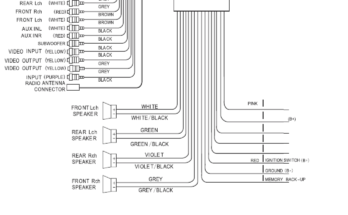
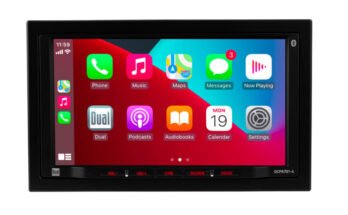
Sony XAV-AX5600 troubleshooting usually comes down to power, wiring, settings, or firmware issues.
If you have spent time with Sony car stereos, you already know the XAV-AX5600 is a strong receiver when it is set up right. In real-world use, most problems are not “bad units” at all. They are usually small setup errors, loose connections, or software quirks that can be fixed fast once you know where to look. This guide walks through Sony XAV-AX5600 troubleshooting in a simple, practical way so you can get your system working again without guesswork.

49% off Today's Exclusive Deals
Limited-time Exclusive Deals. Check current discount on Amazon.
Check Price on Amazon As an Amazon Associate I earn from qualifying purchases.
Sony XAV-AX5600 Troubleshooting basics
The Sony XAV-AX5600 is a double-DIN receiver with Apple CarPlay, Android Auto, Bluetooth, USB, and rear camera support. That means troubleshooting often involves both the head unit and the car itself. When something goes wrong, start with the simplest things first, because that is where the answer usually lives.
From experience, I have seen people assume the radio is “dead” when the real issue was a weak ground wire or a blown fuse. I have also seen CarPlay fail simply because the USB cable was charge-only. Sony XAV-AX5600 troubleshooting gets much easier when you follow a step-by-step process instead of changing five things at once.
49% off Today's Exclusive Deals
Limited-time Exclusive Deals. Check current discount on Amazon.
Check Price on Amazon As an Amazon Associate I earn from qualifying purchases.Common causes of problems
Most issues with the Sony XAV-AX5600 usually come from one of these areas:
- Power supply problems
- Loose or reversed wiring
- Blown fuse
- Incorrect parking brake connection
- Bad USB cable or port
- Bluetooth pairing errors
- Phone compatibility issues
- Outdated firmware
- Incorrect sound settings
- Camera or steering wheel control setup errors
The good news is that many of these are easy to test at home with basic tools.
Sony XAV-AX5600 not turning on
If the screen stays black, the first thing to check is power. I have made the mistake of chasing software settings before checking a simple fuse, and that wastes time. In most Sony XAV-AX5600 troubleshooting cases, no power means the unit is not getting proper constant or accessory voltage.
49% off Today's Exclusive Deals
Limited-time Exclusive Deals. Check current discount on Amazon.
Check Price on Amazon As an Amazon Associate I earn from qualifying purchases.What to check first
- Make sure the car ignition is on
- Check the fuse on the vehicle side and the head unit side
- Confirm the yellow constant power wire has 12V
- Confirm the red accessory wire gets power with ignition
- Check the black ground wire for a solid connection
- Inspect the harness for bent pins or loose plugs
Practical fix steps
- Remove the unit safely.
- Test the fuse with a multimeter.
- Check for 12V on the yellow and red wires.
- Tighten the ground wire to clean bare metal.
- Reconnect the harness firmly.
- Try restarting the car after reconnecting.
If the unit still does not power on, the issue may be with the car’s wiring, not the Sony XAV-AX5600 itself. In older vehicles, weak grounds are a common hidden problem.
Sony XAV-AX5600 touch screen not responding
A frozen or unresponsive screen can feel worse than a full shutdown, but it is often fixable. Sometimes the display is on, but the system is stuck in a temporary software loop. Sony XAV-AX5600 troubleshooting here usually starts with a reset.
Try these steps
- Press the reset button on the front panel
- Turn the car off and back on
- Disconnect the battery for a short time if needed
- Check if the screen is dirty or wet
- Remove any installed screen protector that may affect touch response
When the touchscreen acts strange
If the screen is laggy or misses taps, temperature can be part of the problem. Very cold or very hot conditions can affect touch response for some electronics. I have seen this happen in parked vehicles during extreme weather, and sometimes all it takes is letting the cabin normalize.
If the issue continues after a reset, update the firmware and check whether a connected phone or USB device is causing the freeze.
Sony XAV-AX5600 Bluetooth not connecting
Bluetooth problems are among the most common Sony XAV-AX5600 troubleshooting complaints. The unit may not find your phone, may fail to pair, or may connect and then drop. In many cases, the pairing list is full or the old device profile is corrupted.
Try this reset process
- Delete the Sony unit from your phone’s Bluetooth list
- Delete the phone from the Sony unit’s paired devices list
- Turn Bluetooth off and on again on both devices
- Restart your phone
- Pair again from scratch
Other useful checks
- Keep the phone close to the head unit during pairing
- Make sure the phone is not connected to another car or headset
- Update the phone OS
- Confirm Bluetooth permission settings are enabled
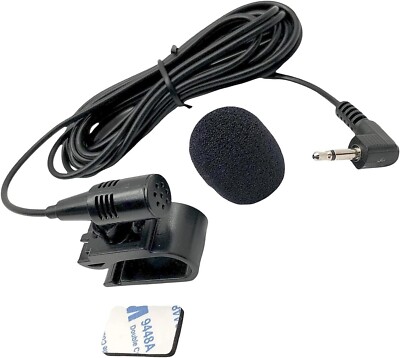
If audio connects but calls do not, check the phone permissions for contacts and microphone access. That small detail is easy to miss and causes a lot of frustration.
Sony XAV-AX5600 Apple CarPlay or Android Auto not working
If CarPlay or Android Auto fails, the problem is often the USB cable rather than the receiver. I have seen perfectly good systems “fail” because the owner used a cheap cable that only charged the phone. Sony XAV-AX5600 troubleshooting for phone projection usually starts with the cable and phone settings.
Things to verify
- Use an original or high-quality data cable
- Plug into the correct USB port
- Make sure the phone is unlocked
- Confirm CarPlay or Android Auto is enabled on the phone
- Check that Siri or Google Assistant permissions are on
- Restart both the phone and the receiver
Why projection may fail
CarPlay and Android Auto need a clean data path. A cable can look fine and still fail under load. If the cable is bent, frayed, or loose in the connector, replace it before testing anything else.
If possible, test with another phone. That helps you tell whether the issue is with the Sony XAV-AX5600 or with the phone itself.
Sony XAV-AX5600 has no sound
A black screen is obvious, but no sound can be trickier because the unit may appear normal. Sound problems usually come from settings, external amplifiers, speaker wiring, or mute mode. This is one of those Sony XAV-AX5600 troubleshooting jobs where the answer is often hidden in the audio menu.
Check these sound-related items
- Make sure volume is not set too low
- Confirm mute is off
- Check balance and fade settings
- Verify the source is playing audio
- Inspect speaker wires for shorts
- Check amplifier turn-on wire if you use an external amp
Extra audio checks
If the receiver powers on but no speakers work, test each speaker channel. A shorted wire can trigger protection behavior or kill output. In aftermarket installs, speaker wire mismatches are common, especially when the original car wiring was altered.
Also check the EQ and loudness settings. A strange setting will not usually silence everything, but it can make audio seem weak or distorted.
Sony XAV-AX5600 sound distortion or static
If the sound is crackling, distorted, or full of static, that points to wiring, speaker damage, or gain issues. I like to think of it like a garden hose with a kink in it. The signal is trying to flow, but something is blocking or stressing it.
Likely causes
- Speaker wire shorting to metal
- Damaged speaker cone
- Gain set too high on an amplifier
- Bad ground
- Poor RCA connection
- Wrong impedance setup
How to diagnose it
- Lower the volume and test again.
- Switch to another source like Bluetooth or radio.
- Disconnect external amp inputs if used.
- Inspect speaker wires for pinches.
- Listen to one speaker at a time if possible.
- Reset EQ settings to flat.
If distortion only happens at high volume, the issue may be clipping from the amplifier or the head unit. That is not always a defect. It can simply mean the system is being pushed beyond its clean range.
Sony XAV-AX5600 rear camera not displaying
Rear camera issues can be stressful because they affect safety. If the camera does not appear when shifting into reverse, the problem is usually wiring or camera setup. Sony XAV-AX5600 troubleshooting in this area is more about signal detection than the display itself.
Check the reverse camera setup
- Confirm the reverse trigger wire is connected
- Make sure the camera has power
- Check the video RCA cable
- Verify the correct camera input is selected
- Review the camera settings in the menu
Common mistakes
A very common mistake is reversing the camera power and trigger connections. Another one is using a camera that works on a different voltage than the car provides. If the camera gets power but no image appears, the video cable may be damaged or not fully seated.
Also check whether the unit is set to automatically switch to camera view. Sometimes the feature is working, but the trigger signal is not reaching the receiver.
Sony XAV-AX5600 steering wheel controls not working
Steering wheel controls depend on proper interface setup. If they stop working, the issue is rarely the steering wheel buttons themselves. More often, the adapter module is not programmed correctly or the wire mapping is off.
What to verify
- Confirm the steering wheel control interface is compatible
- Check the key wires or adapter harness
- Relearn the button assignments
- Inspect the adapter power and ground
- Reset and reprogram the interface if needed
Real-world tip
I have seen installs where the unit worked perfectly except for steering controls, and the fix was simply a missing data connection in the harness. That is why it helps to test each feature separately after installation. It saves a lot of time later.
Sony XAV-AX5600 firmware update and reset tips
Firmware updates can fix bugs, improve compatibility, and stabilize performance. If the Sony XAV-AX5600 keeps acting up for no clear reason, updating the software is worth doing. It is one of the best long-term Sony XAV-AX5600 troubleshooting steps because it addresses hidden issues.
When to update
- Bluetooth keeps dropping
- CarPlay or Android Auto is unstable
- The screen freezes
- The unit behaves oddly after a phone update
- Sony recommends a newer version for your model
Safe update advice
- Use a clean USB drive
- Follow the model-specific update steps carefully
- Do not turn off the car during the update
- Keep the battery stable if possible
If the unit becomes unresponsive after a bad update or power loss, a reset may help. In stubborn cases, disconnecting vehicle power briefly can clear a temporary fault state.
Preventing future Sony XAV-AX5600 problems
The best repair is the one you do not have to repeat. Good install habits reduce the chance of future trouble and make Sony XAV-AX5600 troubleshooting much easier later. A clean install is like a strong foundation under a house.
Best preventive practices
- Use quality wiring and adapters
- Secure all connections with proper crimping or soldering
- Avoid sharp bends in USB and RCA cables
- Keep firmware current
- Use approved data cables for phone projection
- Test every feature before reinstalling trim panels
- Label wires during installation for easier future repairs
A simple install mindset
When I work on these systems, I always test power, audio, Bluetooth, and camera function before putting the dashboard back together. That one habit has saved me more time than any fancy tool. It also makes later Sony XAV-AX5600 troubleshooting much less stressful.
Frequently Asked Questions of Sony XAV-AX5600 Troubleshooting
Why does my Sony XAV-AX5600 keep restarting?
This usually points to unstable power, a weak ground, or a wiring issue. Check the battery, fuse, accessory wire, and ground connection first, since those are the most common causes.
Why is my Sony XAV-AX5600 not connecting to CarPlay?
A bad USB cable is the first thing to check, followed by phone settings and permissions. If the cable and settings are correct, try another phone to see whether the problem is device-specific.
How do I reset my Sony XAV-AX5600?
Use the reset button on the front panel if the unit is frozen or acting oddly. If that does not help, cycle vehicle power or disconnect the battery briefly, then test the unit again.
Why is my rear camera not showing on the Sony XAV-AX5600?
The reverse trigger wire, camera power, or video connection is likely the problem. Also confirm the camera input is enabled in the settings and that the camera is compatible with your vehicle.
Can a firmware update fix Sony XAV-AX5600 problems?
Yes, firmware updates can fix bugs, improve phone compatibility, and stabilize performance. It is a good idea to check for updates if Bluetooth, CarPlay, or general system behavior becomes unreliable.
Conclusion
Sony XAV-AX5600 troubleshooting is usually straightforward once you break it into small checks. Power, wiring, USB cables, Bluetooth pairing, and firmware updates solve most problems, and the rest often comes down to setup details that are easy to miss. The key is to stay calm, test one thing at a time, and avoid guessing.
If your unit is still acting up, go back to the basics and work through the system step by step. A careful approach saves time, money, and frustration, and it often gets the radio working again without a shop visit. If this guide helped, take the next step by checking your wiring, updating your firmware, or sharing your experience in the comments.