You should select a diagnostic scanner based on the level of control you need over your vehicle’s systems. While basic models read engine codes, advanced tools provide bidirectional commands to test individual parts or perform system resets.
Best overall: FOXWELL NT301 offers a perfect balance for DIYers by providing instant code reading and live data graphing without requiring complex software setups or ongoing subscriptions. Best for beginners: ANCEL AD310 is the simplest choice for those who just want to clear engine lights quickly without needing technical knowledge or extra hardware. Best for advanced repairs: Autel MaxiCOM MK808S stands out for its deep bidirectional control, allowing users to test actuators and perform service resets across hundreds of vehicle brands.
49% off Today's Exclusive Deals
Limited-time Exclusive Deals. Check current discount on Amazon.
Check Price on Amazon As an Amazon Associate I earn from qualifying purchases.This guide is designed for car owners who want to handle basic maintenance or diagnose issues before visiting a professional mechanic.
How We Picked
We compared 48 different diagnostic scanner listings to identify which tools provide the most value for home users and mechanics. To earn a spot in our final selection, a product had to clearly state its supported OBDII protocols, list the specific systems it can access, and confirm its compatibility with common vehicle makes.
All 7 products side by side — scroll sideways to see every column.
49% off Today's Exclusive Deals
Limited-time Exclusive Deals. Check current discount on Amazon.
Check Price on Amazon As an Amazon Associate I earn from qualifying purchases.| Top Pick | Runner-Up | Best for Repair Reports | Best for Component Testing | Best for Service Functions | Best for Full Diagnostics | Best for Simple Diagnosis | |
| Preview | 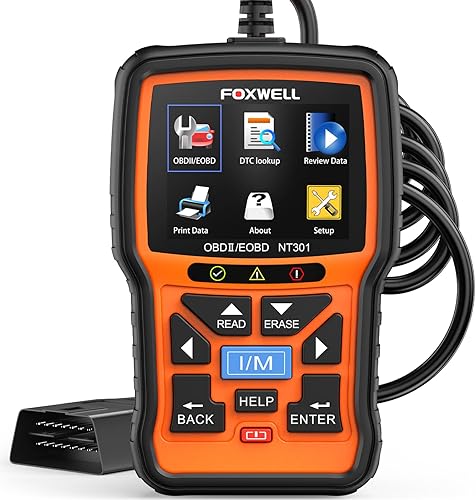 |  |  |  |  |  |  |
|---|---|---|---|---|---|---|---|
| Product | FOXWELL NT301 | OBDLink MX+ | BlueDriver Bluetooth Scanner | Innova 5610 | Autel MaxiCOM MK808S | XTOOL D7 | ANCEL AD310 |
| Brand | FOXWELL | OBDLink | BlueDriver | Innova | Autel | XTOOL | ANCEL |
| Best for | Best Overall | Runner-Up | Best for Repair Reports | Best for Component Testing | Best for Service Functions | Best for Full Diagnostics | Best for Simple Diagnosis |
| The listing says | Reads and clears engine fault codes Clears check engine light after repairs | Connects to iPhone, Android, and Windows Compatible with FORScan, Torque, and more | Scans and clears vehicle trouble codes Accesses ABS, SRS, TPMS, and transmission codes | Accesses OBD2 and OEM live data Includes enhanced data stream and reset functions | Features 3,000+ active tests and system scans Sends commands to actuators across most brands | Includes 64GB storage and 5000mAh battery Performs 4,000+ active tests and bidirectional control | Reads and clears engine trouble codes Features 2.5 foot cable and 12 ounces weight |
| More information | Price on Amazon | Price on Amazon | Price on Amazon | Price on Amazon | Price on Amazon | Price on Amazon | Price on Amazon |
1. FOXWELL NT301 OBD2 Scanner Live Data Professional Mechanic OBDII Diagnostic
Best for: DIY owners needing reliable engine diagnostics.
The FOXWELL NT301 is a standalone tool that doesn’t require a phone or external app to function. You simply plug it into your car’s 16-pin port to get immediate results on its 2.8-inch color screen. This physical connection ensures you aren’t dealing with signal drops or pairing issues, making it ideal for a quick check in the driveway.
49% off Today's Exclusive Deals
Limited-time Exclusive Deals. Check current discount on Amazon.
Check Price on Amazon As an Amazon Associate I earn from qualifying purchases.Pros
- Clear, easy-to-read color display.
- No subscription or setup required.
- Includes lifetime free software updates.
Cons
- Lacks bidirectional control features.
- Limited to emission-related diagnostics.
2. OBDLink MX+ OBD2 Bluetooth Scanner
Best for: Users who prefer using their smartphone.
The OBDLink MX+ turns your phone, tablet, or Windows PC into a diagnostic hub through a wireless Bluetooth connection. It’s the recommended adapter for third-party software suites including FORScan, Torque, BimmerCode, Dashcommand, AlfaOBD, and Carista. Because the connection is wireless, you can monitor live vehicle parameters while sitting in the driver’s seat or during a test drive.
This device provides enhanced OEM support for Ford, GM, Mazda, Nissan, Toyota, Honda, Hyundai, and Kia. It allows you to clear check engine lights and access deep system data like ABS, SRS, and TPMS that basic scanners often miss.
If you plan to leave the scanner plugged in, the built-in over-voltage and battery drain protection prevents electrical issues. However, you must check the online troubleshooting guide to confirm your specific vehicle’s compatibility before buying. This tool isn’t for those who want a dedicated handheld screen, as you must provide your own mobile device to visualize the data.
Pros
- Works with popular third-party software.
- Compact design stays out of the way.
- Includes protection against battery drain.
Cons
- Requires a separate smartphone or tablet.
- Dependent on a stable Bluetooth connection.
3. BlueDriver OBD2 Scanner Bluetooth
Best for: Drivers wanting verified repair reports.
The BlueDriver Bluetooth Scanner provides technician-verified repair reports matched to your specific VIN. This feature removes guesswork by offering definitions, causes, and confirmed fixes for your trouble codes. It connects wirelessly to your phone, keeping your dashboard free of bulky cables.
You should use this tool if you need to monitor live vehicle data, check smog readiness, or analyze Mode 6 test results while driving. It reaches beyond the engine to scan ABS, SRS, Airbag, TPMS, and transmission systems on supported vehicles. If you drive a gas vehicle made in 1996 or newer, or a light-duty truck like an F-250 or Silverado, this scanner is built for your needs.
Don’t expect a physical, all-in-one handheld screen, as the interface relies entirely on the BlueDriver app. A common mistake is assuming universal coverage; always check the compatibility chart for your specific model, especially for enhanced communication on newer 2024+ Nissan and Mazda vehicles.
Pros
- Provides technician-verified repair suggestions.
- No subscription fees for full access.
- Extensive support for multiple vehicle systems.
Cons
- Relies on a smartphone connection.
- Compatibility varies by specific vehicle model.
4. Innova 5610 OBD2 Bidirectional Scan Tool
Best for: Those needing bidirectional control in a handheld unit.
The Innova 5610 is a bidirectional scan tool that lets you send commands to your car, such as turning on a fuel pump or retracting an electronic parking brake. This takes you beyond just reading codes and allows you to actively test components. It’s a robust option for those who want a professional-grade experience in a dedicated, handheld device.
Because it pairs with the RepairSolutions2 app, you can also access additional insights on your mobile device. It isn’t recommended for owners of very old or unique vehicles, as the bidirectional features are limited to specific, modern makes and models.
Pros
- Features professional-level bidirectional controls.
- Includes free software updates.
- Supports multiple languages for global use.
Cons
- Bidirectional features are model-dependent.
- Requires checking coverage before purchase.
5. Autel Scanner MaxiCOM MK808S
Best for: Serious DIYers and small repair shops.
The Autel MaxiCOM MK808S is an all-in-one diagnostic powerhouse featuring a 7-inch touchscreen. It utilizes the same processor and software coverage as the MK900 series, including 3,000+ active tests and full-system diagnostics. Because it uses a direct wired connection, you avoid the signal drops or lag often associated with Bluetooth tools.
If you’re a casual driver only needing to clear a single check engine light, this tool is likely overkill. Its complexity is designed for those who need to perform 28+ service functions, such as BMS, SAS, or clutch learning. If you choose this over a wireless unit, you gain rock-solid stability, but you sacrifice the convenience of walking around the vehicle while connected.
Always verify compatibility for your specific vehicle before purchasing, as features vary by model. It covers 200+ brands, including newer FCA and VAG models with SGW access, and requires an annual renewal fee for software updates.
Pros
- Zero-lag wired connection.
- Access to 3,000+ active tests.
- Lower annual renewal fees than the MK900 series.
Cons
- Wired link limits mobility.
- Steeper learning curve for basic tasks.
6. XTOOL D7 Bidirectional Scan Tool
Best for: Mechanics and DIY enthusiasts needing deep system access.
The XTOOL D7 is a bidirectional scanner featuring 64GB of storage and an all-day 5000mAh battery. It provides OE-level access to all vehicle systems, including airbags and brake modules. It supports FCA, CAN FD, and DoIP protocols.
Always check your battery voltage using the tool’s dedicated reading before starting diagnostics.
The device allows you to graph up to 8 PIDs simultaneously, which is vital for spotting performance trends. Use this to isolate intermittent issues that don’t trigger a dashboard warning light. Use the 39+ special functions to handle various maintenance, relearn, and registration processes.
Pros
- Includes 3 years of free updates.
- Handles advanced module coding and resets.
- Long-lasting battery for all-day use.
Cons
- Steeper learning curve for beginners.
- Features might exceed casual user needs.
7. ANCEL AD310 Classic Enhanced Universal OBD II Scanner Car Engine
Best for: Quick, simple check engine light diagnosis.
The ANCEL AD310 is a straightforward, no-nonsense scanner designed for those who want to identify the cause of an engine light without any fuss. It is compact and durable, with a 2.5-foot cable featuring thick, flexible insulation. It draws power directly from your vehicle’s OBDII port, so you never have to worry about batteries.
This tool is strictly for emission-related codes and basic diagnostics. If your vehicle has an OBDI interface, this scanner won’t work, even with an adapter. It’s also not suitable for users who need to access ABS, SRS, or transmission systems. If you require those advanced diagnostics, choose the FX2000 instead.
Before buying, confirm compatibility with your specific vehicle through customer service. While it supports all OBDII protocols—including CAN, KWP2000, and ISO9141—it’s limited to emission-related engine faults.
Pros
- Very easy to use for beginners.
- No batteries or charging required.
- Sturdy, compact, and highly portable.
Cons
- Limited to emission-related engine codes.
- No advanced system or service reset features.
- Can’t diagnose non-emission engine faults, ABS, or SRS issues.
How to Choose in Sixty Seconds
Which type of scanner is right for my needs?
If your goal is strictly to identify why a check engine light is illuminated, a basic handheld unit like the ANCEL AD310 or FOXWELL NT301 is sufficient. These devices require no prior mechanical knowledge and function as standalone tools. Use these if you want to verify repairs or check your I/M readiness status before an inspection. However, note that these basic models typically ignore non-emission issues like ABS or airbag faults.
If you prefer using your smartphone and want deeper insights, choose a Bluetooth scanner like the BlueDriver or OBDLink MX+. These provide professional-grade data, such as live sensor monitoring and repair reports matched to your specific VIN. These are ideal for the driver who wants to avoid unnecessary shop visits by understanding the root cause of a fault.
For those performing actual repairs or component testing, a bidirectional tool like the Autel MaxiCOM MK808S or XTOOL D7 is essential. These allow you to send commands to your car’s systems—such as cycling a fuel pump, testing cooling fans, or retracting electronic parking brakes. If you’re doing your own maintenance, such as battery registration or throttle body relearns, these tools pay for themselves by replacing dealership-level service fees.
Does the scanner work with all cars?
Most scanners cover gasoline vehicles manufactured from 1996 onwards that utilize the standard OBDII protocol. However, compatibility is never universal. While a basic reader may pull engine codes from almost any 1996+ vehicle, advanced features like bidirectional control, SRS, or ABS access are restricted by the specific make, model, and year of your car.
If you own a newer vehicle with a Security Gateway Module, such as recent FCA or Renault models, you must ensure your scanner supports gateway access. Always verify your specific VIN against the manufacturer’s compatibility chart before purchasing. If you attempt to use a scanner on an older vehicle with an OBDI interface, it won’t function, even if you use an adapter.
Should I worry about ongoing costs?
If you plan to own the tool for many years, prioritize models that offer lifetime free updates. If you choose a device with a renewal fee, consider the long-term commitment required to maintain access to the latest vehicle software. Avoid tools that force you into recurring monthly subscriptions if you only perform occasional maintenance. Always check if the device requires an active account or internet connection to function, as this can limit your ability to diagnose a vehicle in a remote location.
Frequently Asked Questions
What happens if the scanner doesn’t cover my car’s specific system?
If a scanner doesn’t list support for a specific system like ABS or SRS, it cannot retrieve codes for that module. Most basic scanners are limited to engine emission systems. Always verify coverage for your specific vehicle, as even high-end scanners may have limitations on certain brands or model years.
Do I need a professional mechanic to help me use these tools?
No, these tools are designed for car owners, though the technical knowledge required varies. A simple scanner provides a code to look up online, while advanced tools offer deeper data that may require research. If you are unsure about a diagnostic result, consult a professional mechanic.
What is the most common reason a scanner fails to connect?
The most common issue is a poor connection to the 16-pin DLC port or a blown fuse in the OBDII circuit. Ensure the scanner is firmly connected and the ignition is in the “On” position. If it still fails to power on, check your vehicle’s fuse box or update the scanner’s firmware.
Is the simplest scanner on this list enough for me?
A simple scanner is sufficient if you only need to clear a check engine light or confirm readiness for an emissions test. However, if you plan to replace parts or diagnose complex sensor or transmission issues, you will need an advanced tool capable of showing live data and performing bidirectional tests.
Closing
For most drivers, the FOXWELL NT301 remains the top choice due to its balance of ease and capability. It’s a plug-and-play tool, requiring no battery or subscription, making it ideal for quick check engine light diagnostics.
If you prefer a wireless experience with extra repair guidance, the BlueDriver is an excellent alternative. It connects directly to your phone and provides technician-verified repair reports matched to your specific VIN.
Before making your final selection, double-check your vehicle’s make and year against the manufacturer’s compatibility list. Functionality varies significantly; a basic reader like the ANCEL AD310 only handles emission-related codes, while bidirectional units like the XTOOL D7 or Autel MK808S offer advanced module resets and active tests.
If you need to perform maintenance like battery registration or electronic parking brake service, skip the basic code readers and invest in a bidirectional tool. Once you have your scanner, keep it in your glove box so it’s ready whenever a warning light appears.