Most Boss Audio BV9358B problems come from wiring, power, settings, or a bad reset.
If your Boss Audio BV9358B is acting up, you are not alone. I have seen this unit confuse people with no sound, a blank screen, Bluetooth issues, and odd touch response, but most fixes are simple once you know where to look. In this Boss Audio BV9358B Troubleshooting guide, I’ll walk you through the real causes, the best checks to make, and the practical fixes that usually solve the problem fast.

49% off Today's Exclusive Deals
Limited-time Exclusive Deals. Check current discount on Amazon.
Check Price on Amazon As an Amazon Associate I earn from qualifying purchases.
Understanding the Boss Audio BV9358B
The Boss Audio BV9358B is a double-DIN multimedia receiver built for in-dash use. It supports features like Bluetooth, USB playback, AM/FM radio, and touchscreen controls. Like many car stereos, it depends on clean power, proper ground, correct speaker wiring, and the right settings to work well.
When people search for Boss Audio BV9358B Troubleshooting, they usually want one of a few things: no power, no sound, Bluetooth pairing trouble, screen problems, or units that freeze after installation. In my experience, most of these are not caused by a dead stereo. They are often caused by a loose wire, a blown fuse, or a setup issue that looks bigger than it is.
49% off Today's Exclusive Deals
Limited-time Exclusive Deals. Check current discount on Amazon.
Check Price on Amazon As an Amazon Associate I earn from qualifying purchases.If you approach the Boss Audio BV9358B Troubleshooting process step by step, the fix becomes much easier. Think of the stereo like a small computer in a noisy car environment. It needs stable power and clean connections before anything else can work right.

Common Boss Audio BV9358B Problems
Before jumping into repairs, it helps to know the most common failure points. That way, you can narrow down the issue instead of guessing.
No power at all
If the unit will not turn on, the problem is often power related. A blown fuse, disconnected yellow constant power wire, or missing red accessory power wire can stop the radio completely.
49% off Today's Exclusive Deals
Limited-time Exclusive Deals. Check current discount on Amazon.
Check Price on Amazon As an Amazon Associate I earn from qualifying purchases.Screen lights up, but there is no sound
This usually points to speaker wiring, mute settings, or an amplifier issue. Sometimes the unit is working fine, but the audio path is broken somewhere between the head unit and the speakers.
Bluetooth will not connect
Bluetooth problems may come from pairing errors, a full device memory list, or phone compatibility. I have also seen cases where people paired the phone, but the stereo was still set to another source.
Touchscreen is slow or frozen
A frozen screen may happen after a voltage drop or system glitch. The fix is often a reset, but sometimes the display needs a full power cycle.
Radio has poor reception
Weak AM/FM reception can come from a bad antenna connection or a damaged antenna cable. Cars with aftermarket antennas or adapters may need extra care here.
USB or media files do not play
This may be a file format issue, a bad USB stick, or a port problem. The BV9358B can be picky about unsupported formats, corrupted files, or oversized libraries.

Boss Audio BV9358B Troubleshooting Steps
This is the part where careful checking matters. Start with the basics, because many problems are caused by simple setup mistakes.
Check the power wiring first
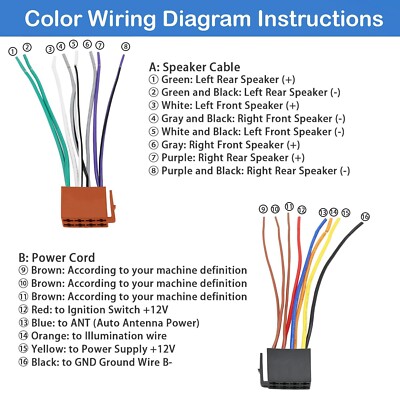
Power is the heart of Boss Audio BV9358B Troubleshooting. Verify that the yellow wire has constant 12V, the red wire gets switched accessory power, and the black wire has a solid ground connection.
A weak ground is one of the most common mistakes I have seen. If the ground is painted, loose, or attached to a poor metal point, the unit may act random, reset, or refuse to boot.
Use a multimeter if you have one. It is a small tool that saves a lot of time because you can confirm voltage instead of guessing.
Inspect the fuse
Check the stereo fuse and the vehicle fuse linked to the radio circuit. A blown fuse can happen during installation, especially if wires were touched together by accident.
If the new fuse blows again right away, stop and inspect the wiring. That usually means there is a short in the harness or a speaker wire touching ground.
Confirm the harness connections
Make sure every wire in the harness is matched correctly. Pay close attention to power, ground, speaker outputs, illumination, and remote turn-on if you are using an amplifier.
Loose crimp connectors or half-seated plugs can create problems that come and go. That is the kind of issue that drives people crazy because the stereo seems to work one minute and fail the next.
Test the speakers one by one
If there is no sound, test the speaker wiring and speaker load. A damaged speaker, shorted wire, or crossed wire can make the amplifier shut down or mute audio.
When I troubleshoot audio systems, I like to disconnect the speakers and test them in a simple pattern. That helps separate a head unit problem from a speaker problem fast.
Reset the unit
A reset can fix frozen screens, odd settings, and pairing glitches. If the Boss Audio BV9358B has a reset pinhole or reset option, use it after checking power and wiring.
A reset is useful, but it should not be your first and only move. If the wiring is wrong, the problem will return no matter how many times you reset it.
Re-pair Bluetooth the right way
Delete the BV9358B from your phone’s Bluetooth list, then clear saved devices from the stereo if needed. After that, pair again from scratch.
Many users accidentally keep old pairings that conflict with the current connection. This is a lot like trying to open the same door with two different keys at once.
Check the source and settings
Make sure the stereo is not muted and that the volume is not set too low. Also check that the unit is on the correct source, such as Bluetooth, radio, USB, or AUX.
It sounds basic, but I have lost count of how often a “broken” stereo was simply on the wrong input. The fix took seconds once the right source was selected.
Inspect the antenna and media inputs
If radio reception is weak, check the antenna plug at the rear of the unit. If USB playback is failing, test a different flash drive and use simple files first.
Use clean, standard audio files to rule out format issues. A messy USB drive can hide the real problem and make the stereo seem faulty when it is not.

Fixing No Power Issues on the Boss Audio BV9358B
No power is one of the most frustrating Boss Audio BV9358B Troubleshooting cases because it feels like a total failure. Still, most of the time the stereo is fine and the issue is upstream.
What to check
• Yellow constant power wire: This should have battery power at all times.
• Red accessory wire: This should get power when the ignition is on.
• Black ground wire: This must connect to bare metal with a strong contact.
• Fuse: Check both the stereo fuse and vehicle fuse.
• Harness fit: Make sure plugs are fully locked in.
Common causes
• Blown fuse from a short during install
• Wrong wire matched to the wrong source
• Poor ground point
• Loose adapter harness
• Dead vehicle battery or low voltage
Practical tip
If the unit turns on only sometimes, test the voltage while the car is running. A weak battery or bad alternator can cause the stereo to reboot or shut off when the voltage drops.

Fixing No Sound or Low Volume
If the display works but the speakers stay silent, the Boss Audio BV9358B Troubleshooting process should focus on the audio path.
Check these items
• Volume and mute setting
• Speaker balance and fade
• Speaker wire pairs
• Amplifier remote wire, if used
• RCA connections, if your system uses an external amp
Why this happens
A shorted speaker wire can make the internal amp protect itself. A bad speaker can do the same thing. Sometimes the head unit is fine, but one wire touching bare metal shuts down the whole sound stage.
What has worked well for me
I like to disconnect all speakers, then reconnect them one pair at a time. That makes it easier to find the bad channel without tearing apart the whole dash.
If the unit has sound on headphones, Bluetooth, or another source but not radio, the issue may be source specific. That helps narrow the problem instead of replacing parts too soon.
Fixing Bluetooth Pairing Problems
Bluetooth is one of the most searched parts of Boss Audio BV9358B Troubleshooting because it feels simple, but it often gets messy.
Try this order
- Turn Bluetooth off on your phone, then on again.
- Delete the BV9358B from your phone’s saved devices.
- Clear the stereo’s stored pairings if possible.
- Restart the phone and the stereo.
- Pair again from scratch.
Common Bluetooth causes
• Too many saved devices
• Old pairing data
• Phone software bugs
• Distance between phone and stereo
• Wrong audio source selected
Helpful lesson
People often assume a Bluetooth issue means the stereo is broken. In reality, the phone is sometimes the problem. I have fixed many pairing issues just by removing old devices and starting clean.
Fixing Screen, Touch, and Freeze Issues
Display issues can feel serious, but they often come from momentary glitches. This is common in car electronics because the system faces vibration, heat, and voltage shifts.
What to do
• Perform a reset
• Turn the car off, wait a minute, and restart
• Check for loose power and ground connections
• Confirm the screen is not in a dimmed or demo state
• Inspect for heat buildup behind the dash
Why the screen may freeze
A screen freeze can happen after a low-voltage event. It can also happen if the stereo was installed in a way that traps heat or bends the wiring too tightly.
What I have learned
A lot of touchscreen problems are not permanent. If the unit was working before a battery disconnect or jump start, start with a hard reset and voltage check before assuming the display failed.
Fixing Radio Reception and Static
Poor radio performance is another common Boss Audio BV9358B Troubleshooting complaint. If the unit plays everything else well but radio sounds weak or noisy, the antenna path is the first place to check.
Check these points
• Antenna plug fully inserted
• Antenna adapter compatibility
• Damaged antenna cable
• Loose head unit connector
• Nearby electrical noise from poor grounding
Simple test
Switch from FM to AM and compare the signal. If both are weak, the issue is more likely the antenna system than the station itself.
Extra note
Aftermarket radios may need the correct antenna adapter. Without it, the connection can seem fine but still perform badly.
Fixing USB and Media Playback Issues
USB problems usually come down to file format, drive quality, or port damage. The Boss Audio BV9358B can only read what it understands, so the source media matters a lot.
Try these steps
• Use a different USB drive
• Format the drive if needed
• Load a few simple MP3 files
• Remove very large folders or strange file names
• Test another source like Bluetooth or radio
Common causes
• Unsupported audio format
• Corrupted files
• Bad flash drive
• Dirty or damaged USB port
• File structure too deep or too large
Practical example
I once had a unit that refused one USB stick but worked perfectly with another. The problem was not the stereo. The drive itself was old and had bad sectors, which made the player act like it was failing.
When to Suspect a Deeper Hardware Problem
Sometimes Boss Audio BV9358B Troubleshooting reaches a point where the issue is likely internal. That does happen, but it is less common than wiring or setup trouble.
Signs of hardware failure
• The unit will not power on after confirmed voltage checks
• The screen stays dead after reset and power test
• Audio cuts out even with correct wiring and good speakers
• Buttons or touchscreen do not respond at all
• Smoke, burning smell, or visible damage
What to do next
At that point, professional repair or replacement may make more sense than more testing. If the unit is under warranty, avoid opening it or modifying it further.
Trustworthy approach
This is where honesty matters. Not every stereo is worth saving, and not every symptom has a cheap fix. A careful diagnosis protects your time and your wallet.
Prevention Tips to Avoid Future Problems
Good troubleshooting is useful, but prevention is even better. A clean install can save hours later.
Best habits
• Use proper crimp connectors or soldered joints
• Ground to clean bare metal
• Keep wires neat and secure
• Use the correct fuse size
• Test the system before fully reassembling the dash
• Protect the unit from heat and moisture
Why this matters
Car audio systems live in a rough environment. Heat, vibration, and poor wiring can turn a good stereo into a headache. The cleaner the install, the fewer surprises later.
Personal takeaway
The best Boss Audio BV9358B Troubleshooting session is the one you never need. A little patience during installation usually prevents the biggest problems afterward.
Frequently Asked Questions of Boss Audio BV9358B Troubleshooting
Why does my Boss Audio BV9358B turn on and off repeatedly?
This usually means the unit is losing power or ground. Check the yellow, red, and black wires first, then inspect the fuse and battery voltage.
Why is there sound only on some speakers?
That often points to a speaker wire issue, a bad speaker, or a connection problem in the harness. Test each speaker pair one at a time to find the fault.
How do I reset the Boss Audio BV9358B?
Use the reset button or reset pinhole if your unit has one. If that does not help, turn the car off, disconnect power if needed, and then restart the system after a short wait.
Why won’t my phone connect to Bluetooth?
Old pairing data is a common cause. Remove the stereo from your phone’s Bluetooth list, clear stored devices on the head unit if possible, and pair again from scratch.
Why is my screen on but the stereo has no sound?
The unit may be muted, on the wrong source, or connected to a faulty speaker path. Check volume, source, speaker wiring, and any external amplifier connections.
Can a bad battery affect Boss Audio BV9358B performance?
Yes, low voltage can cause the unit to restart, freeze, or act unstable. A weak battery or charging system can create problems that look like stereo failure.
Conclusion
Boss Audio BV9358B Troubleshooting becomes much easier when you follow the basics: power, ground, fuse, wiring, settings, and reset. In most cases, the problem is not mysterious at all. It is usually a connection issue, a pairing mistake, or a small setup problem hiding in plain sight.
If you take your time and test one thing at a time, you will save money and avoid unnecessary part swaps. Start with the simple checks, document what you find, and only move to deeper repairs if the basics are solid. If this guide helped, try the steps on your own system, explore more car audio tips, or leave a comment with the issue you are seeing.





