If you use a car diagnostic tool like the Ancel AD310, you already know how helpful it is for reading trouble codes and checking your vehicle’s health. But what happens if you want to get the latest features, bug fixes, or compatibility updates? Many people ask: How do you update the Ancel AD310? The answer is not as simple as plugging it in and pressing a button. In this guide, you’ll learn everything you need to know about updating the Ancel AD310—from understanding its design, to step-by-step instructions, to expert tips that most beginners miss.
Let’s clear up the confusion, so you can keep your scanner working its best and avoid common mistakes that waste time or even damage your device. This article is designed for both new and experienced users, with simple language and practical advice.

49% off Today's Exclusive Deals
Limited-time Exclusive Deals. Check current discount on Amazon.
Check Price on Amazon As an Amazon Associate I earn from qualifying purchases.Understanding The Ancel Ad310: What Makes It Unique?
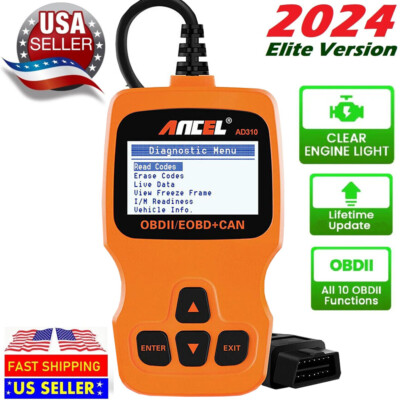
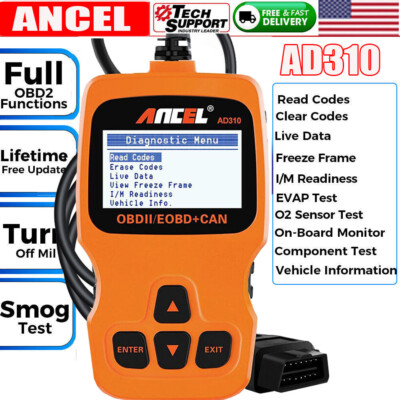
Before you look for updates, it’s important to understand what the Ancel AD310 is and how it works. The AD310 is a basic OBD2 code reader. It helps car owners and mechanics read and clear engine codes, check emissions, and get basic data about a vehicle’s performance. It’s known for being affordable, easy to use, and compatible with most vehicles made after 1996.
But here’s something many people don’t realize: the Ancel AD310 is a hardware-based scanner. This means it doesn’t have an operating system or software that you can update like a smartphone or computer. Most of its functions are built into the device itself.
Why Do People Think Updates Are Needed?
You may have read online or in the product manual about “firmware” or “software” updates. This can be confusing. Some OBD2 scanners do allow updates via USB or SD card. These are usually more advanced models, often with screens, extra buttons, or Wi-Fi.
49% off Today's Exclusive Deals
Limited-time Exclusive Deals. Check current discount on Amazon.
Check Price on Amazon As an Amazon Associate I earn from qualifying purchases.The Ancel AD310 does NOT support software or firmware updates. Its features are fixed at the factory. This is an important point, and one that many beginners miss. Trying to update it like a modern, upgradable device can lead to frustration—or even risk damaging your scanner if you try to force an update with the wrong files.
Can The Ancel Ad310 Really Be Updated?
This is the question at the heart of the matter. Let’s look at the facts.
- The AD310 does not have a USB port for data transfer.
- It does not have an SD card slot.
- The manufacturer, Ancel, does not provide update files on their official website.
- The user manual does not mention any update process.
- Technical support confirms the device is not designed for updates.
If you search online, you may see videos or forums that talk about updating OBD2 devices. Almost always, these refer to other models in the Ancel lineup or to scanners from other brands.
In short: The Ancel AD310 cannot be updated with new software or firmware. What you buy is what you use, for the life of the device.
49% off Today's Exclusive Deals
Limited-time Exclusive Deals. Check current discount on Amazon.
Check Price on Amazon As an Amazon Associate I earn from qualifying purchases.Why This Is Not A Bad Thing
You might think, “If I can’t update my AD310, is it useless? ” Not at all. This tool is built to last, and its fixed features mean you don’t have to worry about complicated update steps, compatibility problems, or bricking your device by installing the wrong file.
For most users, the AD310’s core functions—reading and clearing codes, checking emissions, viewing data streams—are all you need. The lack of updates actually makes it very reliable.

When Should You Consider An Upgrade?
If you want new features, support for more car makes, or advanced diagnostics, you might need to look beyond the AD310. Here are some signs it’s time to upgrade:
- You have a newer car (2020 or later) and the AD310 can’t connect or read codes.
- You want extra features like ABS/SRS diagnostics, live data graphing, or Bluetooth connectivity.
- You need updates for changing vehicle technology (for example, hybrid or electric vehicles).
In these cases, it’s best to research more advanced scanners. Some of these do offer regular updates, often with simple instructions and support.
Comparing The Ad310 To Updatable Scanners
Here’s a quick look at how the Ancel AD310 compares to updatable models:
| Feature | Ancel AD310 | Advanced Updatable Scanner |
|---|---|---|
| Update Capability | No updates | Regular updates via USB or Wi-Fi |
| Supported Vehicles | Most OBD2 cars (1996+) | Wider range, including newer models |
| Functions | Basic code reading/clearing | Advanced diagnostics, live data, more systems |
| Price | Budget-friendly | Mid to high-end |
If you only need basic diagnostics, the AD310 is still a smart pick. But if you want the latest features, consider investing in a model that supports updates.
What If You See “update” Options Online?
Many websites and sellers use the word “update” in marketing, but they may be referring to different things:
- Stock rotation: Sellers sometimes call newer batches “updated versions,” but the design is the same.
- Product upgrades: Newer models, not the same AD310, may have added features or software.
- Counterfeit warnings: Some unofficial sellers offer “update files” for the AD310. These are often scams.
Always check the official Ancel website or reach out to their support for the latest and most accurate information.
How To Keep Your Ancel Ad310 Working Its Best
Even though you can’t update the software, there are practical steps you can take to keep your device in top condition:
1. Handle With Care
The AD310 is a sturdy tool, but dropping it or exposing it to moisture can damage the screen or buttons. Always store it in a dry, padded case.
2. Clean The Connector
The OBD2 connector is the part that plugs into your car. If the pins get dirty or bent, the scanner may not work. Gently clean with a dry cloth and check for bent pins before each use.
3. Avoid Extreme Temperatures
Like most electronics, the AD310 doesn’t like very hot or cold environments. Don’t leave it in a car during a heatwave or freezing night.
4. Use With Supported Vehicles Only
The AD310 works with most cars made after 1996 that support OBD2. Using it on incompatible vehicles won’t break the scanner, but you won’t get any useful information.
5. Keep The Manual Handy
Sometimes a code appears that you’re not sure about. The manual has a list of common codes and troubleshooting tips. If you lose your manual, you can usually download a PDF from the manufacturer’s site.
6. Check For Physical Damage
Over time, the cable can wear out, or the buttons can get sticky. If you notice problems, it’s better to replace the device than try to fix it yourself.
7. Buy From Reputable Sellers
Counterfeit or “clone” scanners can look like the real thing, but may not work properly. Always buy from trusted stores or the official Ancel website.
What To Do If You Want More From Your Scanner
If you feel limited by what the Ancel AD310 offers, you might want to look into upgrading to a more advanced model. Some of the best updatable OBD2 scanners include:
- Ancel FX2000
- Autel MaxiCOM MK808
- Launch CRP129E
These devices often feature:
- USB or Wi-Fi update capability
- Touchscreen displays
- More systems (like ABS, SRS, transmission)
- Live data graphing
- Support for newer cars and even some trucks
How To Update An Advanced Obd2 Scanner
To give you an idea of what updating looks like (for models that support it), here’s a quick step-by-step:
- Visit the manufacturer’s website and download the latest update file.
- Connect your scanner to your computer via USB.
- Run the update tool and follow the on-screen instructions.
- Safely disconnect after the update is complete.
This is not possible with the AD310, but it’s the process for other Ancel models and brands.
Comparing Features: Basic Vs. Updatable Scanners
Here’s a side-by-side view of what you get with a basic scanner like the AD310 and an advanced, updatable scanner:
| Function | Ancel AD310 | Updatable Scanner |
|---|---|---|
| OBD2 Codes | Yes | Yes |
| ABS/SRS Codes | No | Yes |
| Live Data Graphing | No | Yes |
| Update Support | No | Yes |
| Price | Low | Mid to High |
Myths And Mistakes: What Beginners Often Get Wrong
When it comes to updating the Ancel AD310, there are a few common misunderstandings that can cost you time and money.
1. Believing All Obd2 Scanners Are Updatable
Not every scanner can be updated. Some are designed to be simple and reliable—like the AD310. Don’t assume all devices work like your phone or laptop.
2. Looking For “secret” Update Tools
There are websites that claim to offer hidden updates or hacks. These are often scams and can harm your device. Only trust the official Ancel website or support.
3. Mixing Up Model Numbers
Ancel makes many scanners, and their names can look similar. For example, the AD410 and FX2000 do offer updates, but the AD310 does not. Always check your exact model before following any instructions.
4. Thinking Updates Fix Every Problem
If your scanner isn’t working, it’s usually a hardware issue or an incompatible car—not a missing update. Try basic troubleshooting (like checking your car’s fuse or the OBD2 port) before assuming a software fix is possible.
5. Ignoring Product Documentation
The manual and official website have important details about what your scanner can (and cannot) do. Reading these can save you hours of frustration.
Expert Tips For Getting The Most Out Of Your Ancel Ad310
Even if you can’t update the scanner, you can still use it like a pro. Here are two smart tricks many users miss:
Use A Reference App
If you want to understand trouble codes quickly, pair your scanner with a smartphone app or website that explains OBD2 codes in plain English. This makes it easier to take action, especially if you’re new to car diagnostics.
Keep A Diagnostic Log
Write down the codes you read and what you did to fix them. Over time, this helps you spot patterns, predict future problems, and communicate better with your mechanic.
Share The Tool
The AD310 is easy to use and works on most cars. Let friends or family borrow it, or keep it in your glovebox for emergencies. It’s a small investment that can save you big money on repairs.
Real-world Example: The Value Of Simplicity
Mark, a taxi driver in Chicago, bought the Ancel AD310 to keep track of his car’s health. He liked that it was “plug and play”—no apps or updates needed. When his check engine light came on, he used the AD310 to read the code and found a simple fix: a loose gas cap. No dealer visit, no stress.
This story shows that sometimes, having a tool that “just works” is more valuable than chasing the latest software update.
Why Simplicity Wins For Many Car Owners
The car diagnostic world is full of complex, feature-packed devices. But for most people, simplicity and reliability matter more than having the latest update. The Ancel AD310 fits this need perfectly. It’s a “what you see is what you get” tool—no updates, but also no confusion.
If you want a scanner that’s always ready, never needs software updates, and delivers results in seconds, the AD310 is still a top choice.
However, if you’re working with newer vehicles, want the latest technology, or need advanced diagnostics, it may be worth upgrading to a model that supports updates. Just make sure you choose a model that matches your real needs—not just the promise of updates.
For more information on OBD2 standards and scanner compatibility, visit the official On-Board Diagnostics Wikipedia page.
Frequently Asked Questions
Can I Update My Ancel Ad310 Scanner’s Software?
No, you cannot update the Ancel AD310. It is a hardware-based device with fixed software. There are no update files or procedures offered by the manufacturer.
Why Do Some Sellers Say The Ad310 Is “upgradable” Or “latest Version”?
Some sellers use the word “upgrade” to mean the latest production batch or packaging. This does not mean the device is actually updatable. Always check the official Ancel website for accurate information.
What Should I Do If My Ad310 Is Not Working With My Car?
First, make sure your car supports OBD2 (most cars made after 1996 do). Check the OBD2 port for damage and make sure the scanner is plugged in fully. If it still does not work, the issue is likely with the car’s system or the scanner’s hardware.
Can I Use The Ancel Ad310 On Cars Made After 2020?
The AD310 works with most cars made after 1996, but newer cars (2020 and later) may use updated protocols. If your AD310 can’t connect, you may need a more advanced scanner that supports updates and newer standards.
Is It Safe To Buy “update Files” For The Ad310 From Third-party Websites?
No, it is not safe. The AD310 does not support updates. Any files or tools offered online for updating the AD310 are likely scams and could damage your device.
Choosing the right tool for your needs and understanding its real capabilities will save you time, money, and frustration. The Ancel AD310 is a strong, reliable scanner for everyday car owners. Just remember: it does not require and cannot accept updates. If you need more, explore advanced models—but always buy from trusted sources and follow official instructions.