Most Kenwood Excelon DMX709S issues come from wiring, settings, Bluetooth, or firmware glitches.
If your Kenwood Excelon DMX709S is acting up, the good news is that most problems are fixable without replacing the unit. I’ve seen this model go from “dead screen” panic to smooth daily use after a few simple checks, and that is exactly what this guide is for. You’ll learn how to troubleshoot the Kenwood Excelon DMX709S step by step, what causes the most common issues, and how to avoid the mistakes that waste time and money.

49% off Today's Exclusive Deals
Limited-time Exclusive Deals. Check current discount on Amazon.
Check Price on Amazon As an Amazon Associate I earn from qualifying purchases.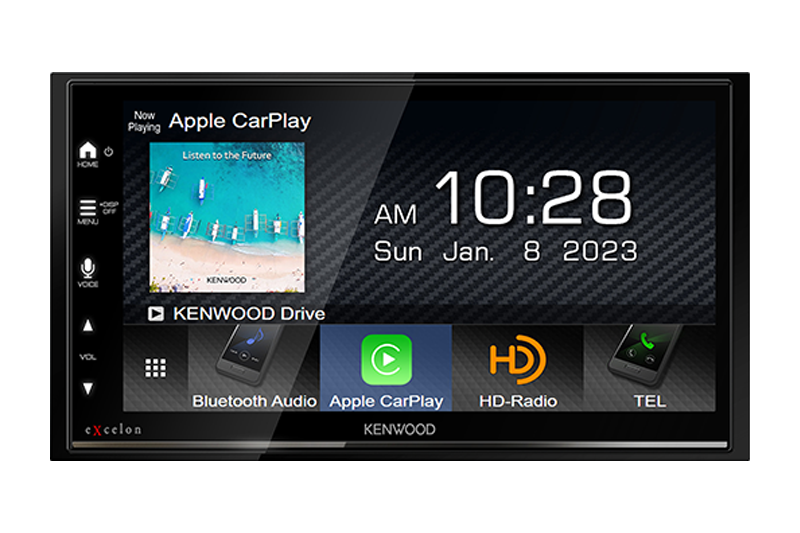
Common Kenwood Excelon DMX709S Problems
The Kenwood Excelon DMX709S is a capable multimedia receiver, but like any car audio system, it can run into small problems. The most common complaints usually involve no power, blank screens, Bluetooth trouble, sound issues, Apple CarPlay or Android Auto problems, and touch response glitches.
In my experience, most of these issues are not “bad unit” problems. They usually come from loose connections, incorrect settings, or outdated firmware. That is why a calm, step-by-step approach works better than guessing.
49% off Today's Exclusive Deals
Limited-time Exclusive Deals. Check current discount on Amazon.
Check Price on Amazon As an Amazon Associate I earn from qualifying purchases.Some symptoms you may notice include:
• The unit does not turn on
• The screen is black but the radio is powered
• Bluetooth will not pair or keeps dropping
49% off Today's Exclusive Deals
Limited-time Exclusive Deals. Check current discount on Amazon.
Check Price on Amazon As an Amazon Associate I earn from qualifying purchases.• No sound from the speakers
• CarPlay or Android Auto will not connect
• The touchscreen is slow or unresponsive
• Camera input does not show up
• The unit keeps rebooting

Start With the Basics Before You Dig Deeper
Before chasing a bigger issue, always start with the simple checks. I cannot count how many times a “major failure” turned out to be a fuse, a bad ground, or a cable that was not fully seated.
Here is the first pass I recommend:
• Check the vehicle fuse and the radio fuse
• Make sure the wiring harness is firmly connected
• Confirm the ground wire is attached to clean metal
• Inspect the battery voltage
• Verify the parking brake wire is connected correctly if required
• Make sure the display brightness is not turned all the way down
A weak battery can also cause strange behavior. Car audio units are sensitive to unstable voltage, so if the vehicle battery is low or the charging system is weak, the Kenwood Excelon DMX709S may act flaky even when nothing is wrong with the receiver itself.
Kenwood Excelon DMX709S Troubleshooting for Power Issues
If your unit will not turn on, start with power first. This is one of the most common Kenwood Excelon DMX709S troubleshooting cases, and it often comes down to a basic electrical issue.
Check these points in order:
-
Confirm constant 12V power is present on the yellow wire
-
Confirm ignition or accessory power is present on the red wire
-
Check the black ground wire for a solid metal connection
-
Inspect the fuse behind the unit and the vehicle fuse box
-
Test the harness with a multimeter if possible
A loose ground is a classic problem. It can cause the unit to fail to power up, reboot randomly, or lose settings. I have seen systems come back to life after simply cleaning the grounding point and tightening the connection properly.
If the unit powers on only sometimes, the issue may be vibration-related. That usually means a loose connector, a weak crimp, or a wire that is just barely making contact.
Fixing a Blank Screen or No Display
A blank screen does not always mean the system is dead. Sometimes the unit is on, but the display settings, dimmer, or wiring are the real issue.
Try these steps:
• Increase screen brightness in the settings
• Check if the dimmer is enabled
• Restart the unit
• Inspect the display cable connection if the unit was recently installed or removed
• Try a hard reset if the screen stays black
If the audio works but the display does not, that points toward a screen or display connection issue rather than a full power failure. On the other hand, if nothing works at all, go back to the power checks first.
One thing I learned early on is not to assume the screen is broken just because it looks off. A dimmed display in daylight can fool you fast.
Bluetooth Pairing and Connection Problems
Bluetooth issues are one of the most searched Kenwood Excelon DMX709S troubleshooting topics. The good news is that they are often easy to solve.
If your phone will not pair, try this:
• Delete the DMX709S from your phone’s Bluetooth list
• Delete your phone from the unit’s paired device list
• Turn Bluetooth off and back on again on both devices
• Restart the phone and the receiver
• Pair again from scratch
• Keep the phone close to the unit during pairing
If the connection keeps dropping, interference may be the cause. Other Bluetooth devices, old phone software, or too many saved devices can create instability. Clearing old pairings often helps more than people expect.
Also check whether the phone is connected to another car, headset, or speaker. A phone can only “focus” so well, and sometimes it grabs the wrong device first.
Apple CarPlay and Android Auto Troubleshooting
Many owners buy the Kenwood Excelon DMX709S for smartphone integration, so when CarPlay or Android Auto fails, it feels frustrating. In most cases, the problem is with the cable, phone settings, or firmware.
For wired connections, use a high quality USB cable that supports data transfer. Cheap charging cables often power the phone but do not pass data properly, which makes the system look broken when it is really just the cable.
Try this checklist:
• Use an original or certified USB cable
• Plug into the correct USB port
• Unlock the phone before connecting
• Enable CarPlay or Android Auto permissions on the phone
• Remove old phone profiles and reconnect
• Update the phone OS and the Kenwood firmware
For wireless setups, distance and interference matter even more. Keep the phone close during setup and avoid multiple wireless devices trying to connect at the same time.
I have found that bad cables cause more “mystery” CarPlay issues than the unit itself. If you only try one thing first, make it a known good cable.
Sound Problems: No Audio, Low Volume, or Distortion
If the screen works but there is no sound, the issue may be in the audio path, speaker wiring, or settings. This is another area where Kenwood Excelon DMX709S troubleshooting pays off when you go step by step.
Check the following:
• Make sure mute is off
• Increase volume and confirm source volume is not low
• Verify balance and fade are centered
• Check the amplifier remote wire if using an external amp
• Inspect speaker wire connections for shorts or loose ends
• Confirm the source is playing audio
If sound is distorted, the gain structure may be off. Too much gain can cause clipping, especially if the system includes an amplifier or subwoofer. The DMX709S can sound clean, but only when the signal chain is set correctly.
A hidden problem I have seen more than once is speaker wire touching metal behind the dash. That can cause weak output, cutouts, or protection mode behavior. It is a small mistake with a big effect.
Touchscreen, Freezing, and Reboot Problems
If the unit freezes or the touchscreen acts slow, software or firmware is often the culprit. Like a phone, the receiver can get confused by bad data, old firmware, or too many failed connections.
Try these fixes:
• Perform a soft reboot
• Check for firmware updates
• Remove unused Bluetooth pairings
• Reset user settings if needed
• Disconnect external devices one by one to isolate the issue
If the unit keeps rebooting, look for a power drop. That can happen when the ignition wire loses voltage or the ground is unstable. Reboot loops are often power problems disguised as software problems.
A factory reset can help, but use it wisely. It clears settings and saved profiles, so only do it after you have tried the easier steps and written down your custom settings.
Camera and Backup Input Problems
Backup camera problems are common after installation or after a vehicle battery change. If the rear camera does not show, the issue may be in the trigger wire, camera power, or video input connection.
Check these points:
• Confirm the camera is powered correctly
• Inspect the RCA video connection
• Check the reverse trigger wire
• Make sure the vehicle is actually in reverse
• Verify the camera is compatible with the receiver’s input type
Sometimes the camera works, but the image is black because the reverse trigger is not signaling the unit. In other cases, the camera may need to be wired to a proper power source rather than a weak accessory line.
If the image is upside down or mirrored, that is usually a camera setting, not a hardware problem. Small settings can make a big difference here.
How to Reset the Kenwood Excelon DMX709S
Resetting the unit can solve a lot of strange behavior. I usually treat it like a fresh start when the unit is stuck, glitchy, or refusing to connect properly.
Use these reset options:
• Soft reset: Restart the unit without deleting everything
• Factory reset: Restore default settings and erase custom setup
Before resetting, note these items:
• Audio settings
• Bluetooth pairings
• Camera settings
• Steering wheel control assignments
• Equalizer settings
A reset is useful, but it is not magic. If the root problem is wiring or power, the issue will come right back after the reset. That is why I always say: reset last, not first.
Firmware Updates and Why They Matter
Firmware updates are one of the most overlooked parts of Kenwood Excelon DMX709S troubleshooting. They can fix bugs, improve smartphone compatibility, and make the unit more stable.
Before updating:
• Use a reliable USB drive if required
• Format it properly
• Follow the receiver’s update steps exactly
• Do not turn off the vehicle during the update
• Make sure battery voltage is stable
A failed update can create more problems than it solves. That is why I always recommend doing updates with the engine running or with a battery maintainer, when appropriate and safe.
Keeping firmware current is especially important if you use newer iPhones or Android phones. Phone updates can expose old compatibility issues fast.
Installation Mistakes That Cause Trouble
A lot of “Kenwood Excelon DMX709S troubleshooting” starts with installation mistakes. The receiver may be excellent, but a sloppy install can make it behave badly.
Common mistakes include:
• Poor grounding
• Loose crimp connectors
• Wrong reverse trigger wiring
• Incorrect amp turn-on wire connection
• Using low-quality USB extensions
• Pinched wires behind the dash
• Ignoring vehicle-specific integration needs
I always tell people to think of installation like plumbing. If one joint leaks, the whole system suffers. Audio gear is the same way.
If you did the install yourself, go back and inspect each connection slowly. If a shop installed it, ask them to verify the wiring before assuming the unit is faulty.
When the Kenwood Excelon DMX709S May Be Defective
Most issues are fixable, but sometimes the unit itself is the problem. A defective receiver is less common than wiring or setup issues, but it does happen.
Possible signs of a real hardware failure:
• The unit will not power on even with correct voltage
• The screen stays dead after all checks
• Audio outputs fail on every source
• The touchscreen does not respond after reset
• The unit overheats abnormally
• The device reboots even with stable power and clean wiring
If you reach this point, document everything you tested. That makes warranty support much easier. It also helps prove that the issue is not from installation or vehicle wiring.
Best Troubleshooting Workflow for Fast Results
The fastest way to solve problems is to test from the outside in. That means starting with the easy checks before moving to the deeper ones.
Use this order:
-
Check vehicle battery and fuse power
-
Inspect power, ground, and ignition wires
-
Confirm the screen and brightness settings
-
Test Bluetooth or smartphone cables
-
Check sound settings and speaker wiring
-
Reset the unit if needed
-
Update firmware
-
Test with known good devices and cables
This order saves time because it separates power issues, connection issues, and software issues. That simple structure has saved me hours on more than one install.
Preventive Tips to Avoid Future Problems
The best troubleshooting is the kind you never need. A few small habits can keep the Kenwood Excelon DMX709S running smoothly for years.
Helpful prevention tips:
• Use quality wiring and connectors
• Keep firmware updated
• Use certified phone cables
• Avoid unplugging devices while the system is active
• Secure all wires behind the dash
• Check battery health regularly
• Save your settings after any major change
Think of the receiver like a car engine. It runs best when the basics are right and the system is kept clean, stable, and up to date.
Frequently Asked Questions
Why does my Kenwood Excelon DMX709S not turn on?
The most common causes are a blown fuse, missing accessory power, or a bad ground. Check the yellow, red, and black wires first before assuming the unit is defective.
Why is my Kenwood Excelon DMX709S screen black but the audio works?
This usually points to a display brightness issue, dimmer setting, or a screen connection problem. Try increasing brightness and restarting the unit before moving to deeper checks.
Why won’t my phone connect to Bluetooth or CarPlay?
Old pairings, a bad USB cable, or phone permission settings are often the cause. Delete the old connection on both devices and pair again using a known good cable if needed.
How do I reset my Kenwood Excelon DMX709S?
You can use a soft reset for a quick restart or a factory reset to restore default settings. A factory reset clears saved data, so only use it after checking basic wiring and settings.
Why does my Kenwood Excelon DMX709S keep rebooting?
Random reboots are often caused by unstable power, a weak ground, or a loose connector. Firmware problems can also play a role, so check power first and then look at software updates.
Can a bad USB cable cause CarPlay or Android Auto issues?
Yes, absolutely. A cable may charge the phone while failing to pass data, which can make the receiver seem faulty when the real issue is the cable itself.
Conclusion
Kenwood Excelon DMX709S troubleshooting becomes much easier when you break the problem into clear parts: power, wiring, settings, connections, and firmware. Most issues are caused by simple things, and the best results usually come from careful checks instead of quick guesses.
If your unit is acting up, start with the basics, test one thing at a time, and keep notes on what changes. That approach saves time, reduces frustration, and gives you a much better shot at fixing the issue the right way. If you found this guide helpful, leave a comment with your symptom or explore more car audio tips to keep your system running at its best.





