When you pick up a battery charger and see numbers like 2A, 6A, or 10A on the dial, it’s easy to feel confused if you’re not an expert. The amp setting isn’t just a technical detail—it controls how your charger interacts with your battery. Choose wrong, and you might wait too long, damage your battery, or even create safety problems. This article will guide you through everything about the amp setting on a battery charger, so you can charge smarter, safer, and with more confidence.
Understanding What “amp” Means
Let’s start with the basics. Amp stands for “ampere,” a unit that measures the flow of electrical current. The amp setting on your battery charger tells you how much current the charger sends to the battery every second. Think of it like water flowing through a hose: more amps mean more “water” (electricity) moving faster. The voltage is like the pressure, and the amp is the volume. Both are important, but for charging, the amp setting is what you control.

49% off Today's Exclusive Deals
Limited-time Exclusive Deals. Check current discount on Amazon.
Check Price on Amazon As an Amazon Associate I earn from qualifying purchases.Why Amp Settings Matter
If you set the amps too high, the battery can overheat, bubble, or even become damaged. Too low, and you’ll be waiting forever for a full charge. The right setting helps you:
- Charge your battery faster when you need to
- Extend your battery’s overall life
- Avoid common charging mistakes and safety risks
Types Of Battery Chargers And Their Amp Settings
Not all battery chargers work the same way. Understanding the different types helps you choose the best amp setting for your needs.
Manual Vs. Automatic Chargers
Manual chargers let you set the amp rate yourself. You need to monitor the process and stop charging when the battery is full. Automatic chargers detect when the battery is full and stop or switch to a maintenance mode automatically. They often adjust the amp setting as needed, but many still let you choose the starting current.
49% off Today's Exclusive Deals
Limited-time Exclusive Deals. Check current discount on Amazon.
Check Price on Amazon As an Amazon Associate I earn from qualifying purchases.Smart Chargers
Smart chargers use microprocessors to sense the battery condition. They select the ideal amp setting, sometimes even changing it during the charge. This protects the battery and makes charging safer and more efficient.
Fast Chargers
Fast chargers provide higher amp settings (sometimes over 20A) to fill a battery quickly. These are often used by professionals or in emergencies, but they can shorten battery life if used too often.
Common Amp Settings On Battery Chargers
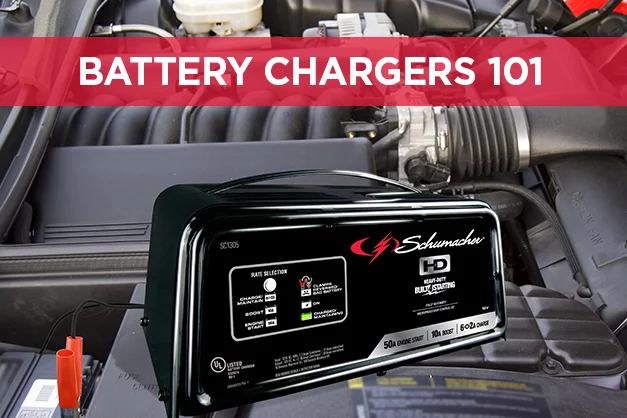
Most chargers offer several amp settings. You might see these numbers on your device:
- 2A (Trickle or Maintenance Charging): For small batteries or to keep a battery topped up.
- 6A (Standard Charging): Suitable for regular car batteries.
- 10A (Quick Charging): For faster charging, but not recommended for long periods.
- 15A and higher: Used for large batteries or emergency fast charging.
Here’s a look at how these settings compare for a typical 48Ah car battery:
49% off Today's Exclusive Deals
Limited-time Exclusive Deals. Check current discount on Amazon.
Check Price on Amazon As an Amazon Associate I earn from qualifying purchases.| Amp Setting | Approximate Charge Time* | Best Use |
|---|---|---|
| 2A | 24-28 hours | Small or deep-cycle batteries, maintenance |
| 6A | 8-10 hours | Standard charging |
| 10A | 4-6 hours | Quick charge, emergencies |
| 15A+ | 2-3 hours | Large batteries, urgent cases |
*Actual time depends on the battery’s state of charge, age, and health.
How To Choose The Right Amp Setting
Choosing the amp setting is not guesswork. It should match your battery type, size, and your charging goals.
1. Check The Battery Label
Look for information printed on your battery. It often tells you the Amp-hour (Ah) rating and sometimes the recommended charging current.
2. Follow The 10% Rule
A safe rule for most lead-acid batteries: never charge at more than 10% of the battery’s Ah rating. For example, for a 48Ah battery, stay below 4.8A. This protects the battery from overheating and damage.
3. Consider Battery Type
- Lead-acid batteries: Use 10% rule. Slow charging is best for long life.
- AGM or gel batteries: Often need lower amp settings (1-5A). Check manufacturer’s instructions.
- Lithium-ion batteries: Require smart chargers. Never exceed the recommended current.
4. Think About Time
If you need your car soon, a higher amp setting will charge faster—but don’t leave it unattended. For regular maintenance, a low amp setting is safer and healthier for your battery.
5. Use The Right Charger For The Job
Not all chargers are suitable for all types of batteries. For example, using a high-amp automotive charger on a small motorcycle battery can damage it.
What Happens If You Use The Wrong Amp Setting?
The results can range from harmless to dangerous. Here’s what to expect:
- Too High: The battery heats up, acid may bubble, and plates can warp. This shortens battery life and can even cause leaks or bursts.
- Too Low: Charging takes a long time, but generally safe. The only risk is not having enough power when you need it.
- Mismatched Battery/Charger: A charger with too high an amp rating for a small battery can cause instant damage.
Real-world Example
If you set a 10A charger on a small 12Ah motorcycle battery, you’re pushing almost the full capacity of the battery in just over an hour. This can destroy the battery quickly.
Practical Steps To Set The Right Amp Setting
- Identify your battery type and size.
- Read the owner’s manual or battery label for recommended charge rate.
- Choose the lowest amp setting that meets your time needs.
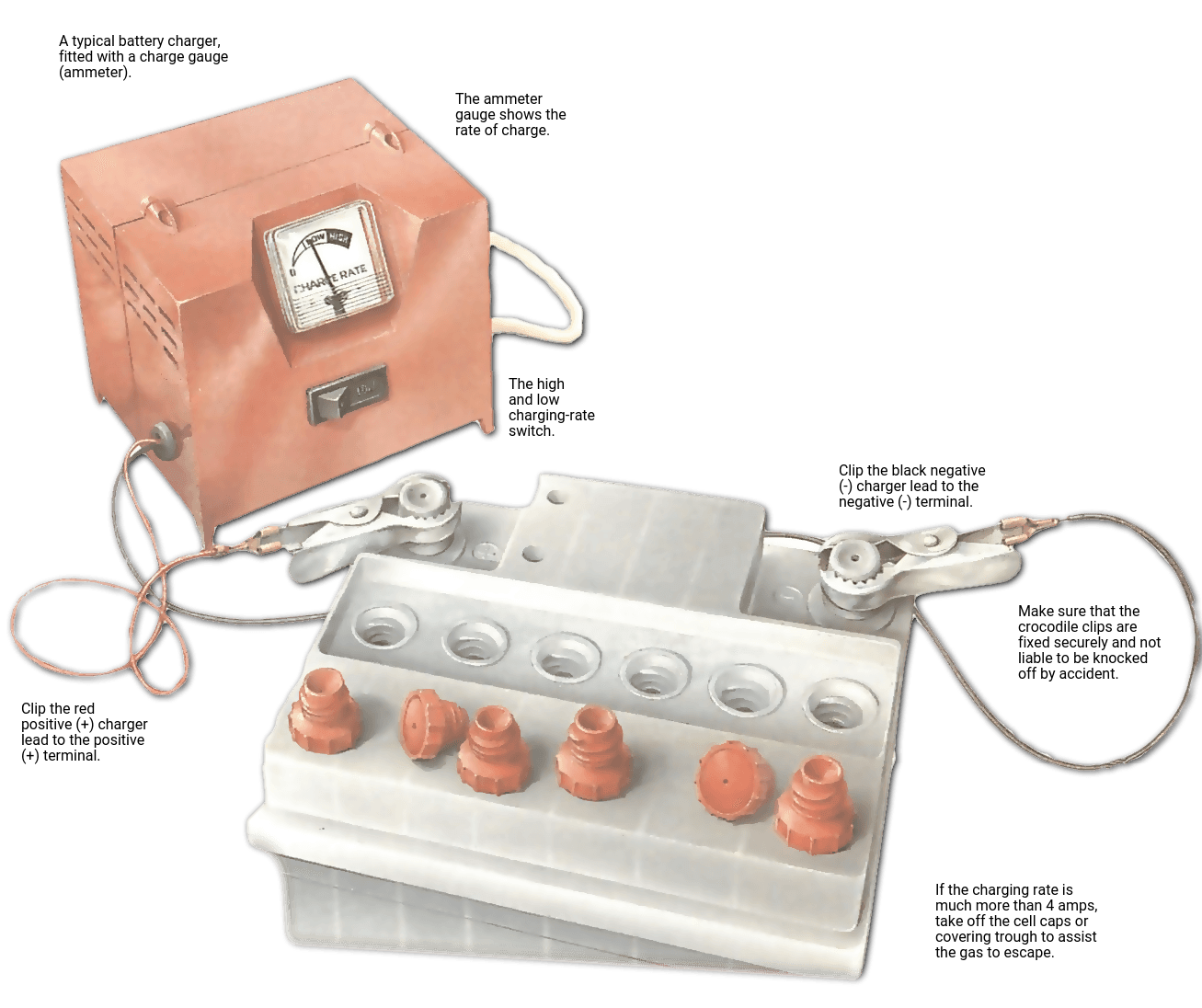
- Connect the charger: Positive to positive terminal, negative to negative.
- Set the amp rate before switching the charger on.
- Monitor temperature: If battery gets hot, reduce the amp setting or stop charging.
- Disconnect safely once fully charged or when the charger indicates completion.
Key Differences: Trickle, Standard, And Fast Charging
Understanding these terms helps you use your charger more effectively.
Trickle Charging (low Amp, E.g., 2a)
This is a slow, steady charge that keeps a battery full without overcharging. It’s best for long-term storage or rarely used batteries.
Standard Charging (medium Amp, E.g., 6a)
A safe, regular charge rate for most car batteries. Balances speed and battery health.
Fast Charging (high Amp, E.g., 10a+)
Used when you need power quickly. It’s convenient but can stress the battery if done too often.
Here’s a summary:
| Type | Amp Range | When to Use | Battery Impact |
|---|---|---|---|
| Trickle | 1-2A | Long-term, maintenance | Very low wear |
| Standard | 4-8A | Normal charging | Low wear |
| Fast | 10A+ | Emergency, quick charge | Higher wear |
How Amp Setting Affects Battery Life
The amp setting directly impacts how long your battery lasts.
- Lower amp settings are gentle and extend battery life.
- Higher amp settings can cause internal heat, gas bubbles, and physical changes in the battery that reduce life over time.
- Using the right setting means your battery will give more starts, for more years.
Example
A car battery charged regularly at 2A may last 4-5 years. If charged at 10A all the time, it might only last 2-3 years.
Special Cases: Small Batteries, Deep Cycle, And Large Batteries
Not all batteries are the same. Here’s how the amp setting works with special types:
Small Batteries (motorcycle, Lawn Mower)
These usually need low amp settings (1-2A). Anything higher can overheat or damage them.
Deep Cycle Batteries
Used in boats, RVs, or solar setups, they can handle medium to high amp rates but still benefit from slow charging for long life.
Large Batteries (trucks, Industrial)
These can safely handle higher amp settings (10-20A) due to their size, but slow charging is still preferred when possible.
Here’s a quick comparison:
| Battery Type | Typical Amp Setting | Notes |
|---|---|---|
| Motorcycle | 1-2A | Use only low settings |
| Car | 4-8A | Standard chargers work well |
| Deep Cycle | 5-15A | Check manufacturer guidance |
| Truck/Industrial | 10-20A | High settings safe, but slow is better |
Common Myths And Mistakes About Amp Settings
Many people have wrong ideas about how amps affect battery charging. Here are some common myths:
Myth 1: Higher Amps Are Always Better
People often think charging faster is always good. In reality, high amps can damage the battery’s internal plates, shorten its life, and create safety risks.
Myth 2: Any Charger Works For Any Battery
A charger with a high amp rating can quickly destroy a small battery. Always match the charger to the battery size.
Myth 3: You Can’t Overcharge With Low Amps
Even at low amps, if you leave the charger connected too long, you can overcharge the battery, especially with manual chargers.
Myth 4: Smart Chargers Always Get It Right
Smart chargers are safer, but not perfect. Always double-check settings, especially for unusual battery types.
Safety Tips When Setting The Amp Rate
Safety should always come first when working with battery chargers.
- Wear gloves and eye protection. Batteries can release acid or gas.
- Charge in a well-ventilated area to avoid gas buildup.
- Double-check connections: Positive to positive, negative to negative.
- Don’t leave high-amp charging unattended.
- If the battery feels hot, stop charging and reduce the amp rate.
How Modern Technology Changes Amp Settings
Today’s chargers use technology to make charging safer and more efficient.
- Microprocessors: Adjust the amp rate based on battery condition.
- Pulse charging: Sends short bursts of current to reduce heat.
- Multi-stage charging: Starts with high amps, then reduces to low amps or maintenance mode.
These features help batteries last longer, especially for sensitive types like AGM or lithium-ion.
Signs You’re Using The Wrong Amp Setting
Even with good intentions, mistakes happen. Watch for these signs:
- Battery feels very hot to touch
- Hissing or bubbling sounds
- Charger shuts off suddenly
- Battery case swelling or leaking
If you notice any of these, disconnect immediately and check your amp setting.
How To Read Your Charger’s Amp Meter
Most manual chargers have a small gauge or screen showing the charging amps. Here’s how to use it:
- Before charging: Set the amp dial to your chosen setting.
- During charging: The needle or display may start higher, then drop as the battery fills.
- End of charging: The amp reading will approach zero, showing the battery is full.
This helps you see if the amp setting is too high or low for your battery’s needs.
Environmental Impact: Why Amp Settings Matter
Choosing the right amp setting isn’t just about safety and battery life. It also reduces waste and pollution.
- Longer battery life means fewer batteries in landfills.
- Lower amp settings use less energy and create less heat.
- Proper charging reduces the risk of battery leaks, which harm the environment.
Troubleshooting: What If Your Charger Has Only One Amp Setting?
Some basic chargers don’t let you change the amp setting. In this case:
- Check if the charger matches your battery size. Don’t use a 10A charger on a 2Ah battery.
- Limit charging time to avoid overcharging.
- Consider upgrading to a charger with selectable amp settings for more flexibility and safety.
Non-obvious Insights Beginners Miss
- Charger “output” is not always the same as “setting.” Some chargers show peak amp output, but the actual charge rate may decrease as the battery fills. Don’t be surprised if a “10A” charger only puts out 5A after a while.
- Temperature changes affect charging speed. Cold batteries charge slower, hot batteries charge faster but risk damage. Adjust your expectations and check the battery temperature during charging.
- Low amp trickle charging can revive “dead” batteries that won’t take a charge at higher settings. Try a 2A setting overnight before throwing out an old battery.
When To Ask A Professional
If you’re ever unsure, get help from a mechanic or battery specialist. This is especially important for:
- Expensive or unusual batteries (like electric vehicle batteries)
- Batteries that show physical damage
- Charging systems with unknown specifications
Frequently Asked Questions
What Does The Amp Setting Actually Control On My Charger?
The amp setting controls how much electrical current the charger sends to your battery. Higher amps charge faster but can overheat the battery. Lower amps are safer for most batteries and extend their life.
Is It Bad To Always Use The Highest Amp Setting?
Yes, always using the highest amp setting can shorten your battery’s life, cause overheating, and increase the risk of leaks or damage. Use high settings only when you need a quick charge, and never leave it unattended.
How Do I Know Which Amp Setting To Use For My Battery?
Check your battery’s Amp-hour (Ah) rating and follow the 10% rule: use an amp setting that is less than 10% of the Ah rating. Always read the battery and charger manuals for guidance.
Can I Use The Same Charger For My Car And Motorcycle?
Only if your charger has selectable amp settings. Car batteries need higher amps (4-8A), while motorcycles need lower (1-2A). Using a high-amp charger on a small battery can damage it.
Where Can I Learn More About Battery Charging And Safety?
The Battery University website is a trusted resource. Visit Battery University for in-depth guides, research, and safe charging tips.
Choosing the right amp setting isn’t just a detail—it’s the key to safer charging, longer battery life, and peace of mind. Next time you use your battery charger, you’ll know exactly what that amp dial means and how to use it wisely.