Most Pioneer DMH-342EX problems come from wiring, settings, weak power, or a bad reset.
If you are dealing with Pioneer DMH-342EX Troubleshooting, the good news is that most issues are simple once you know where to look. I’ve worked through enough head unit glitches to know that a car stereo can look “dead” while the real problem is often something small, like a loose ground, a bad USB cable, or a setting that got changed by accident. This guide walks you through the most common Pioneer DMH-342EX Troubleshooting steps with clear fixes, real-world tips, and the kind of checks that save time and frustration.

49% off Today's Exclusive Deals
Limited-time Exclusive Deals. Check current discount on Amazon.
Check Price on Amazon As an Amazon Associate I earn from qualifying purchases.Common Pioneer DMH-342EX Problems and What They Usually Mean
The Pioneer DMH-342EX is a reliable double-DIN multimedia receiver, but like any in-dash unit, it can run into setup or connection issues. Most Pioneer DMH-342EX Troubleshooting cases fall into a few buckets: no power, no sound, Bluetooth problems, screen issues, CarPlay or Android Auto glitches, or USB connection failures.
When I first started working on aftermarket head units, I learned a simple rule: always check the basics first. A lot of “broken” systems were really just power, fuse, or cable problems hiding in plain sight. That same idea applies here, and it is the fastest way to narrow down your Pioneer DMH-342EX Troubleshooting path.
49% off Today's Exclusive Deals
Limited-time Exclusive Deals. Check current discount on Amazon.
Check Price on Amazon As an Amazon Associate I earn from qualifying purchases.Pioneer DMH-342EX Troubleshooting: Start With the Basics
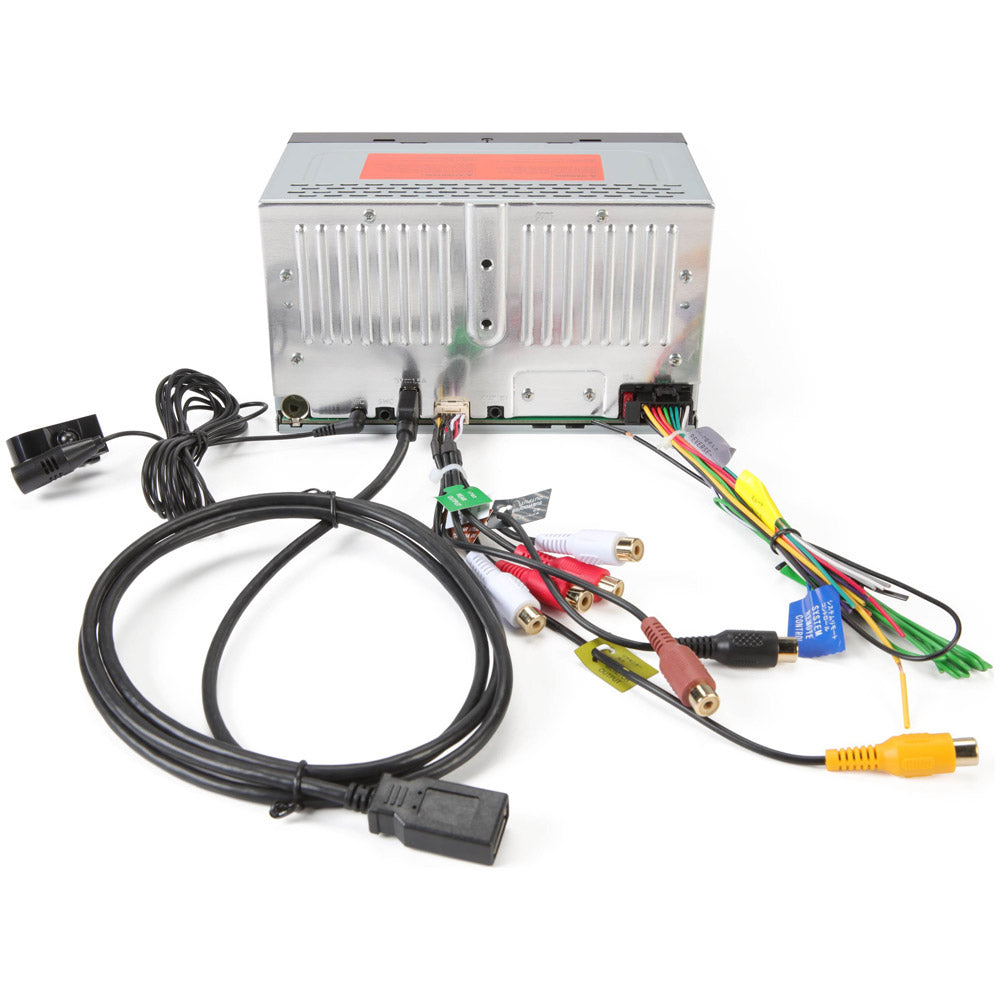
Before you dive into settings, take a slow, careful look at the whole system. The receiver depends on clean power, solid grounding, correct speaker wiring, and stable source connections. If one link is weak, the whole system can act strange.
Here is the basic checklist I use first:
- Check the vehicle fuse and the stereo fuse. A blown fuse is still one of the most common causes of no power.
- Confirm the yellow constant power wire and red accessory wire are connected correctly.
- Make sure the black ground wire is attached to bare metal.
- Inspect the antenna, USB, and AV cables for loose plugs.
- Look for pinched or damaged wires behind the dash.
A simple power test can save you a lot of time. If the unit does not turn on at all, the problem is often upstream, not inside the radio itself. Good Pioneer DMH-342EX Troubleshooting starts with clean, methodical checks.

49% off Today's Exclusive Deals
Limited-time Exclusive Deals. Check current discount on Amazon.
Check Price on Amazon As an Amazon Associate I earn from qualifying purchases.No Power on the Pioneer DMH-342EX
If your Pioneer DMH-342EX will not turn on, the issue usually comes down to power delivery. In many installs, the accessory wire and constant wire are swapped, loose, or tied into the wrong circuit. That can make the unit seem dead even when the screen and radio are fine.
Try these steps:
- Check the car fuse box and the inline fuse behind the unit.
- Test the yellow wire for constant 12V power.
- Test the red wire for accessory power when the key is on.
- Verify the black ground wire has a strong metal-to-metal connection.
- Reseat the main harness connector on the back of the unit.
One mistake I have seen more than once is a weak ground. It can make the radio behave like it has a ghost in it, with random shutdowns or no response at all. In Pioneer DMH-342EX Troubleshooting, a solid ground is not optional. It is the foundation.
No Sound or Low Sound Output
If the screen powers up but there is no sound, the issue may be in the speaker wiring, mute settings, or amplifier control. Sometimes the volume is up, but the unit is set to a low output mode or muted by a connected device. Other times the speakers are wired out of phase or one of the channels is shorted.
Check the following:
- Make sure mute is off and volume is not set very low.
- Verify that fade and balance are centered.
- Check speaker wires for short circuits or loose connections.
- Confirm any external amplifier is turning on.
- Look for damaged speaker wire insulation behind the dash.
If you use an external amp, make sure the blue/white remote turn-on wire is connected correctly. I once spent nearly an hour chasing a “dead” audio system when the amp simply was not getting the trigger signal. That kind of thing is common in Pioneer DMH-342EX Troubleshooting, and it is why wiring checks matter so much.
Bluetooth Pairing and Connection Problems
Bluetooth issues are one of the most common complaints with modern receivers. The Pioneer DMH-342EX usually pairs well, but stored device conflicts, phone settings, or software hiccups can get in the way. If your phone will not connect, or if calls and music keep dropping, the fix is often on the phone side, not the head unit.
Try this:
- Delete the pairing from both the phone and the stereo.
- Turn Bluetooth off and back on.
- Restart your phone.
- Re-pair the device from scratch.
- Remove other saved phones that may be interfering.
Also check whether your phone has the latest operating system update. Car audio Bluetooth performance can depend on phone software, especially after major OS changes. In my experience, clearing old pairings solves more Pioneer DMH-342EX Troubleshooting Bluetooth issues than any fancy reset.
Apple CarPlay or Android Auto Not Working
If CarPlay or Android Auto does not launch, the problem is often the USB cable, phone permission settings, or a bad connection. The Pioneer DMH-342EX is sensitive to cable quality, and cheap charging-only cables often fail to pass data properly. That means the phone may charge but still not connect.
Use this process:
- Use the original phone cable or a certified high-quality data cable.
- Plug into the correct USB port for smartphone integration.
- Unlock the phone before connecting.
- Confirm CarPlay or Android Auto is enabled on the phone.
- Restart both the phone and the receiver.
If the system worked yesterday and stopped today, it may be as simple as a bad cable. I keep a known-good USB cable in the glove box for this exact reason. In Pioneer DMH-342EX Troubleshooting, the cable is often the quiet villain.
Touchscreen Problems or Frozen Display
A frozen or unresponsive screen can be caused by software glitches, temperature changes, or a temporary system hang. Sometimes the unit needs a reboot more than a repair. If the display is dim, laggy, or frozen, start with a soft reset.
Try these steps:
- Power the unit off and back on.
- Perform a reset using the reset button if available.
- Disconnect vehicle power briefly if needed.
- Check for extreme heat or cold inside the cabin.
- Clean the screen with a soft cloth to remove debris or moisture.
Touchscreens can be touchy, especially in hot cars. I have seen units act sluggish after sitting in direct sun for hours. A short cool-down period often helps. When doing Pioneer DMH-342EX Troubleshooting, do not assume the screen is bad until you rule out temperature and reset issues.
USB, Media, and File Playback Issues
If USB drives are not recognized or music files fail to play, the issue is often format-related. The Pioneer DMH-342EX works best with properly formatted drives and common file types. A drive that works on your computer may still fail in the stereo if the file structure is messy or the format is unsupported.
Check these points:
- Format the USB drive correctly.
- Use supported audio or video formats.
- Keep folder names and file names simple.
- Avoid corrupted files.
- Try a different USB stick to compare results.
I have had better luck with smaller, simple USB drives than with oversized drives packed with folders. That is not a universal rule, but it is a practical one. In Pioneer DMH-342EX Troubleshooting, simplifying the media source often fixes playback faster than changing settings.
Factory Reset and Software Recovery
A factory reset can clear out strange settings, connection bugs, and temporary errors. It is one of the best last-resort steps before assuming hardware failure. That said, it will also erase saved settings and paired devices, so only do it after you note anything important.
Use a reset when:
- The screen freezes repeatedly.
- Bluetooth keeps failing after re-pairing.
- Audio settings act unpredictably.
- CarPlay or Android Auto errors continue.
- The unit behaves differently after a battery disconnect.
Before resetting, I always recommend writing down EQ settings, Bluetooth pairings, and display preferences. A reset can be helpful, but it should be intentional. Smart Pioneer DMH-342EX Troubleshooting means using reset as a tool, not a guess.
Installation Problems That Look Like Product Failures
A lot of head unit “failures” are really installation mistakes. That is not a criticism, just reality. Dash kits, harness adapters, steering wheel control modules, and aftermarket amps all add complexity. One small wiring mistake can make the system seem faulty when it is just misconfigured.
Common install-related causes include:
- Wrong harness adapter
- Poor ground point
- Loose RCA connections
- Reversed speaker wires
- Missing remote turn-on wire
- Incorrect parking brake lead connection
If the system was installed recently and problems started right away, the install deserves a close look. I always tell people to treat the wiring like plumbing. If the flow is wrong, the whole house feels broken. That mindset helps a lot with Pioneer DMH-342EX Troubleshooting.
When to Suspect a Hardware Fault
Sometimes the unit really is defective. If you have checked power, ground, wiring, cables, reset steps, and source devices, but the receiver still fails, then hardware may be the issue. That could involve the display, internal amplifier, USB port, or main board.
Signs of a possible hardware fault:
- The unit will not boot even with confirmed power
- The screen shows artifacts, black areas, or permanent flicker
- The USB port is physically loose or damaged
- Audio cuts out even after wiring is verified
- The unit randomly restarts with stable voltage
At that stage, warranty support or a professional installer is the smart move. I like doing as much diagnosis as possible before returning gear, because that prevents wasted trips and mixed signals. But good Pioneer DMH-342EX Troubleshooting also means knowing when you have reached the limit of what basic checks can solve.
Practical Tips to Prevent Future Issues
The best fix is the one you do not need to repeat. A few habits can make the Pioneer DMH-342EX more stable over time and reduce repeat problems. Small choices during install and daily use matter more than most people think.
Helpful habits include:
- Use quality USB and phone cables.
- Keep firmware and phone software updated.
- Avoid forcefully yanking cables from the front port.
- Check wiring after any battery work or dash repairs.
- Store unused pairings and media devices cleanly.
A well-installed unit can run smoothly for years. The goal is not just to fix the immediate issue, but to keep the system dependable. That is the real win in Pioneer DMH-342EX Troubleshooting.
Frequently Asked Questions of Pioneer DMH-342EX Troubleshooting
Why does my Pioneer DMH-342EX turn on but have no sound?
This usually points to speaker wiring, mute settings, or an amplifier issue. Check the volume, fade, balance, and any external amp connections first.
Why won’t my phone connect to Bluetooth?
Most Bluetooth issues come from old pairings, phone settings, or a simple software glitch. Delete the pairing on both devices, restart the phone, and pair again.
Why is CarPlay not working on my Pioneer DMH-342EX?
A bad USB cable is often the main cause. Use a certified data cable and make sure the phone is unlocked when you connect it.
How do I reset the Pioneer DMH-342EX?
Use the reset button if your model has one, or follow the unit’s reset procedure in the manual. A reset can clear temporary errors, but it will also remove saved settings.
Why does the screen freeze sometimes?
Freezing can happen from software glitches, heat, or a temporary system lockup. Try a restart or reset, and make sure the unit is not overheating in the dash.
What should I check first if the unit has no power?
Start with the fuse, then check the yellow constant wire, red accessory wire, and black ground wire. Those three connections solve many Pioneer DMH-342EX Troubleshooting cases.
Conclusion
Pioneer DMH-342EX Troubleshooting gets much easier when you break it into simple parts: power, ground, wiring, source devices, and settings. Most issues are not random at all. They are usually small problems that build into bigger symptoms, and once you know the pattern, the fix becomes far less stressful.
If your unit is acting up, start with the basics, work step by step, and do not skip the simple checks. That calm approach saves time, money, and a lot of frustration. If this guide helped, keep it handy, explore more car audio tips, and leave a comment with the issue you are seeing.





