Hold the trip button, turn ignition to ON (do not start) and wait until the light resets.
I’ve worked on dozens of Toyotas and walked owners through dashboard warnings. This guide explains how to reset the maintenance light on a Toyota Yaris step by step, covers model differences, troubleshooting tips, and safety notes so you can reset confidently and responsibly. Read on to learn exact procedures for key and push-button starts, when not to reset, and simple maintenance habits to avoid repeated warnings.

49% off Today's Exclusive Deals
Limited-time Exclusive Deals. Check current discount on Amazon.
Check Price on Amazon As an Amazon Associate I earn from qualifying purchases.Why the maintenance light appears and what it means
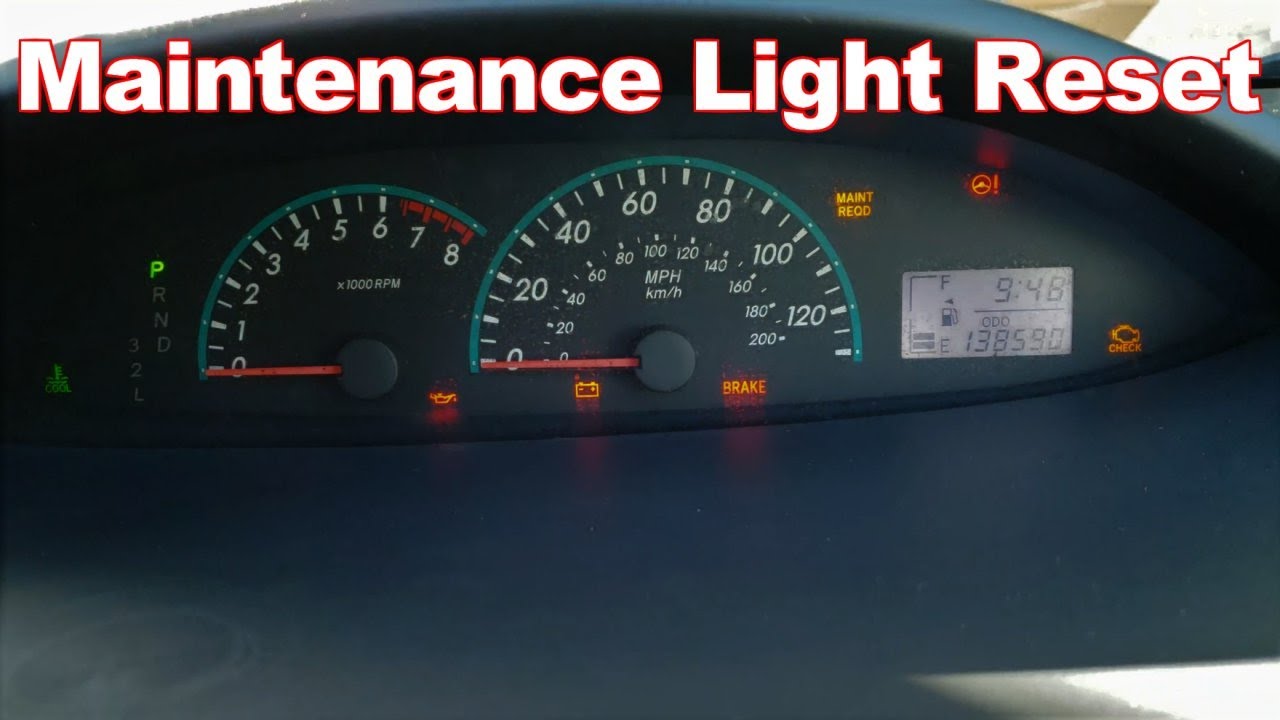
The maintenance light, often shown as MAINT REQD, reminds you that scheduled service is due. It is tied to mileage intervals, not to the engine computer fault codes. The car tracks distance and triggers the light to prompt oil changes and inspections.
If you reset the light without doing service, you’ll lose the mileage reminder. That can lead to missed oil changes and faster engine wear. Know why it lit up before you reset it.

When you should and should not reset the maintenance light
You should reset the maintenance light on a Toyota Yaris only after completing the recommended service. Basic service usually includes an oil and filter change and a short vehicle inspection.
Do not reset the maintenance light if a warning for engine, brakes, or airbags is active. Those require diagnosis and repairs before turning off any indicator.
49% off Today's Exclusive Deals
Limited-time Exclusive Deals. Check current discount on Amazon.
Check Price on Amazon As an Amazon Associate I earn from qualifying purchases.
What you need before resetting
Have these simple items ready:
- Car key or access to push-button start
- Trip/ODO button familiarity
- Pen and maintenance log to note the date and mileage
These steps are quick and require no tools. Still, perform the actual service first or confirm a technician did it.

Source: tvtoyota.com
How to reset the maintenance light on a Toyota Yaris (older key models)
Follow these steps for many Yaris models with a physical key and TRIP or ODO button:
- Turn the ignition off. Ensure the key is out or in LOCK position.
- Press and hold the trip meter button until the odometer display appears.
- While holding the trip button, turn the ignition to the ON position (do not start the engine).
- Keep holding the trip button. The display will show dashes, then zeros, and the MAINT REQD light will go out after about 10 seconds.
- Release the button and start the car to verify the light is off.
If the light stays on, repeat the process or check that the previous service was completed correctly.

Source: youtube.com
How to reset the maintenance light on a Toyota Yaris (push-button start models)
For Yaris models with push-button start, use this method:
49% off Today's Exclusive Deals
Limited-time Exclusive Deals. Check current discount on Amazon.
Check Price on Amazon As an Amazon Associate I earn from qualifying purchases.- Close all doors and ensure the car is in PARK.
- Press the START button without pressing the brake to enter ACCESSORY or ON mode.
- Press and hold the trip/ODO button on the instrument cluster.
- While holding the button, press the START button once more to cycle to ON (do not start the engine) and continue holding.
- Wait for the dashes and zeros to appear. The MAINT REQD light should turn off. Release the trip button.
If yours uses a different menu-based display, use the touchscreen vehicle settings to find “Maintenance” or “Oil Maintenance” and follow the on-screen reset prompts.

Source: reddit.com
Troubleshooting if the maintenance light won’t reset
Common causes and fixes:
- Procedure timing: Repeat the reset sequence more slowly and hold the button for at least 10–15 seconds.
- Wrong display mode: Some models require ODO (total mileage) rather than TRIP A. Switch to ODO and retry.
- Electrical issues: A weak battery or loose battery terminal can prevent reset. Check battery health and connections.
- Software or module faults: If the light still won’t reset, a technician can use an OBD-II tool or software to clear maintenance flags.
If you’re unsure, ask a certified Toyota technician to confirm the reset and any stored maintenance codes.

Source: youtube.com
Maintenance habits, tracking, and why resetting alone isn’t enough
Resetting the maintenance light on a Toyota Yaris is easy. But tracking service matters more. Use a paper log or app to record:
- Date and mileage of oil changes
- Type of oil and filter used
- Any inspections or parts replaced
Good records prevent accidental skipping of service. I once helped a neighbor who reset the light without changing oil. The engine soon developed sludge and needed costly cleaning. Don’t repeat that mistake.

Source: reddit.com
Personal tips and lessons from real work
From my experience working on compact Toyotas:
- Always confirm the service first. Reset only after oil/filter change.
- Keep a sticky note in the glove box with the next due mileage.
- If you’re not confident with the reset, ask a technician to show you. Watching once makes it easy next time.
These small habits keep your Yaris running longer and save money on repairs.
Source: youtube.com
Common quick questions
h3 What if the MAINT REQD light comes back soon after resetting?
If the light returns quickly, the car likely needs actual service or a sensor/logic issue exists. Get the oil and filter checked and have a technician scan for stored codes.
h3 Can I reset the maintenance light without doing an oil change?
You can, but you shouldn’t. Resetting without service removes an important reminder and increases the risk of engine wear and damage.
h3 Will a dealer or mechanic use a special tool to reset the light?
Dealers and mechanics can reset the light manually or with diagnostic tools. Tools are helpful if the dash won’t reset via the trip button or if there are related codes.

Frequently Asked Questions of How do you reset the maintenance light on a Toyota Yaris?
How long does it take to reset the maintenance light on a Toyota Yaris?
Resetting usually takes under a minute once you know the sequence. The process is a simple button hold while turning the ignition to ON.
Do all Toyota Yaris models use the same reset method?
Most older models use the trip/odo button method, while newer models with push-button start may require different steps or a menu option. Check your owner’s manual for model-specific instructions.
Will resetting the maintenance light fix an engine problem?
No. Resetting only clears the reminder. Engine problems require diagnostics and repairs before any warning lights are cleared.
Is it safe to drive after resetting the maintenance light?
Yes, if the required maintenance was performed. If you reset without service, driving may risk engine damage over time due to missed maintenance.
Can I use an OBD-II scanner to reset the maintenance light on a Toyota Yaris?
Some advanced OBD-II tools and Toyota-specific scanners can clear maintenance flags. For simple resets, the manual trip-button method is usually faster and free.
Conclusion
Resetting the maintenance light on a Toyota Yaris is quick when done correctly. Always perform or confirm the required maintenance before resetting, follow the correct procedure for your model, and keep clear service records. Take action today: check your owner’s manual, schedule or confirm service, and practice the reset steps so you’re ready next time the reminder appears. Leave a comment if you want model-specific help or share your experience resetting the light.