Image source: Bing (Web (fair-use with source credit))

49% off Today's Exclusive Deals
Limited-time Exclusive Deals. Check current discount on Amazon.
Check Price on Amazon As an Amazon Associate I earn from qualifying purchases.Figuring out Tesla Model 3 charging stops for a long trip feels confusing at first. But once you understand how the car plans, when to trust it, and when to override it, the whole process becomes routine. You're not alone if you're worried about range, charger availability, or how long each stop takes.
As of 2026, the Supercharger network is dense enough that cross-country road trips are genuinely practical. Tesla's Long Range Model 3 can hit a peak charging rate of 250 kW, adding roughly 200 miles in about 15 minutes under ideal conditions. The real challenge is learning the variables that decide whether your trip needs two stops or four.
Quick Answer
Most highway trips need one charging stop per 150 to 200 miles. Your battery size, driving speed, and weather all change the math. Tesla's navigation calculates every charging stop automatically.
49% off Today's Exclusive Deals
Limited-time Exclusive Deals. Check current discount on Amazon.
Check Price on Amazon As an Amazon Associate I earn from qualifying purchases.It factors in battery level, traffic, weather, and Supercharger availability in real time.
How Tesla's Navigation Plans Your Charging Stops (and When to Override It)
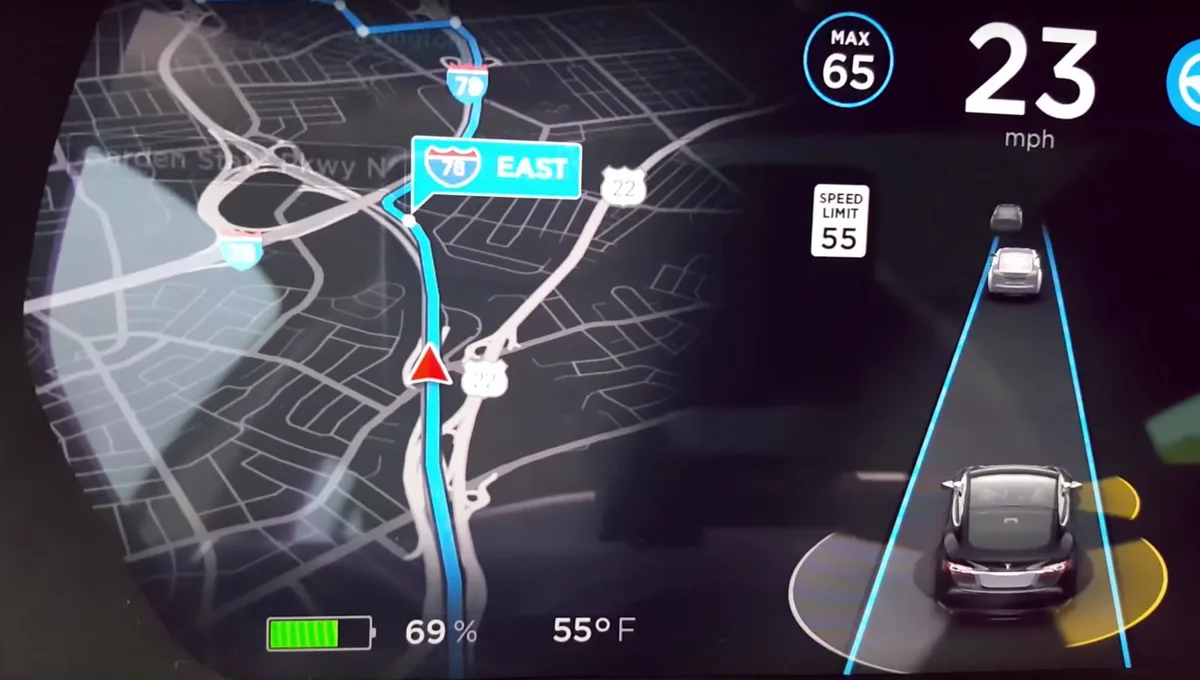
The most important feature is the built-in Trip Planner. It doesn't just pick a destination and hope. It calculates a complete route with charging stops built in, including exactly how long to charge at each one.
The system aims to arrive at each Supercharger with 10 to 20 percent battery remaining. That buffer keeps you in the fastest part of the charging curve without stressing the last few miles.
49% off Today's Exclusive Deals
Limited-time Exclusive Deals. Check current discount on Amazon.
Check Price on Amazon As an Amazon Associate I earn from qualifying purchases.Image source: Bing (Web (fair-use with source credit))
The planner also accounts for terrain, speed limits, and even headwinds. It updates continuously as you drive. If you speed up or the weather turns, it recalculates your targets on the fly.
That's why most owners simply trust the route as-is.
But you shouldn't always. During holidays, the planner doesn't know a particular Supercharger gets swamped every Thanksgiving. Same with stations that are offline or under repair.
In those moments, glance at the on-screen load indicator. It shows which stalls are busy and which are free.
| Charger Generation | Peak Power | Typical Vehicle Capability |
|---|---|---|
| V2 | 150 kW | Charge speed drops when stalls share power |
| V3 | 250 kW | Full speed without sharing |
| V4 | 250 kW+ | Newest stalls, better cable handling |
The Charging Stop Decision Tree: Model, Weather, Route, and Speed Variables
Not every Model 3 charges the same way. The Rear-Wheel Drive version has a smaller battery and a lower peak charge rate. The Long Range and Performance versions share similar batteries, so their stop patterns are nearly identical.
You can compare official range numbers for each trim on the EPA's fueleconomy.gov site.
Image source: Bing (Web (fair-use with source credit))
Weather changes everything. In winter, expect range to drop by roughly 20 to 30 percent. Your comfortable 150-mile gaps shrink to around 110 miles.
The navigation knows this and adjusts stops automatically, but you'll stop more often than in summer. Hot weather also cuts range slightly, mostly from air conditioning load.
Driving speed is the second big variable. At 75 mph or higher, aerodynamic drag cuts range noticeably. If you cruise at 80 mph, plan on an extra stop for longer routes.
The system will actually suggest slowing down if it thinks you'll arrive with too little battery.
- Cold and fast driving: Expect one extra stop compared to a summer trip.
- Mountain routes: Climbs use more energy; regen braking recovers some on descents.
- Roof box or towing: Add at least one extra stop per 300 miles.
- Arriving under 5 percent: Risky in extreme weather, even with the buffer.
Step-by-Step: Planning a Road Trip in Your Model 3
You don't need third-party apps or spreadsheets. The workflow is simple once you know the steps.
- Enter your destination in Tesla navigation. Do this from the car or the mobile app. The app can send the route before you get in.
- Review the suggested stops. Check each one's availability status on screen before leaving.
- Set your departure time. Enter it into the app so the car preconditions the battery while still plugged in at home.
- Let the battery precondition en route. As you approach a Supercharger, the car warms the battery automatically for peak charging speed.
- Charge to the navigation target. That's usually 60 to 80 percent, depending on the distance to the next stop. Charging past it wastes time because speed drops dramatically after that point.
- Adjust mid-trip if needed. Traffic, road closures, or sudden cold fronts shift your estimates. The car recalculates automatically. Listen to it, it's usually right.
The entire system is designed to minimize total travel time. That's why it never charges to 100 percent unless absolutely necessary. A quick 20-minute charge to 80 percent gets you to the next station faster than a 35-minute charge to 90 percent.
How to Handle Charging Stops Like a Pro: Etiquette, Timing, and Idle Fees
Charging stops have unwritten rules. Breaking them costs money or makes you unpopular at the station. The most important rule is simple: when charging finishes, move your car.
Tesla charges idle fees when you stay plugged in after hitting the target level. At busy stations, fees reach up to $1 per minute.
Timing matters as much as etiquette. The battery accepts energy quickly when low, then slows down as it fills. Charging from 10 to 80 percent on a Long Range model takes 25 to 35 minutes.
Filling from 80 to 100 percent takes another 25 minutes. That final stretch usually isn't worth it.
| Charge Strategy | Time at 250 kW Station | Best Use Case |
|---|---|---|
| 10% to 80% | 25-35 minutes | Most highway trips |
| 10% to 100% | 60+ minutes | No nearby charging at destination |
| 50% to 80% | 15-20 minutes | Quick top-up to reach home |
If the station is packed, unplug a little early and move to a free spot. Also, avoid power-sharing stalls on older V2 stations. Two adjacent stalls share one 150 kW connection.
Picking the "A" side of a pair can double your speed.
Common Mistakes That Add Extra Stops or Longer Charge Times
Even experienced drivers mess these up. They cost time, range, or cash.
- Skipping battery preconditioning. If you don't enter the Supercharger into navigation, the battery never warms. You'll charge at half speed. Let the car do its thing.
- Charging to 100 percent at every stop. The last 20 percent takes as long as the first hour. Charge to 80 percent and move on.
- Ignoring the arrival percentage. The nav shows your battery level at each stop. Ignore it and you might take an unscheduled detour.
- Choosing a shared V2 stall. At older V2 stations, adjacent stalls split 150 kW. Pick an "A" stall and check the screen for the layout.
- Driving 80 mph to save time. Speeding cuts range and can add a whole extra stop. Slowing down by 10 mph often saves more time than it costs.
Real-World Scenarios: Cold-Weather Interstate, Mountain Route, and Holiday Weekend
Real trips reveal the patterns. Here's what three common drives look like.
Take a 450-mile interstate run in January. Starting at 100 percent, a Long Range model arrives at the first Supercharger with around 12 percent. The car plans two stops, each about 25 minutes.
Range drops because cabin heat, cold wind, and winter tires all drain the battery. The U.S. Department of Energy's Alternative Fuels Data Center reports winter range loss can hit 30 percent.
On a mountain route, a 4,000-foot elevation gain can cut effective range by 15 percent. Good news: regen braking recovers a chunk on the way down. If you arrive at a summit charger with 15 percent, you'll often leave with the same or more after a long descent.
Plan one stop before the pass, not after.
Thanksgiving traffic means packed Superchargers. The nav might send you to a station with a wait. Instead, charge 10 minutes longer at a quieter stop before the busy one.
It beats sitting in a queue. Idle fees are strictly enforced on holidays. Move your car the moment charging ends.
Frequently Asked Questions
How many charging stops will I need for a 500-mile trip?
Most drivers need two stops. A Long Range Model 3 covers roughly 150 to 200 miles between charges. Your first stop lands around 30 percent battery, the second near 60 percent.
Total charging time adds about 45 minutes to the drive.
Should I charge to 100% before a road trip?
Yes, if it's the start of a long day. Charge at home to 100 percent so you leave with maximum range. On the road, stick to 80 percent unless the next stop is far away.
That keeps charge times short.
What is battery preconditioning?
It's the car warming the battery before you reach a Supercharger. A warm battery accepts power faster, sometimes the full 250 kW. The navigation starts this automatically.
Just let it do its job and don't cancel the route.
Why is my charging speed so slow at some Superchargers?
Older V2 stations share power between two stalls. If both cars charge together, both slow down. Also, a cold battery cuts speed until it warms.
Try a different stall or wait a few minutes for the battery to warm.
How do I avoid idle fees?
Watch the app while charging. It tells you when charging is done and warns that fees are coming. Unplug and move your car within a few minutes.
At busy stations, the fee is higher, so move quicker.





