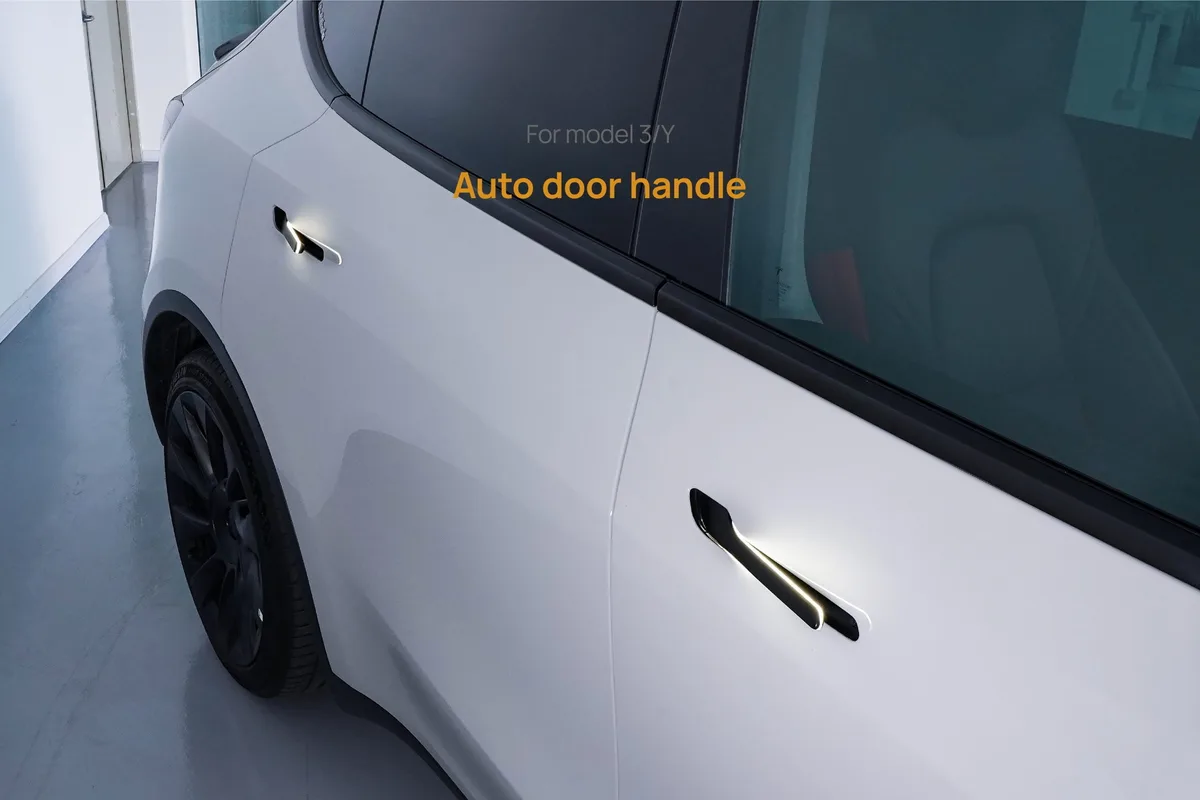
Facing a Tesla Model Y door handle problem can stop you in your tracks. You walk up, touch the handle, and nothing happens. The door stays shut, and you're left guessing whether it's a dead battery, ice, or a failed motor.
There's a clear way to work through this, and it starts with two questions.

49% off Today's Exclusive Deals
Limited-time Exclusive Deals. Check current discount on Amazon.
Check Price on Amazon As an Amazon Associate I earn from qualifying purchases.As of 2026, Tesla still uses flush electronic handles on the Model Y. They rely on a small 12V accessory battery, not the main drive battery, to extend the handle. Federal Motor Vehicle Safety Standard 206 requires every door to have a manual release as a backup.
That backup is your best friend when the electronics don't cooperate.
49% off Today's Exclusive Deals
Limited-time Exclusive Deals. Check current discount on Amazon.
Check Price on Amazon As an Amazon Associate I earn from qualifying purchases.Image source: Bing (Web (fair-use with source credit))
Quick Answer
The Tesla Model Y door handle problem has three common causes. Dead 12V battery, ice, or failed actuator motor. Check the interior manual release first.
Then try de-icer or a 12V power cycle. Schedule service if the handle still won't move.
How Your Model Y's Door Handle Actually Works
Model Y's flush handles look simple, but they're a small electro-mechanical system. Press the button on the handle and it sends a signal to the door control module. That module fires a small actuator motor, which pops the handle outward.
49% off Today's Exclusive Deals
Limited-time Exclusive Deals. Check current discount on Amazon.
Check Price on Amazon As an Amazon Associate I earn from qualifying purchases.A separate latch motor then releases the door when you pull the handle.
Every one of those steps runs off the 12V accessory battery. The high-voltage pack stays isolated and only powers the drive system. That's why a drained 12V battery can make every handle feel dead, even when the touchscreen still shows range.
The two systems are completely separate, and that detail matters when you're troubleshooting.
Inside the door panel, you'll find a plastic actuator assembly with small gears. Those gears are a known weak point. They wear, crack, or jam, especially after repeated pulls in cold weather.
As of 2026, Tesla hasn't changed this core design on the Model Y, so owners still deal with gear wear over time.
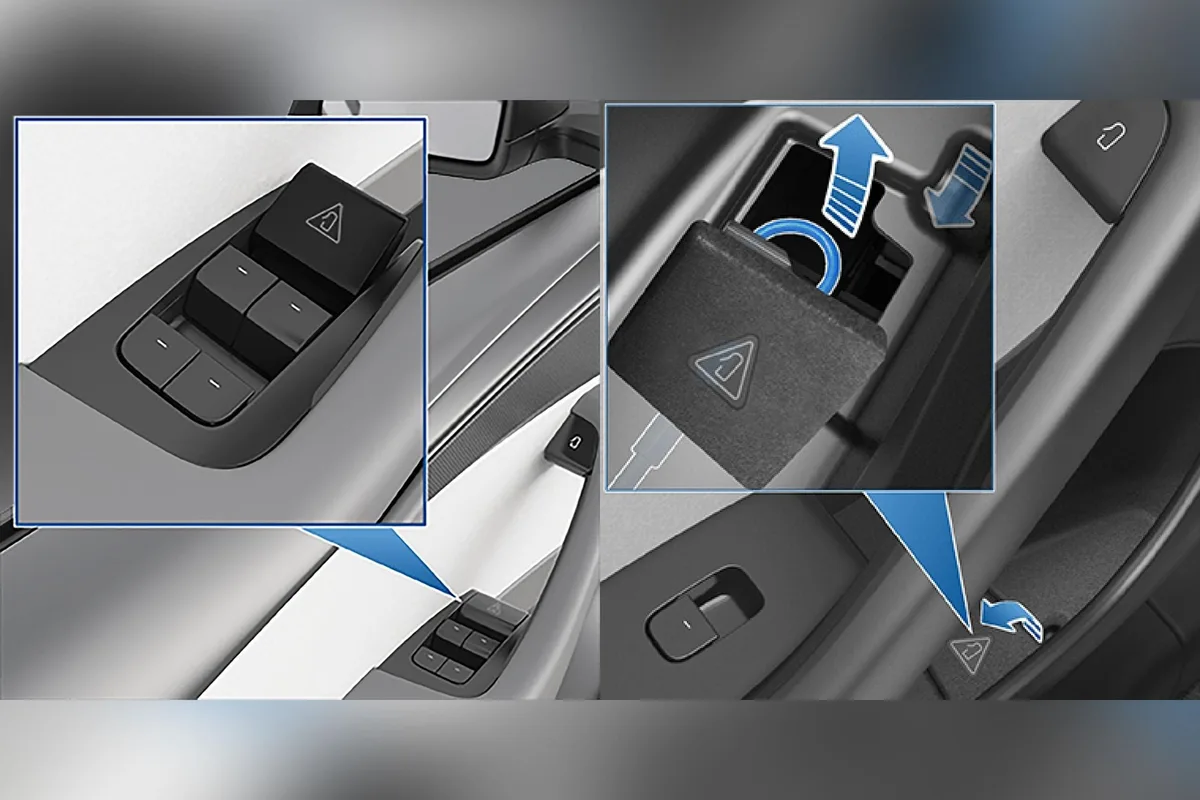
Image source: Bing (Web (fair-use with source credit))
From a practical standpoint, the handle has three layers: the outer painted shell, the button sensor underneath it, and the actuator motor behind the door panel. It's the same kind of electric actuator you'd find in a power window that stops responding in a gas car. The difference here is that the handle is also the door's primary entry point, so a failure locks you out in a way a window doesn't.
If you're comfortable with basic car electrical work, you can test the actuator with a multimeter. But the first step is always identifying whether you have a power problem or a mechanical one.
Step 1: Start Here – Check for Power and Basic Conditions
Before you assume the actuator failed, confirm the car has power. Open the Tesla app and see if it connects. Walk to the driver's window and look at the display.
If the screen is dark, the 12V battery is likely dead.
A low 12V battery is the most common cause of multiple dead handles. It's a classic low-voltage failure, not a mechanical one. You might still unlock the car through the app, but the handles won't present because the battery doesn't have enough voltage.
The same kind of simple checks you'd do for a radiator fan that won't turn on apply here: test the power source before swapping parts.
Next, test a second door handle. If only one handle is dead, the issue is local to that door. If all handles are dead, suspect a low 12V battery, a system fault, or a software glitch.
This single step eliminates half the possible causes.
Then check the weather. Temperatures below freezing can cause handles to freeze to the door body. Look along the seam between the handle and the paint for ice.
If you see ice, you're dealing with a frozen handle, not an actuator failure.
Apply de-icer and wait a few minutes. Use warm water, never boiling water, to clear heavy ice. A sharp temperature swing after washing your car is a common trigger for this exact problem.
Step 2: Diagnose the Handle Behavior – Won't Present or Won't Latch
Now watch what the handle does when you press it. Does it stay completely flush? Does it pop out but fail to open the door?
The answer splits your troubleshooting path in two.
If the handle stays flush, the button sensor, actuator motor, or wiring isn't working. Press firmly and listen for a click. No click usually means a dead button, a failed actuator, or a broken connection.
If you have a working handle on the other side, compare the feel side by side.
If the handle presents but the door stays shut, the latch isn't releasing. Push the door inward while pulling the handle. That often frees a tight latch.
If it still won't open, the latch cable may have come loose, much like a clutch pedal that suddenly feels soft.
The table below sums up the difference.
| Symptom | Most likely cause | First move |
|---|---|---|
| Handle stays flush | Dead 12V battery, bad button, failed actuator, broken wiring | Check power, press for click, test another handle |
| Handle pops out, door won't open | Latch motor stuck, loose latch cable, frozen latch | Pull while pushing door inward, then lubricate latch |
| Handle grinds or feels gritty | Worn actuator gears, debris in mechanism | Clean, apply silicone lubricant, schedule service |
Mechanically, a presented handle that won't open is the same kind of stuck condition as a stuck gear shifter, where the lever moves but the transmission doesn't engage. That detail guides whether you need a new actuator or a latch adjustment.
The Essential Backup: Using the Interior Manual Release
Every Model Y door has a mechanical manual release. It doesn't use electricity, so it works even with a dead 12V battery or a failed actuator. On the front doors, lift the small plastic cover near the window switches and pull the red tab.
On the rear doors, the tab sits under a rubber mat in the cup holder area.
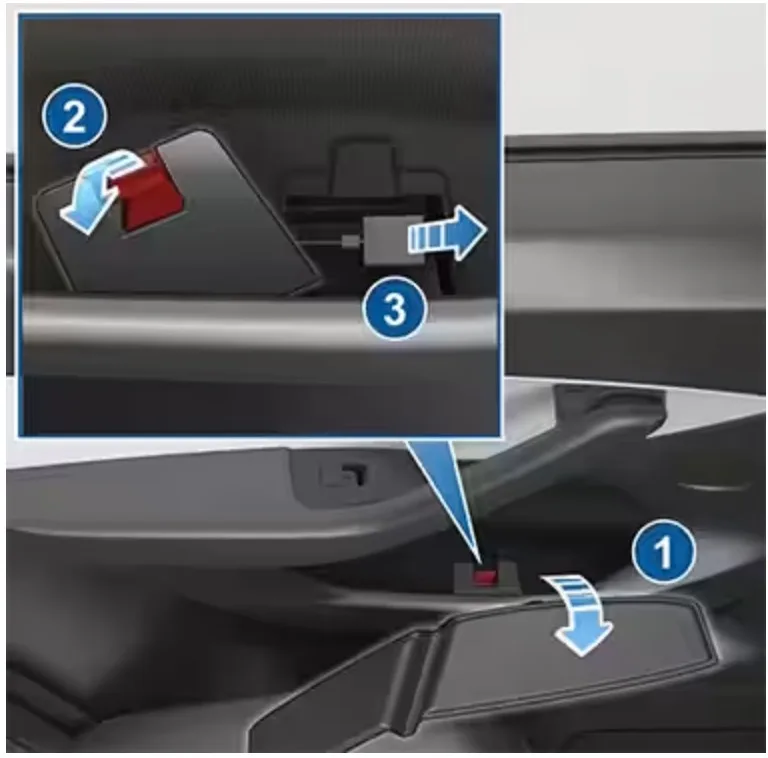
Image source: Bing (Web (fair-use with source credit))
Tesla's official owner's manual shows the exact locations for your market. Federal Motor Vehicle Safety Standard 206 requires this manual release in every car door, but Tesla made it slightly different from the usual pull handle. That red tab is not a decorative feature.
It's your emergency exit and your diagnostic tool.
Practice using it once while the car is parked. You don't want to be hunting for it in the dark or while you're stressed. Show your passengers where it is too.
If you ever need to get out quickly, they'll need to know.
One warning: never pull the manual release while the car is moving. It can open the door at speed, which is dangerous. This is a tool for emergencies and troubleshooting, not a normal way to open the door.
Think of it the same way you think about what to do when your brakes fail in traffic.
After you open the door with the manual release, you can start the 12V reset or schedule service. The door will open, and that gives you room to work on the next step.
Decision Guide: DIY Lubrication vs. Professional Service
If the handle works intermittently or feels gritty, a silicone-based lubricant can extend its life. If it fails the same way every time, you're looking at a worn actuator. Only a replacement fixes that.
For the DIY route, use a silicone spray with a straw nozzle. Spray it along the seam where the handle sits flush, then work the handle back and forth twenty times. This helps when ice or debris makes the mechanism hesitate.
It rarely fixes a dead motor.
The service route makes sense when you see a "door handle needs service" alert, feel grinding, or get zero response after power checks. Tesla charges roughly $150 to $350 per handle, parts and labor included. Mobile service can do it in your driveway in about an hour.
| Fix type | Best for | Cost | Effort |
|---|---|---|---|
| Lubrication (DIY) | Gritty, slow, or ice-affected handles | $10 (spray) | Low, 15 minutes |
| Actuator replacement | Dead, grinding, or non-responsive handles | $150-$350 | High, done by Tesla |
A handle that keeps failing is a mechanical issue, much like a car window that gets stuck despite repeated attempts. Don't keep burning through lubricant if the handle never improves. Book the service and let the tech confirm whether it's the actuator, latch, or wiring.
Frequently Asked Questions
Can a dead 12V battery really stop my door from opening?
Yes. The handle actuator runs off the 12V accessory battery, not the high-voltage drive pack. When that battery drains below a usable level, the handles won't present.
The touchscreen might look fine, but the handle motors need the low-voltage system. Jump the 12V battery or charge it, and the handles usually work again.
Is there a software reset to fix a glitchy handle?
Sometimes. Go to Controls, then Service, and select Power Off. Wait two minutes, then press the brake pedal to wake the car.
This reboots the door control modules and can clear a stuck software state. It's worth trying once before you schedule service. If the handle still won't respond, the hardware is at fault.
Why does only one handle have a problem?
Each door runs its own actuator and wiring harness. A single dead handle points to a local failure. Common causes include a worn gear, a broken wire in the door boot, or a stuck latch sensor.
If every handle fails at once, suspect the 12V battery or a central module fault instead.
Are all Model Y door handles the same?
Model Y handles share the same design language as the Model 3, but they're separate part numbers. The actuator assemblies differ slightly across production years. As of 2026, Tesla still uses the flush electronic design on all Model Y trims.
Always confirm the part number for your specific build before ordering.
Final Recommendation: Choose Your Path
The fix comes down to three checks in order. Confirm the 12V battery has power. Check for ice along the handle seam.
Test the interior manual release before you touch anything else.
If the car responds and the handle feels gritty, start with silicone lubricant. If the handle is dead or throws a service alert, skip the DIY diagnosis and book Tesla service. You'll spend $150 to $350 per handle, but you'll get a properly rebuilt assembly with a warranty.
The biggest mistake owners make is pulling or yanking the handle harder. That strains the gears and turns a lubrication job into an actuator replacement. Work slowly, test each branch of the decision tree, and use the manual release when in doubt.
It's the safest and cheapest first move every time.