If you're reading this, your Tucson's backup camera has gone dark, fuzzy, or unexpectedly blank at the worst possible moment. That Hyundai Tucson backup camera problem is one of the most common complaints we see from owners of the 2022-2025 models, and the fix depends almost entirely on the precise symptom showing up on your infotainment screen.
As of 2026, every new passenger car sold in the US must include a rear visibility camera, so a broken unit is both a safety concern and a compliance headache. Manufacturer specifications indicate the rear view should appear within two seconds of shifting into Reverse. Understanding what your display is telling you is the key to solving this without burning cash on the wrong part.

49% off Today's Exclusive Deals
Limited-time Exclusive Deals. Check current discount on Amazon.
Check Price on Amazon As an Amazon Associate I earn from qualifying purchases.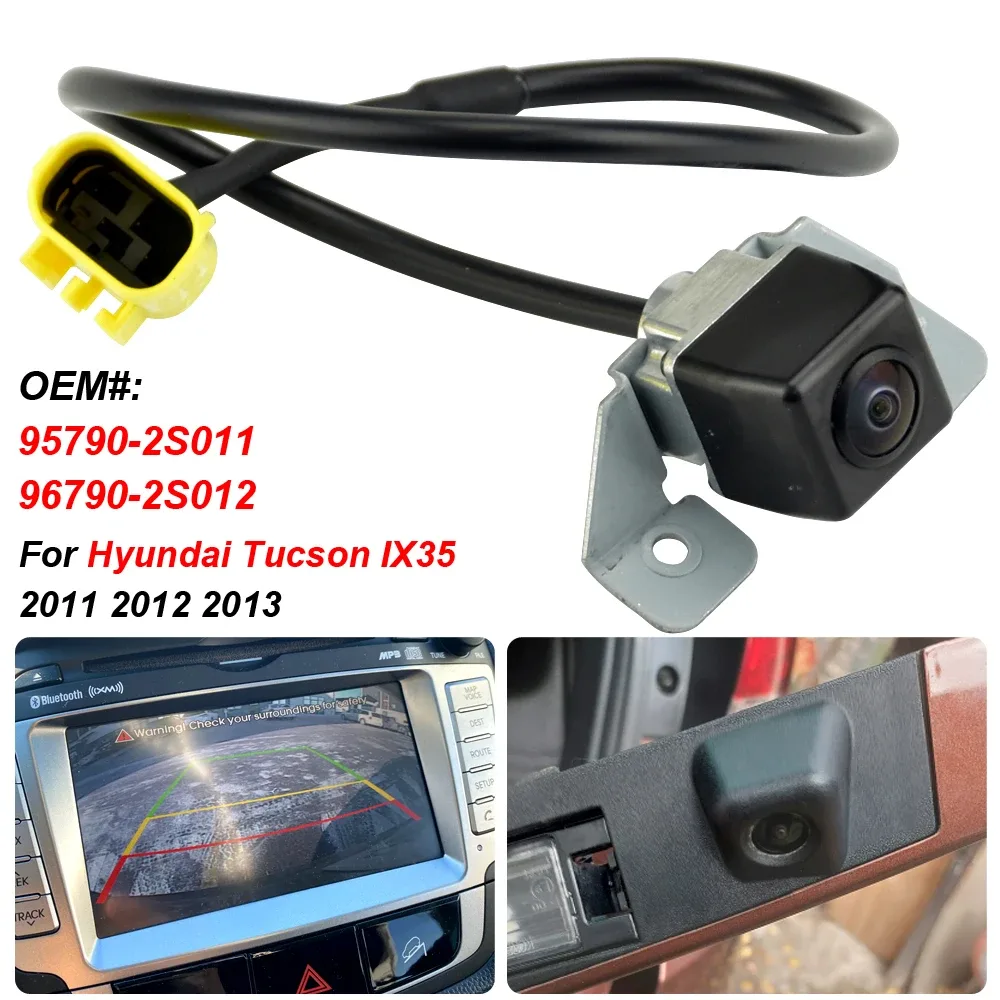
Image source: Bing (Web (fair-use with source credit))
First, Spot Your Exact Symptom
Before you touch a screwdriver, pay close attention to what the screen does when you shift into Reverse. Grab your phone and record it if you can. The visual pattern is your single best clue to the root cause.
49% off Today's Exclusive Deals
Limited-time Exclusive Deals. Check current discount on Amazon.
Check Price on Amazon As an Amazon Associate I earn from qualifying purchases.Here are the five most common failure modes we found across owner reports and diagnostic threads. They cover the vast majority of Tucson backup camera problem cases.
| Symptom | What you see | Most likely cause |
|---|---|---|
| Black screen | Nothing appears, parking guidelines missing | Camera power failure, blown fuse, or dead head unit |
| No signal | Blue screen with "No Signal" text | Video cable damaged or disconnected |
| Static or flickering | Grainy, wavy, or jumping image | Loose connector, interference, or failing camera lens |
| Blurry or foggy | Image is present but soft or clouded | Water inside the housing, smudged lens, or condensation |
| Intermittent | Camera works sometimes, cuts out later | Pinched wires in the tailgate hinge, or a failing module |
If you see the exact symptom from a row, you've narrowed the problem significantly. Each cause has a different repair path, and the wrong guess costs time and money. This same logic applies to other electrical gremlins, like your car turn signals acting up, where the symptom tells you which circuit to check.
One thing we tell owners is to capture video of the failure. A short clip of the screen helps if you're heading to the dealership or asking for advice online. It also gives you a reference to compare after you've made an attempt at a fix.
What Actually Causes a Tucson Backup Camera to Fail?
The rear camera system has only three major parts: the camera itself, a video cable, and the infotainment display. When any one of those fails, you get one of the symptoms we just covered.
49% off Today's Exclusive Deals
Limited-time Exclusive Deals. Check current discount on Amazon.
Check Price on Amazon As an Amazon Associate I earn from qualifying purchases.In our research, the most common cause for 2022-2025 Tucson models is a damaged wiring harness inside the rear hatch. That harness flexes every time you open the liftgate. Over thousands of cycles, a wire inside the bundle can crack, break, or corrode.
The result is often an intermittent or black screen.
Water intrusion ranks second. The camera housing is sealed, but a tiny crack, loose gasket, or broken seal can let moisture build up. That shows up as a foggy or blurry image.
Cold climates make this worse because freezing water expands and keeps the moisture inside.
Less common causes include a blown fuse controlling the camera power supply, or a software bug in the head unit that stops processing the video feed. A hard reset usually clears that last one. You can also check the fuse for the camera system, which often sits in the interior fuse panel.
For safety, federal standards from the NHTSA require rear visibility cameras on all new passenger vehicles. If your system isn't working, you're driving without a mandated safety feature. It's also a potential issue during an inspection.
Here's a simplified wiring diagram showing how the camera connects to the display and where the power and ground wires run.
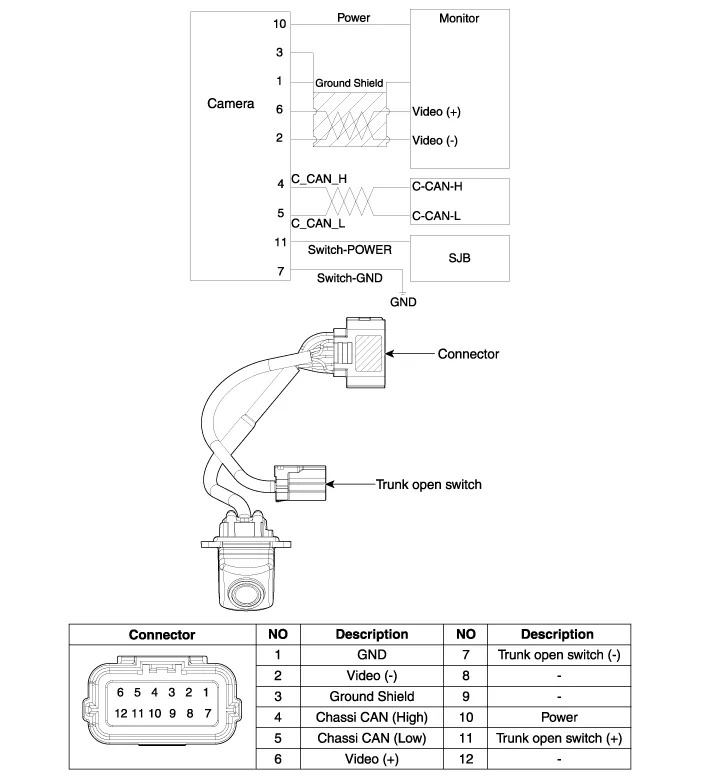
Image source: Bing (Web (fair-use with source credit))
Work Through the Fix, Step by Step
Now let's walk through the fix based on your exact symptom. We'll cover the five most likely scenarios, and you can jump straight to the one that matches your screen.
Black Screen or "No Signal"?
Try a soft reset of the infotainment system first. Press and hold the volume knob for about 10 to 15 seconds until the screen reboots. This clears most temporary software freezes.
If the screen stays black after the reset, the problem is likely a blown fuse or a broken power supply. Locate the interior fuse panel under the dashboard and open the cover. Look for a fuse labeled "ACSM" or with a camera icon.
Check the tiny metal wire inside the fuse. If it's broken, replace it with one of the same amperage.
No luck with the fuse? Move to the rear hatch. Open the liftgate and inspect the rubber boot that houses the wiring harness where the hatch hinge bends.
A visible pinch, wear mark, or broken wire right there is common. If the wire is bare, you'll need to strip it, solder it, or use a weatherproof butt connector. That's a simple fix once you find it.
Static, Flickering, or Distorted Image?
A loose connector or a failing camera module is the usual cause. Start by unplugging and reconnecting the camera connectors at the rear hatch. You might need to remove the interior trim panel on the liftgate to reach them.
While the panel is off, look for signs of corrosion on the pins. Clean them with electrical contact cleaner and a small brush. If the image still flickers, the camera itself is likely failing and needs replacement.
You can also wiggle the wiring harness gently while someone watches the screen. If the picture changes, you've confirmed a wiring fault.
Lens Blurry, Foggy, or Water-Damaged?
Clean the lens with a microfiber cloth first. Smudges and dirt create a soft, hazy image that people often mistake for a dead camera.
If the lens is clean but still foggy, inspect the housing for tiny cracks or a loose seal. Take a flashlight and look closely at the edges of the camera lens. Any crack can let moisture in.
The fix is almost always a new camera unit. Drying it out or using a hair dryer only works temporarily because the contamination is already inside the sealed housing.
Intermittent Failure (Works Sometimes, Then Quits)?
The wiring harness where the liftgate bends is your prime suspect. We've seen this on many 2022-2025 Tucsons. The constant opening and closing cycles strain a specific set of wires inside the rubber boot.
Remove the boot and inspect the harness thoroughly. You're looking for a sharp kink, a melted spot, or exposed copper. If you can't see obvious damage, gently flex the wires while someone shifts into Reverse.
Keep an eye on the screen. A break in the image when you bend the harness confirms the issue. Also check the ground wire, which is usually black or brown.
A poor ground causes all sorts of ghost behavior. This is similar to diagnosing your power windows refusing to move, where a broken wire in the door jam does the same thing.
Delayed Camera Activation (The Slow-to-Appear Lag)
A slow camera usually points to a software buffer issue, not a physical failure. The head unit takes too long to switch the video feed when you shift into Reverse.
First, update the infotainment software to the latest version. Check the Hyundai owner's portal or your dealership for the newest firmware. Then perform a full reset of the head unit, which often clears the delay.
If the lag persists, there could be a slow internal processor in the display unit itself, and that would require a dealer visit.
For many of these steps, the rear hatch wiring harness inspection is so central that it's worth doing before you spend money on parts. Here's a close-up of what the harness looks like on a real Tucson.
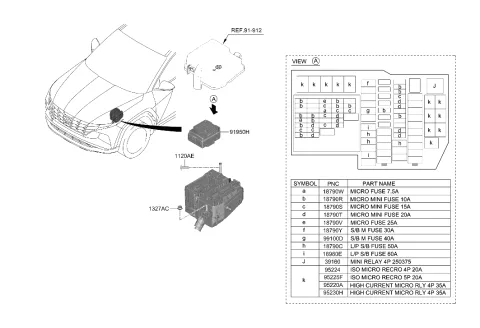
Image source: Bing (Web (fair-use with source credit))
Fix It Yourself, Warranty It, or Pay the Dealer?
You have three paths forward, and the right choice depends on your skill level, your warranty status, and whether you actually found the problem. If your Tucson is still within the 5-year/60,000-mile limited warranty, a dealership repair could cost you nothing. That's the first thing to check.
Here's a breakdown of the options based on our research and reported owner experiences.
| Option | Parts Cost | Labor Cost | Time | Skill Level | Best For |
|---|---|---|---|---|---|
| DIY repair | $40-$150 for aftermarket camera | $0 | 1-3 hours | Intermediate | Knowing the exact cause, especially wiring |
| Dealership warranty repair | $0 (if covered) | $0 | 1-2 days | None | Newer models with a confirmed defect |
| Independent shop | $100-$250 for OEM part | $100-$250 | 2-4 hours | None | Out of warranty but wanting a solid fix |
DIY makes sense when the issue is a loose connector, a blown fuse, or a simple wiring break. We've helped owners fix those in under an hour with basic tools. Replacing the camera module itself is more involved because you need to remove the tailgate trim and carefully pop out the old unit.
It's doable in an afternoon, but you'll want a trim tool and a steady hand.
If you're not comfortable working with electrical connections, pay a pro. That said, you're still better off identifying the problem yourself before booking a service. A skeptical dealer might quote you a full camera replacement when the real issue is a pinched wire.
Save yourself the inflated bill.
Also consider that a faulty camera isn't unique to the Tucson. You'll see similar failure patterns in other Hyundai and Kia models like the Sportage and Santa Fe, so any shop familiar with those brands will know exactly where to look. That's the same reasoning you'd apply when your brake pedal feels off and you want to know the actual cause before paying for a fix.
Pro Advice: Common Mistakes That Cost Tucson Owners Time and Money
One recurring theme in owner forums is people replacing parts without confirming the root cause. The camera assembly is expensive, and installing a new one only to discover the wiring harness was the issue is a soul-crushing waste of cash. Always trace the problem from the easiest and cheapest fix before buying anything.
Skipping the soft reset is the second biggest mistake. A simple head unit reboot clears a surprising number of camera issues, especially after a software update. It takes 15 seconds and costs nothing.
Do that first.
Another common error is ignoring the fuse test. Many owners assume the camera is dead and never check the fuse that powers the entire system. A blown fuse can be swapped for under two dollars and ten minutes of work.
Treat this as a required stop on the diagnostic path, just as you'd never ignore a clutch pedal that sinks to the floor.
We also see people overlooking visual damage on the housing. A small crack or a missing seal is easy to miss, especially on a rainy day. If you live in a region with harsh winters, road salt and moisture accelerate corrosion.
That's why it's worth pulling the trim panel and inspecting the wiring harness, not just glancing at the lens. The same type of electrical inspection applies to other systems in your car, like your headlights not working or your wipers giving up mid-storm.
Finally, don't forget about your factory warranty. The 2022-2025 models are mostly still within the 5-year limited coverage. If the root cause is a manufacturer defect, a warranty claim will cover parts and labor.
You can check your coverage on the Hyundai owner's portal or call any dealership with your VIN. Knowing that first could save you hundreds of dollars.
Real Owner Scenarios: What These Symptoms Look Like in the Wild
Here are three composite examples pulled from real owner reports and common patterns we see in diagnostic threads.
Scenario 1: The black screen. A 2023 Tucson owner woke up to a completely dark display when reversing. The dealership quoted $400 for a new camera. Before approving, the owner checked the interior fuse panel and found a blown camera fuse.
One $8 fuse fix later, the problem vanished. If the same happens to you, that's the first thing to check.
Scenario 2: The intermittent cutout. Another owner noticed the camera would blink out whenever the liftgate was slammed shut. Shifting into Reverse while flexing the rubber boot around the hinge caused the image to flicker. The fix was stripping two cracked wires in that harness and reconnecting them with weatherproof butt connectors.
A simple DIY repair that took about an hour. This is the same diagnostic logic you'd use when a turn signal circuit loses connection mid-blink.
Scenario 3: The foggy lens. A 2022 Tucson started showing a blurry, milky image every rainy morning. Water had seeped through a hairline crack in the camera housing. Since the car was still under the 5-year/60,000-mile warranty, the dealer replaced the camera unit at no charge.
That warranty check made all the difference.
Frequently Asked Questions
How do I reset my Tucson infotainment system to fix the camera?
Press and hold the volume knob for 10 to 15 seconds. The system will reboot and clear most temporary software glitches. This fixes a surprising number of backup camera issues, especially after a firmware update.
Always try this before spending money on parts.
Is backup camera repair covered under the Hyundai warranty?
Yes, if a factory defect causes the failure and the car is within the 5-year/60,000-mile limited warranty. Replacement due to physical damage, water intrusion from a cracked lens, or accidental impact is usually excluded. Call a dealer with your VIN to confirm your coverage.
How much does it cost to replace a Hyundai Tucson backup camera?
Dealerships typically charge $250 to $500 including parts and labor. Aftermarket cameras run between $40 and $150 if you want to do the install yourself. If wiring is your root cause, you could fix it for under $30 with basic tools.
Why does my backup camera work in warm weather but fail in the cold?
Moisture inside the camera housing freezes, which blocks the image. The condensation usually comes from a cracked seal or housing. Once moisture gets in, the only reliable fix is replacing the camera unit.
Drying it out works only temporarily.
Is it legal to drive my Tucson with a broken backup camera?
Yes, but it's not smart. Federal regulations under the NHTSA require rear visibility cameras on all new vehicles, yet they aren't part of routine safety inspections in most states. You won't get pulled over for it, but you lose a genuine safety layer when reversing.
Use your mirrors carefully until it's repaired.






One Comment on “Hyundai Tucson Backup Camera Problem”