Tesla Model 3 battery draining fast is a common worry for owners. You park with a certain charge and wake up to a noticeably lower number. While some drain is normal, a significant overnight drop points to a specific cause you can fix yourself.
Phantom drain, or vampire draw, refers to power consumed while the car is off and parked. Manufacturer specifications indicate a Model 3 with all features disabled should lose less than 1% of charge per 24 hours. If you're seeing more than that, it's time to diagnose the issue.

49% off Today's Exclusive Deals
Limited-time Exclusive Deals. Check current discount on Amazon.
Check Price on Amazon As an Amazon Associate I earn from qualifying purchases.
Image source: Bing (Web (fair-use with source credit))
Quick Answer
A Tesla Model 3 battery draining fast while parked is usually caused by a specific feature. Sentry Mode and Cabin Overheat Protection are the top two culprits. Check your Tesla app energy graph to confirm.
49% off Today's Exclusive Deals
Limited-time Exclusive Deals. Check current discount on Amazon.
Check Price on Amazon As an Amazon Associate I earn from qualifying purchases.Disabling these features or setting exceptions often solves the problem instantly. If drain persists, power cycle the car or check the 12V battery.
First, Check This: The Energy App Tells You Where the Power Is Going
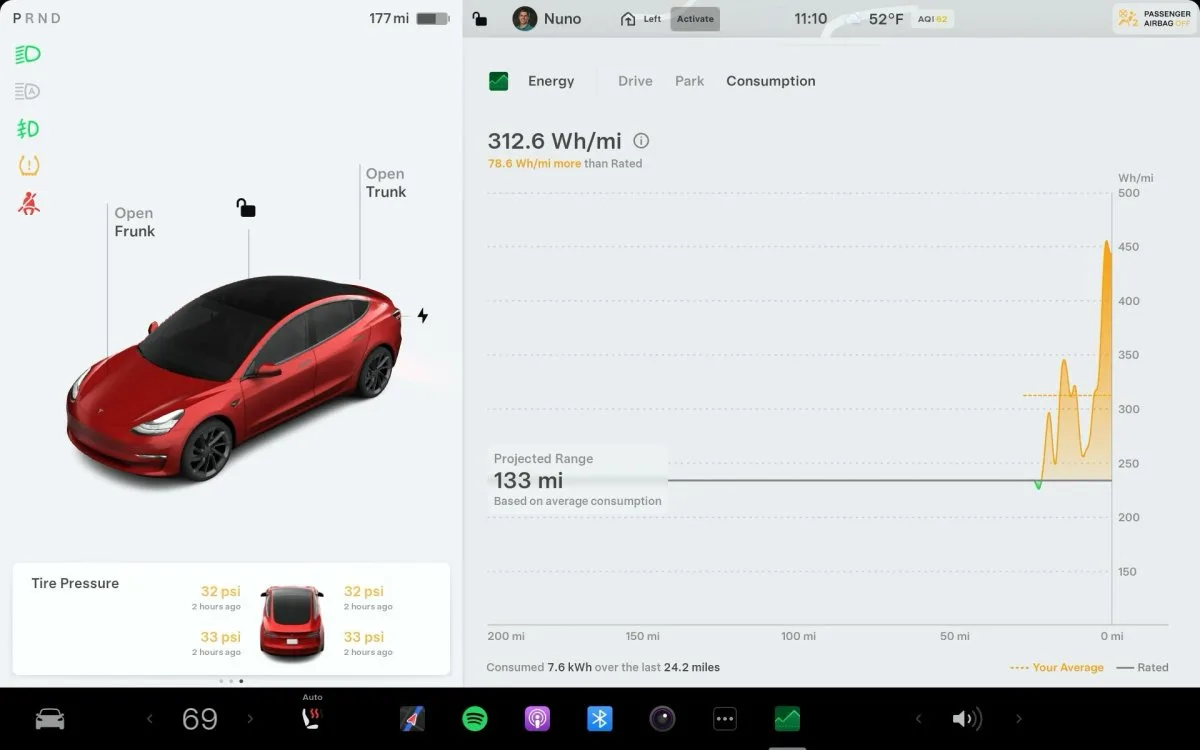
Your first and best tool is the Tesla mobile app's energy graph. It doesn't just show drain. It breaks down exactly where the power went, which feature used it, and for how long.
Open the app, tap on your car, and go to the "Energy" tab. Look at the graph for the "Parked" period since your last full charge. This is different from the "Since Last Charge" graph, which includes driving.
49% off Today's Exclusive Deals
Limited-time Exclusive Deals. Check current discount on Amazon.
Check Price on Amazon As an Amazon Associate I earn from qualifying purchases.Image source: Bing (Web (fair-use with source credit))
The parked graph shows standby consumption broken into categories: Sentry Mode, climate control, and other. A large "Sentry Mode" block confirms that feature is the main drain. A big "Climate" block means Cabin Overheat Protection is running.
If you see large "Wake" events, something is preventing deep sleep. Phone key proximity, frequent app check-ins, or third-party integrations can cause this. This graph turns a vague problem into a specific diagnosis.
The "Draining Fast" Decision Tree: What to Do Based on Your Situation
Use this flow to find your specific fix. Start with where the drain happens.
Is the drain happening overnight or over several days while parked?
If yes, the issue is almost certainly a standby feature. Jump to the "Parked" branch. If the drain happens while driving, it points to energy consumption from habits, climate control, or a mechanical issue.
The "Parked" Branch
- Check Sentry Mode. Is it enabled 24/7? Each day costs 1-5% of battery. Is it set to "ON" at home? Many owners forget to add home as an exception.
- Check Cabin Overheat Protection. Is it set to "ON" or "ON with A/C"? In summer, this can run the compressor for hours, draining over 5% in a single hot afternoon.
- Check Scheduled Departure. Is it preconditioning the cabin every morning? This uses significant power, especially if the car isn't plugged in.
- Check App Activity. Are you checking the car's status via the app frequently? Each check wakes the car for several minutes.
The "Driving" Branch
- Review Climate Control. Seat heaters, steering wheel heater, and full-blast A/C are major power draws.
- Consider Weather. Below 20°F (-6°C), range loss of 20-30% on short trips is normal due to battery chemistry and cabin heating.
- Examine Driving Style. High speeds above 75 mph dramatically increase consumption. Compare your Wh/mile in the energy graph to EPA estimates.
Image source: Bing (Web (fair-use with source credit))
Step-by-Step Fixes for the Most Common Drain Culprits
Once you've identified the cause, these steps address each one.
Disable or Limit Sentry Mode. Go to Controls, then Safety & Security, then Sentry Mode. Add your home address as a "Home" location so it disables automatically in your driveway. If you need it away from home, keep it on and accept the 2-5% daily cost.
Adjust Cabin Overheat Protection. Go to Controls, then Climate, then Cabin Overheat Protection. The "No A/C" setting uses only the fan, not the compressor. That alone cuts the drain significantly.
If your car AC is blowing hot air when you do need cooling, that's a separate issue worth checking.
Disable Scheduled Departure. Go to Controls, then Charging, then Scheduled Departure. Uncheck "Precondition Cabin" if you don't rely on it. This stops the car from warming up the interior when you're not using it.
Power Cycle the Car. Go to Controls, then Safety, then Power Off. Wait two full minutes without touching the car. Press the brake pedal to wake it up.
This clears minor software glitches that cause wake-loop bugs.
Check the 12V Battery. Open the service menu via Controls, then Service, then Vehicle Battery. If the 12V battery health shows low, schedule a replacement. A weak unit forces the main pack to waste energy recharging it.
Work through these in order after checking your energy graph. Usually, the fix is a single toggle away.
Real-World Scenarios: What Owners Actually See
Aggregate user reports paint a clear picture of normal versus problematic drain.
| Scenario | Reported Daily Drain | Common Cause |
|---|---|---|
| Parked at home, all features off | < 1% | Normal deep sleep standby |
| Sentry Mode active in a driveway | 2% – 4% | Parking cameras and processing |
| Cabin Overheat Protection on (A/C) in summer | 3% – 6%+ | A/C compressor cycling |
| Parked at airport for 7 days (Sentry off) | 10% – 15% total | Minor daily draw adds up |
| Extreme cold (-10°F), parked unplugged | 4% – 7% | Battery conditioning |
The biggest drains are easily controlled features, not mysterious defects. One owner reported 5% overnight drain. The energy graph showed 4.8% was Sentry Mode.
Adding their garage as a "Home" location fixed it instantly.
If your car heater isn't working properly, the system may overcompensate and draw extra power to maintain cabin temperature. That's another drain path worth ruling out in cold weather.
Mistakes to Avoid When Trying to Stop the Drain
When you're losing battery fast, the instinct is to change everything at once. That usually backfires.
Power cycling too often. Restarting the computer can fix a glitch. But doing it daily introduces new minor bugs. Use it as a diagnostic step, not a routine fix.
Blaming the high-voltage battery. Phantom drain is about energy consumption, not battery capacity. Your battery's health is a separate issue. Focus on the energy graph first.
Ignoring the 12V battery. The small auxiliary battery powers the computer and locks. When it fails, the main pack wakes up repeatedly to recharge it. That shows up as phantom drain.
If your car is over three years old, check its health.
Trusting anecdotal numbers. A forum post claiming "my car only loses 1% a day" doesn't apply to your situation. Your energy graph is the only truth. Compare your numbers to your own baseline.
Setting the charge limit too high. Keeping the battery at 100% daily accelerates degradation. Tesla recommends 80% for daily driving. Charge to 100% only before long trips.
When to Stop Guessing and Call Tesla Support
Most drain causes are settings you can control. But sometimes the car is genuinely misbehaving.
Look for these red flags: losing more than 5% per day with Sentry Mode and Cabin Overheat Protection disabled, constant wake events in the energy graph, or electrical errors in the service menu.
Note your charge level at a specific time, then check it again after 12 hours. Screenshot the energy graph. Your service technician will need these details.
Tesla can also run remote diagnostics once you book an appointment.
A few deeper issues can cause abnormal drain: a failing 12V battery, a faulty BMS sensor, or a software bug from a recent update. Tesla's warranty covers battery defects but not normal phantom drain. The high-voltage battery is covered for 8 years or 100,000 to 120,000 miles depending on your variant.
Describe the problem in concrete terms when you schedule service. "Lost 8% in 10 hours parked with all features off" gets attention. Vague descriptions don't.
If you've noticed the car fan not working or other electrical oddities alongside the drain, mention them to the technician. They may point to the same root cause.
For context on EV battery behavior, the U.S. Department of Energy's Alternative Fuels Data Center provides foundational information on how lithium-ion packs operate under different conditions.
Frequently Asked Questions
How much battery drain per day is normal for a parked Model 3?
Under 1% per 24 hours is normal with all standby features off. With Sentry Mode active, expect 2-5% per day. Cabin Overheat Protection in hot weather pushes it higher.
Anything above these ranges points to a specific feature or a weak 12V battery.
Should I leave Sentry Mode on overnight?
Only if you need the coverage. Sentry Mode costs about 1-5% of battery per day. Add your home address as an exception in Sentry settings so it disables automatically in your driveway or garage.
Is it bad to charge my Tesla to 100% every day?
Yes, for daily use. Frequent 100% charges accelerate battery degradation. Tesla recommends a daily limit of 80%, or lower for short commutes.
Charge to 100% only before long trips.
Does cold weather drain my Tesla battery?
Cold weather causes temporary range loss, not permanent damage. Short trips in freezing temperatures can use 20-30% more energy for cabin heating. Plugging in overnight keeps the battery warm and reduces this drain.
When should I contact Tesla about battery drain?
Contact Tesla if you lose more than 5% per day with all standby features disabled. Also reach out if the energy graph shows constant wake events or electrical errors. Have specific numbers and screenshots ready.
Tesla can run remote diagnostics to pinpoint the issue.





