If you're watching your Tesla Model Y battery draining fast overnight, you're not alone. It's one of the most common owner worries. The range number drops before you've even turned the car on.
Normal phantom drain sits between 1% and 2% overnight in mild weather. Manufacturer specs and owner reports agree. Once you know that baseline, you can decide whether this is a settings issue or something deeper.

49% off Today's Exclusive Deals
Limited-time Exclusive Deals. Check current discount on Amazon.
Check Price on Amazon As an Amazon Associate I earn from qualifying purchases.
Image source: Bing (Web (fair-use with source credit))
Quick Answer
If your Tesla Model Y battery drains fast, check parked loss first.
49% off Today's Exclusive Deals
Limited-time Exclusive Deals. Check current discount on Amazon.
Check Price on Amazon As an Amazon Associate I earn from qualifying purchases.Normal overnight drain sits between 1% and 2%.
Sentry Mode and Cabin Overheat Protection cause most excess drain.
Run a 24-hour parked test with all extras off.
Loss above 5% means it's time to contact Tesla Service.
49% off Today's Exclusive Deals
Limited-time Exclusive Deals. Check current discount on Amazon.
Check Price on Amazon As an Amazon Associate I earn from qualifying purchases.First, Know What "Normal" Battery Drain Looks Like
Before changing settings, get a realistic baseline. Drain while parked depends on temperature, active features, and how often the car wakes up. Use the state of charge percentage, not miles, to measure it.
Phantom drain is the energy used while the car is parked and "off." The high-voltage battery still feeds the battery management system, connectivity modules, and security systems. A small amount of loss is normal. As of 2026, Tesla's official support documentation still lists this standby usage as expected.
| Condition | Expected overnight drain |
|---|---|
| Mild weather, all features off | 1% to 2% |
| Hot day (95°F/35°C), Cabin Overheat Protection on | 2% to 5% |
| Cold night (20°F/-6°C), unplugged | 3% to 5% |
| Sentry Mode active, busy street | 5% or more |
This table gives you a reference for normal. If your Model Y stays inside these ranges, the battery likely isn't failing. If it doesn't, move to the app.
Check the Tesla App Before You Do Anything Else
The Tesla mobile app is your first diagnostic tool. Open the Energy section and look for the "Parked" or "Since Last Charge" view. This shows real consumption data, not guesses.
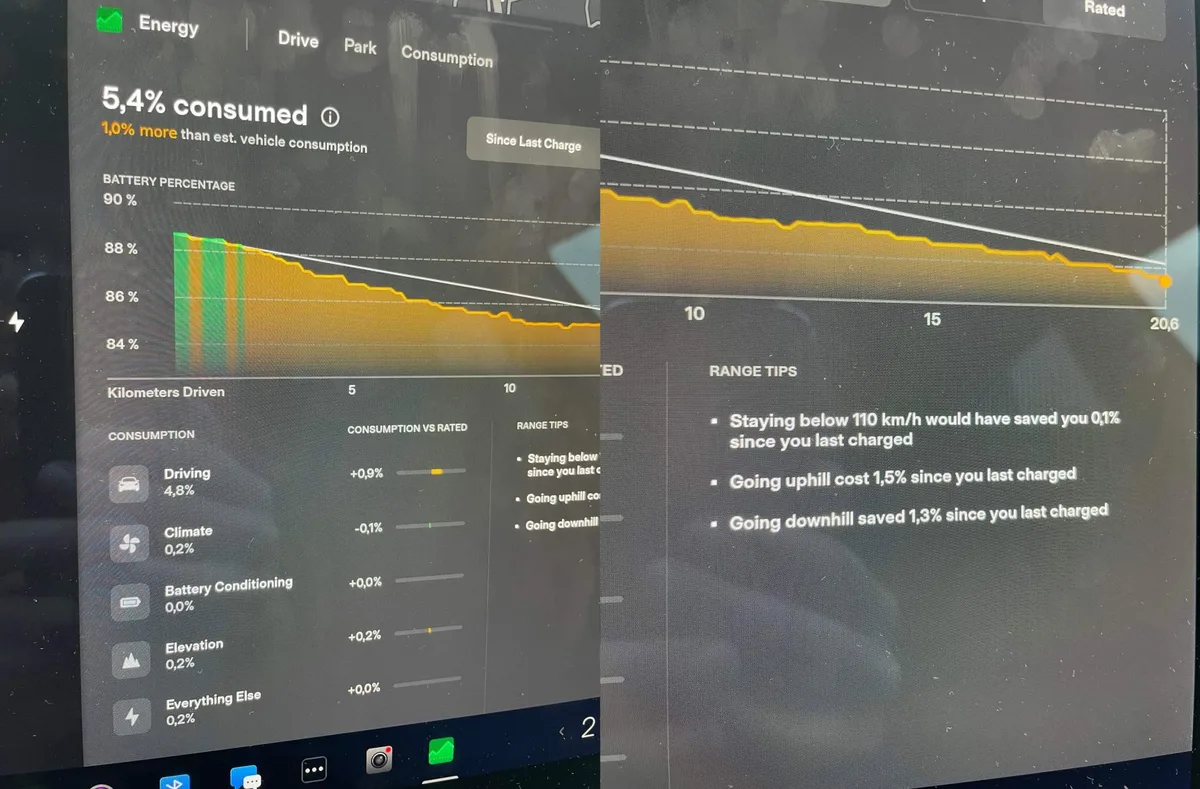
Image source: Bing (Web (fair-use with source credit))
- Note the starting percentage after you park.
- Check the percentage the next morning.
- Look for events. Each spike in the energy graph lines up with a system waking.
A clean result is a mostly flat line with a small blip when you open the app. A busy nighttime line means something stayed active.
The most overlooked number is energy per mile on your last drive. If that number is high, the problem could be driving style, tire pressure, or HVAC use. That's a different fix than parked drain.
This step tells you whether the drain happens while driving or while parked. That distinction changes everything.
The Usual Suspects: Sentry Mode, Cabin Overheat Protection, and App Wake-Ups
Most fast drain cases trace back to three settings. We'll handle each one.
Sentry Mode
Sentry Mode records security events using the cameras and keeps the computer awake. On a busy street, it can trigger dozens of times a day. Each event burns energy.
The fix is in the Safety menu. Set Sentry Mode to Exclude Home and Exclude Work. Keep it on only when parked somewhere unfamiliar.
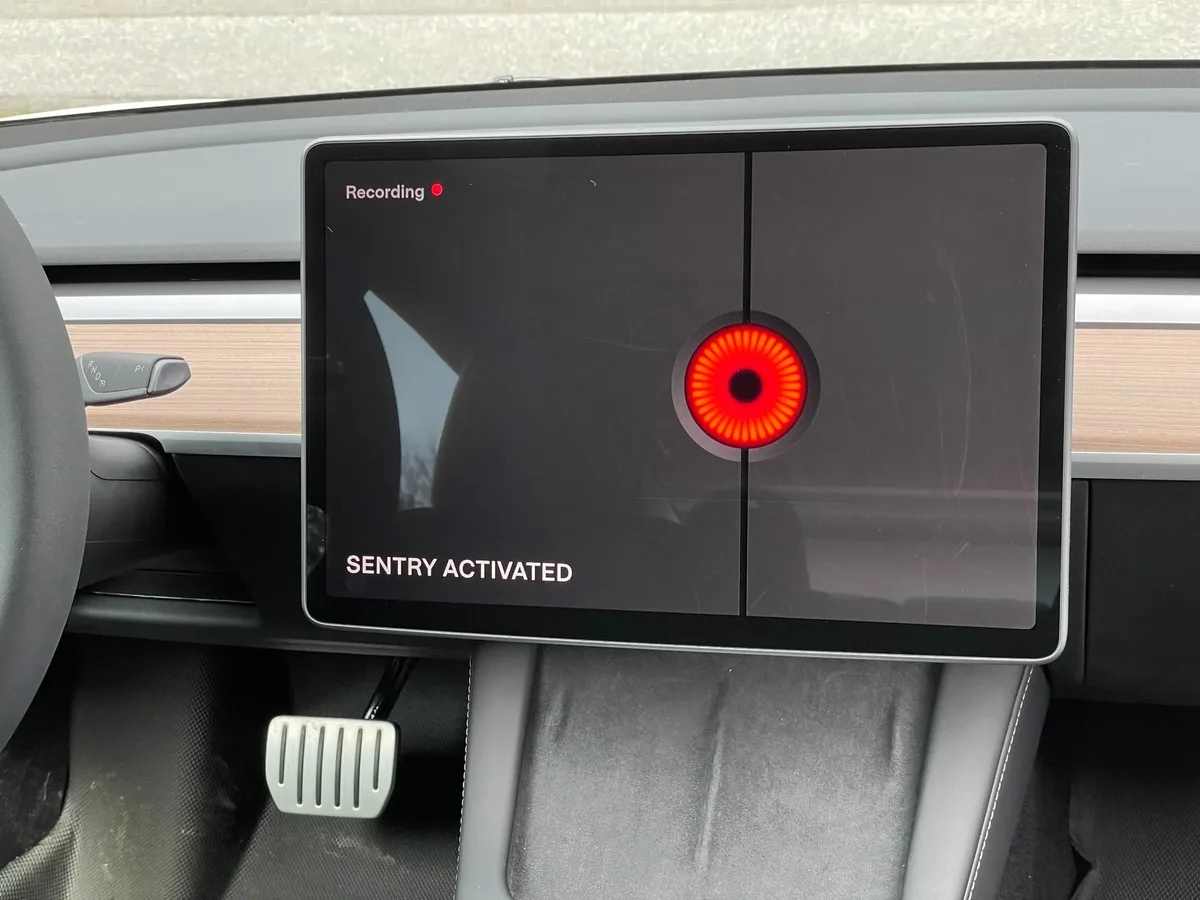
Image source: Bing (Web (fair-use with source credit))
Cabin Overheat Protection
This feature cools the cabin to keep the interior below 105°F (40°C). On hot days, it cycles the AC frequently and pulls energy from the battery.
If you park in a garage or carry no heat-sensitive items, turn it off in the Climate settings. The interior materials handle heat fine. An AC system struggling to keep up can also run longer, similar to blowing hot air from vents in any vehicle.
App Wake-Ups
Each time you open the Tesla app, it sends a wake signal to the car. Opening it repeatedly prevents deep sleep. This is a quiet but real drain source.
Close the app. Let notifications handle charging and security updates. The car can then sleep properly.
These three features cause the majority of excess phantom drain complaints. Turning them off usually solves the issue. If not, run the parked drain test.
Run the 24-Hour Parked Drain Test
If settings changes didn't help, run this test. It removes daily variables and gives you a clear answer.
Charge to 80-90% first. Park in mild weather if you can. Turn off Sentry Mode, Cabin Overheat Protection, and scheduled departure.
Leave the car unplugged for 24 hours. Do not open the app or approach it during that time. Record the starting and ending percentages.
Here's how to read the result:
- 1% or less: Healthy. The issue was settings, weather, or driving habits.
- 3% to 5%: Borderline. Something may be staying awake.
- More than 5%: Strong signal for service.
If loss stays above 5% with everything off, capture screenshots of the Energy graph. That data will help Tesla's service team diagnose the problem faster.
Is It the Cold, or Is It the Battery?
Cold weather confuses the range estimate. The battery has less available capacity in freezing temperatures because ions move slower. The battery management system also spends energy warming the pack.
Cabin heat pulls more power too.
This explains most winter range loss. It also explains why expected range drops overnight even if the car is off. The pack is colder, so the computer predicts less range.
How to separate thermal loss from real degradation:
- Park plugged in. The car can heat the pack using wall power instead of battery power.
- Check the Battery Health screen in Controls > Software. Newer firmware includes it.
- Watch the pattern. If the car recovers range after a warm drive, it's thermal. If the loss is permanent, it's degradation.
As of 2026, many newer software versions include a Battery Health screen that estimates degradation. The number takes a few cycles to settle, so don't panic over one reading.
If your cabin heater seems weak while preconditioning, the same logic applies as with heater problems in other cars. Check the climate schedule and confirm the fan is actually running. In most cases, cold weather isn't a fault.
It's physics.
Red Flags: When to Contact Tesla Service
Most drain cases are settings or weather. But some signs point to a real fault.
Contact Tesla Service if:
- Loss stays above 5% per 24 hours with every extra feature off.
- The battery percentage drops while plugged in and charging is active.
- You see a warning about battery health or charging speed.
- The car feels warm near the charge port or under the pack when parked.
- Drain started right after a software update and hasn't improved in a week.
Before contacting service, gather evidence. Take screenshots of the Energy app, note daily percentage loss, and keep a record of the 24-hour test. Tesla's remote diagnostic team can pull logs from the car, but clear data speeds up the process.
Per Tesla's official service documentation, the Model Y battery and drive unit are covered for 8 years or 120,000 miles, whichever comes first. During that period, Tesla generally warrants the battery to retain at least 70% of capacity. Severe degradation below that level may qualify for repair or replacement.
You should also check NHTSA's recall database with your VIN. Rare firmware or battery-related recalls can cause abnormal behavior. It takes two minutes and costs nothing.
Frequently Asked Questions
How much battery drain overnight is normal for a Tesla Model Y?
Normal overnight loss is 1% to 2% in mild weather with Sentry Mode and Cabin Overheat Protection off. If your car is unplugged in cold weather, expect 3% to 5%. Anything above 5% in moderate conditions deserves attention.
Does Sentry Mode really drain the battery that fast?
Yes. Sentry Mode keeps the cameras, computer, and USB drive active. On a busy street, it can use 5% or more overnight.
Set it to exclude home and work if you want a healthy sleep cycle.
Can cold weather permanently damage the Tesla Model Y battery?
Mild cold exposure is not damaging. It lowers available capacity while it lasts, then recovers when warm. Charging a frozen battery is a different story.
Always warm the battery first by setting a departure schedule or letting the car precondition.
Does opening the Tesla app cause battery drain?
Yes, but not a huge amount. Each open sends a wake signal. A short query does not use much power, but the wake state it triggers can last several minutes.
Frequent checks mean the car never reaches deep sleep.
Should I keep my Tesla Model Y plugged in overnight?
Yes, plugging in is generally best. The car can manage battery temperature using grid power, especially in winter. Tesla's official guidance supports leaving the car plugged in when not in use.
You don't have to charge to 100% every night. Around 80% to 90% is plenty for daily driving.
If my battery drains fast, will Tesla replace it under warranty?
Only if the pack fails a capacity and diagnostic test. Tesla's warranty covers batteries that lose more than 30% of capacity during the coverage period. A normal 5% to 10% loss after 50,000 miles is not a warranty case.





