Typing "Tesla Model 3 battery problem" into Google is a rite of passage for every owner. The fear of a dead pack is real. But most battery issues are just cold weather, software quirks, or a low 12V battery.
Manufacturer specifications indicate the Model 3 pack should hold about 90% of its capacity after 200,000 miles. Tesla's warranty covers the battery for 8 years or 100,000 to 120,000 miles, depending on trim. Understanding what's normal saves you time, money, and panic.

49% off Today's Exclusive Deals
Limited-time Exclusive Deals. Check current discount on Amazon.
Check Price on Amazon As an Amazon Associate I earn from qualifying purchases.
Image source: Bing (Web (fair-use with source credit))
Quick Answer
A Tesla Model 3 battery problem is usually a false alarm. Cold weather, phantom drain, or a failing 12V battery cause most symptoms. Real battery failures are rare.
49% off Today's Exclusive Deals
Limited-time Exclusive Deals. Check current discount on Amazon.
Check Price on Amazon As an Amazon Associate I earn from qualifying purchases.The warranty covers the HV pack for 8 years or up to 120,000 miles. If your car shuts down, contact Tesla roadside immediately.
First Thing to Know: Your Battery Is Probably Fine (But Here's When It's Not)
Most owners panic at the first sign of range loss. They assume the pack is dying. In our research, the vast majority of battery alerts trace back to cold weather, a low 12V battery, or a pending software update.
None of those require a new high-voltage pack.
The battery in your Model 3 is a lithium-ion pack. It degrades slowly over time. The first 5% of capacity loss usually happens in the first 30,000 miles.
49% off Today's Exclusive Deals
Limited-time Exclusive Deals. Check current discount on Amazon.
Check Price on Amazon As an Amazon Associate I earn from qualifying purchases.After that, the curve flattens out significantly. That's normal calendar aging and cycle aging, not a defect.
The golden rule is simple: symptoms plus context equals diagnosis. A single warning message after a cold night is not the same as repeated shutdowns during normal driving. Treat each case on its own terms.
- Normal: Range drops 20-30% in freezing weather
- Normal: Charge speed slows when the battery is cold or nearly full
- Normal: Minor capacity loss after years of use
- Not normal: Sudden shutdowns at 10-20% state of charge
- Not normal: Repeated "Battery Power Limited" warnings in warm weather
- Not normal: Visible damage or a strong burning smell
It's the same logic as diagnosing car brake grinding. You don't replace the whole system over one symptom. You dig a little deeper first.
Reading the Warning Signs: Dashboard Alerts, App Data, and Range Drop
Your Tesla gives you plenty of clues. The dashboard and center touchscreen show alerts when something is wrong. The Tesla app adds another layer of data.
You just need to know what each signal actually means.

Image source: Bing (Web (fair-use with source credit))
What Each Alert Tells You
The most common battery-related alerts include "Battery Power Limited", "Unable to Charge", and "Battery Performance Limited". Each one has a different cause and severity.
| Alert | Typical Cause | Severity |
|---|---|---|
| Battery Power Limited | Cold battery, low SoC, or BMS recalibration | Low to moderate |
| Unable to Charge | Charge port issue, faulty cable, or HV connector corrosion | Moderate |
| Battery Performance Limited | Cell imbalance or thermal management problem | High |
| Vehicle Shutting Down | 12V battery failure or severe HV fault | Critical |
Range drop is trickier. The displayed range is an estimate, not a hard measurement. It changes with driving habits, tire pressure, HVAC use, and weather.
A 30-mile drop after a software update is often just a recalibration of the estimate, not actual capacity loss.
The Tesla app shows current charge level and estimated range. It doesn't directly show State of Health (SoH). For that, you'd need third-party diagnostic tools or a service appointment.
But the app is still useful for tracking patterns over time.
Step-by-Step Troubleshooting Flow: What to Check Before You Panic
Here's the exact process we recommend when any battery-related symptom shows up. Work through it in order. Most issues resolve by step 3.
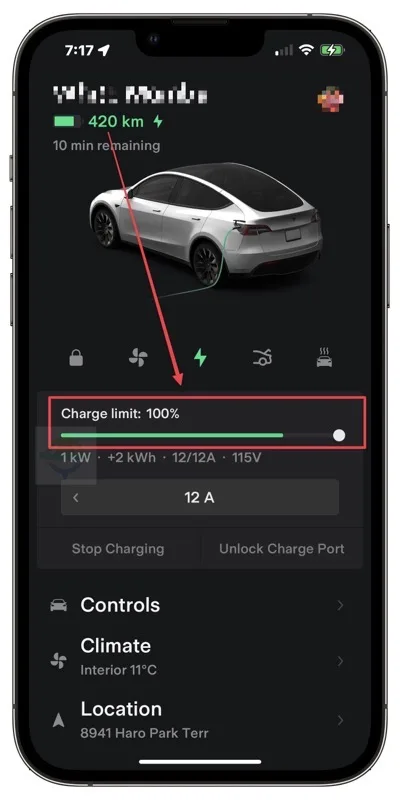
Image source: Bing (Web (fair-use with source credit))
Step 1: Reboot the Infotainment System
Hold both scroll wheels on the steering wheel until the screen goes black. Wait for the Tesla logo. This clears temporary software glitches.
It fixes "Unable to Charge" errors more often than you'd think. It's the same as restarting a car that won't shift after it gets stuck in a gear.
Step 2: Check Your Charge Limit
Open the charging screen and confirm the slider is where you expect it. If the limit dropped overnight, that's a software issue. If you're using a schedule, the car may be waiting for off-peak rates.
Adjust the limit and try again.
Step 3: Measure Consumption in the Energy App
The Energy app shows exactly where your range is going. Climate control, sentry mode, and cabin overheat protection draw significant power. If your consumption is 400 Wh/mi instead of the usual 250, that explains your range anxiety.
Step 4: Test a Supercharger Session
If your home charger works fine but fast charging is slow, visit a Supercharger. Slow speeds can mean the battery is cold or heat-soaked. It can also mean the specific stall is throttled.
Try a different stall if the first one behaves oddly.
Step 5: Do a Full Charge Cycle (If Needed)
For LFP batteries, Tesla recommends charging to 100% at least once a week. For NCA and NMC packs, that's not necessary. If you suspect cell imbalance, a full charge lets the BMS rebalance cells.
Watch the range display before and after.
Step 6: Book a Service Request Through the App
If the problem persists after steps 1-5, schedule service. Write down exactly what you did and when. Tesla can run remote diagnostics before you even arrive.
Often they'll push a software patch that resolves the issue.
Scenarios That Look Like a Failure But Aren't (Plus the Ones That Are)
Some situations feel terrifying but are completely harmless. Others are genuine red flags. Let's separate them.
Cold weather range loss tops the list. Lithium-ion chemistry slows down in freezing temperatures. The battery also preheats itself, which draws extra power.
A 20-30% range reduction in winter is normal and reversible. We've seen this reported consistently across owner forums and our own analysis.
Phantom drain is another false alarm. Sentry mode alone eats about 2-3% per day. Cabin overheat protection uses more.
If your car loses 1% overnight in a parking lot with sentry on, that's not a battery failure. It's the security system doing its job.
Slow Supercharging during extreme heat is also normal. The battery limits charge current to protect cell chemistry. A heat-soaked pack may charge at half speed until the thermal management system cools it down.
This is by design, not a defect.
The real red flags are different. A sudden shutdown while driving, a repeated "Battery Power Limited" warning at moderate temperatures, or a strong chemical smell from underneath the car. Those point to actual HV battery issues.
In those cases, stop driving and contact Tesla immediately.
The 12V battery is the sneakiest culprit. It's a small auxiliary battery that powers the electronics. When it dies, the car may throw strange alerts, refuse to wake up, or fail to shift into drive.
It's the electric equivalent of a car radiator fan that stops spinning. The symptom looks catastrophic, but the fix costs under $200.
Replacement Costs, Warranty Limits, and Your Real Out-of-Pocket
If you do need a high-voltage battery replacement, the cost is significant. But before you panic, check your warranty. Tesla covers the battery and drive unit for 8 years or 100,000 miles on Standard Range models, and 8 years or 120,000 miles on Long Range and Performance trims.
That coverage starts on the original in-service date.
Warranty claims are generally approved when the battery fails, meaning it drops below 70% usable capacity, or shows a functional fault. Normal degradation is not covered. That's why a car losing 20% over years is expected, not a warranty event.
Out-of-pocket replacement costs vary widely. Rebuilds and remanufactured packs run cheaper. A new replacement pack from Tesla can land between $5,000 and $15,000 plus labor, depending on the trim and whether there's a core exchange.
Some independent EV specialists offer lower rates for older models.
Compare that to fixing a car oil leak which might cost a few hundred dollars, and you'll see why battery health matters so much. It's the single most expensive component in the car.
If you're buying a used Model 3, factor battery health into the price. A car with 80% capacity left is worth significantly less than one at 90%. Ask the seller for a recent service report.
Check the battery warranty transfer rules. Tesla warranties generally transfer to new owners, but it's worth verifying with Tesla's official support pages.
Common Mistakes That Wreck or Misdiagnose a Tesla Battery
A few habits cause more battery stress than they need to. And some diagnostic mistakes send owners down the wrong path entirely.
- Charging to 100% daily on NCA/NMC packs: This increases heat and cell strain. It's fine for road trips, but not for daily use.
- Ignoring the 12V battery warning: That's like ignoring car brakes not working. It never gets better by itself. Replace it when Tesla suggests.
- DIY high-voltage repairs: The pack carries lethal voltage. Don't open it. Even checking cell voltages with cheap tools can damage the BMS.
- Using third-party diagnostic tools that read data incorrectly: Some tools show scary values that are actually normal. Cross-check with the Energy app before panicking.
- Letting the battery sit at near-zero SoC for weeks: Lithium-ion packs hate being fully depleted. Store the car plugged in at 50% if you leave it for more than a week.
None of these mistakes are fatal on their own. But together, they shorten battery life and create false alarms.
Quick Decision Flow: Used Buyer Edition
Buying a used Model 3 is a smart way to save money. The battery health makes or breaks the deal. Here's how to check it before you commit.
| What to Check | What's Normal | Red Flag |
|---|---|---|
| Range at 100% charge | Within 10% of original EPA rating | Over 15% loss for a low-mileage car |
| Third-party SoH reading | Above 90% for a 2-year-old car | Below 80% on any car |
| Degradation trend | Loses 5% in year one, then slows | Loses 8-10% per year |
| Battery warranty transfer | Tesla honors transfer | Certificate of sale missing |
Ask the seller for a copy of the most recent service report. If they refuse, walk away. You can also request the car's charging history.
A car that spent years at 100% charge probably degraded faster than one kept at 80%.
If the price already accounts for lower range, that's fine. Just know what you're buying. A Model 3 with 85% battery health is still a great car.
But it's worth thousands less than a 95% example.
Frequently Asked Questions
My range dropped 10% after the last software update. Did Tesla nerf my battery?
No. Tesla doesn't reduce battery capacity through software. The range estimate is recalculated based on recent driving patterns, temperature, and battery temperature.
Track the Energy app for two weeks. If actual consumption stays normal, the range display was just recalibrating.
I drive in below-freezing temps. Is 30% range loss normal?
Yes. Lithium-ion batteries lose chemical efficiency in the cold. The battery also spends energy heating itself and the cabin.
A 20-30% range reduction in sub-zero weather is expected. Plug in overnight and precondition before driving to reduce the hit.
My car shut down at 5% battery. Is that a bad cell?
Possibly. A healthy Model 3 should reach 0% or close to it before shutdown. If yours dies at 10-20%, you likely have a cell imbalance or a faulty module.
Stop driving it. Book a Tesla service appointment and mention the early shutdown.
Should I charge to 100% every day?
It depends on the battery chemistry. LFP packs, found in newer Standard Range models, are fine at 100% daily. NCA and NMC packs, found in Long Range and Performance models, should stay at 80% for daily driving.
Charge to 100% only when you're about to take a longer trip.
Is Supercharging every day bad for the pack?
Not significantly. Tesla's Battery Management System protects the pack from overcharge and overheating. Frequent fast charging in extreme heat can slightly increase degradation.
But Supercharging as needed is safe. Use it when you need it and don't overthink the occasional road trip.
How much does it cost to replace a Model 3 battery?
Out of pocket, a full replacement runs between $5,000 and $15,000, depending on trim, labor, and whether Tesla offers a refurbished pack. Under warranty, a defect replacement costs $0. Normal degradation is never covered, so treat the 8-year warranty as protection against failure, not aging.





